Agent frameworks - LangChain, LangGraph
An agent framework gives you the loop, the state and the tool plumbing from the previous lesson as ready-made parts. This lesson names the eight frameworks interviewers expect you to recognise, then teaches you to read LangChain and LangGraph code line by line: tools, create_agent, state, reducers, nodes, conditional edges, checkpointers and interrupts.
Why it matters
Many job descriptions for AI engineers name LangChain or LangGraph, and interviewers often hand you a short snippet and ask what each line does. You also review code like this at work, written by a teammate or by an AI assistant. The questions that separate candidates are specific: what a reducer does, why the loop ends, what a checkpointer saves, and what happens when a paused run resumes. If you can answer those on a 20-line graph, you can pick up any other framework quickly, because they all wrap the same loop.
Read first: Prompting and context engineering, Vector DBs and RAG, Agents from first principles - build a mini framework
Lesson
You do not need to write this code from memory, but you must be able to read it and say what each line does. LangChain gives you a ready-made agent. LangGraph is the engine underneath, where the agent is drawn as a graph.
Frameworks to recognise
| Framework | Known for | Choose it when your main constraint is |
|---|---|---|
| LangGraph | Agent as a graph with shared state and checkpoints; strong control and human-approval steps | Control: audit, approvals, long-running flows |
| CrewAI | Role-based teams of agents; fastest route to a multi-agent prototype | Time to a multi-agent demo |
| Microsoft Agent Framework | Merged AutoGen and Semantic Kernel into one SDK in April 2026; fits Azure and .NET | An Azure or .NET stack |
| OpenAI Agents SDK | Lightweight, minimal abstraction, OpenAI-centred | A small API to learn, on OpenAI models |
| Google ADK | Code-first toolkit for Gemini and Google Cloud | A Gemini and Google Cloud stack |
| LlamaIndex Workflows | Event-driven agents over large document sets | Document-heavy work |
| Pydantic AI | Type-safe Python with validated structured output | Type safety and validated output |
| Claude Agent SDK | Anthropic-native agents with sub-agents | Anthropic models with sub-agents |
AutoGen itself is now effectively in maintenance mode, so say "Microsoft Agent Framework" if asked about it.
To choose, name the one constraint that dominates your project and take the framework built around it. Then check that it covers what every production agent needs: saved state, a pause for approval, step limits and tracing. If you need none of these, plain SDK code is the right choice.
How the LangChain products fit together
| Product | Layer | What it gives you | Reach for it when |
|---|---|---|---|
| LangChain | Agent framework | One interface to models, tools and embeddings across providers, plus create_agent | You want a working agent quickly and will customise it |
| LangGraph | Orchestration runtime | State, nodes, edges, persistence, human-in-the-loop, streaming | You need control over the flow, mixing fixed steps with model-driven steps |
| Deep Agents | Agent harness on top of LangChain agents | Planning, sub-agents, a virtual filesystem, automatic context compression | Long tasks where you want those features ready-made |
| LangSmith | Platform | Tracing, evaluation, deployment | Always, for debugging and evals; it works with all three |
LangChain's agents are built on LangGraph, so a LangChain agent is a LangGraph graph inside.
LangChain words you will see in code
- Chat model: one interface for every provider. Changing provider is changing a string.
- Messages: system, user, AI and tool messages. A conversation is a list of these.
- Tool: a normal Python function. Its name, docstring and type hints become the schema the model sees.
- create_agent: takes a model, tools and a system prompt, and returns a ready agent with the tool-calling loop built in.
- Middleware: hooks that run around model and tool calls. Guardrails, retries, summarising and approval steps are added this way.
- Structured output: asking the model to return a typed object, not free text.
- Loader, splitter, embeddings, vector store, retriever: the RAG pieces from the Vector DBs and RAG lesson.
- invoke, stream, batch: run once, stream the output as it is produced, or run many inputs.
- Pipe syntax (
prompt | model | parser): the older chain style, still common in existing codebases. Each piece passes its output to the next.
Reading a LangChain agent
# needs: langchain
from langchain.agents import create_agent

def get_order_status(order_id: str) -> str:
    """Look up the delivery status of an order."""
    return lookup(order_id)

agent = create_agent(
    model="provider:model-name",
    tools=[get_order_status],
    system_prompt="You are a support assistant.",
)

result = agent.invoke(
    {"messages": [{"role": "user", "content": "Where is order 123?"}]}
)
- The function is the tool. The docstring tells the model when to use it; the type hints define its arguments.
create_agentwires the model, the tools and the prompt into a loop.invokesends the user message. The agent calls the model, runs any tool the model asks for, feeds the result back, and repeats until the model answers without a tool call.result["messages"]holds the whole exchange, including tool calls. The last message is the answer.
LangGraph words you will see in code
- State: a shared, typed dictionary. Every node reads it and returns only the part it changes.
- Reducer: the rule for merging an update into a state key. The default overwrites.
add_messagesappends, which is why chat history grows. - Node: a Python function that takes the state and returns an update. It can be an LLM call or plain code.
- Edge: a fixed rule, "after A, go to B".
- Conditional edge: a function that looks at the state and returns the name of the next node. Branches and loops come from here.
- START and END: the entry and exit points.
- compile: turns the definition into something you can run. The checkpointer is attached here.
- Checkpointer: saves the state after every step, per
thread_id. It gives conversation memory, recovery after a crash, human-in-the-loop and replay. In-memory for development; SQLite or Postgres for production. The LangGraph docs suggest SQLite for local workflows and Postgres for a production service. - interrupt: pauses inside a node and waits for a person. You resume by invoking the graph with
Command(resume=...). It needs a checkpointer. - Command: lets a node return a state update and the next node together.
- Send: starts many parallel runs of a node, one per item. Reducers merge the results. This is map-reduce.
- Subgraph: a graph used as a node inside another graph. Multi-agent systems are built this way.
- ToolNode: a prebuilt node that executes the tool calls in the last AI message.
- Store: long-term memory shared across threads. The checkpointer is memory within one thread.
The agent loop as a graph
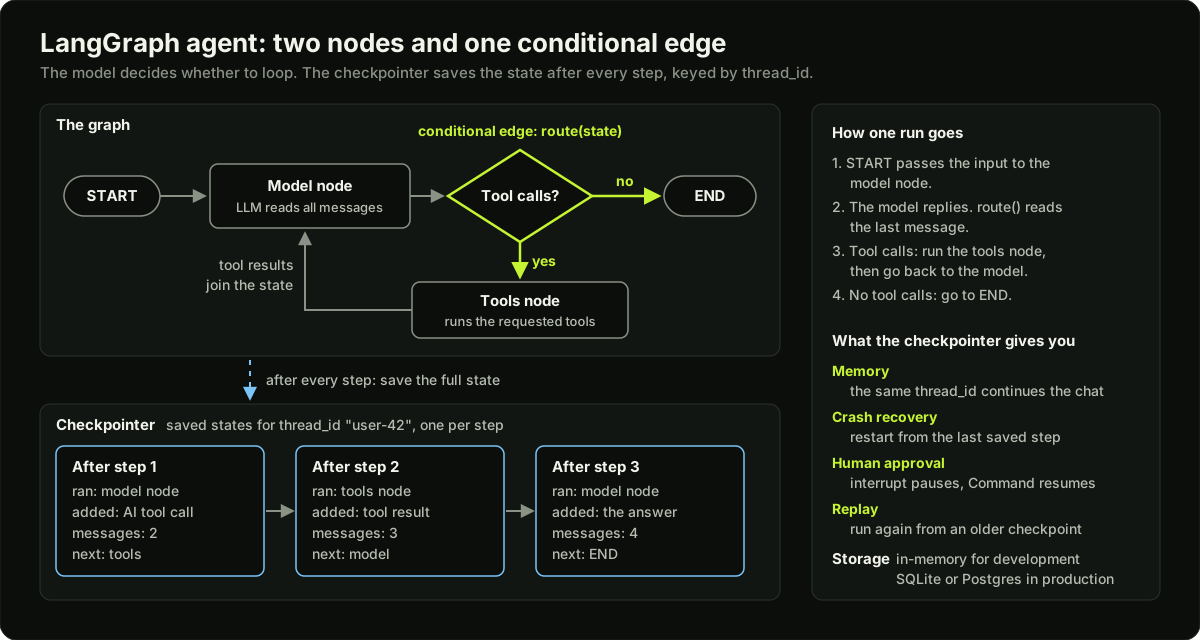 The LangGraph agent loop from START through the model node, the tool calls decision and the tools node to END, with a checkpointer saving the state after every step
The loop is START, model node, a "tool calls?" decision, then either END or the tools node, whose results join the state before the model runs again. A checkpointer saves the state after every step, keyed by thread_id.
The conditional edge after the model node is the whole agent: tool calls send the run to the tools node and back, and no tool calls send it to END.
Reading a LangGraph agent
# needs: langgraph
from typing import Annotated, TypedDict
from langgraph.graph import StateGraph, START, END
from langgraph.graph.message import add_messages
from langgraph.prebuilt import ToolNode
from langgraph.checkpoint.memory import InMemorySaver

class State(TypedDict):
    messages: Annotated[list, add_messages]

def call_model(state: State):
    reply = model_with_tools.invoke(state["messages"])
    return {"messages": [reply]}

def route(state: State):
    last = state["messages"][-1]
    return "tools" if last.tool_calls else END

builder = StateGraph(State)
builder.add_node("model", call_model)
builder.add_node("tools", ToolNode(tools))
builder.add_edge(START, "model")
builder.add_conditional_edges("model", route)
builder.add_edge("tools", "model")

graph = builder.compile(checkpointer=InMemorySaver())
graph.invoke(
    {"messages": [{"role": "user", "content": "Where is order 123?"}]},
    config={"configurable": {"thread_id": "user-42"}},
)
- State: one key,
messages.add_messagesmeans new messages are appended, not overwritten.Annotated[list, add_messages]is how a reducer is attached to a key. - call_model: sends all messages to the LLM and returns its reply as the update.
model_with_toolsis defined outside the snippet: it is the chat model with the tool schemas attached, usually bymodel.bind_tools(tools), so the model knows which tools it may ask for. - route: if the reply asks for a tool, go to
tools. Otherwise finish. - add_node: registers the two nodes.
ToolNoderuns the requested tools and adds their results as tool messages. - Edges: START to model; model to wherever
routesays; tools back to model. That last edge creates the loop. - compile with a checkpointer: the state is saved after every step.
- invoke with a thread_id: calling again with the same id continues the same conversation.
If the model never stops asking for tools, the recursion limit ends the run. It caps the steps of one run, raises GraphRecursionError when reached, and is set per call with config={"recursion_limit": 25}.
What a reducer does: a two-node example
Take a state with one key, results, and two nodes. Node A returns {"results": ["a"]}. Node B returns {"results": ["b"]}.
| Setup | results at the end |
|---|---|
| No reducer, A runs and then B | ["b"]. A's value is lost |
Reducer operator.add, A runs and then B | ["a", "b"] |
| No reducer, A and B run in the same step | Error: two writes to one key and no rule to merge them |
Reducer operator.add, A and B run in the same step | Both values are kept |
# needs: langgraph
import operator
from typing import Annotated, TypedDict

class State(TypedDict):
    results: Annotated[list, operator.add]   # reducer: old + new
    status: str                               # no reducer: the new value replaces the old one
add_messages is a reducer written for chat history. It appends new messages, and when an update carries the id of an existing message it replaces that message.
What a checkpointer stores per thread
A thread is the chain of checkpoints saved under one thread_id. Each checkpoint is a snapshot with these parts:
| Part | Holds | Used for |
|---|---|---|
| Values | The full state at that point, such as the message list | Memory: the next call starts from here |
| Next | The node or nodes due to run next; empty when the run has finished | Resuming a crashed or paused run |
| Config | The thread id and this checkpoint's id | Loading one exact checkpoint |
| Metadata | The step counter and what wrote the checkpoint | Debugging |
| Parent | A pointer to the previous checkpoint | Walking the history, replay |
| Tasks | Pending work, including a waiting interrupt or an error | Human approval |
graph.get_state(config) returns the latest snapshot of a thread and graph.get_state_history(config) returns all of them, newest first. Replaying from an older checkpoint skips the nodes before it and runs the later ones again, LLM calls included.
Reading a human approval step
# needs: langgraph
from langgraph.types import interrupt, Command

def approve_refund(state: State):
    decision = interrupt({"refund": state["amount"]})
    return {"approved": decision == "yes"}

graph.invoke(Command(resume="yes"), config)
In this snippet State also has the keys amount and approved, and config is the same thread_id config that started the run.
interrupt saves the state and stops the run. Hours later, the second call resumes it with the person's answer. On resume the node runs again from its first line, so anything before the interrupt must be safe to repeat.
How the resume works, step by step:
- The node calls
interrupt(payload). LangGraph saves a checkpoint and the firstinvokereturns, with the payload underresult["__interrupt__"]. - Your application shows the payload to a person. Nothing is running while it waits.
- The application calls
invokewithCommand(resume="yes")and the samethread_id. - LangGraph loads the checkpoint and restarts the node. This time
interruptreturns"yes"and the node finishes.
Two rules follow. Put side effects after the interrupt, never before it. Do not wrap interrupt in a bare try/except, because the pause is raised as an exception.
When someone else, or an AI, writes the code: five things to check
- State and reducers: which keys exist, and which append instead of overwrite?
- Exits: where can the loop end, and what stops it if the model keeps calling tools?
- Checkpointer: is one attached, and is it a production one, not in-memory?
- Tools: does each have a clear docstring and typed arguments?
- Side effects: is there an approval step before anything that spends money or cannot be undone?
Diagram
Worked example
Tracing one thread. Run the graph above on "Where is order 123?" with thread_id "user-42". The input is merged first, so the state starts with 1 message.
| Step | Node that ran | Update it returned | Messages after the merge | Next node | Checkpoints in the thread |
|---|---|---|---|---|---|
| 1 | model | 1 AI message with a tool call | 2 | tools | 1 |
| 2 | tools | 1 tool message: "out for delivery" | 3 | model | 2 |
| 3 | model | 1 AI message: the answer | 4 | END | 3 |
route ran twice. After step 1 the last message had a tool call, so it returned "tools". After step 3 it had none, so it returned END.
The last column counts one checkpoint per node step, as the small engine below does. Real LangGraph also saves two at the start of a run, an empty one and one that holds the input, so get_state_history returns 5 snapshots after this first call.
Second call, same thread. The user sends "Thanks!" with thread_id "user-42". The engine loads checkpoint 3 (4 messages), appends the new message (5), and runs the model once (6 messages, next is END). The thread now holds 4 checkpoints. A call with thread_id "user-7" starts from an empty state and ends with 2 messages: threads share nothing.
The same run without the reducer. Remove add_messages, so messages is overwritten. Step 1 replaces the user's question with the AI message: 1 message. Step 2 replaces that with the tool result: 1 message. At step 3 the model sees only "out for delivery" and has no idea what was asked. One missing annotation breaks the agent, and nothing raises an error.
The loop that never ends. If route always returns "tools", the run goes model, tools, model, tools. With a recursion limit of 4 it is stopped after step 4, with 4 checkpoints saved that show where it was going wrong.
The code example below is this exact run on a small engine written from scratch, and it prints the same numbers.
Runnable code
"""A tiny state-graph engine in the style of LangGraph, standard library only.

Nodes read the state and return an update. A reducer merges each update. A conditional edge picks
the next node. A checkpointer saves the state after every step, keyed by thread id. No network.
"""
import copy

START, END = "__start__", "__end__"


class StateGraph:
    def __init__(self, reducers):
        self.reducers = reducers                      # key -> merge rule; other keys are overwritten
        self.nodes, self.edges, self.routers = {}, {}, {}

    def add_node(self, name, fn):
        self.nodes[name] = fn

    def add_edge(self, src, dst):                     # fixed: after src, always go to dst
        self.edges[src] = dst

    def add_conditional_edges(self, src, router):     # router(state) returns the next node's name
        self.routers[src] = router

    def merge(self, state, update):
        for key, value in update.items():
            reducer = self.reducers.get(key)
            state[key] = reducer(state[key], value) if reducer and key in state else value
        return state

    def invoke(self, update, thread_id, checkpointer, recursion_limit=10):
        history = checkpointer.setdefault(thread_id, [])              # one checkpoint list per thread
        state = copy.deepcopy(history[-1]["state"]) if history else {}
        state = self.merge(state, update)                             # the input is merged like any update
        node, step = self.edges[START], 0
        while node != END:
            step += 1
            if step > recursion_limit:
                raise RecursionError(f"no END after {recursion_limit} steps (recursion limit)")
            state = self.merge(state, self.nodes[node](state))        # run the node, merge what it returns
            nxt = self.routers[node](state) if node in self.routers else self.edges[node]
            history.append({"node": node, "next": nxt, "state": copy.deepcopy(state)})   # checkpoint
            last = state["messages"][-1]
            print(f"  step {step}: ran {node:5} next {nxt:7} | {len(state['messages'])} messages, "
                  f"model_calls={state['model_calls']} | last = {last['role']}: {last.get('tool_calls') or last['content']}")
            node = nxt
        return state


def add_messages(old, new):                           # reducer: append, do not overwrite
    return old + new


def call_model(state):                                # scripted fake model: decides from the last message
    last = state["messages"][-1]
    if last["role"] == "user" and "order" in last["content"]:
        reply = {"role": "ai", "content": "", "tool_calls": [{"name": "get_order_status", "args": {"order_id": "123"}}]}
    elif last["role"] == "tool":
        reply = {"role": "ai", "content": f"Order 123 is {last['content']}."}
    else:
        reply = {"role": "ai", "content": "You are welcome."}
    return {"messages": [reply], "model_calls": state.get("model_calls", 0) + 1}


def run_tools(state):                                 # like ToolNode: run every call in the last AI message
    tools = {"get_order_status": lambda order_id: "out for delivery"}
    calls = state["messages"][-1].get("tool_calls", [])
    return {"messages": [{"role": "tool", "content": tools[c["name"]](**c["args"])} for c in calls]}


def route(state):                                     # the conditional edge: tools, or finish
    return "tools" if state["messages"][-1].get("tool_calls") else END


def build(router):
    g = StateGraph(reducers={"messages": add_messages})   # model_calls has no reducer: it is overwritten
    g.add_node("model", call_model)
    g.add_node("tools", run_tools)
    g.add_edge(START, "model")
    g.add_conditional_edges("model", router)
    g.add_edge("tools", "model")
    return g


if __name__ == "__main__":
    saver, graph = {}, build(route)                   # saver: in-memory checkpointer, thread_id -> checkpoints
    for thread, text in [("user-42", "Where is order 123?"), ("user-42", "Thanks!"), ("user-7", "Hello")]:
        print(f"thread {thread}: {text}")
        out = graph.invoke({"messages": [{"role": "user", "content": text}]}, thread, saver)
    assert len(saver["user-42"][-1]["state"]["messages"]) == 6 and len(out["messages"]) == 2
    print("checkpoints per thread:", {t: len(h) for t, h in saver.items()})
    try:                                              # a broken router that never returns END
        build(lambda state: "tools").invoke({"messages": [{"role": "user", "content": "Hi"}]}, "user-9", saver, 4)
    except RecursionError as exc:
        print("stopped:", exc)
Key takeaways
LangChain is the high-level framework with a prebuilt agent (
create_agent). LangGraph is the runtime underneath: state, nodes, edges, persistence, interrupts.A LangGraph agent is two nodes and one conditional edge: tool calls go to the tools node and back, no tool calls go to END.
A node returns only the keys it changes. The reducer decides how that update merges: overwrite by default, append with
add_messages.The checkpointer saves the state after every step under a
thread_id. It gives memory, crash recovery, human approval and replay.interruptpauses a node;Command(resume=...)restarts that node from its first line, so code before the interrupt must be safe to repeat.Loops end through the conditional edge, a counter in the state, or the recursion limit. Set the limit yourself.
Pick a framework by your dominant constraint, and use plain SDK code when a single call or a fixed pipeline is enough.
Microsoft Agent Framework merged AutoGen and Semantic Kernel in April 2026; AutoGen itself is effectively in maintenance mode.
Common mistakes
Forgetting the reducer on
messages, so each node overwrites the history and the model loses the question.Shipping with
InMemorySaver. Every thread is lost when the process restarts, and paused approvals can never resume.Putting a side effect such as "send email" or "charge card" before
interruptin the same node. It runs again on resume.Using a new
thread_idon every call and then wondering why the agent has no memory.Relying only on the conditional edge to end the loop, with no step counter and no explicit recursion limit.
Reaching for a graph framework when one model call or a three-step fixed pipeline would do.
Practice
Run the code example, then change the engine so
messageshas no reducer. Record how many messages the model sees at step 3 (it should be 1) and explain the printed trace.Add an
interruptto the engine: a node may return{"__interrupt__": payload}, the engine saves a checkpoint and returns, and a secondinvokewithresume=valuereruns that node. Add a refund approval node and show both the yes path and the no path.Take the LangGraph agent from this lesson and write, for each of the five review questions, the exact line that answers it. Note the two questions the snippet fails (no production checkpointer, no approval step).
Build the same order-status agent twice, once with
create_agentand once as your own graph, and list three things the second version lets you control that the first hides.
Interview questions (14)
1.LangGraph or CrewAI?Easy
LangGraph when you need explicit control, state, auditability and long-running flows. CrewAI when the work splits into roles and you want a prototype quickly. Teams often prototype in one and move critical paths to the other. The difference is the core idea: LangGraph makes you draw the flow as nodes and edges with saved state, while CrewAI makes you describe a team of agents with roles and lets them coordinate.
2.LangChain vs LangGraph?Easy
LangChain is the high-level framework: standard components and a prebuilt agent. LangGraph is the low-level runtime: you define state, nodes and edges yourself and get persistence, interrupts and streaming. LangChain agents run on LangGraph. I start with create_agent and drop to LangGraph when I need custom control flow.
3.What is a reducer, and why does it matter?Medium
It decides how a node's update merges into the state. Without one, a new value replaces the old one. If two parallel nodes write the same key with no reducer, LangGraph cannot choose a winner and raises an error. So keys that accumulate, such as messages or results, need a reducer. The classic bug is a messages key without add_messages: every node overwrites the history, and the model stops seeing the user's question.
4.Edge vs conditional edge?Easy
An edge always goes to the same next node. A conditional edge runs a function on the state and picks the next node at run time. Every loop and branch in a graph is a conditional edge. In the standard agent graph there is exactly one: after the model node, go to the tools node if the last message has tool calls, otherwise go to END.
5.What do you lose without a checkpointer?Medium
Memory between calls, the ability to resume after a failure, interrupts for human approval, and the history you need for replay and debugging. I would not ship an agent without one. I would also make sure it is a database-backed checkpointer such as Postgres, because the in-memory one loses every thread when the process restarts.
6.Checkpointer vs store?Easy
The checkpointer keeps the state of one thread, which is short-term memory. The store keeps data across threads, such as user preferences, which is long-term memory. A support agent uses both: the checkpointer holds the messages of this conversation under its thread_id, and the store holds the fact that this customer prefers replies in Hindi, which every future conversation can read.
7.How do you run steps in parallel?Medium
Give one node several outgoing edges, or return Send objects to start one run per item. The parallel results merge through the reducer on the state key. For example, to summarise 10 documents I return 10 Send objects that each run the summarise node on one document, and a list key with an append reducer collects the 10 summaries. Without the reducer the parallel writes would conflict.
8.How do you stop an infinite loop?Medium
LangGraph enforces a recursion limit on steps. I also keep a counter in the state and make the conditional edge exit when it passes a threshold. The counter gives a clean exit with a useful message, and the recursion limit is the backstop that raises GraphRecursionError. I set the limit explicitly per run, because the default is high: the documentation gives 1,000 steps from version 1.0.6.
9.How do you debug a LangGraph agent?Medium
Turn on LangSmith tracing to see every node, tool call and state change. Inspect the saved state and its history for a thread, and replay from an earlier checkpoint to reproduce a failure. In practice I find the first step where the state looks wrong, check which node wrote it, and read that node's input. Replay matters because agents are not deterministic, so re-running from the top may not reproduce the bug.
10.create_agent or your own graph?Medium
create_agent when the standard model-and-tools loop fits and I only need to add behaviour through middleware. My own graph when the flow has fixed business steps, several branches, approvals in specific places, or multiple agents. A refund flow is a good example of the second: verify identity, then check the policy, then ask for approval above a set amount. Those steps must happen in that order every time, so I code them as nodes.
11.When would you not use these frameworks?Medium
For a single model call or a simple fixed pipeline, plain SDK code is clearer. Frameworks add abstraction to learn and APIs that change between versions, so they have to pay for themselves in persistence, tracing or orchestration. My test is simple: if I do not need saved state, a pause for approval, or a loop the model controls, I do not need a graph runtime.
12.What happens, step by step, when a graph resumes after an interrupt?Hard
When the node calls interrupt, LangGraph saves a checkpoint for the thread and the invoke call returns with the interrupt payload. Nothing runs while the person decides. The application then invokes the graph with Command(resume=answer) and the same thread_id. LangGraph loads the checkpoint and runs the interrupted node again from its first line, and this time interrupt returns the answer. Two consequences: code before the interrupt runs twice, so it must be safe to repeat, and the whole thing needs a checkpointer that survives a restart.
13.How do you choose an agent framework for a new project?Medium
I name the dominant constraint first. Control, audit and approvals point to LangGraph. A quick multi-agent prototype points to CrewAI. An Azure or .NET stack points to Microsoft Agent Framework, and a Google Cloud stack to Google ADK. Document-heavy work points to LlamaIndex Workflows, and strict typing to Pydantic AI. Then I check four things in the candidate: saved state, a way to pause for approval, step limits and tracing. If the task is one call or a fixed pipeline, I use no framework.
14.An interviewer asks about AutoGen. What do you say?Easy
I would say that AutoGen was merged with Semantic Kernel into Microsoft Agent Framework in April 2026, and that AutoGen itself is now effectively in maintenance mode. So for new work on a Microsoft stack I would name Microsoft Agent Framework, which fits Azure and .NET. The idea AutoGen made popular, several agents solving a task by exchanging messages, still matters as a pattern.
Quiz
1.In the standard LangGraph agent, what decides whether the run goes to the tools node or to END?
2.A state key has no reducer. A node returns a new value for it. What happens?
3.A node sends an email and then calls `interrupt`. A person approves an hour later. What happens on resume?
4.You call the graph twice with the same `thread_id` and a checkpointer attached. What does the second call see?
5.Which is the best reason to write your own graph and not use `create_agent`?
Practice these problems
Further reading
My notes
Your notes
Autosaves to this browser.