Prompting and context engineering
Prompt engineering is writing a good instruction. Context engineering is deciding everything that enters the context window: instructions, examples, retrieved data, tool definitions and history. This lesson covers both: the parts of a prompt, when to use few-shot examples or step-by-step reasoning, how to get valid JSON every time, how to keep a long conversation inside a token budget, and how to prove a prompt change helped.
Why it matters
Interviewers now ask about context engineering more than about prompt wording, because that is where production systems fail. An agent's context grows on every step: tool results pile up, history gets long, and quality drops well before the window is full. The questions are concrete: the conversation no longer fits, what do you keep? How do you get reliable JSON? How do you cut cost without losing quality? How do you know version B of a prompt is better than version A? Each has an answer with numbers, and each applies to every later topic: RAG, agents, evals and system design all end with "what goes into the window, and in what order".
Read first: LLM fundamentals - tokens, embeddings, decoding
Lesson
The parts of a prompt
A prompt has four parts: the system prompt (role and rules), few-shot examples, the user message, and the output format. Here is a ticket-triage prompt with each part marked.
[system]             role and rules; identical on every request
You are a support triage assistant for an online store.
Rules:
1. Use only the ticket text. Never guess an order id.
2. If the category is unclear, use "other".
3. Reply with one JSON object and nothing else.

[few-shot example 1]  shows the format on a clear case
Ticket: "Paid twice for order 8841, refund one please."
{"category": "billing", "order_id": "8841", "urgency": "high"}

[few-shot example 2]  shows the edge case: no order id
Ticket: "Do you ship to Nepal?"
{"category": "shipping", "order_id": null, "urgency": "low"}

[user]               the only part that changes per request
Ticket: "My parcel 5520 shows delivered but nothing came."

[output format]      enforced by a schema, not only by rule 3
category: billing | shipping | delivery | other
order_id: string or null
urgency: low | medium | high
What makes it work: the role is one line, the rules are numbered and testable, the examples cover an edge case (a missing id), and the format lists the allowed values. A rule such as "be accurate" does nothing, because the model cannot check it.
Keep instructions and data apart. Wrap anything you did not write (a ticket, a retrieved document, a tool result) in clear delimiters such as <ticket>...</ticket>, and say that the text inside is data to analyse, not instructions to follow. Delimiters help the model and make the prompt easier to debug. They do not stop a determined prompt injection on their own; lesson 16 covers the defences.
Count tokens with the model's own tokenizer when you can. As a rough guide, 1 token is about 0.75 English words, so a 1,500-token system prompt is about 1,125 words.
Techniques: zero-shot, few-shot, chain-of-thought, chaining
| Technique | What you do | Helps when | Cost |
|---|---|---|---|
| Zero-shot | Instruction only, no examples | The task is common and easy to describe | Lowest |
| Few-shot | Add 3 to 5 input-output examples | The format or style is hard to describe in words | More input tokens on every call |
| Chain-of-thought | Ask for step-by-step reasoning before the answer | Multi-step maths or logic on a normal model | More output tokens and latency |
| Prompt chaining | Split the task into several calls, each feeding the next | One prompt is doing three jobs badly | More calls; an early error carries forward |
| Structured output | Force JSON that matches a schema | Code will parse the result | Small; needs a schema |
Start zero-shot. Add few-shot examples only when the output format or tone keeps drifting. Make the examples varied: if all five show "urgency": "high", the model learns that the answer is "high". Fixed examples belong in the stable first part of the prompt, which the provider can cache (see prompt caching below). Examples retrieved per request can fit the input better, but they change the prompt on every call, so they belong after the stable part.
Chain-of-thought helps a normal model because the reasoning it writes becomes context for the final answer. The answer must come after the reasoning: if you ask for "the answer, then an explanation", the answer is already fixed when the explanation starts. Reasoning models already think before answering, so they need a clear goal and constraints more than a step-by-step script.
Prompt chaining example: a refund email handled as three calls, (1) extract order id and reason as JSON, (2) decide refund or reject from the policy text and the extracted fields, (3) draft the reply. Each call has a short prompt, its own eval set, and can use a smaller model.
Structured output: schema, validate, retry
"Please return JSON" fails a small share of the time: a missing brace, an extra sentence, an invented field. At 100,000 calls a day, a 1% failure rate is 1,000 broken responses. The fix has three layers.
- Constrain. Pass a JSON schema to the provider's structured-output feature or to a server with constrained decoding. At each step, tokens that would break the schema are masked, so they cannot be sampled.
- Validate in code. A schema guarantees shape, not truth. Check what the schema cannot: does the order id appear in the ticket text?
- Retry with the error. Send the invalid output back with the exact validation message, at most twice, then fall back to a default or a human.
Field order matters, because the model writes the object left to right. If you want reasoning inside the JSON, put a reasoning field before the answer field. Keep schemas small and flat, and prefer an enum to free text wherever the set of values is known.
{
  "type": "object",
  "properties": {
    "category": {"type": "string", "enum": ["billing", "shipping", "delivery", "other"]},
    "order_id": {"type": ["string", "null"]},
    "urgency": {"type": "string", "enum": ["low", "medium", "high"]}
  },
  "required": ["category", "order_id", "urgency"],
  "additionalProperties": false
}
The four context moves
Every context decision is one of four moves.
| Move | Meaning | Example in a support or coding agent |
|---|---|---|
| Select | Bring in only what is relevant | Retrieve 6 policy chunks of 500 tokens, not the 400-page manual. Keep file paths in context and read a file only when needed |
| Compress | Summarise old turns | After 30 turns, replace the oldest ones with a 1,200-token summary of decisions, open items and key facts. Replace a used 1,400-token tool result with a one-line note |
| Isolate | Give sub-tasks their own context | A research sub-agent reads 20 pages, about 60,000 tokens, in its own window and returns a 500-token summary to the lead agent |
| Persist | Write notes or memory outside the window | A coding agent keeps a progress file with what is done and what is next, and re-reads it after the history is compacted |
Context rot and lost in the middle
Context rot: answer quality drops as the window fills with loosely relevant text. The model has to find the few useful lines among thousands, and stale tool results or old plans pull it in the wrong direction. A bigger window does not remove the need to choose. It only raises the point where you are forced to.
Lost in the middle: models use the start and end of a long context better than the middle. In experiments where one relevant document is placed among many, accuracy is highest when it comes first or last and lowest when it sits in the middle. Two practical rules follow. Put key instructions and facts at the edges: rules at the top, the question at the bottom, and repeat a critical rule after a long block of documents. Order retrieved chunks so the best ones are not buried.
Prompt caching: stable content first
When two requests start with the same tokens, the provider or server can reuse the computation for that shared prefix instead of running it again. It is the KV cache from lesson 11, kept between requests. Cached tokens are faster and are usually billed at a lower rate. Two limits: an entry expires if it is not reused within a set time, often minutes on hosted APIs, and some providers charge extra to write it. A prefix that is used once gains nothing.
The match is on an exact prefix. Reuse ends at the first token that differs, and everything after it is computed again. So order the window from most stable to most changing: system prompt, tool definitions, fixed examples and documents first, then the conversation, then the part that is new on this call.
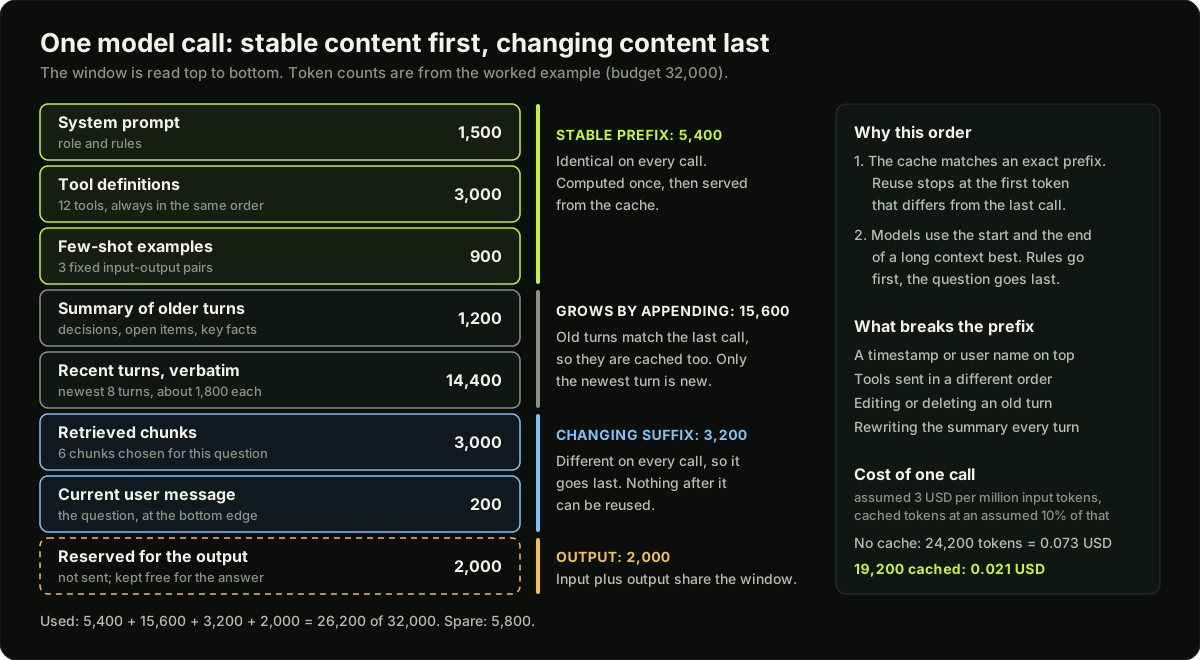 Layout of one context window: a stable cached prefix on top and a changing suffix below
Things that break the cache without anyone noticing:
- A timestamp, request id or user name at the top of the system prompt.
- Tool definitions sent in a different order on each call.
- Editing or deleting an early message. Appending keeps the prefix; rewriting does not.
- Compacting on every turn. Each new summary changes the prefix, so compact in batches.
Budgeting the window
The context window is the maximum for input plus output. Treat it as a budget and give each part a line.
B is the budget you choose, often far below the model's limit, because cost and latency grow with every input token and quality falls as the window fills. When history exceeds its line, apply the moves in order of damage: clear old tool results, then summarise old turns, then move durable facts to external memory. The worked example runs this with numbers.
Testing a prompt change
A prompt is code. Change it the way you change code: with a test suite.
- Build a fixed eval set of 50 to 200 real inputs with expected outputs. Include past failures and edge cases.
- Pick metrics you can compute: exact match per field, schema-valid rate, a judge-model score for free text.
- Run the old and the new prompt on the same set, with the same model and settings.
- Compare case by case, not only the averages. On 100 cases, suppose version A gets 82 right and version B gets 86. If B fixed 9 cases and broke 5, read the 5 before you ship.
- Keep the set and the prompt in version control, and rerun the set when the model version changes.
The same loop guards every cost cut: cache repeated prefixes, shorten the prompt, cap output tokens, route easy requests to a smaller model, batch offline work, and measure quality on the eval set before and after each one. Batching offline work means sending jobs that can wait, such as nightly summaries, through a provider's batch endpoint, which is usually priced below the live one.
Diagram
Worked example
A support agent at turn 40. The model's window is 128,000 tokens. The team sets a budget of 32,000 tokens per call to control cost, latency and context rot.
Step 1: fixed lines. System prompt 1,500. Tool definitions: 12 tools x 250 = 3,000. Few-shot examples: 3 x 300 = 900. Stable prefix = 1,500 + 3,000 + 900 = 5,400. Retrieved chunks: 6 x 500 = 3,000. Current user message: 200. Reserved output: 2,000.
Step 2: what is left for history. 32,000 - 5,400 - 3,000 - 200 - 2,000 = 21,400 tokens.
Step 3: what history needs. One turn averages 100 (user) + 1,400 (tool results) + 300 (assistant) = 1,800 tokens. At turn 40 there are 39 earlier turns: 39 x 1,800 = 70,200 tokens. Sending it all would be 5,400 + 70,200 + 3,000 + 200 = 78,800 input tokens. It fits in the 128,000 window, but it is more than twice the budget and most of it is stale tool output.
Step 4: clear old tool results. Keep the newest 8 turns whole: 8 x 1,800 = 14,400. Strip tool results from the other 31: 31 x 400 = 12,400. Total 26,800, still over 21,400.
Step 5: summarise. Replace those 31 turns with one 1,200-token summary. History = 14,400 + 1,200 = 15,600, which leaves 5,800 spare. That spare room lets the recent turns grow from 8 to 11 (11 x 1,800 + 1,200 = 21,000) before the next compaction, so the summary changes roughly once every three turns, not every turn.
Step 6: cost. Input is now 5,400 + 15,600 + 3,000 + 200 = 24,200 tokens. At an assumed 3 USD per million input tokens, a call drops from 78,800 x 3 / 1,000,000 = 0.236 USD to 0.073 USD, a 69% cut. With prompt caching at an assumed 10% of the normal price for cached tokens, the prefix, the summary and the 7 older recent turns are cached: 5,400 + 1,200 + 12,600 = 19,200 tokens. Only 5,000 are new. Cost = 19,200 x 0.3 / 1,000,000 + 5,000 x 3 / 1,000,000 = 0.021 USD per call.
Runnable code
"""A context-budget manager: fit a long conversation into a token budget.

Policy, in order: always keep the system prompt, keep the newest turns
verbatim, replace older turns with one summary, and only then drop turns.
Token counts use the rule of thumb 1 token = 0.75 English words.
"""
import math


def count_tokens(text):
    return math.ceil(len(text.split()) / 0.75)


def message_tokens(messages):
    return sum(count_tokens(m["content"]) for m in messages)


def summarise(messages, max_words=30):
    """Stub. A real system calls a small model here and asks it to keep
    decisions, open items and key facts."""
    asked = [" ".join(m["content"].split()[:6]) for m in messages if m["role"] == "user"]
    text = f"Summary of {len(messages)} earlier messages. User asked: " + "; ".join(asked)
    return " ".join(text.split()[:max_words])


def fit_context(system_prompt, history, budget, reserve_output, keep_recent=4):
    """Return (messages, report). `history` is a list of {role, content} dicts,
    oldest first. `budget` is the total number of tokens allowed for this call."""
    system = {"role": "system", "content": system_prompt}
    room = budget - count_tokens(system_prompt) - reserve_output
    if room <= 0:
        raise ValueError("system prompt and reserved output already exceed the budget")

    report = {"before": count_tokens(system_prompt) + message_tokens(history),
              "room_for_history": room, "summarised": 0, "dropped": 0}

    if message_tokens(history) <= room:                  # everything fits: change nothing
        report["after"] = report["before"]
        return [system] + history, report

    recent = history[-keep_recent:]                      # newest turns stay verbatim
    older = history[:-keep_recent]

    summary = []
    if older:                                            # move 1: compress the older turns
        summary = [{"role": "user", "content": summarise(older)}]
        report["summarised"] = len(older)

    if message_tokens(summary + recent) > room and summary:
        summary = []                                     # move 2: the summary itself is too big
        report["dropped"] += report["summarised"]
        report["summarised"] = 0

    while message_tokens(summary + recent) > room:       # move 3: drop recent turns, oldest first
        if len(recent) == 1:
            raise ValueError("the newest message alone does not fit; shorten or chunk it")
        recent = recent[1:]
        report["dropped"] += 1

    messages = [system] + summary + recent
    report["after"] = message_tokens(messages)
    return messages, report


if __name__ == "__main__":
    SYSTEM = ("You are a support assistant for an online store. Answer only from the "
              "order data and policy text you are given. If the answer is not there, say so.")
    history = []
    for i in range(1, 11):
        history.append({"role": "user", "content":
                        f"Question {i}: where is order {1000 + i} and can I still change "
                        "the delivery address for it?"})
        history.append({"role": "assistant", "content":
                        f"Order {1000 + i} left the warehouse on day {i} and is with the courier. "
                        "The address can be changed until the parcel reaches the local hub, "
                        "which usually takes two days after dispatch."})
    history.append({"role": "user", "content": "Thanks. Now cancel order 1010 please."})

    RESERVE = 100
    for budget in (2000, 400, 250):
        messages, r = fit_context(SYSTEM, history, budget=budget, reserve_output=RESERVE)
        print(f"budget {budget:4d} | before {r['before']:3d} tokens | after {r['after']:3d} tokens | "
              f"room for history {r['room_for_history']:4d} | "
              f"summarised {r['summarised']:2d} messages | dropped {r['dropped']:2d}")
        assert messages[0]["role"] == "system"                       # system prompt always kept
        assert messages[-1]["content"] == history[-1]["content"]     # newest turn kept verbatim
        assert r["after"] + RESERVE <= budget                        # fits with the reserved output

    print()
    print("Final context for the smallest budget:")
    for m in messages:
        print(f"  [{m['role']:9s}] {count_tokens(m['content']):3d} tokens | {m['content'][:68]}")
Key takeaways
Prompt engineering tunes one instruction. Context engineering manages everything in the window across many steps, and it matters most for agents.
A prompt has four parts: system prompt, few-shot examples, user message, output format. Start zero-shot and add examples only when format or style drifts.
Chain-of-thought helps normal models on multi-step problems. Reasoning models need a clear goal, not a script.
Reliable JSON is three layers: a schema with constrained decoding, validation in code, and a retry that includes the error.
The four context moves are select, compress, isolate and persist.
Quality drops as the window fills (context rot), and the middle of a long context is used worst. Put rules at the top and the question at the bottom.
Prompt caching reuses an exact shared prefix. Put stable content first, the changing part last, and never edit early messages.
A prompt change is better only if it wins on a fixed eval set, compared case by case.
Common mistakes
Putting a timestamp or the user's name at the top of the system prompt, which changes the prefix and turns every call into a cache miss.
Relying on "please return JSON" with no schema and no validation in code.
Few-shot examples that all share one label or one length, so the model copies the pattern.
Letting raw tool results pile up for 40 turns because the window is large enough to hold them.
Burying the key instruction or the question in the middle of a long block of documents.
Judging a prompt change on five hand-picked inputs and shipping a regression.
Practice
Take one task (for example ticket triage), write 40 labelled inputs, and score zero-shot against few-shot with 3 examples. Report exact match per field for both and list every case that flipped.
Add a JSON schema and a validate-and-retry loop to the same task. Report the schema-valid rate before and after over 200 calls, and how many calls needed a retry.
Extend the code example: add a
clear_tool_resultsstep that runs before summarising, feed it a 40-turn history with tool messages, and print the tokens saved by each step.Lay out a real prompt as stable prefix then changing suffix, send 20 requests, and read the cached-token count from the API usage data. Move a timestamp to the top and measure again.
Interview questions (11)
1.Prompt engineering vs context engineering?Easy
Prompt engineering tunes the wording of one instruction. Context engineering manages the whole input across many steps: instructions, examples, retrieved data, tool definitions and history. It matters most for agents, because tool results and history grow every turn. A well-worded system prompt does not help if it is followed by 60,000 tokens of stale tool output. So the daily work is deciding what to select, compress, isolate and persist, and in what order to lay it out.
2.Zero-shot, few-shot, chain-of-thought: when do you use each?Easy
Start zero-shot. Add few-shot examples when the format or style is hard to describe, usually three to five varied examples that include an edge case. Use chain-of-thought for multi-step problems on normal models, because the written reasoning becomes context for the final answer. It costs output tokens and latency, so I do not use it for simple lookups. Reasoning models already think before answering, so they need a clear goal more than a step-by-step script.
3.How do you get reliable JSON from an LLM?Medium
Use the provider's structured output or constrained decoding with a JSON schema, so invalid tokens cannot be sampled. Then validate the result in code and retry with the error message if validation fails. Never rely on "please return JSON" alone. The schema guarantees the shape, not the truth, so the code check also covers things like "this order id appears in the input". I cap retries at two and then fall back to a default or a human, and I track the schema-valid rate as a metric.
4.The conversation is longer than the context window. What do you do?Medium
Keep recent turns verbatim, summarise older ones, and move durable facts into external memory that you retrieve when needed. For agents, also clear old tool results that are no longer useful, since they are usually the largest part. I set a token line for history well below the model's limit and compact when it is crossed. I compact in batches, not every turn, so the prompt cache keeps working, and I make the summary keep decisions, open items and key facts.
5.How do you reduce LLM cost without hurting quality?Medium
Cache repeated prefixes, shorten prompts, cap output tokens, route easy requests to a smaller model, and batch offline work. Measure quality on an eval set before and after each change. I start by measuring where the tokens go. In agents it is usually input: long history and tool results resent on every step. So trimming context and making the prefix cacheable often saves more than changing the model.
6.How do you know a prompt change is better?Easy
Run both versions on a fixed eval set with clear metrics, then compare. Without that you are judging by a few hand-picked examples, and regressions slip through. I use 50 to 200 real cases including past failures, hold the model and settings constant, and compare case by case, because an average can hide five newly broken cases behind nine fixed ones. The eval set and the prompt both live in version control.
7.What is "lost in the middle", and how do you design around it?Medium
Models use information at the start and end of a long context better than information in the middle. When the one relevant document sits in the middle of many, accuracy is lower than when it is first or last. So I put the rules at the top and the question at the bottom, after the documents. I retrieve fewer, better chunks instead of filling the window, order them so the strongest are near an edge, and repeat a critical instruction after a long block.
8.What is context rot? Does a bigger context window fix it?Medium
Context rot is the drop in answer quality as the window fills with loosely relevant text. The model has to find a few useful lines among thousands, and old tool results or outdated plans distract it. A bigger window does not fix it. It only moves the point where you are forced to choose, and it adds cost and latency on the way. The fix is the four moves: select less, compress old turns, isolate exploration in sub-agents, and persist notes outside the window.
9.How does prompt caching work, and how do you lay out a prompt for it?Medium
The provider or server keeps the computation for a prefix it has seen and reuses it when a new request starts with the same tokens. Those tokens are faster and usually cheaper. The match is an exact prefix, so reuse stops at the first token that differs. I order the window from stable to changing: system prompt, tool definitions and fixed documents first, then the conversation, which only grows by appending, then the new retrieved chunks and the user message last.
10.Your cache hit rate dropped after a deploy. What do you look for?Hard
Something near the top of the prompt now changes per request. I diff two consecutive requests token by token and find the first difference. Usual causes: a timestamp, request id or user name added to the system prompt, tool definitions serialised in a different order, a retrieved document placed before the history, or a step that rewrites early messages. The fix is to move the changing value to the end, make the ordering deterministic, and append to the history rather than edit it.
11.Give an example of each of the four context moves in an agent.Medium
Take a coding agent. Select: it keeps file paths in context and reads a file only when it needs it, and loads only the tools relevant to the step. Compress: when history nears its token line, it summarises old turns into decisions and open items and replaces used tool output with one-line notes. Isolate: a sub-agent searches the repository in its own window and returns a short summary. Persist: it writes progress to a notes file and re-reads it after compaction, so nothing depends on the history surviving.
Quiz
1.A system prompt begins with "Current time: 14:32:07". What is the main cost of this line?
2.Budget 32,000 tokens; stable prefix 5,400; retrieved chunks 3,000; user message 200; reserved output 2,000. How many tokens are left for history?
3.A model keeps returning JSON with an extra sentence before it. What is the strongest fix?
4.You must place one critical rule and 20 retrieved documents in a long prompt. Where should the rule go?
5.Prompt B scores 86 of 100 and prompt A scores 82 on the same eval set. What should you do before shipping B?
Practice these problems
Further reading
My notes
Your notes
Autosaves to this browser.