Agents from first principles - build a mini framework
An agent is an LLM running in a loop with tools: it chooses an action, sees the result, and repeats until the goal is met. A chatbot answers; an agent acts. This lesson builds a small agent framework piece by piece (message list, tools, registry, loop, error handling, limits), so you can explain what any agent framework is doing underneath.
Why it matters
"Write an agent loop without a framework" is a common coding round, and "design a customer support agent" is a common design round. Both test the same thing: do you know what happens between the model's reply and the next model call? Interviewers ask what the model actually returns when it calls a tool, who runs the tool, what happens when the tool fails, and what stops a run that never finishes. Frameworks hide these answers. Once you have written the loop yourself in about 150 lines, you can read any framework, debug a stuck agent from its trace, and say which limits you would set and why.
Read first: LLM fundamentals - tokens, embeddings, decoding, Prompting and context engineering
Lesson
An LLM in a loop
One LLM call is one question and one answer. An agent puts that call inside a loop and gives it tools, which are functions the model may ask your code to run. Six ideas cover the topic.
- Agent loop: read the goal, decide the next step, call a tool, observe the result, repeat. It needs a stop condition and a step limit.
- Workflow vs agent: in a workflow you code the path and the LLM fills in steps. In an agent the model chooses the path. Use the simplest one that solves the task.
- Tool calling: each tool has a name, a description and a JSON schema for its arguments. The model outputs a structured call, your code runs it, and the result goes back into the context.
- ReAct: the model alternates reasoning and acting, so each action is based on the latest observation.
- Planning: plan-and-execute makes a plan first and then runs the steps. Reflection has the model review its own output and retry.
- Human in the loop: pause for approval before actions that cost money or cannot be undone. This needs saved state so the run can resume.
Agent = model + harness
The model is stateless. It receives text and returns text. It cannot run code, it does not remember the previous call, and it cannot stop itself. The harness is everything around the model that makes it an agent.
| Harness part | Its job | In the mini framework |
|---|---|---|
| Prompt | States the rules and the reply format | The SYSTEM string |
| Tools | What the model may ask for | REGISTRY |
| Loop | Calls the model, runs tools, feeds results back | run_agent |
| Context management | Builds the prompt for each call and decides what stays in the message list as it grows | Short tool results, token counting |
| Permissions | Which tools may run, and which need a person to say yes | The registry as an allow-list. The approval flag is a practice task |
| Checkpoints | Saved state, so a run can pause, resume or recover | Not in the code. Saving messages to a file is a practice task |
Larger harnesses add three more parts, which the mini framework leaves out.
- Hooks: your own code that the harness runs at fixed points, such as before and after every tool call. A hook can log the call, block it or change it. The schema check in
executesits where a before-tool hook would run. - Skills: saved instructions for one kind of task, such as "how to process a return". Only a one-line description stays in the context. The full text is loaded when a task needs it.
- Sub-agents: a second loop with its own message list. It does one sub-task and returns a short summary, so its tool results never enter the main list.
When two products use the same model and behave differently, the harness is the difference.
Step 1: the message list
The whole state of a run is one list. Each message has a role: system (rules), user (the task), assistant (what the model said) and tool (what a tool returned).
messages = [
    {"role": "system", "content": SYSTEM},
    {"role": "user", "content": "What does order A123 cost in total with 18% GST?"},
]
Because the model remembers nothing, every call sends the whole list again. The list is the agent's short-term memory. It is also why each step costs more than the one before.
Step 2: a tool is a name, a description and a schema
"get_order": {
    "description": "Look up one order by its id. Use it before answering any question about an order.",
    "schema": {"properties": {"order_id": {"type": "string"}}, "required": ["order_id"]},
    "fn": get_order,
}
The model never sees fn. It sees the name, the description and the schema, and it chooses a tool by reading the description. So the description is part of the prompt: say when to use the tool, not only what it does. The schema is a contract that your code checks before anything runs.
Five rules make a good tool: one clear job, a description that says when to use it, typed arguments, short and relevant results, and errors that tell the model how to fix the call.
Step 3: the registry
The registry is a dictionary from tool name to tool. It does two jobs. It is rendered into text and sent to the model as the tool definitions. It is also the allow-list: a name that is not in the registry never runs, whatever the model writes.
Step 4: the loop
for step in range(1, max_steps + 1):
    reply = model(messages)                               # the model decides
    messages.append({"role": "assistant", "content": reply})
    decision = json.loads(reply)                          # parse the tool call
    if "final" in decision:
        return decision["final"]                          # stop condition
    observation = execute(decision["tool"], decision["args"])   # your code runs the tool
    messages.append({"role": "tool", "content": observation})   # feed the observation back
return "stopped: step limit"
Each pass does four things: call the model, parse its reply, run the tool, and append the result (the observation) so the next call can see it. In this framework the model replies with JSON text such as {"tool": "get_order", "args": {"order_id": "A123"}}. Provider APIs do the same thing with structured fields: you pass the tool definitions as a request parameter, the reply contains a tool name with JSON arguments, and you send the result back as a new message. In both cases the model does not run anything. Your application validates and executes the call.
Step 5: errors come back as readable text
Three things go wrong: the model names a tool that does not exist, the arguments fail the schema, or the function itself raises. None of these may crash the loop. execute catches all three and returns a string:
ERROR: missing required argument 'order_id'. get_order expects {"order_id": {"type": "string"}}
The model reads this as its next observation and usually fixes the call on the next step. A stack trace or a bare "400 Bad Request" gives it nothing to act on. A good error says what was wrong and what a correct call looks like.
Step 6: the exits
A loop with one exit is a bug waiting for a confused model. The harness owns every exit.
- Stop condition: the model returns a final answer and no tool call. This is the normal exit.
- Step limit:
max_steps. If good runs need 6 steps, a cap of 12 is reasonable. - Cost budget: count the tokens of every call and stop before the task spends more than its allowance. Production harnesses also cap wall-clock time and money.
- Repeated call: the same tool with the same arguments three times is a loop. Stop, or tell the model to change approach.
- Human approval: the run pauses before a risky tool and waits.
The budget check runs before each model call, so the run can never overspend:
prompt_tokens = sum(count_tokens(m["content"]) for m in messages)   # the whole list is sent again
if spent + prompt_tokens > budget_tokens:
    return "stopped: budget"
A stopped run should still report what it finished and why it stopped. "Stopped at the step limit after 12 steps, order found, refund not issued" is useful to the user and to whoever reads the trace.
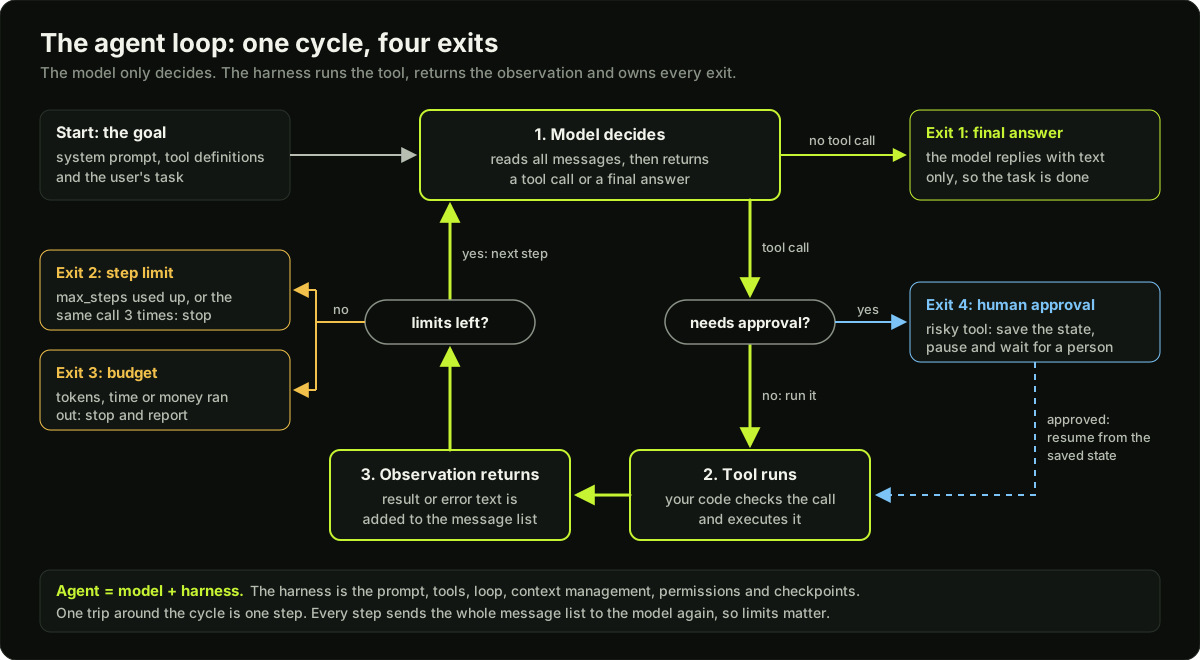 The agent loop as a cycle of model decides, tool runs and observation returns, with four marked exits
One full trace
The task is "What does order A123 cost in total with 18% GST?". It needs two tools: get_order and calculator. The model's first call uses a wrong argument name, and the error text lets it recover.
| Step | Model output | Tool result |
|---|---|---|
| 1 | get_order with {"id": "A123"} | ERROR: missing required argument 'order_id'. get_order expects {"order_id": {"type": "string"}} |
| 2 | get_order with {"order_id": "A123"} | {"item": "keyboard", "unit_price": 2500, "qty": 2} |
| 3 | calculator with {"expression": "2500 * 2 * 1.18"} | 5900.0 |
| 4 | Final: "Order A123 costs 5900.0 rupees with 18% GST." | None. The loop ends. |
A trace like this, saved for every run, is the main debugging tool for agents. The code example prints exactly this table.
From the mini framework to production
The loop stays the same. Five things change around it.
- Real token counts. The API response reports the input and output tokens of each call. Use those numbers for the budget, not a characters-divided-by-4 estimate.
- Several tool calls in one reply. A model may ask for two tools at once. Run each call and append one result per call, matched by the call's id.
- Timeouts and retries on tools. Tools call networks, and networks fail. Give every tool call a timeout. Retry failures that may pass on a second try (timeouts, rate limits) with exponential backoff: wait 1 s, 2 s, 4 s, each with a little random jitter, then give up and return an error text. Retry a write only if repeating it is safe.
- A saved trace. Store every step with its model output, tool result, tokens and latency. You cannot debug or evaluate an agent you cannot replay.
- An eval set. Measure the outcome (task success rate) and the path (right tools, right order, number of steps, cost, latency) on a fixed set of tasks, and add every failure you find as a new task.
ReAct, planning and reflection
The loop above becomes ReAct when the model writes a short thought before each call: thought, action, observation, repeat. Each action uses the newest observation, so the agent can change direction after a surprise. Plan-and-execute spends the first call on a numbered plan, runs the steps one by one, and replans when a step fails. It suits long tasks, but a plan goes stale when the facts change. Reflection adds a review call: the model checks its own draft against the criteria and retries. It costs extra calls, so cap the number of retries.
Workflow or agent
If you can write the steps down in advance, build a workflow: classify the ticket, retrieve the policy, draft the reply. You code the path and the LLM fills in each step. Use an agent only when the path depends on what the model finds along the way, such as debugging a failing test. Workflows are cheaper, faster and easier to test, so the agent has to earn its place. Do not build an agent when a single prompt or a fixed workflow solves the task, when mistakes are expensive and cannot be reviewed, when latency must be very low, or when you have no way to evaluate the result.
Human in the loop
Mark risky tools, such as issue_refund, as needing approval. When the model asks for one, the harness does not run it. It saves the message list and the pending call (a checkpoint) and returns "waiting for approval". Hours later a person answers. On yes, the harness loads the checkpoint, runs the tool and continues the loop. On no, it appends "ERROR: a person rejected this action" as the observation and the model picks another path. Without saved state the process would have to stay alive for hours, or the task would start again from zero.
What goes wrong, and what the harness does about it
| Failure mode | Harness answer |
|---|---|
| Wrong tool chosen | Few tools, clear names, descriptions that say when to use each one |
| Invalid arguments | Strict schema check, error text that shows the expected arguments |
| Loops | Step limit and repeated-call detection |
| Errors that compound over many steps | Validation between steps, checkpoints to resume from |
| Context overflow | Short tool results; trim or summarise old ones |
| Prompt injection through tool results | Treat tool output as data, never as instructions; approval gates on risky tools |
Long tasks are the hardest, because small mistakes add up.
Diagram
Worked example
What a 10-step run costs. Assume the system prompt and tool definitions take 1,500 tokens and the task takes 100. On each step the model writes 150 tokens (a short thought and a tool call) and the tool returns 600 tokens. Both join the message list, so the list grows by 750 tokens per step. Every call sends the whole list again:
Input tokens at step n = 1,600 + 750 x (n - 1)
| Step | Input tokens sent | Output tokens |
|---|---|---|
| 1 | 1,600 | 150 |
| 2 | 2,350 | 150 |
| 3 | 3,100 | 150 |
| 10 | 8,350 | 150 |
Total input over 10 steps = 10 x 1,600 + 750 x (0 + 1 + ... + 9) = 16,000 + 750 x 45 = 49,750 tokens. Total output = 10 x 150 = 1,500 tokens.
At an assumed 3 USD per million input tokens and 15 USD per million output tokens: 49,750 x 3 / 1,000,000 = 0.149 USD, plus 1,500 x 15 / 1,000,000 = 0.0225 USD. About 0.17 USD per task.
Double the steps. For 20 steps the sum is 20 x 1,600 + 750 x 190 = 174,500 input tokens. Twice the steps cost 3.5 times the tokens. This is why a step limit is also a cost limit.
Trim the tool results. If each tool returns 200 tokens, not 600, the list grows by 350 per step. Ten steps cost 16,000 + 350 x 45 = 31,750 input tokens, 36% fewer.
Why small errors add up. Suppose each step is right 95% of the time and one wrong step ruins the task. A 10-step task succeeds 0.95^10 = 60% of the time, and a 20-step task 0.95^20 = 36%. At 99% per step, 10 steps succeed 0.99^10 = 90% of the time. Schema checks and readable errors let the model repair a bad step, so it does not carry the mistake forward.
Runnable code
"""A mini agent framework: message list, tools, registry, loop, limits, trace.

The "model" is a scripted function, so this runs with no network and no API key.
Replace fake_model with a real chat API call and the harness stays the same.
"""
import ast
import json
import operator
from collections import Counter

# ---- Tools: plain functions -------------------------------------------------
ORDERS = {"A123": {"item": "keyboard", "unit_price": 2500, "qty": 2}}
OPS = {ast.Add: operator.add, ast.Sub: operator.sub, ast.Mult: operator.mul, ast.Div: operator.truediv}


def get_order(order_id):
    if order_id not in ORDERS:
        raise ValueError(f"no order with id {order_id}; ids look like A123")
    return ORDERS[order_id]


def calculator(expression):
    def ev(node):                                   # walk the syntax tree, never eval()
        if isinstance(node, ast.Constant) and isinstance(node.value, (int, float)):
            return node.value
        if isinstance(node, ast.BinOp) and type(node.op) in OPS:
            return OPS[type(node.op)](ev(node.left), ev(node.right))
        raise ValueError("only numbers and + - * / are allowed")
    return round(ev(ast.parse(expression, mode="eval").body), 2)


# ---- Registry: name -> description + argument schema + function ---------------
REGISTRY = {
    "get_order": {
        "description": "Look up one order by its id. Use it before answering any question about an order.",
        "schema": {"properties": {"order_id": {"type": "string"}}, "required": ["order_id"]},
        "fn": get_order,
    },
    "calculator": {
        "description": "Evaluate arithmetic such as '2500 * 2 * 1.18'. Use it for every calculation.",
        "schema": {"properties": {"expression": {"type": "string"}}, "required": ["expression"]},
        "fn": calculator,
    },
}
TYPES = {"string": str, "number": (int, float)}
SYSTEM = ('Reply with JSON only: {"tool": name, "args": {...}} to act, or {"final": text} to finish.\nTools:\n'
          + "\n".join(f"- {n}: {t['description']} Arguments: {json.dumps(t['schema'])}" for n, t in REGISTRY.items()))


def execute(name, args):
    """Run one tool call. Never raises: every failure becomes text the model can read."""
    tool = REGISTRY.get(name)
    if tool is None:
        return f"ERROR: unknown tool '{name}'. Available tools: {sorted(REGISTRY)}"
    props = tool["schema"]["properties"]
    hint = f"{name} expects {json.dumps(props)}"
    if not isinstance(args, dict):
        return f"ERROR: args must be a JSON object. {hint}"
    for key in tool["schema"]["required"]:
        if key not in args:
            return f"ERROR: missing required argument '{key}'. {hint}"
    for key, value in args.items():
        if key not in props or not isinstance(value, TYPES[props[key]["type"]]):
            return f"ERROR: bad argument '{key}'. {hint}"
    try:
        return json.dumps(tool["fn"](**args))
    except Exception as exc:                        # a tool crash must not crash the loop
        return f"ERROR: {name} failed: {exc}"


def count_tokens(text):
    return max(1, len(text) // 4)                   # rough rule: about 4 characters per token


def run_agent(task, model, max_steps=6, budget_tokens=3000):
    messages = [{"role": "system", "content": SYSTEM}, {"role": "user", "content": task}]
    spent, seen = 0, Counter()
    for step in range(1, max_steps + 1):
        prompt_tokens = sum(count_tokens(m["content"]) for m in messages)   # the whole list is sent again
        if spent + prompt_tokens > budget_tokens:
            return "stopped: budget", None, spent
        reply = model(messages)                                             # 1. the model decides
        spent += prompt_tokens + count_tokens(reply)
        messages.append({"role": "assistant", "content": reply})
        try:                                                                # 2. parse the decision
            decision = json.loads(reply)
        except json.JSONDecodeError:
            decision = {}
        if "final" in decision:                                             # 3. stop condition
            print(f"  step {step} | final: {decision['final']} | tokens so far {spent}")
            return "done", decision["final"], spent
        seen[reply] += 1
        if seen[reply] == 3:
            print(f"  step {step} | {reply} | not run: third identical call")
            return "stopped: same call 3 times", None, spent
        if "tool" in decision:                                              # 4. run the tool
            observation = execute(decision["tool"], decision.get("args"))
        else:
            observation = 'ERROR: reply must be JSON with "tool" and "args", or with "final".'
        messages.append({"role": "tool", "name": decision.get("tool"), "content": observation})  # 5. feed it back
        print(f"  step {step} | {reply} | {observation} | tokens so far {spent}")
    return "stopped: step limit", None, spent


# ---- Scripted stand-ins for the LLM -------------------------------------------
def call(tool, **args):
    return json.dumps({"tool": tool, "args": args})


def fake_model(messages):
    last = messages[-1]
    if last["role"] == "user":
        return call("get_order", id="A123")                 # mistake: wrong argument name
    if last["content"].startswith("ERROR"):
        return call("get_order", order_id="A123")           # reads the error text and fixes the call
    if last["name"] == "get_order":
        order = json.loads(last["content"])
        return call("calculator", expression=f"{order['unit_price']} * {order['qty']} * 1.18")
    return json.dumps({"final": f"Order A123 costs {last['content']} rupees with 18% GST."})


def stuck_model(messages):
    return call("get_order", order_id="Z999")               # never changes its approach


def wandering_model(messages):
    return call("get_order", order_id=f"Z{len(messages)}")  # a new wrong guess every step


if __name__ == "__main__":
    task = "What does order A123 cost in total with 18% GST?"
    runs = [("recovers from a bad call", fake_model, 6, 3000), ("repeats itself", stuck_model, 6, 3000),
            ("wanders", wandering_model, 4, 3000), ("tight budget", fake_model, 6, 400)]
    results = {}
    for label, model, max_steps, budget in runs:
        print(f"{label} (max_steps={max_steps}, budget_tokens={budget})")
        results[label] = run_agent(task, model, max_steps, budget)
        print(f"  -> {results[label][0]}, {results[label][2]} tokens spent\n")
    assert results["recovers from a bad call"][:2] == ("done", "Order A123 costs 5900.0 rupees with 18% GST.")
    assert results["repeats itself"][0] == "stopped: same call 3 times"
    assert results["wanders"][0] == "stopped: step limit"
    assert results["tight budget"][0] == "stopped: budget"
    print("all four exits checked")
Key takeaways
An agent is an LLM in a loop with tools: decide, call a tool, observe, repeat.
Agent = model + harness. The harness is the prompt, tools, loop, context management, permissions and checkpoints. Larger harnesses add hooks, skills and sub-agents.
The model never runs a tool. It returns a tool name and JSON arguments; your code validates, executes and appends the result as a message.
A tool is a name, a description and an argument schema. The description decides whether the model picks it.
Return every tool failure as readable text that says how to fix the call. Never let it crash the loop.
Every loop needs several exits: final answer, step limit, token or money budget, repeated-call detection, and a pause for human approval.
Each step re-sends the whole message list, so input tokens grow roughly with the square of the step count.
If you can write the steps down in advance, build a workflow, not an agent.
Common mistakes
Shipping a loop whose only exit is "the model says it is done". One confused run then burns tokens until someone notices.
Letting a tool exception crash the run, or returning a stack trace, when one clear sentence would let the model fix the call.
Writing tool descriptions that say what the tool does but not when to use it, then blaming the model for picking the wrong one.
Trusting the model's arguments without a schema check, so a wrong type reaches a real API.
Returning huge tool results (a full JSON dump of 50 fields) when the model needs three of them. The context fills and cost climbs.
Building an agent for a task whose steps are fixed and known in advance.
Practice
Build an agent with no framework: the loop, four tools, a step limit and tracing. Save one trace per run as JSON lines with the step number, model output, tool result and tokens spent.
Add a
needs_approvalflag to one tool in the code example. When it is requested, save the message list to a file and stop. Write aresume(approved)function that loads the file and continues. Check that both the yes path and the no path reach a final answer.Write 10 tasks with known answers for your agent, run each 3 times, and report the pass rate, average steps and average tokens per task. Then shorten one tool's output and report the change in tokens.
Break one tool on purpose (make it raise on every call). Confirm that the run ends through the step limit or the repeated-call check, not through a crash, and that the trace shows why.
Interview questions (12)
1.How does tool calling actually work?Easy
You send the tool definitions with the prompt: a name, a description and a JSON schema for each tool. The model does not run anything; it returns a tool name and JSON arguments. Your application validates the arguments against the schema and executes the call, then sends the result back as a new message. The model continues from there, and either asks for another tool or writes the final answer. The key point is the split of duties: the model only decides, and the application acts. That is also where you put permission checks, timeouts and logging.
2.What are the common failure modes of agents?Medium
Wrong tool chosen, invalid arguments, loops, errors that compound over many steps, context overflow, and prompt injection through tool results. Long tasks are the hardest, because small mistakes add up: at 95% accuracy per step, a 10-step task succeeds only about 60% of the time if nothing catches the errors. Each failure has a harness answer: clearer tool descriptions, schema validation, step limits and repeated-call detection, validation and checkpoints between steps, trimming tool results, and treating tool output as data with approval gates on risky actions.
3.How do you make an agent reliable?Medium
Give it few, clearly named tools with strict schemas and useful error messages. Set step, time and cost limits. Add validation between steps, checkpoints to resume, approval gates for risky actions, and tracing on every run. Then test on a fixed set of tasks. I would add one rule: anything that code can check should be enforced in code, not in the prompt. A refund cap written in the system prompt is a suggestion. The same cap checked inside the refund tool is a guarantee.
4.How do you evaluate an agent?Medium
Measure the outcome (task success rate) and the path (right tools, right order, number of steps, cost, latency). For the outcome I check the end state, such as whether the right record was updated, not only the final message. Agents are not deterministic, so I run each task several times and report the pass rate. Then I review traces of failures and turn each one into a test case, so the test set grows from real mistakes.
5.The agent is stuck in a loop. What do you do?Medium
Cap iterations, detect repeated identical calls, and return clearer errors from tools so the model can change approach. A loop usually means the model keeps getting an observation it cannot act on, for example "not found" with no hint about valid ids. So I read the trace first and fix the error text. If it still loops, simplify the tools or split the task into smaller ones.
6.How do you write a good tool?Easy
One clear job per tool, a description that says when to use it, typed arguments, short and relevant results, and errors that tell the model how to fix the call. I test a tool by reading only its name, description and schema and asking whether a new teammate could call it correctly. If two tools overlap, the model will confuse them, so I merge them. I also keep results small, because every token a tool returns is sent again on every later step.
7.Workflow or agent: how do you decide?Medium
If I can write the steps down in advance, it is a workflow, and I code the path. I use an agent only when the path depends on what the model finds along the way. Workflows are cheaper, faster and easier to test, so the agent has to earn its place. A common middle ground is a workflow with one agentic step inside it: fixed intake and fixed output checks, with a small loop in the middle where the path really is unknown.
8.When should you not build an agent?Medium
When a single prompt or a fixed workflow solves it, when mistakes are expensive and cannot be reviewed, when latency must be very low, or when you have no way to evaluate the result. An agent makes several model calls per task, so it is slower and costs more than one call, and its behaviour varies between runs. If I cannot measure whether it succeeded, I cannot improve it or defend it in production.
9.What is an agent harness?Easy
The harness is everything around the model that makes it an agent: the system prompt, the tool definitions and the code that runs them, the loop, context management, permissions, and checkpoints. A short way to say it is agent = model + harness. The model only maps text to text. The harness decides what the model sees, executes what it asks for, enforces limits, and saves state. Larger harnesses add hooks (my code that runs before and after each tool call), skills (instructions loaded only when a task needs them) and sub-agents (a separate loop with its own context). Much of an agent's reliability comes from harness work, which is why two agents on the same model can perform very differently.
10.Why return tool errors to the model as text instead of raising an exception?Medium
An exception ends the run, and the model never learns what went wrong. An error returned as an observation gives the model a chance to repair the call on the next step, which it often can. The text must be written for the model: what was wrong, and what a valid call looks like, for example "missing required argument order_id, expected a string". I still stop the run for failures the model cannot fix, such as an expired credential, and I count consecutive errors so a broken tool does not eat the whole step budget.
11.Why does the cost of an agent run grow faster than the number of steps?Hard
Because the model is stateless, every call re-sends the whole message list, and the list grows on every step. If each step adds 750 tokens to a 1,600-token start, 10 steps send about 50,000 input tokens in total and 20 steps send about 175,000. Input tokens grow roughly with the square of the step count. The fixes are a step limit, short tool results, dropping or summarising old tool output, and a stable prefix so the provider's prompt cache can discount the repeated part.
12.How does a human approval step work inside the loop?Hard
The harness marks certain tools as needing approval. When the model requests one, the harness does not execute it. It saves the run state, meaning the message list and the pending call, and returns control with a status such as "waiting for approval". When the person answers, the harness loads the saved state. On approval it runs the tool and continues the loop. On rejection it appends the rejection as the observation so the model can choose another path. The saved state is what makes this possible, because the answer may come hours later and from a different process.
Quiz
1.The model's reply contains a tool call. Who executes the tool?
2.A tool raises "order not found". What should the harness do?
3.Which of these is part of the harness, not the model?
4.A run starts with 1,600 input tokens and each step adds 750 tokens to the message list. How many input tokens does step 3 send?
5.The steps of a task are fixed and known in advance: classify, retrieve, draft. What should you build?
Practice these problems
Further reading
My notes
Your notes
Autosaves to this browser.