Hugging Face end to end
Hugging Face is where open models live and the set of Python libraries used to run them. This lesson follows one path from start to finish: find a model on the Hub, read its card and licence, load the tokenizer and the weights, format a chat with the model's template, generate text, measure the output, and save or push your own version. Every step names the object you get back.
Why it matters
Almost every open-model project starts with from_pretrained. Interviewers who ask about fine-tuning or serving expect you to know what sits underneath: what a tokenizer returns, why a batch needs an attention mask, what a chat template is, and how an 8-billion-parameter model fits on a 16 GB GPU. The same knowledge saves hours of real work. Most "my model outputs garbage" reports come from a wrong template, a missing generation prompt or a default of 20 new tokens, not from the model. If you can run, measure and publish a model yourself, lessons 9 to 11 on fine-tuning and serving become much easier.
Read first: LLM fundamentals - tokens, embeddings, decoding
Lesson
The Hub: what you are downloading
The Hub is a hosting site for three kinds of repository: models, datasets and demo apps (called Spaces). A model repository is a versioned folder of files. Versioning is based on Git, so you can load an exact commit with the revision argument.
| File | What it holds |
|---|---|
config.json | Architecture: layer count, hidden size, vocabulary size |
model.safetensors | The weights. Large models are split into shards such as model-00001-of-00006.safetensors |
| Tokenizer files | The vocabulary, the special tokens and the chat template |
generation_config.json | Default generation settings for this model |
README.md | The model card |
*.gguf | Optional: the same model packed for llama.cpp |
Read the model card before anything else. It is the README.md, with a YAML block at the top that the Hub indexes: license, base_model, datasets, language, tags. Check three things: the licence (some forbid commercial use; license: other means a custom licence you must read), the base_model (is this a fine-tune, an adapter or a quantized copy of something else?), and the prompt format. Some models are gated: you accept the author's terms in the browser, then log in on your machine by running hf auth login, which stores an access token.
Two weight formats matter.
| Format | Contains | Loaded by | Typical use |
|---|---|---|---|
| safetensors | Tensors only, no executable code | transformers, vLLM, most Python tools | Training, fine-tuning, GPU serving |
| GGUF | Tensors plus standard metadata in one binary file, usually quantized | llama.cpp, Ollama, LM Studio | Laptops, CPUs, edge devices |
Older PyTorch weights were stored with Python's pickle, which can run code when a file is loaded. Safetensors cannot, and it loads faster, so from_pretrained picks it when available. Some repositories ship their own model code and need trust_remote_code=True. Pass it only for code you have read, and pin a revision.
The libraries, and the shortest path
- transformers: model classes, tokenizers,
generate,pipeline. - accelerate: places weights across GPU, CPU and disk.
device_map="auto"needs it. - datasets: load, transform and split data.
- peft: LoRA and other adapter methods (lesson 9).
- trl: training loops such as
SFTTrainer(lesson 10). - bitsandbytes: 8-bit and 4-bit loading.
pipeline is the shortest path. It loads the tokenizer and model, applies the chat template, generates and decodes.
# needs: transformers, accelerate, torch
from transformers import pipeline

chat = [
    {"role": "system", "content": "You are a helpful science assistant."},
    {"role": "user", "content": "Explain gravity in two sentences."},
]
pipe = pipeline(task="text-generation", model="HuggingFaceTB/SmolLM2-1.7B-Instruct",
                dtype="auto", device_map="auto")
response = pipe(chat, max_new_tokens=128)
print(response[0]["generated_text"][-1]["content"])
Use pipeline to try a model. Use the explicit classes below when you need to see the tokens, batch prompts or train.
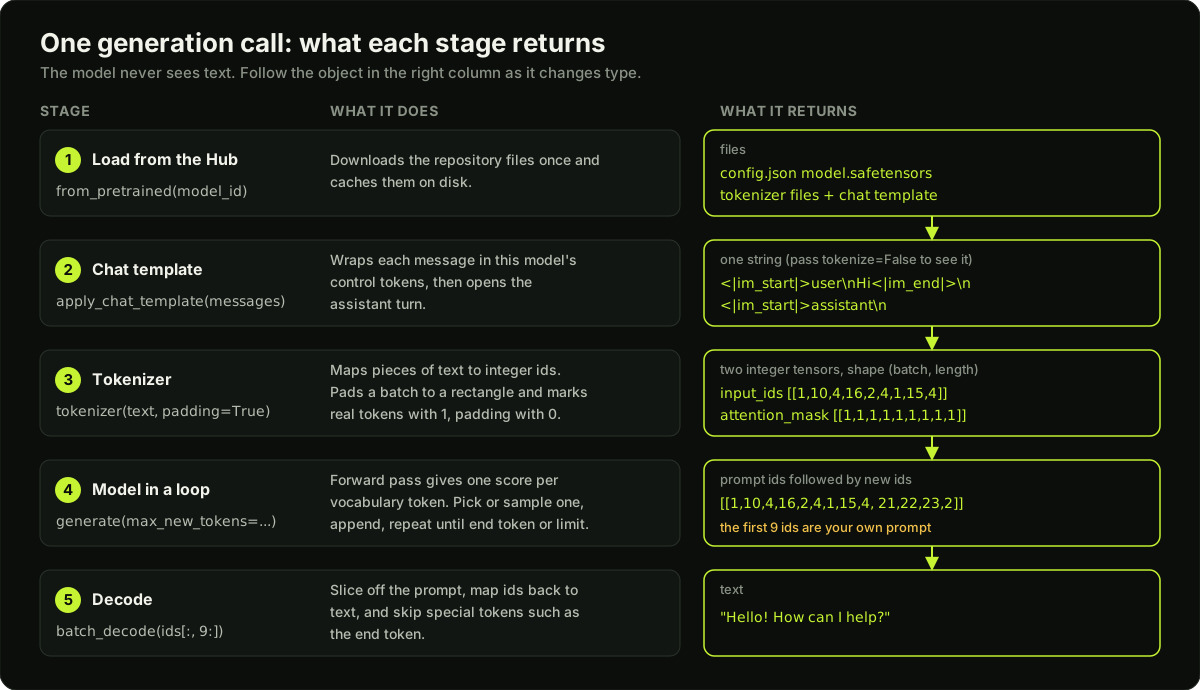 Five stages from a Hub repository to generated text, with what each stage returns
What the tokenizer returns
AutoTokenizer.from_pretrained(model_id) reads the repository and builds the right tokenizer. Calling it on text returns a dictionary. Two entries matter for a decoder model.
input_ids: one integer per token. This is what the model reads.attention_mask: same shape, 1 for a real token and 0 for padding.
The tokenizer also adds special tokens, which mark structure and are not words: beginning of sequence, end of sequence, padding. Each model defines its own set. decode(ids, skip_special_tokens=True) strips them on the way back.
A tensor must be a rectangle, so a batch of prompts with different lengths needs padding and sometimes truncation.
| Argument | Value | Effect |
|---|---|---|
padding | True or "longest" | Pad to the longest sequence in the batch |
padding | "max_length" | Pad every row to max_length |
truncation | True | Cut rows longer than max_length; trailing tokens are lost |
max_length | integer | The limit used by both |
return_tensors | "pt" | Return PyTorch tensors, not Python lists |
Both padding and truncation are off by default. For generation, pad on the left by loading the tokenizer with padding_side="left". A decoder continues from the last position, and it was never trained to continue from padding tokens. Many decoder tokenizers ship without a padding token, and padding then raises an error. For generation, the usual fix is tokenizer.pad_token = tokenizer.eos_token. Truncation cuts the end of a prompt, which for a chat is the newest question. Trim old turns yourself before tokenizing.
Chat templates
A chat model is still a next-token predictor. During fine-tuning, every conversation was flattened into one string with control tokens that mark who is speaking. A chat template is the code, stored with the tokenizer, that rebuilds that exact string from a list of {"role", "content"} messages.
Formats differ between models, even between fine-tunes of the same base. One family marks a user turn with [INST] and [/INST], another writes <|user|> and <|assistant|>, a third wraps each message in <|im_start|> and <|im_end|>. Feed a model the wrong format and it sees text unlike anything in its training data. It does not raise an error. It answers worse, rambles or continues the user's message. This is why a wrong template is the most common cause of bad output, in inference and in fine-tuning: when a fine-tuned model is worse than its base, check the template and special tokens first.
# needs: transformers, accelerate, torch
from transformers import AutoModelForCausalLM, AutoTokenizer

model_id = "HuggingFaceTB/SmolLM2-1.7B-Instruct"
tokenizer = AutoTokenizer.from_pretrained(model_id)
model = AutoModelForCausalLM.from_pretrained(model_id, dtype="auto", device_map="auto")

inputs = tokenizer.apply_chat_template(
    chat, tokenize=True, add_generation_prompt=True, return_dict=True, return_tensors="pt"
).to(model.device)
input_length = inputs.input_ids.shape[1]

generated_ids = model.generate(**inputs, max_new_tokens=128)
print(tokenizer.batch_decode(generated_ids[:, input_length:], skip_special_tokens=True)[0])
Three rules prevent most template bugs.
- Always call
apply_chat_template. Never hand-write the control tokens. - Set
add_generation_prompt=Truefor inference. It appends the tokens that open the assistant's turn. For training data set it toFalse, because the assistant's reply is already in the text. - Do not add special tokens twice. The template already contains them. If you render with
tokenize=Falseand tokenize later, passadd_special_tokens=False. Usingtokenize=Trueavoids the problem.
Device and precision
AutoModelForCausalLM.from_pretrained picks the model class from config.json and loads the weights. Two arguments decide where and how.
device_map="auto"places the weights on the fastest device available, GPU first. What does not fit spills to CPU memory and then to disk, which is much slower.dtypesets the number format."auto"uses the type stored in the checkpoint;torch.bfloat16forces 16-bit floats. Older code spells this argumenttorch_dtype.
Memory for weights is parameters times bytes per parameter. For an 8-billion-parameter model:
| Precision | Bytes per parameter | Weights |
|---|---|---|
| float32 | 4 | about 32 GB |
| bfloat16 or float16 | 2 | about 16 GB |
| 4-bit | 0.5 | about 4 GB, plus the layers left unquantized |
To load in 4-bit, pass a quantization config. The weights are stored in 4 bits and computed in 16-bit.
# needs: transformers, accelerate, bitsandbytes, torch
import torch
from transformers import AutoModelForCausalLM, BitsAndBytesConfig

quantization_config = BitsAndBytesConfig(
    load_in_4bit=True, bnb_4bit_quant_type="nf4", bnb_4bit_compute_dtype=torch.bfloat16
)
model = AutoModelForCausalLM.from_pretrained(
    model_id, device_map="auto", quantization_config=quantization_config
)
print(model.get_memory_footprint())
The printed footprint is larger than parameters x 0.5 bytes. Only the linear layers are replaced by 4-bit layers. The embedding table is not a linear layer, and the output head of a causal model keeps its original type. On a model with a large vocabulary these add 1 GB or more.
NF4 is the 4-bit scheme QLoRA uses. A model loaded this way cannot be fully fine-tuned; you can only train extra parameters such as LoRA adapters on top of it.
Generation settings
generate runs the decode loop: forward pass, choose a token, append, repeat. Its defaults surprise people. Unless the model's generation_config.json says otherwise, decoding is greedy and stops after 20 new tokens.
| Argument | What it controls | Note |
|---|---|---|
max_new_tokens | Upper limit on generated tokens, not counting the prompt | Always set it |
do_sample | False: greedy, take the top token. True: sample | Greedy for extraction and evals |
temperature | Flattens (above 1) or sharpens (below 1) the distribution | Ignored unless do_sample=True |
top_p | Sample only from the smallest set of tokens whose probability reaches p | Default 1.0, which keeps everything |
top_k | Sample only from the k most likely tokens | Default 50 |
repetition_penalty | Above 1.0 discourages repeats | 1.0 means off |
A decoder-only model returns the prompt ids followed by the new ids. Slice from the input length, as in the code above, or the prompt appears in your answer.
Datasets: load, map, split
A dataset is a table with named columns. load_dataset downloads one from the Hub, map applies a function to every row, and train_test_split creates a held-out set. Shuffling once with a fixed seed and then splitting with shuffle=False gives the same split on every run. In the sketch below, replace your-name/support-chats with any dataset that has a messages column.
# needs: datasets, transformers
from datasets import load_dataset

dataset = load_dataset("your-name/support-chats", split="train")
dataset = dataset.shuffle(seed=42).train_test_split(test_size=0.1, shuffle=False)

def to_text(example):
    text = tokenizer.apply_chat_template(
        example["messages"], tokenize=False, add_generation_prompt=False
    )
    return {"text": text}

dataset = dataset.map(to_text)
print(dataset["train"][0]["text"])
Printing one formatted row and reading it is the cheapest check in the whole pipeline. With batched=True, map passes 1,000 rows at a time, which is much faster for tokenizing.
Where PEFT and TRL fit
Inference stops at generate. To change the model you add two libraries. PEFT wraps the loaded model with small trainable adapter matrices: build a LoraConfig, call get_peft_model, and the base weights stay frozen. TRL supplies the training loop. SFTTrainer takes a model, a train_dataset and an optional peft_config, and applies the chat template for you when the dataset has a messages column. Lessons 9 and 10 cover the choices.
Evaluating outputs
Before you call your version better, measure it.
- Hold out data the model never trains on. The
testsplit above is enough to start. - Fix the generation settings. Use
do_sample=Falseso two runs give the same text. - Score with the cheapest check that fits the task: exact match for labels, valid JSON for extraction, a unit test for code, a judge model with a rubric for free text.
- Run the base model and your model on the same prompts and compare the two numbers.
- Read 20 raw outputs. A metric will not tell you that every answer starts with a stray token.
Saving and pushing
save_pretrained writes the files to a local folder. push_to_hub creates a repository under your account and uploads them. Save the tokenizer with the model, or the next user gets no chat template.
# needs: transformers, huggingface_hub (run `hf auth login` first)
model.save_pretrained("my-model")
tokenizer.save_pretrained("my-model")

model.push_to_hub("your-name/my-model")
tokenizer.push_to_hub("your-name/my-model")
A PEFT model saves only the adapter: adapter_config.json and adapter_model.safetensors, usually a few megabytes. Then write the model card: base model, training data, licence, prompt format and your eval numbers.
Diagram
Worked example
Fitting and running an 8-billion-parameter chat model on one 16 GB GPU.
Step 1: memory. In float32 the weights need 8 billion x 4 bytes = 32 GB. In bfloat16 they need 8 billion x 2 = 16 GB, which fills the card and leaves nothing for activations or the KV cache. In 4-bit they need 8 billion x 0.5 = 4 GB, plus the embedding table and output head, which stay unquantized. With a 128,000-token vocabulary and a hidden size of 4,096, each of those is 128,000 x 4,096 x 2 bytes = about 1 GB in 16-bit, so plan for about 6 GB. So load in 4-bit.
Step 2: a batch. Three chats go through the template and the tokenizer and come out as 22, 9 and 14 token ids. With padding=True every row becomes 22 long. The batch has 3 x 22 = 66 slots, of which 22 + 9 + 14 = 45 are real tokens and 21 are padding, so 32% of the batch is padding. The attention mask has 45 ones and 21 zeros. With left padding, the last column holds a real token in all three rows, which is where generation continues.
Step 3: generate. With max_new_tokens=50 the output has at most 22 + 50 = 72 columns. Slicing from column 22 leaves at most 50 new tokens per row. Rows that finish early are filled with padding after their end-of-sequence token, and skip_special_tokens=True removes it.
Step 4: measure. On 200 held-out prompts with greedy decoding, suppose the base model gets 124 exactly right: 124 / 200 = 62%. After training an adapter, 163 are right: 163 / 200 = 81.5%. That is a gain of 19.5 points on the same prompts and the same settings.
Step 5: save. The PEFT documentation's example adapter on a model with 1,236,338,688 parameters trains 524,288 of them, which is 0.0424%. In float32 that adapter is 524,288 x 4 bytes = about 2.1 MB. The full model in 16-bit is 1,236,338,688 x 2 bytes = about 2.5 GB. You push megabytes, and the card names the base model.
Runnable code
"""A chat template and a padded batch, in miniature.

The tokenizer here is a toy (one id per word or special token). It stands in
for a real subword tokenizer so every step runs with NumPy alone.
"""
import re

import numpy as np


def render_chatml(messages, add_generation_prompt=True):
    """ChatML-style template: <|im_start|>role, newline, content, <|im_end|>."""
    text = ""
    for m in messages:
        text += f"<|im_start|>{m['role']}\n{m['content']}<|im_end|>\n"
    if add_generation_prompt:
        text += "<|im_start|>assistant\n"      # tells the model: your turn starts here
    return text


def render_zephyr(messages, add_generation_prompt=True):
    """A different model family: same messages, different control tokens."""
    text = ""
    for m in messages:
        text += f"<|{m['role']}|>\n{m['content']}</s>\n"
    if add_generation_prompt:
        text += "<|assistant|>\n"
    return text


class ToyTokenizer:
    """Maps each special token, word or punctuation mark to an integer id."""

    SPECIAL = ["<pad>", "<|im_start|>", "<|im_end|>"]

    def __init__(self):
        self.vocab = {tok: i for i, tok in enumerate(self.SPECIAL)}
        self.pad_token_id = self.vocab["<pad>"]

    def tokenize(self, text):
        return re.findall(r"<\|im_start\|>|<\|im_end\|>|\n|\w+|[^\w\s]", text)

    def encode(self, text):
        ids = []
        for tok in self.tokenize(text):
            if tok not in self.vocab:
                self.vocab[tok] = len(self.vocab)
            ids.append(self.vocab[tok])
        return ids

    def decode(self, ids, skip_special_tokens=False):
        inv = {i: t for t, i in self.vocab.items()}
        toks = [inv[i] for i in ids]
        if skip_special_tokens:
            toks = [t for t in toks if t not in self.SPECIAL]
        return " ".join(toks).replace("\n", "\\n")


def pad_batch(sequences, pad_id, side="left", max_length=None):
    """Return (input_ids, attention_mask) as rectangular integer arrays."""
    if max_length is not None:                       # truncation keeps the first max_length ids,
        sequences = [s[:max_length] for s in sequences]   # so the END of a long prompt is lost
    width = max(len(s) for s in sequences)
    input_ids = np.full((len(sequences), width), pad_id, dtype=np.int64)
    attention_mask = np.zeros((len(sequences), width), dtype=np.int64)
    for row, seq in enumerate(sequences):
        if side == "left":
            input_ids[row, width - len(seq):] = seq
            attention_mask[row, width - len(seq):] = 1
        else:
            input_ids[row, :len(seq)] = seq
            attention_mask[row, :len(seq)] = 1
    return input_ids, attention_mask


def mean_pool(input_ids, attention_mask, table):
    """Average the token vectors of each row, counting only positions where mask is 1."""
    vectors = table[input_ids]                       # (batch, width, dim)
    mask = attention_mask[:, :, None]
    return (vectors * mask).sum(axis=1) / mask.sum(axis=1)


if __name__ == "__main__":
    chats = [
        [{"role": "system", "content": "Answer in one word."},
         {"role": "user", "content": "Capital of India?"}],
        [{"role": "user", "content": "Hi"}],
        [{"role": "user", "content": "What is 2 + 2?"}],
    ]

    print("STEP 1. One list of messages, two templates")
    print(render_chatml(chats[0]))
    print(render_zephyr(chats[0]))

    print("STEP 2. Template string to token ids")
    tok = ToyTokenizer()
    batch = [tok.encode(render_chatml(c)) for c in chats]
    for ids in batch:
        print(f"  {len(ids):2d} ids: {ids}")

    print("STEP 3. Pad to a rectangle and build the attention mask")
    for side in ("right", "left"):
        ids, mask = pad_batch(batch, tok.pad_token_id, side=side)
        print(f"  padding_side={side}, shape={ids.shape}, "
              f"real tokens={int(mask.sum())}, padding={int((1 - mask).sum())}")
        print("  input_ids:\n" + "\n".join("    " + str(r) for r in ids))
        print("  attention_mask:\n" + "\n".join("    " + str(r) for r in mask))
        last_is_real = bool(mask[:, -1].all())
        print(f"  last column is a real token in every row: {last_is_real}")
        assert mask.sum(axis=1).tolist() == [len(s) for s in batch]

    print("STEP 4. Truncation: max_length=8 keeps the first 8 ids of each row")
    ids, mask = pad_batch(batch, tok.pad_token_id, side="left", max_length=8)
    print("  shape:", ids.shape, "real tokens per row:", mask.sum(axis=1).tolist())

    print("STEP 5. Why the mask matters")
    rng = np.random.default_rng(0)
    table = rng.normal(size=(len(tok.vocab), 4))     # one 4-number vector per token id
    ids, mask = pad_batch(batch, tok.pad_token_id, side="left")
    alone = table[np.array(batch[1])].mean(axis=0)   # the short chat on its own
    with_mask = mean_pool(ids, mask, table)[1]
    no_mask = mean_pool(ids, np.ones_like(mask), table)[1]
    print("  short chat alone      :", np.round(alone, 3))
    print("  in batch, with mask   :", np.round(with_mask, 3))
    print("  in batch, mask ignored:", np.round(no_mask, 3))
    assert np.allclose(alone, with_mask) and not np.allclose(alone, no_mask)

    print("STEP 6. Decode ids back to text")
    print("  with special tokens   :", tok.decode(batch[1]))
    print("  skip_special_tokens   :", tok.decode(batch[1], skip_special_tokens=True))
Key takeaways
A model repository is a folder: config, weights, tokenizer files with the chat template, generation defaults and a model card. Read the card and the licence first.
Safetensors is the format transformers loads: tensors only, no executable code. GGUF is one file with metadata for llama.cpp-style runtimes, usually quantized.
A tokenizer returns
input_idsandattention_mask. The mask is 1 for real tokens and 0 for padding. Pad on the left for generation.The chat template rebuilds the exact string format the model was trained on. A wrong or missing template is the first thing to check when output is bad.
Weights memory is parameters times bytes per parameter: 8 billion parameters is 32 GB in float32, 16 GB in 16-bit, and about 4 GB in 4-bit plus the layers left unquantized.
generateis greedy and stops after 20 new tokens unless told otherwise. Setmax_new_tokens, and remembertemperatureandtop_pdo nothing withoutdo_sample=True.Compare your model with the base on the same held-out prompts with fixed settings before you push it.
Push the tokenizer with the model. After a LoRA run, the adapter is two small files.
Common mistakes
Writing the prompt as a plain string for a chat model, or copying another model's control tokens, when
apply_chat_templateexists.Leaving out
add_generation_prompt=Trueat inference, so the model continues the user's message.Tokenizing a templated string with special tokens added again, which doubles the beginning-of-sequence token.
Batching prompts with right padding, so short rows generate from padding tokens.
Not setting
max_new_tokens, then concluding the model "cuts off mid-sentence".Decoding the full output and reporting the prompt as part of the answer.
Practice
Load a small instruct model (under 2 billion parameters) with
AutoTokenizerandAutoModelForCausalLM. Print the string fromapply_chat_template(..., tokenize=False)and the token count for one chat, then generate withmax_new_tokens=64and decode only the new tokens.Break it on purpose: run the same 10 prompts with the template, without the template, and without
add_generation_prompt. Record how many answers are acceptable in each case.Load the same model in 16-bit and in 4-bit. Report
get_memory_footprint()for both and the exact-match score on 50 held-out prompts with greedy decoding.Split a small dataset 90/10 with
train_test_split, write the eval numbers into a model card, and push the model and tokenizer to a private repository. Load it back from the Hub on a clean machine and confirm that greedy decoding gives the same output.
Interview questions (11)
1.What does a tokenizer return, and what is the attention mask for?Easy
It returns a dictionary. input_ids holds one integer per token, and that is what the model reads. attention_mask has the same shape, with 1 for real tokens and 0 for padding. A batch must be rectangular, so short prompts are padded to the length of the longest one. Attention looks at every position, so without the mask the padding tokens would change the result for the short rows. The mask tells the attention layers to ignore those positions. The tokenizer also adds the model's special tokens, such as beginning of sequence.
2.What is a chat template, and why does the wrong one hurt?Medium
A chat model only continues a token sequence. In fine-tuning, each conversation was flattened into one string with control tokens marking the roles, and the format differs per model: one uses [INST] tags, another uses <|im_start|> and <|im_end|>. The chat template is stored with the tokenizer and rebuilds that format from a list of role and content messages. With the wrong format the model sees input unlike its training data. Nothing crashes, the answers just get worse: it ignores the system prompt, rambles or continues the user's turn. So I always call apply_chat_template and never hand-write the tokens.
3.Your model's output is bad after loading it or fine-tuning it. What do you check first?Medium
The chat template, because it is the most frequent bug. I print the exact string the model receives and compare it with the format on the model card. I look for three things: the right control tokens, special tokens that appear twice, and the generation prompt at the end for inference. For a fine-tune I check that training and inference used the same template and the same end-of-turn token. Then I check generation settings: max_new_tokens, sampling, left padding for batches. Only after that do I suspect learning rate, epochs or the data.
4.Why do you pad on the left for generation?Medium
A decoder-only model predicts the next token from the last position of each row. With right padding, a short row ends in padding tokens, and the model was never trained to continue from padding, so the continuation is poor. With left padding, every row ends with its real last token and the padding sits at the start, where the attention mask hides it. For training the side matters less, because the loss ignores padded positions, but for batched generation it must be left.
5.safetensors or GGUF: what is the difference?Easy
Both store model weights. Safetensors stores only tensors and cannot run code when loaded, unlike the older pickle-based files, and it loads fast. It is what transformers, PEFT and GPU servers such as vLLM read. GGUF is a single binary file that holds the tensors plus standard metadata, and it is the format llama.cpp and tools built on it use. GGUF files are usually quantized, for example to about 4.5 bits per weight. I use safetensors to train or serve on GPUs and GGUF to run on a laptop or CPU.
6.How do you fit an 8-billion-parameter model on a 16 GB GPU?Medium
Start with the arithmetic. Float32 is 4 bytes per parameter, so 32 GB. 16-bit halves that to 16 GB, which fills the card with no room for activations or the KV cache. So I load it in 4-bit with a BitsAndBytesConfig, which stores the linear layers in about 4 GB and computes in bfloat16. The embeddings and output head stay in 16-bit, so the real footprint is nearer 6 GB. I pass device_map="auto" so placement is handled for me. The cost is some quality, more on reasoning and long outputs, so I compare against the 16-bit model on my own eval set if I can run it somewhere.
7.Which generation settings do you set, and what are the defaults?Easy
By default generate is greedy and stops after 20 new tokens unless the model's generation config says otherwise. So I always set max_new_tokens. For extraction, classification and evals I keep do_sample=False, so runs are repeatable. For chat or creative text I set do_sample=True with a temperature around 0.7 and top_p around 0.9. Temperature and top-p are ignored when sampling is off, which is a common confusion. I also remember that the output contains the prompt, so I slice it off before decoding.
8.pipeline or AutoModel with generate: when do you use each?Easy
pipeline is one call that loads the tokenizer and model, applies the chat template, generates and decodes. I use it to try a model or build a quick demo. I switch to AutoTokenizer and AutoModelForCausalLM when I need control: inspecting token ids, batching prompts with padding, custom stopping, reading logits, or training. In production I usually use neither for serving. A dedicated engine such as vLLM handles batching and caching far better than a Python loop around generate.
9.How do you show that your version of a model is better than the base?Medium
I hold out data the model never trained on, usually 10 to 20 percent. I run the base and my model on the same prompts with the same template and greedy decoding, so differences come from the weights and not from sampling. I score with the cheapest check that fits: exact match, schema validity, unit tests, or a judge model with a rubric. I also run a small set of general prompts to catch forgetting, and I read a sample of raw outputs. If the gain is not clear, I do not ship.
10.After a LoRA fine-tune, what do you push to the Hub?Medium
Usually only the adapter. A PEFT model's save_pretrained and push_to_hub write two files, adapter_config.json and adapter_model.safetensors, a few megabytes against gigabytes for the base. The config records the base model, and I set base_model in the card so the Hub links them. I push the tokenizer too if I changed the template or added tokens. I push merged full weights only when the serving stack cannot load adapters, because that costs the full model size per variant.
11.What do you check on a model card before using a model?Easy
The licence first: whether commercial use is allowed and whether the model is gated. Then the base model and what was changed, the training data, the prompt format or chat template, the context length, and any eval numbers with how they were measured. I also look at the files tab: is there a safetensors file, does the repository need trust_remote_code, and how large are the weights. If code must be trusted, I read it and pin a commit.
Quiz
1.A chat model answers well through pipeline, but badly when you tokenize a plain string yourself and call generate. What is the most likely cause?
2.You batch three prompts of 22, 9 and 14 tokens with padding=True. How many zeros does the attention mask contain?
3.A model's generation config does not enable sampling. You call generate with temperature=0.2 and nothing else. What happens?
4.Roughly how much memory do 7 billion parameters need when each is stored in 4 bits?
5.Which file format would you download to run a model with llama.cpp on a laptop CPU?
Practice these problems
Further reading
My notes
Your notes
Autosaves to this browser.