Inference and serving - KV cache, batching, vLLM
Inference is running a trained model to produce output. Serving is doing that for many users at once, fast and cheaply. This lesson follows one request through an LLM server: the prefill and decode phases, the KV cache that makes decode fast, batching that keeps the GPU busy, quantization that shrinks the model, and the metrics and engines you use to run it in production.
Why it matters
Serving questions test whether you can reason with numbers. "Serve an open model to 1,000 users" and "design a batching system for one GPU" are asked at AI labs and platform teams, and the follow-ups are always the same: where does the memory go, why is the first token slow, what happens to latency when you raise the batch size. In real work the same ideas decide your GPU bill. A team that understands the KV cache, continuous batching and prefix caching can serve the same traffic on a fraction of the hardware.
Read first: LLM fundamentals - tokens, embeddings, decoding, Coding simple attention
Lesson
Serving comes down to three numbers: latency, throughput and cost per token. Almost every technique here trades one for another, and saying which trade you are making is what interviewers listen for.
Two phases: prefill and decode
- Prefill processes the whole prompt in one parallel pass and saves what it computed for every prompt token. Prefill sets time to first token.
- Decode then generates one token at a time. Each step feeds in only the newest token. Decode sets tokens per second.
Prompt: "The capital of France is"   (5 tokens)

Prefill   [The][capital][of][France][is]   one parallel pass      -> " Paris"   cache: 5 tokens
Decode 1  [ Paris]                         reads 5 cached tokens  -> "."        cache: 6 tokens
Decode 2  [.]                              reads 6 cached tokens  -> <eos>      cache: 7 tokens
Prefill can be parallel because every prompt token is already known. Decode cannot: token 2 of the answer depends on token 1. So a 2,000-token prompt costs one pass, and a 300-token answer costs 300 passes, one after another. That is why capping output length cuts total latency more than trimming the prompt does.
Each decode pass reads every weight of the model to produce a single token. If 32 requests share the pass, the weights are read once and 32 tokens come out. This is the reason batching helps decode so much.
The KV cache
Attention compares the new token's query with a key and a value from every earlier token. A decoder token only looks backwards, so those keys and values never change once computed. During decode, the keys and values of all earlier tokens are stored for every layer, so each new token only computes its own. Without the cache, every step would push the full sequence through the model again. For a 2,000-token prompt and a 300-token answer that is 2,000 + 2,001 + ... + 2,299 = 644,850 token positions through the layers. With the cache it is 2,299: the prompt once, then one position per step. The cache makes generation fast, and it is the main memory cost besides the weights.
The 2 is for keys plus values. Heads x head dim equals the hidden size in a standard model. Models with grouped-query attention share keys and values between heads, so count the KV heads only. The cache is not shared between requests: every concurrent request holds its own.
Memory maths you should be able to do
Weights = parameters x bytes per parameter. A 7B model in FP16 (2 bytes) needs about 14 GB. In 4-bit it needs about 3.5 GB. A 70B model in FP16 needs about 140 GB. Then add the KV cache, which grows with layers x sequence length x batch size.
Quantization stores weights in fewer bits (FP16 to INT8 to 4-bit). Memory drops and speed rises, with a small quality loss.
| Precision | Bytes per parameter | 7B model | Quality |
|---|---|---|---|
| FP32 | 4 | 28 GB | Training precision; rarely served |
| FP16 or BF16 | 2 | 14 GB | The serving default |
| INT8 | 1 | 7 GB | Usually near lossless |
| 4-bit | 0.5 | 3.5 GB | Fine for many tasks; can hurt reasoning, maths and long outputs |
Names to know:
- GPTQ and AWQ are post-training methods: they quantize an already trained model using a small calibration set, with no retraining. GPTQ goes layer by layer and adjusts the remaining weights to cancel each rounding error. AWQ looks at activations to find the small share of weights that matter most and protects them.
- GGUF is the file format llama.cpp uses. One file holds the quantized weights, the tokenizer and the metadata, at a bit width you choose when you download it.
- NF4 is the 4-bit data type used by QLoRA.
GPU engines such as vLLM load a GPTQ or AWQ checkpoint; llama.cpp and Ollama load GGUF; TensorRT-LLM compiles the model into an engine file built for one GPU type. Quantizing the weights does not shrink the KV cache, so long contexts stay expensive.
The metrics
- TTFT (time to first token): queue wait plus prefill.
- TPOT (time per output token): the gap between streamed tokens.
- Tokens per second: 1 / TPOT for one request.
- End-to-end latency: from request to last token.
- Throughput: total tokens per second across all requests on the server.
N is the number of output tokens. With streaming, users feel TTFT first and TPOT after that, so a chat product sets a target for each. A batch job cares only about throughput. Always quote p95 or p99, not the average. p95 is the latency that 95% of requests beat. Latency has a long tail, and the slowest 5% of requests are the ones users complain about.
Batching: static and continuous
A GPU can run many requests in one forward pass for little extra time, so batching is where throughput comes from.
Static batching waits to fill a batch and holds every request until the longest finishes. A request that needs 2 tokens sits in a batch with one that needs 8, and its slot does nothing for 6 steps.
Continuous batching adds new requests and removes finished ones at every decode step, so the GPU stays busy.
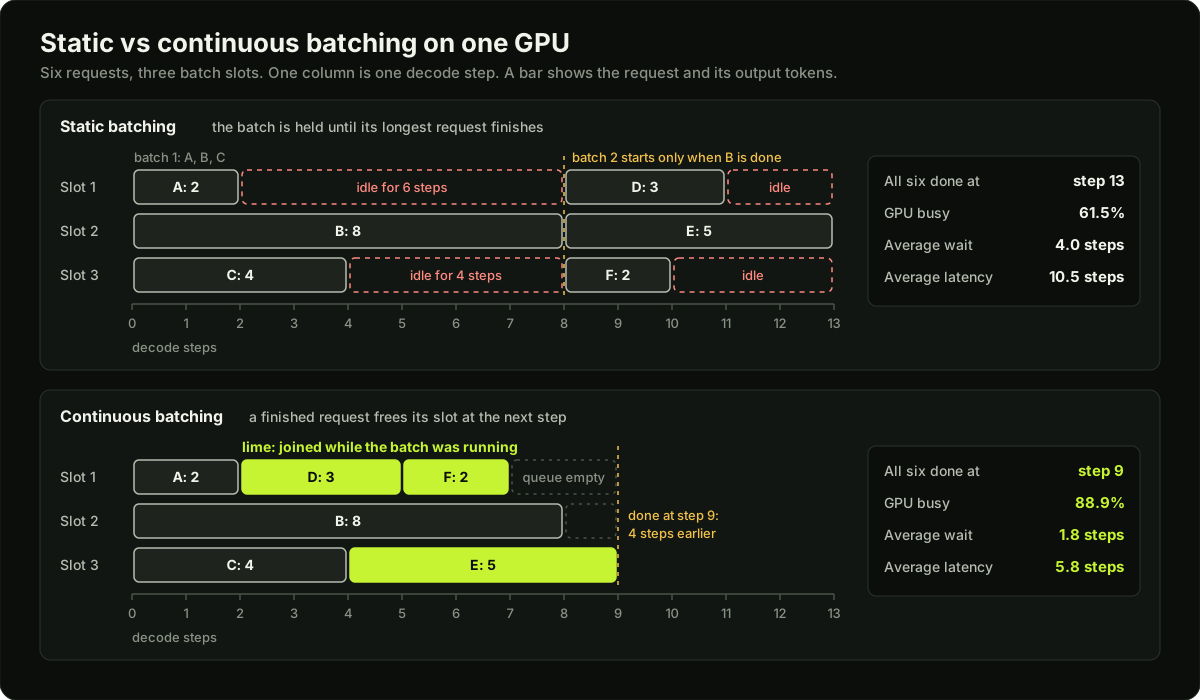 Two timelines of six requests on three GPU slots: static batching leaves slots idle, continuous batching refills them
In the picture, six requests need 2, 8, 4, 3, 5 and 2 tokens on three slots. Static batching finishes at step 13 with the GPU 61.5% busy. Continuous batching finishes at step 9 with the GPU 88.9% busy, and the average wait drops from 4.0 steps to 1.8. The gap widens when output lengths vary more, which is the normal case for chat.
What limits the batch is memory first and latency second. Every running request needs room for its KV cache, and every extra request slows each step a little.
The one-GPU batching question. "Design an inference batching system for one GPU while users wait" is reported again and again at AI labs. The expected answer: requests enter a queue, and a scheduler fires a batch when either the maximum batch size or a short maximum wait window is reached. Call the wait window your latency-throughput dial. Group requests by length so padding does not dominate, add backpressure when the queue grows, and mention continuous batching for token generation. Padding is the filler that brings every prompt in a batch up to the longest one. Backpressure means the server rejects or delays new requests once the queue is too long.
PagedAttention and prefix caching
A request's cache grows one token at a time, and the server cannot know the final length. Older engines reserved one contiguous block per request, sized for the longest possible output. Most of that reservation stayed empty, and the gaps between blocks were too small to reuse.
PagedAttention stores the KV cache in small fixed-size blocks, like virtual memory pages, instead of one contiguous block per request. A block is handed out only when the sequence needs it, and a table maps each request to its blocks. Less fragmentation means bigger batches on the same GPU.
Prefix caching reuses the KV cache for a shared prompt prefix (system prompt, few-shot examples, chat history) across requests. The second request with the same first 1,500 tokens skips prefill for them, so TTFT drops. The match must be exact from the first token, so put stable text first and anything that changes (the user message, the time) last.
Speculative decoding, FlashAttention and multi-GPU
- Speculative decoding: a small draft model proposes several tokens and the large model checks them in one pass. Accepted tokens are free speed; the output distribution stays the same. Say the draft proposes 4 tokens and the large model agrees with the first 3. It keeps those, replaces the fourth with its own choice, and has produced 4 tokens for the price of one large pass plus four cheap ones. If the first guess is wrong, it still gets 1 token, so the output is never worse, only the speed-up is lost. The method spends extra compute to cut latency, so it helps most when the GPU has spare capacity.
- FlashAttention: computes exact attention in a memory-efficient way on the GPU, by working in blocks that fit in fast on-chip memory. Same result, less memory, faster.
- Multi-GPU: tensor parallelism splits each layer across GPUs when a model does not fit on one. A 70B model at 140 GB in FP16 does not fit on one 80 GB GPU.
Serving engines
| Engine | Best for | Remember |
|---|---|---|
| Ollama | Local development and prototyping | Simplest setup; not built for production scale |
| llama.cpp | CPU, laptops, edge devices | Runs GGUF quantized models almost anywhere |
| vLLM | High-concurrency production APIs | PagedAttention plus continuous batching; OpenAI-compatible API; broad hardware support |
| SGLang | Multi-turn chat, agents, structured output | RadixAttention reuses shared prefixes automatically; fast constrained decoding |
| TensorRT-LLM with Triton | Maximum performance on NVIDIA; multi-model pipelines | Needs a model compile step and MLOps skill |
| TGI | Existing deployments only | In maintenance mode since December 2025; Hugging Face recommends vLLM or SGLang for new work |
To serve many fine-tuned variants, keep one base model in memory and load a LoRA adapter (a small set of extra weights from fine-tuning) per request. This is multi-LoRA serving.
Autoscaling and load testing
Autoscaling. Scale on queue depth, tokens in flight or TTFT, not CPU.
| Signal | What it tells you | Watch out for |
|---|---|---|
| Queue depth | Requests are waiting for a slot right now | The earliest warning; scale on it first |
| Tokens in flight | Prompt plus expected output tokens of all running and queued requests | Better than a request count, because one request can be 100 times larger than another |
| p95 TTFT | What users feel | It moves late, after the queue has already built up |
| CPU or GPU utilisation | Little | CPU stays low while the GPU is saturated; GPU utilisation reads high at almost any batch size |
Model loading is slow: a new replica must start a node, download tens of gigabytes of weights and load them into GPU memory. So keep a warm minimum of replicas, scale up early and scale down slowly. Put a gateway in front for rate limits, retries and fallback to another model.
Load testing. Replay prompts with a realistic length distribution, sweep concurrency upward, and record TTFT and TPOT percentiles at each level. The point where latency climbs sharply is your capacity per replica. Send requests at a fixed arrival rate as well as with a fixed number of simulated users: simulated users who wait for each reply slow down when the server does, which hides the queue that real traffic would build. Use the measured number in capacity planning, not a number from a blog post.
Diagram
Worked example
KV cache for a 7B model. Take 32 layers, 32 heads, head dimension 128 (hidden size 4,096) and FP16 values (2 bytes).
- Per token: 2 x 32 x 32 x 128 x 2 bytes = 524,288 bytes, about 0.52 MB.
- One request with 4,000 tokens of prompt plus output: 524,288 x 4,000 = 2.10 GB.
- A batch of 16 such requests: 2.10 x 16 = 33.6 GB.
- The FP16 weights are 14 GB. On a 48 GB GPU that leaves 34 GB, so 16 requests of this length fit. On an 80 GB GPU, 66 GB is left, so 31 fit.
- Quantize the weights to 4-bit (3.5 GB) on a 24 GB GPU: 20.5 GB is left, so 9 requests fit. The cache, not the weights, now sets the limit.
- With grouped-query attention and 8 KV heads, the cache is 4 times smaller: 0.52 GB per request.
Real servers also keep a few GB for activations, so treat these as upper bounds.
Latency for one request. Assume a 2,000-token prompt, 300 output tokens, 40 ms of queue wait, prefill at 10,000 tokens per second and a TPOT of 25 ms.
- Prefill: 2,000 / 10,000 = 200 ms. TTFT = 40 + 200 = 240 ms.
- Tokens per second: 1 / 0.025 = 40.
- End to end: 0.240 + 299 x 0.025 = 7.715 s. Decode is 97% of it.
- Halve the prompt: 7.615 s, a 0.1 s gain. Cap the output at 150 tokens: 0.240 + 149 x 0.025 = 3.965 s. Output length is the bigger lever.
- Cache a 1,500-token prefix: prefill covers 500 tokens (50 ms), so TTFT falls from 240 ms to 90 ms.
Latency against throughput. Suppose 32 requests share the batch and TPOT rises to 40 ms. Each user now gets 25 tokens per second and the same request takes 0.240 + 299 x 0.040 = 12.2 s. The server produces 32 / 0.040 = 800 tokens per second, 20 times the single-request rate, for 1.6 times the per-token latency.
Runnable code
"""Static vs continuous batching on one GPU, plus a memory calculator.

Time is counted in decode steps: one step produces one token for every
request in the running batch. Prefill is ignored and a step costs the same
at any batch size, so the numbers show the scheduling effect only.
Pure Python, no NumPy.
"""
import random


def static_batching(reqs, slots, max_wait):
    """Fire a batch when `slots` requests are waiting or the oldest has waited
    `max_wait` steps. Hold the whole batch until its longest request finishes."""
    pending = sorted(reqs, key=lambda r: r[1])
    t, busy, waits, latencies = 0, 0, [], []
    while pending:
        t = max(t, pending[0][1])                       # GPU is free; first request is here
        fire_at = max(t, pending[0][1] + max_wait)      # latest moment we may fire
        if len(pending) >= slots:
            fire_at = min(fire_at, max(t, pending[slots - 1][1]))   # batch is full earlier
        t = fire_at
        batch = [r for r in pending if r[1] <= t][:slots]
        pending = [r for r in pending if r not in batch]
        longest = max(out for _, _, out in batch)
        for _, arrival, out in batch:
            waits.append(t - arrival)
            latencies.append(t + longest - arrival)     # everyone returns together
            busy += out                                 # useful slot-steps
        t += longest
    return report(waits, latencies, busy, slots, t)


def continuous_batching(reqs, slots):
    """At every decode step, drop finished requests and admit waiting ones."""
    pending = sorted(reqs, key=lambda r: r[1])
    running = {}                                        # name -> (arrival, tokens left)
    t, busy, waits, latencies = 0, 0, [], []
    while pending or running:
        while pending and pending[0][1] <= t and len(running) < slots:
            name, arrival, out = pending.pop(0)
            running[name] = (arrival, out)
            waits.append(t - arrival)
        if not running:                                 # nothing to do: jump to next arrival
            t = pending[0][1]
            continue
        busy += len(running)
        t += 1                                          # one decode step for the whole batch
        for name, (arrival, left) in list(running.items()):
            if left == 1:
                latencies.append(t - arrival)
                del running[name]                       # slot is free for the next step
            else:
                running[name] = (arrival, left - 1)
    return report(waits, latencies, busy, slots, t)


def report(waits, latencies, busy, slots, end):
    n = len(waits)
    return {"avg_wait": sum(waits) / n, "avg_latency": sum(latencies) / n,
            "end": end, "gpu_busy": busy / (slots * end)}


def show(title, reqs, slots, max_wait):
    print(title)
    for name, r in (("static", static_batching(reqs, slots, max_wait)),
                    ("continuous", continuous_batching(reqs, slots))):
        print(f"  {name:<10} avg wait {r['avg_wait']:7.2f}  avg latency {r['avg_latency']:7.2f}"
              f"  done at step {r['end']:4d}  GPU busy {r['gpu_busy']:.1%}")


def weight_gb(params_billion, bits):
    return params_billion * 1e9 * bits / 8 / 1e9


def kv_cache_bytes(layers, kv_heads, head_dim, seq_len, batch, bytes_per_value=2):
    return 2 * layers * kv_heads * head_dim * seq_len * batch * bytes_per_value


if __name__ == "__main__":
    # The six requests from the picture: (name, arrival step, output tokens).
    six = [("A", 0, 2), ("B", 0, 8), ("C", 0, 4), ("D", 0, 3), ("E", 0, 5), ("F", 0, 2)]
    show("Six requests, 3 slots, all arrive at step 0", six, slots=3, max_wait=0)
    s, c = static_batching(six, 3, 0), continuous_batching(six, 3)
    assert (s["end"], c["end"]) == (13, 9)
    assert abs(s["avg_wait"] - 4.0) < 1e-9 and abs(c["avg_wait"] - 11 / 6) < 1e-9

    rng = random.Random(7)
    lengths = [20, 40, 80, 160, 400]
    burst = [(f"b{i}", 0, rng.choice(lengths)) for i in range(200)]
    show("Burst: 200 requests waiting at step 0, 8 slots", burst, slots=8, max_wait=0)

    t, steady = 0, []
    for i in range(200):
        t += rng.randint(10, 50)                        # a new request every 10 to 50 steps
        steady.append((f"s{i}", t, rng.choice(lengths)))
    load = sum(out for _, _, out in steady) / (8 * t)
    show(f"Steady: 200 requests, 8 slots, offered load {load:.0%} of the GPU", steady, slots=8, max_wait=20)

    print("Weights")
    for params, bits, label in ((7, 16, "7B FP16"), (7, 8, "7B INT8"), (7, 4, "7B 4-bit"), (70, 16, "70B FP16")):
        print(f"  {label:<9} {weight_gb(params, bits):6.1f} GB")

    print("KV cache: 32 layers, 32 heads, head dim 128, FP16")
    per_token = kv_cache_bytes(32, 32, 128, seq_len=1, batch=1)
    per_request = kv_cache_bytes(32, 32, 128, seq_len=4000, batch=1)
    print(f"  per token                {per_token:,} bytes ({per_token / 1e6:.2f} MB)")
    print(f"  one 4,000-token request  {per_request / 1e9:.2f} GB")
    print(f"  batch of 16              {kv_cache_bytes(32, 32, 128, 4000, 16) / 1e9:.1f} GB")
    for gpu_gb, w in ((24, weight_gb(7, 4)), (48, weight_gb(7, 16)), (80, weight_gb(7, 16))):
        fit = int((gpu_gb - w) * 1e9 // per_request)
        print(f"  {gpu_gb} GB GPU, {w:.1f} GB weights: {fit} requests of 4,000 tokens fit")
    gqa = kv_cache_bytes(32, 8, 128, 4000, 1)
    print(f"  with 8 KV heads (grouped-query attention): {gqa / 1e9:.2f} GB per request")
Key takeaways
Prefill is one parallel pass over the prompt and sets TTFT. Decode is one pass per output token and sets tokens per second.
The KV cache stores keys and values for every past token in every layer. KV bytes = 2 x layers x heads x head dim x sequence length x batch x bytes per value.
Weights = parameters x bytes per parameter: 7B is 14 GB in FP16 and 3.5 GB in 4-bit; 70B in FP16 is 140 GB.
Latency = TTFT + (N - 1) x TPOT. Quote p95 or p99, not the average.
Continuous batching refills a slot the moment a request finishes. Static batching holds every request until the longest one is done.
PagedAttention stores the cache in small blocks to stop fragmentation; prefix caching skips prefill for a shared prompt prefix.
Bigger batches raise throughput and lower cost per token, and raise per-request latency. Tune to the latency target, then scale out.
Autoscale on queue depth, tokens in flight or TTFT, keep warm replicas, and find capacity per replica with a load test.
Common mistakes
Counting only the weights when sizing a GPU. At long contexts and high concurrency the KV cache is larger than the model.
Quoting average latency. One slow request in twenty is invisible in the average and obvious to users.
Autoscaling on CPU or GPU utilisation. Neither shows that requests are waiting; queue depth and TTFT do.
Putting a timestamp or user id at the top of the prompt, which breaks prefix caching for everything after it.
Shipping a 4-bit model after checking only public benchmarks, not your own eval set.
Load testing with one short prompt repeated. Real traffic has mixed lengths, and long prompts are what break TTFT.
Practice
Run the code example, then change the six-request workload so every request needs 5 tokens and remove the two asserts that check the original workload. Confirm that static and continuous batching now finish at the same step, and explain why in one sentence.
Take a model you can look up the shape of (layers, KV heads, head dimension). Compute its FP16 weight size and its KV cache per token, then the largest batch of 8,000-token requests that fits on a 24 GB GPU.
Serve a small open model with vLLM or llama.cpp. Send the same 1,000-token prompt at concurrency 1, 4, 16 and 64, and record p50 and p95 TTFT and TPOT at each level. Mark the concurrency where p95 TTFT doubles.
Add a fixed 1,500-token system prompt to every request, run the test with prefix caching on and off, and report the change in p95 TTFT.
Interview questions (16)
1.What happens when a request reaches an LLM server?Easy
The text is tokenized and the request joins a queue. The scheduler adds it to the running batch as soon as a slot and cache memory are free. Prefill processes the prompt in one pass and fills the KV cache. Decode then loops: predict a token, sample, append, repeat until a stop token or the limit. Tokens are detokenized and streamed back as they are produced, and when the request ends its cache memory is freed for the next one in the queue.
2.What is the KV cache and why does it use so much memory?Medium
Without it, every new token would recompute attention over the full sequence. The cache stores keys and values for every past token, in every layer and head. So memory grows with sequence length, number of layers and number of concurrent requests. As a formula it is 2 x layers x heads x head dimension x sequence length x batch x bytes per value. For a 7B model with 32 layers and hidden size 4,096 in FP16 that is about half a megabyte per token, so one 4,000-token request holds about 2 GB and sixteen of them hold more than the 14 GB of weights.
3.What affects TTFT, and what affects tokens per second?Medium
TTFT depends on queue wait and prefill, so prompt length and load matter most. Prefix caching cuts it because cached tokens skip prefill. Tokens per second depends on model size, hardware, quantization and how many requests share the batch. The two are tuned separately: a server can have a fast TTFT and slow streaming, or the reverse, so I measure and report both.
4.Latency vs throughput: what is the trade-off?Medium
Larger batches raise total tokens per second and lower cost per token, but each request gets a smaller share of the GPU, so per-request latency rises. Tune batch limits to your latency target, then scale out. For example, going from 1 request at 25 ms per token to 32 requests at 40 ms per token gives 20 times the throughput for 1.6 times the per-token latency. That is a good trade for a chat product and a bad one for a voice agent with a tight response budget.
5.Give six ways to reduce latency.Easy
Shorten the prompt. Cache the prefix. Use a smaller or quantized model. Stream the output so users see tokens early. Add speculative decoding. Cap output tokens. Also: route easy requests to a small model and keep replicas warm. I would first ask which latency hurts. If it is the first token, I work on the prompt, the prefix cache and the queue. If it is total time, output length and model size matter most, because for long answers decode is most of the time.
6.What do you lose with quantization?Medium
Some accuracy, more at lower bit widths. 8-bit is usually near lossless. 4-bit is fine for many tasks but can hurt reasoning, maths and long outputs. Always compare on your own eval set, not only on public benchmarks. I would also say what you do not gain: quantizing weights does not shrink the KV cache, so a long-context workload can still run out of memory.
7.How does speculative decoding keep quality the same?Hard
The large model verifies every drafted token and rejects the ones it would not have produced. You only gain speed when the draft model guesses right often, so it works best on predictable text. In detail, the draft model proposes a few tokens, the large model scores all of them in one parallel pass, and each token is accepted with a probability based on the ratio of the two models' probabilities. At the first rejection a replacement is sampled from a corrected distribution, the large model's probabilities minus the draft's, renormalised, so the final output follows the large model's distribution exactly. If the acceptance rate is 0.8 and 4 tokens are drafted, each large-model pass yields about 3.4 tokens on average.
8.vLLM or SGLang?Medium
vLLM is the safe default: mature, well documented, wide hardware support. SGLang tends to win when requests share long prefixes, as in multi-turn chat and agents, and for structured output. Benchmark both on your real traffic. The reason is the cache design: SGLang's RadixAttention finds and reuses shared prefixes automatically, and agent traffic resends the same long context on every step.
9.How do you serve many fine-tuned variants cheaply?Medium
Keep one base model in memory and load LoRA adapters per request (multi-LoRA serving). You avoid one GPU per customer. An adapter is megabytes in size against gigabytes for the base model, so many fit beside it. Requests with different adapters can share a batch because the base weights are the same. I would keep hot adapters in GPU memory with least-recently-used eviction and load cold ones on demand.
10.How do you autoscale LLM serving?Medium
Scale on queue depth, tokens in flight or TTFT, not CPU. Model loading is slow, so keep a warm minimum of replicas and scale early. Put a gateway in front for rate limits, retries and fallback to another model. CPU is the wrong signal because the work is on the GPU, and GPU utilisation is misleading because it reads high at almost any batch size. I would also set the scale-up threshold below the real limit, since a new replica can take minutes to pull weights and load them.
11.How do you load test an LLM endpoint?Medium
Replay prompts with a realistic length distribution, sweep concurrency upward, and record TTFT and TPOT percentiles at each level. The point where latency climbs sharply is your capacity per replica. I would use logged production prompts where possible, include the long ones, and fix the output length distribution too, because output tokens drive the load. The result is a curve of p95 TTFT against concurrency, and the capacity number is the highest concurrency that still meets the latency target.
12.Design an inference batching system for one GPU while users wait.Hard
Requests enter a queue, and a scheduler fires a batch when either the maximum batch size or a short maximum wait window is reached. The wait window is my latency-throughput dial: a longer window fills bigger batches and adds waiting time. I group requests by length so padding does not dominate. I add backpressure when the queue grows: reject or shed load with a clear error once the wait would break the latency target. For token generation I would use continuous batching, where finished requests leave and waiting ones join at every decode step, so a short answer never waits for a long one. I would track queue wait, batch size and p95 TTFT to tune the window.
13.What is the difference between static and continuous batching?Easy
Static batching waits to fill a batch and holds every request until the longest one finishes, so slots sit idle after short requests end. Continuous batching checks at every decode step: finished requests leave and waiting ones take their slots, so the GPU stays busy. With six requests of 2, 8, 4, 3, 5 and 2 tokens on three slots, static batching needs 13 steps and continuous needs 9. Static batching is still fine for offline jobs and for models with fixed-size outputs, such as embeddings.
14.What problem does PagedAttention solve?Hard
Memory fragmentation in the KV cache. The server does not know how long an output will be, so older engines reserved one contiguous region per request sized for the maximum length. Most of it stayed unused, and free gaps between regions were too small for new requests. PagedAttention splits the cache into small fixed-size blocks, allocates a block only when a sequence grows into it, and keeps a table from each request to its blocks, like an operating system's page table. Waste falls to at most one partly filled block per request, so more requests fit in a batch. Blocks can also be shared between requests with the same prefix.
15.How do you write prompts so that prefix caching works?Medium
The cache matches from the first token, and one different token ends the match. So I order the prompt from most stable to least stable: system prompt, tool definitions, few-shot examples, then chat history, then the new user message. Anything that changes per request, such as the current time or a request id, goes at the end. In chat I append to the history and never rewrite earlier turns. I then check the cache hit rate in the server metrics, because a silent miss shows up only as a higher TTFT.
16.A 7B model runs in FP16 on a 24 GB GPU. Roughly how many 4,000-token requests fit at once?Medium
The weights take 7 billion x 2 bytes, about 14 GB, which leaves 10 GB. For a model with 32 layers and hidden size 4,096, the KV cache is 2 x 32 x 4,096 x 2 bytes, about 0.52 MB per token, so a 4,000-token request holds about 2.1 GB. Ten divided by 2.1 gives 4 requests, a little less after working memory. To fit more I would quantize the weights to 4-bit, which frees about 10 GB, or limit the context length, since the cache grows linearly with it.
Quiz
1.Which change lowers time to first token the most for a chatbot with a 3,000-token system prompt?
2.A model has 24 layers, 16 KV heads, head dimension 64 and FP16 values. How large is the KV cache per token?
3.In static batching, a request that needs 5 tokens shares a batch with one that needs 200. What happens?
4.Which signal is the best trigger for autoscaling an LLM server?
5.What does speculative decoding change about the output?
Practice these problems
Further reading
My notes
Your notes
Autosaves to this browser.