Bash scripting and the terminal toolkit
The shell is the operator's first programming language and the glue of every CI job, Dockerfile and runbook. This lesson covers the model (three streams, exit codes, pipes), the text tools you chain together (grep, awk, sed, sort, uniq, cut, jq), how to write a bash script that does not break on a space or a missing variable, scheduling with cron and systemd timers, ssh, rsync and tmux, and the point where you should stop writing bash and switch to Python or Go.
Why it matters
Live bash exercises are common in DevOps screens: "count the top 10 IPs in this access log", "write a script that backs up a directory and fails loudly", "what does set -e do". Reviewers at product companies read your CI YAML and your Dockerfiles, which are bash underneath, and they notice unquoted variables. On call, the difference between five minutes and fifty is whether grep | awk | sort | uniq -c comes to your fingers. The Bandit wargame and the Missing Semester lectures exist because this is the skill most graduates arrive without.
Read first: Linux for operators
Lesson
The shell model: streams, exit codes, pipes
Every process starts with three open file descriptors (fds): 0 stdin (input), 1 stdout (normal output), 2 stderr (errors and diagnostics). The shell wires them for you. When a process exits it returns a number from 0 to 255, the exit code; 0 means success and anything else means failure. The shell stores the last one in $?.
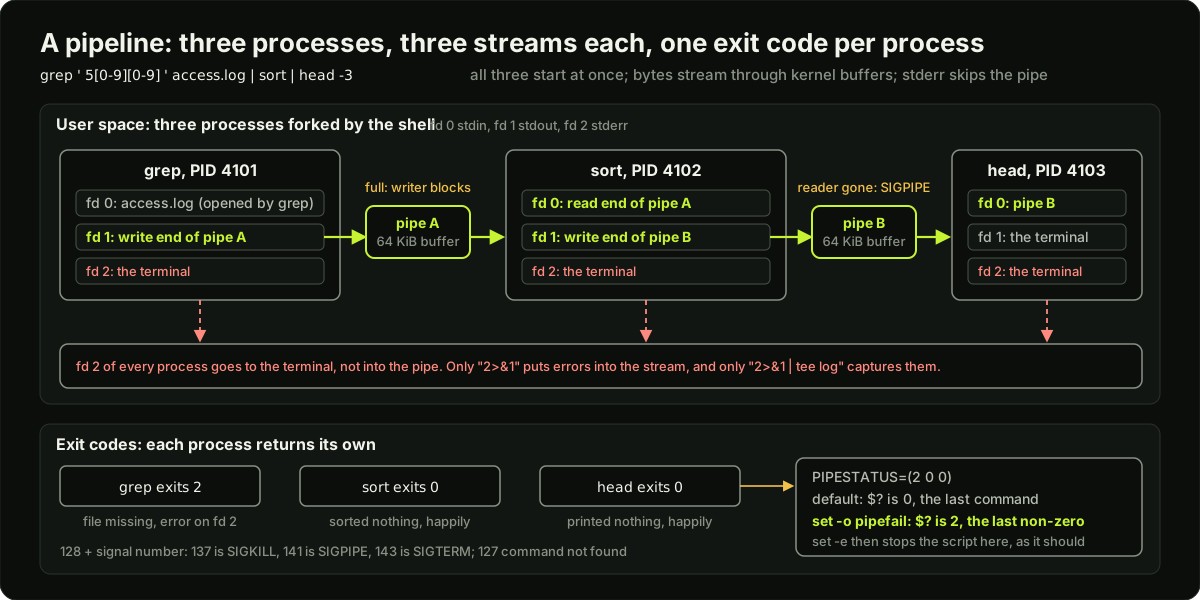 Three processes joined by two pipes, each with stdin, stdout and stderr file descriptors, stderr going to the terminal, the kernel pipe buffers between them, and the three exit codes feeding PIPESTATUS and pipefail
A pipe a | b starts both processes at the same time and connects a's fd 1 to b's fd 0 through a kernel buffer (64 KiB on Linux). When the buffer is full, a blocks until b reads; that is back-pressure, and it is why head can stop a huge cat early. stderr is not in the pipe: it goes straight to the terminal unless you redirect it.
cmd > out.txt            # stdout to a file (truncate); >> appends
cmd 2> err.txt           # stderr to a file
cmd > all.txt 2>&1       # both to one file: redirect stdout first, then point fd 2 at fd 1
cmd 2>&1 > all.txt       # WRONG order: stderr goes to the old stdout (the terminal)
cmd 2>/dev/null          # drop errors
cmd < in.txt             # stdin from a file
cmd | tee log.txt        # stdout to the terminal and a file at once
cmd 2>&1 | tee log.txt   # the same, with errors included
find . -name '*.log' -print0 | xargs -0 gzip     # xargs turns lines into arguments; -0 survives spaces
seq 1 100 | xargs -n 10 -P 4 echo               # 10 args per call, 4 calls in parallel
a && b                   # run b only if a succeeded (exit 0)
a || b                   # run b only if a failed
a; b                     # run both regardless
Exit codes carry meaning by convention: 1 general error, 2 misuse of a builtin or bad arguments, 126 found but not executable, 127 command not found, 128 + N killed by signal N (so 137 is SIGKILL, 143 is SIGTERM). CI systems, systemd and Kubernetes all read exactly this number.
The text toolkit, one real example each
The operator's reflex is a chain. Top 10 client IPs from an Nginx access log, where the IP is the first field:
awk '{print $1}' /var/log/nginx/access.log | sort | uniq -c | sort -rn | head -10
Read it as a sentence: take the first column, sort so equal lines are adjacent, count each run, sort by count descending, keep ten. Every step is a process and the whole thing streams, so it works on a 10 GB file without loading it.
jq deserves ten minutes of practice because every cloud CLI speaks JSON. aws ec2 describe-instances | jq -r '.Reservations[].Instances[] | [.InstanceId, .State.Name, .PrivateIpAddress] | @tsv' turns a page of JSON into a table you can pipe into the tools above. -r prints raw strings without quotes; @tsv joins an array with tabs.
Bash scripting: variables and quoting
Bash has one data type, the string, and one source of most bugs, word splitting. After a variable expands, the shell splits the result on spaces, tabs and newlines and expands globs in each piece, unless the expansion is inside double quotes.
file="my report.txt"
rm $file          # runs: rm my report.txt  -> two arguments, deletes the wrong things
rm "$file"        # runs: rm "my report.txt" -> one argument, correct
echo "$HOME/bin"  # expands inside double quotes
echo '$HOME/bin'  # single quotes: nothing expands, literal text
dir="$(dirname "$file")"            # $(...) for command output; never backticks
n=$(( 7 * 6 ))                      # arithmetic
name="${1:-world}"                  # default when $1 is unset or empty
: "${API_URL:?set API_URL first}"   # abort with a message if unset
echo "${path##*/}"                  # strip the longest prefix matching */ -> the basename
echo "${file%.txt}"                 # strip the suffix
The rule is short: quote every expansion ("$var", "$(cmd)", "$@", "${arr[@]}") unless you can explain why you want splitting. $@ and $* differ exactly here: "$@" expands to each argument as its own word, spaces preserved, which is what you pass to another command; "$*" joins them into one string, which is only for printing.
Conditionals, loops, functions, arrays
if [[ -f "$cfg" && -r "$cfg" ]]; then echo "readable file"; fi    # [[ ]] is bash's safer test
if [[ "$env" == prod* ]]; then echo "glob match"; fi
if [[ "$n" =~ ^[0-9]+$ ]]; then echo "regex match"; fi
if (( n > 10 )); then echo "arithmetic"; fi
case "$1" in start|stop) echo ok ;; *) echo "usage: $0 start|stop" >&2; exit 2 ;; esac

for f in /var/log/*.log; do echo "$f"; done          # glob loop; never for f in $(ls)
for ((i = 0; i < 5; i++)); do echo "$i"; done
while IFS= read -r line; do echo "got: $line"; done < input.txt    # read lines safely
while ! curl -sf localhost:8080/healthz; do sleep 2; done           # wait for a service

deploy() {                           # functions take positional args; return an exit code
  local env="$1" tag="$2"            # local keeps variables out of the global scope
  [[ -n "$tag" ]] || return 2
  echo "deploying $tag to $env"
}
deploy prod v1.4.2 || echo "deploy failed with $?"

hosts=("web-1" "web-2" "db 1")       # indexed array; the third element has a space and survives
for h in "${hosts[@]}"; do ssh "$h" uptime; done
echo "${#hosts[@]}"                  # length: 3
declare -A port=([web]=80 [db]=5432) # associative array
echo "${port[db]}"
The safety header: set -euo pipefail, trap, mktemp
#!/usr/bin/env bash
set -euo pipefail
# -e           exit when a command fails, instead of carrying on with half the job done
# -u           an unset variable is an error, so a typo in $BACKUP_DIR cannot become rm -rf /
# -o pipefail  a pipeline's exit code is the last non-zero one, so `grep x f | sort` fails if grep does
IFS=$'\n\t'    # optional: word-split only on newline and tab, not space

tmp="$(mktemp -d)"                       # /tmp/tmp.X9fL3q: unique and not guessable
trap 'rm -rf "$tmp"' EXIT                # runs on exit, error and Ctrl-C; single quotes delay expansion
trap 'echo "failed at line $LINENO" >&2' ERR
Three things catch people. set -e does not fire inside if, while, && or || conditions, so grep -q x f || true is how you allow a failure on purpose. set -u makes "${arr[@]}" on an empty array an error on bash before 4.4, and $1 with no arguments an error everywhere; use "${1:-}". And pipefail means cmd | head -1 can fail with exit 141 (SIGPIPE) when head closes the pipe early; for that case, read all output into a variable first or accept the code.
Options, here-docs and exit codes in your own scripts
getopts parses short options; the code example shows it in full. A here-doc feeds a block of text to stdin, which is how you embed a config file or a SQL statement in a script:
cat > "$tmp/nginx.conf" <<EOF
server { listen ${PORT}; server_name ${HOST}; }      # variables expand
EOF
cat <<'EOF'
literal $text, nothing expands when the delimiter is quoted
EOF
psql "$DB" <<SQL
SELECT count(*) FROM orders WHERE created_at > now() - interval '1 hour';
SQL
Your script should exit with a meaningful code and print errors to stderr: echo "usage: $0 -e ENV" >&2; exit 2. A caller, human or CI, reads $? and the stderr, nothing else.
Safe scripting rules
Scheduling: cron and systemd timers
cron runs a command on a schedule from a crontab. Five fields: minute, hour, day of month, month, day of week.
crontab -e                                  # edit your crontab; crontab -l lists it
# m  h  dom mon dow  command
0    2  *   *   *    /opt/backup/run.sh >> /var/log/backup.log 2>&1       # daily at 02:00
*/5  *  *   *   *    /usr/local/bin/check-disk.sh                        # every 5 minutes
0    9  *   *   1-5  /opt/reports/weekday.sh                             # weekdays at 09:00
Cron's traps: it runs with a tiny PATH and no environment from your shell, so use absolute paths and set variables at the top of the crontab; a job that prints to stdout mails root or disappears, so redirect to a log; two overlapping runs of a slow job pile up, so use flock -n /run/backup.lock cmd. /etc/cron.d/ holds system crontabs with a user field.
A systemd timer does the same with logging, dependencies and catch-up for missed runs:
# /etc/systemd/system/backup.timer  (pairs with backup.service, same name)
[Unit]
Description=Nightly backup
[Timer]
OnCalendar=*-*-* 02:00:00     # same grammar as systemd-analyze calendar
Persistent=true               # run on boot if the 02:00 run was missed
RandomizedDelaySec=15m        # spread load when 100 hosts share the schedule
[Install]
WantedBy=timers.target
systemctl enable --now backup.timer, systemctl list-timers shows next and last runs, journalctl -u backup.service has the output. The service unit it triggers has Type=oneshot and no Restart=.
ssh, scp, rsync and tmux
ssh -i ~/.ssh/id_ed25519 ubuntu@10.0.1.20 'sudo systemctl restart api && systemctl is-active api'
scp -r ./dist ubuntu@10.0.1.20:/opt/app/          # copy; fine for small things
rsync -avz --delete ./dist/ ubuntu@10.0.1.20:/opt/app/dist/   # only changed files; trailing slash means contents
rsync -avz --dry-run --exclude '.git' ./ host:/srv/site/       # see what would change first
ssh -L 5432:db.internal:5432 bastion                # local port 5432 tunnels to the database through the bastion
rsync beats scp for deploys and backups: it sends only the differences, keeps permissions and timestamps with -a, shows what it did with -v, and --delete removes files that no longer exist in the source, which scp never does.
sftp is scp with an interactive session (sftp host, then get, put, ls), over the same ssh connection. Plain FTP sends passwords in clear text; do not use it.
tmux keeps a shell session alive on the server when your laptop disconnects, which matters for anything that takes more than a minute over a flaky connection. tmux new -s deploy starts a named session, Ctrl-b d detaches, tmux attach -t deploy returns to it, Ctrl-b c opens a new window, Ctrl-b % splits the pane. Run every long migration and every rsync of a large tree inside tmux.
Vim survival on a server
The box you are paged onto will not have your editor, but it will have vi or vim. Know enough to fix one line and get out:
vim /etc/app/config.yaml   # open the file; you start in normal mode, keys are commands
# i        enter insert mode, type as usual
# Esc      back to normal mode
# :wq      write and quit
# :q!      quit without saving, when you made a mess
# /pattern search forward, n jumps to the next match
# dd       delete the current line
# u        undo the last change
Fifteen one-liners every operator uses
When to stop writing bash
Bash is the right tool for gluing commands together, for anything under about 100 lines, and for the first version of an automation. Switch to Python (or Go for anything that ships as a binary) when any of these is true:
- The script passes 100 lines or has more than two levels of nesting.
- It needs to parse JSON or YAML beyond a
jqone-liner, or to call an HTTP API with retries and error handling. - It needs real data structures: nested maps, objects, anything beyond a flat array.
- It needs tests.
batsexists for bash, but a Pythonpytestsuite is cheaper to write and read. - It needs to run on macOS and Linux with the same behaviour (BSD vs GNU tools differ:
sed -i,date -d). - Another person will maintain it.
The Python and Go lesson picks up here. The rule in interviews: write the bash one-liner on the whiteboard, then say where you would switch.
Diagram
Worked example
A log question in a live screen. You are given a 2 GB Nginx access log and 10 minutes. The format is the default combined log: IP - - [time] "METHOD /path HTTP/1.1" STATUS BYTES "referer" "agent". The interviewer asks three things.
Step 1, "how many requests returned 5xx?" awk '$9 ~ /^5/' access.log | wc -l. Field 9 is the status because the quoted request line counts as three fields (method, path, protocol). Say that aloud; the interviewer wants to see you count fields rather than guess. Answer: 18,420.
Step 2, "which paths caused them?" awk '$9 ~ /^5/ {print $7}' access.log | sort | uniq -c | sort -rn | head -5. Output:
  17902 /api/checkout
    311 /api/cart
    140 /health
     42 /api/search
     25 /
So 17,902 / 18,420 = 97.2 percent of the errors are one endpoint. That is a finding, not just a number.
Step 3, "when did it start?" Extract the hour and minute from field 4 [03/Nov/2026:09:14:27: awk '$9 ~ /^5/ {print substr($4, 14, 5)}' access.log | uniq -c | head. substr($4, 14, 5) takes 5 characters starting at position 14, which is 09:14. The counts jump from 2 to 3 per minute to 600 per minute at 09:14, so the problem began at 09:14 and the deploy log shows a release at 09:13. Total time: three commands, under four minutes.
Then the follow-up: "this works, but why not Python?" Answer: 2 GB streams through awk in about 20 seconds with no memory use, and the three commands are easier to type during an incident than a script. You would switch to Python when the question becomes "alert when 5xx exceeds 1 percent over 5 minutes", because that needs state, a config file, tests and an HTTP call to the alert API. That is problem 33, the bash log analyser, and problem 35, the Python health checker, in this roadmap.
Runnable code
#!/usr/bin/env bash
# A tour of the parts every safe bash script has. Run it with no arguments,
# or try: ./toolkit.sh -n sam -c 5 -v extra-arg
#   -n NAME   name to greet (default: operator)
#   -c COUNT  how many sample log files to create (default: 3)
#   -v        verbose
set -euo pipefail
# -e: exit on the first failing command.  -u: an unset variable is an error.
# -o pipefail: a pipeline fails if any command in it fails, not only the last.

# --- trap and mktemp: cleanup that runs no matter how the script ends --------
WORK="$(mktemp -d)"                       # a private, unpredictable temp directory
cleanup() {
  local rc=$?                             # exit code of the script at the moment trap fired
  rm -rf "$WORK"
  echo "trap: removed $WORK, exiting with code $rc"
}
trap cleanup EXIT                         # runs on normal exit, on set -e failure, on Ctrl-C

# --- getopts: a small, portable option parser --------------------------------
name="operator"
count=3
verbose=0
while getopts ":n:c:v" opt; do           # leading colon: we report bad options ourselves
  case "$opt" in
    n) name="$OPTARG" ;;
    c) count="$OPTARG" ;;
    v) verbose=1 ;;
    \?) echo "unknown option -$OPTARG" >&2; exit 2 ;;
    :)  echo "option -$OPTARG needs a value" >&2; exit 2 ;;
  esac
done
shift $((OPTIND - 1))                     # drop parsed options; "$@" now holds positional args
[[ "$count" =~ ^[0-9]+$ && "$count" -ge 2 ]] || { echo "-c must be a number of at least 2" >&2; exit 2; }
echo "getopts: hello $name, count=$count verbose=$verbose remaining args=$#"

# --- functions with arguments and a return value ------------------------------
log() {                                   # usage: log LEVEL MESSAGE...
  local level="$1"; shift                 # $1 is the first argument, shift drops it
  printf '%s [%s] %s\n' "$(date +%H:%M:%S)" "$level" "$*" >&2   # logs go to stderr
}
count_errors() {                          # usage: count_errors FILE  -> prints the number
  local file="$1"
  grep -c ' ERROR ' "$file" || true       # grep exits 1 when it finds nothing; || true keeps set -e calm
}

# --- arrays and a loop over files the script created --------------------------
services=("api" "worker" "scheduler")     # an array; "${services[@]}" expands to each element, quoted
log INFO "creating $count log files for ${#services[@]} services in $WORK"
for ((i = 1; i <= count; i++)); do
  svc="${services[$(( (i - 1) % ${#services[@]} ))]}"
  f="$WORK/$svc-$i.log"
  {                                       # a here-doc builds the sample file
    cat <<EOF
2026-11-03T09:0$i:01 INFO  $svc started
2026-11-03T09:0$i:02 ERROR $svc db timeout
2026-11-03T09:0$i:03 INFO  $svc request ok
EOF
    if [[ $i -eq 2 ]]; then echo "2026-11-03T09:0$i:04 ERROR $svc disk full"; fi
  } > "$f"
done

total=0
declare -A per_service                    # an associative array: name -> count
for f in "$WORK"/*.log; do                # glob, not ls: handles spaces and never parses output
  n="$(count_errors "$f")"
  svc="$(basename "$f" | cut -d- -f1)"
  per_service[$svc]=$(( ${per_service[$svc]:-0} + n ))   # ${var:-0} gives a default for an unset key
  total=$((total + n))
  if (( verbose )); then log DEBUG "$f has $n errors"; fi
done
echo "loop: $total ERROR lines across $count files"
for svc in "${!per_service[@]}"; do echo "  $svc: ${per_service[$svc]}"; done | sort

# --- quoting: the number one bug --------------------------------------------
spaced="$WORK/name with spaces.log"
echo "2026-11-03T09:09:00 ERROR api unquoted paths break" > "$spaced"
unquoted_count="$(count_errors "$spaced")"            # works because every expansion is quoted
echo "quoting: a path with spaces counted $unquoted_count error when quoted"

# --- $@ versus $* ------------------------------------------------------------
show_args() { echo "$# args: $(printf '[%s]' "$@")"; }
set -- "one two" three                    # set the script's positional parameters for the demo
echo -n 'with "$@": '; show_args "$@"     # 2 args, the space is preserved
echo -n 'with  $* : '; show_args $*       # word splitting breaks "one two" into two args

# --- pipefail and exit codes --------------------------------------------------
set +e                                    # turn -e off for a moment so we can inspect failures
false | true; rc_pipefail=$?              # with pipefail: 1 (false failed)
set +o pipefail
false | true; rc_last=$?                  # without: 0 (only the last command counts)
set -eo pipefail
echo "pipefail: 'false | true' exits $rc_pipefail with pipefail and $rc_last without"

# --- assertions: the script checks its own results --------------------------
assert() { [[ "$1" == "$2" ]] || { log FAIL "expected '$2' got '$1' for $3"; exit 1; }; }
assert "$total" "$((count + 1))" "total errors (one per file plus the disk-full line)"
assert "$unquoted_count" "1" "quoted path with spaces"
assert "$rc_pipefail" "1" "pipefail on"
assert "$rc_last" "0" "pipefail off"
assert "${per_service[worker]}" "$(( (count + 1) / 3 + 1 ))" "worker had the extra disk-full error"
files=("$WORK"/*.log)                     # count files with a glob into an array, never by parsing ls
assert "${#files[@]}" "$((count + 1))" "files created in the temp dir"
echo "assertions passed: getopts, functions, arrays, loop, quoting, pipefail, trap"
Key takeaways
Three streams and an exit code: stdout is data, stderr is for humans,
$?is for the caller.2>&1order matters.A pipeline runs all its processes at once through 64 KiB kernel buffers; only
pipefailmakes a failure in the middle count.grep,awk,sort | uniq -c | sort -rn | headandjqanswer most log and API questions in one line.Quote every expansion.
"$@"preserves arguments;$*and unquoted$varsplit on spaces.Start every script with
#!/usr/bin/env bashandset -euo pipefail; addtrap ... EXITandmktempwhen you create files.Scripts must be idempotent and must check inputs before doing anything; run shellcheck.
cron needs absolute paths, output redirection and
flock; a systemd timer gives you logs,Persistent=trueand a random delay.Past 100 lines, JSON, HTTP or tests: switch to Python; for a shipped binary, Go.
Common mistakes
cmd 2>&1 > fileinstead ofcmd > file 2>&1, so errors still land on the terminal.for f in $(ls)orfor f in $(find ...): breaks on spaces; loop over a glob or usefind -print0 | xargs -0.Forgetting that
set -eis ignored insideif,&&and||, and thatgrepreturning 1 for "no match" will kill the script.Using
[ $a == $b ]with unquoted, possibly empty variables;[[ "$a" == "$b" ]]is safe.A cron job that works by hand but not from cron, because
PATHand the environment are different.Writing 400 lines of bash with nested arrays and JSON parsing by regex instead of 80 lines of Python.
Practice
Do OverTheWire Bandit levels 0 to 20 (ssh to
bandit.labs.overthewire.orgport 2220 asbandit0); keep a file with the one-liner that solved each level. Levels 5 to 12 arefind,grep,sort,uniq,trandbase64; levels 13 to 20 are ssh keys, ports and setuid. Target: all 20 in one sitting of 3 hours.Work through the Missing Semester lectures "Course Overview + Introduction to the Shell" and "Command-line Environment", doing every exercise, then rewrite the one-liner table above from memory and check each against the real tool with a sample file you create.
Take the code example, add a
-o FILEoption that writes the per-service counts as JSON using onlyprintf, then runshellcheckon it (install withapt install shellcheck) and fix every warning. Then write abatsor plain-bash test that runs it with-c 4and asserts the JSON has three keys.Set up a systemd timer on a VM or a container with systemd that runs a 10-line backup script with
rsyncto a second directory every 2 minutes, confirm withsystemctl list-timersandjournalctl -u, then kill the host mid-run, reboot, and confirmPersistent=trueran the missed job.
Interview questions (10)
1.What do set -e, set -u and set -o pipefail do, and when do they not help?Easy
set -e exits the script when a command returns non-zero, so a failed step does not leave the job half done. set -u makes any reference to an unset variable an error, which stops rm -rf "$BACKUP_DIR/" from becoming rm -rf / when the variable is misspelled. set -o pipefail makes a pipeline's exit code the last non-zero code in it instead of the last command's, so grep pattern file | sort fails when grep fails. They do not help inside conditions: a failing command in if, while, && or || does not trigger -e, which is also how you allow a failure on purpose with || true. And -e cannot see a failure in a command substitution used as an argument, like echo "$(false)".
2.Why does cmd 2>&1 > file behave differently from cmd > file 2>&1?Medium
Redirections are applied left to right, and 2>&1 means "make fd 2 point where fd 1 points right now". In cmd 2>&1 > file, stderr is first pointed at the current stdout, the terminal, and only then is stdout sent to the file, so errors still appear on screen. In cmd > file 2>&1, stdout goes to the file first and then stderr is pointed at the same place, so both end up in the file. The same rule explains cmd 2>&1 | tee log: the pipe is set up before the redirections in the command, so stdout already points at the pipe when 2>&1 copies it, and both streams flow through tee.
3.Count the top 10 IP addresses in an Nginx access log. Talk me through it.Easy
awk '{print $1}' access.log | sort | uniq -c | sort -rn | head -10. awk prints the first whitespace-separated field, which in the combined log format is the client IP. sort puts identical lines next to each other, which uniq needs because it only collapses adjacent duplicates. uniq -c prefixes each distinct line with its count. sort -rn orders by that count numerically, descending, and head keeps ten. Everything streams, so a multi-gigabyte log works without loading it into memory. If the log were behind a proxy I would use the X-Forwarded-For field instead, and if the question moved to "per minute" I would add a cut on the timestamp before the sort.
4.What is the difference between "$@" and "$*"?Easy
Both expand to the script's positional arguments, but inside double quotes they differ. "$@" becomes one word per argument, with each argument's internal spaces preserved, so a script called with "one two" three passes exactly two arguments on to the next command. "$*" joins everything into a single word separated by the first character of IFS, a space by default, so the same call becomes one argument, one two three. Use "$@" whenever you forward arguments, which is nearly always, and "$*" only to print them in a message. Unquoted, both lose the original boundaries to word splitting, which is the bug.
5.A script works when you run it by hand but fails under cron. What do you check?Medium
Cron runs the command with a minimal environment: a short PATH like /usr/bin:/bin, no variables from your .bashrc, sh as the shell rather than bash, and a working directory that is your home. So I check for commands referenced without absolute paths, for variables the script expects to be exported, for bashisms in a script run by sh, and for relative paths. I capture the output by appending >> /var/log/job.log 2>&1 to the crontab line, because cron otherwise mails stdout to the user or drops it. If the job is slow I add flock -n so two runs cannot overlap. Often the fastest fix is to move it to a systemd timer, which logs to journald and runs with a defined environment.
6.When would you stop writing bash and switch to Python?Medium
Bash is the right tool when the job is gluing existing commands together, when it is short, and when it will run where only a shell is guaranteed, like a Dockerfile or a CI step. I switch when the script passes roughly 100 lines or two levels of nesting, when it needs to parse JSON or YAML beyond a jq one-liner, when it needs to call an HTTP API with retries and proper error handling, when it needs real data structures, and when it needs tests. I also switch when it has to run on macOS and Linux, because BSD and GNU sed, date and find differ. For a tool other engineers will install and run, I go to Go so it ships as one static binary. The line I give in interviews is: bash for the one-liner and the glue, Python for the program.
7.Explain how a pipeline moves data between processes.Medium
When the shell sees a | b | c, it creates two pipes with the pipe system call, forks three children, connects a's stdout to the first pipe's write end and b's stdin to its read end, and so on, then execs the three programs. All three run concurrently. Each pipe is a kernel buffer of 64 KiB on Linux; a writer blocks when it is full and a reader blocks when it is empty, which gives natural back-pressure. When c exits early, like head, the next write by b gets SIGPIPE and b dies, which is why yes | head terminates. stderr is not part of the pipe and goes to the terminal. Each process returns its own exit code; the shell reports the last one unless pipefail is set, and PIPESTATUS holds all of them.
8.Write a bash function that retries a command up to 5 times with backoff.Medium
retry() {
  local attempts="$1"; shift
  local delay=1 n=1
  until "$@"; do
    if (( n >= attempts )); then
      echo "failed after $n attempts: $*" >&2
      return 1
    fi
    echo "attempt $n failed, retrying in ${delay}s" >&2
    sleep "$delay"; delay=$((delay * 2)); n=$((n + 1))
  done
}
retry 5 curl -sf https://api.internal/healthz
The command and its arguments are passed as "$@" so quoting survives. until loops while the command fails, so set -e does not fire inside it. The delay doubles each time, 1, 2, 4, 8 seconds, and the function returns the failure as its own exit code, so the caller can decide what to do.
9.How do you make a script idempotent, and why does it matter?Medium
Idempotent means running it twice gives the same result as running it once, with no error the second time. It matters because CI retries jobs, cron overlaps, and humans re-run a failed script from the top. The tools are the ones that tolerate the end state: mkdir -p instead of mkdir, ln -sfn instead of ln -s, grep -q line file || echo line >> file instead of a blind append, useradd only after id user fails, and rsync instead of cp so unchanged files are skipped. A deploy script should also hold a lock with flock so two runs cannot interleave, and write a marker or check the running version before acting. The CODE problem on the safe deploy script in this roadmap is built around exactly this.
10.You need to process a 50 GB log file on a server with 4 GB of RAM. What do you avoid and what do you use?Hard
I avoid anything that loads the whole file: sort without care, cat file | something with a tool that buffers everything, reading it into a Python list, or opening it in an editor. I use streaming tools: grep, awk and cut process one line at a time in constant memory, so filtering down to the lines I need first is the key step. If I must sort, GNU sort already spills to temporary files on disk, and I point it at a disk with space using -T /data/tmp and give it a bounded buffer with -S 1G. Compressed logs go through zcat or zgrep without being expanded on disk. I run it in tmux so a dropped SSH session does not kill it, and I write results with tee to a file as they come.
Quiz
1.What is the exit code of `false | true` with `set -o pipefail` on, and off?
2.Which line correctly sends both stdout and stderr to a file?
3.`file="my report.txt"; rm $file` does what?
4.A cron job defined as `*/5 * * * * check.sh` never runs, though `./check.sh` works in your shell. Most likely cause?
5.Which is the safe way to loop over files in a directory?
6.Which of these is a reason to move a script from bash to Python?
Practice these problems
Further reading
My notes
Your notes
Autosaves to this browser.