Networking for DevOps - TCP/IP, DNS, HTTP, TLS, SSH
Networking is the part of DevOps you cannot avoid: every outage ends with a packet that did not arrive, a name that did not resolve, or a certificate nobody renewed. This lesson covers the layers you actually debug (link, IP, TCP, TLS, HTTP), CIDR arithmetic with a real VPC plan, DNS end to end, the HTTP status codes operators care about, where TLS terminates, SSH and bastions, load balancers, security groups, and the eight tools that find the fault.
Why it matters
Interviewers use networking to separate people who have run systems from people who have read about them. "What is the difference between connection refused and connection timed out" is asked at every level, from Infosys campus rounds to SRE loops. The daily work matches: a 502 from an ingress, a pod that cannot resolve a database name, an expired certificate at 3 a.m., a security group that blocks the health check. Every one of these is solved faster by someone who knows which layer failed and which tool shows it. This lesson gives you that map and the commands that go with it.
Read first: Linux for operators, Bash scripting and the terminal toolkit
Lesson
The layers you actually debug
The OSI model has seven layers. You debug five.
A frame carries a packet, a packet carries a segment, a segment carries a TLS record, and the record carries HTTP bytes.
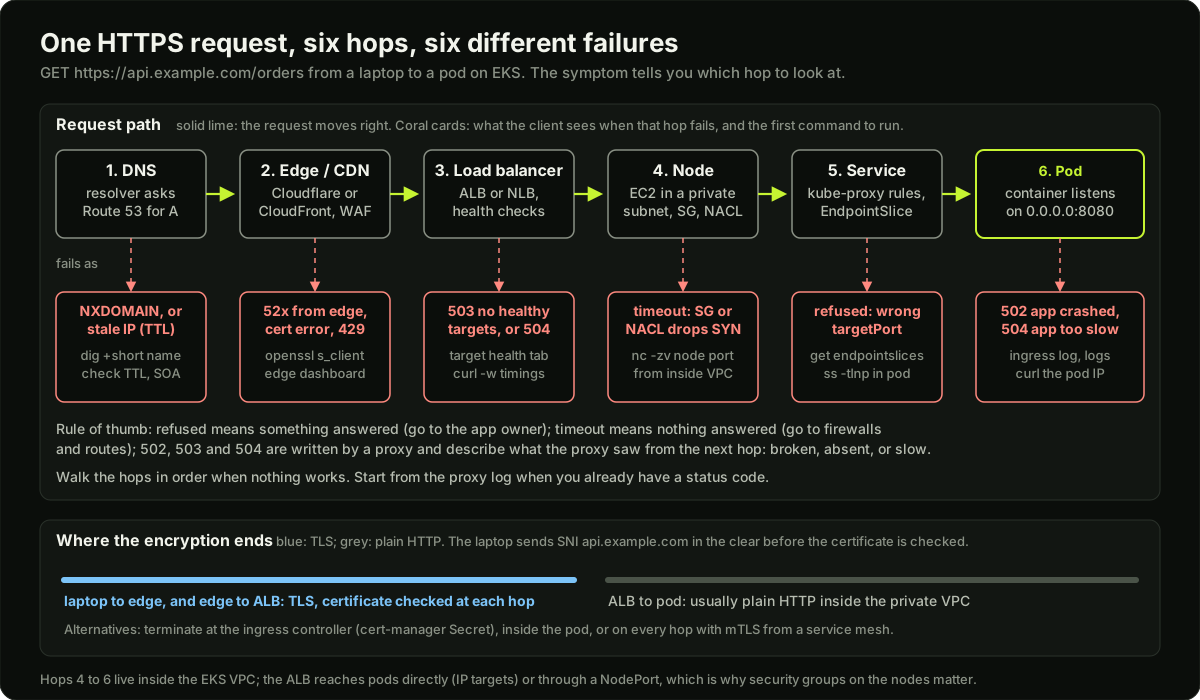 One HTTPS request travelling from a laptop through DNS, the edge, a load balancer, a node and a Service to a pod, with the failure each hop produces
IP addresses and CIDR
An IPv4 address is 32 bits, written as four numbers from 0 to 255. CIDR notation adds a prefix length: 10.0.0.0/16 means "the first 16 bits are the network, the rest are hosts".
Two addresses in any block are not usable by hosts: the first (network address) and the last (broadcast). AWS reserves three more per subnet: the second for the VPC router, the third for DNS, the fourth for future use. So a /24 on AWS has 256 minus 5, which is 251 usable, and the smallest subnet AWS allows, a /28, has 11.
Three private ranges are never routed on the internet and are what you use inside a VPC: 10.0.0.0/8, 172.16.0.0/12 and 192.168.0.0/16. Pick a block that does not overlap any network you may later peer with: two VPCs with the same CIDR cannot be peered.
Splitting a block is counting. Going from /16 to /20 adds 4 bits, so you get 2 to the power of 4, which is 16 subnets of 4096 addresses: 10.0.0.0, 10.0.16.0, 10.0.32.0 and so on, the third octet rising by 16.
Private and public IPs, NAT, gateways and routes
A machine with only a private IP cannot reach the internet or be reached from it unless something translates. NAT (network address translation) rewrites the source IP of outgoing packets to a public IP and remembers the mapping so the reply finds its way back. On AWS a NAT Gateway in a public subnet does this for private subnets; it charges per GB, so it is a visible line on many bills.
A subnet is "public" only because its route table sends 0.0.0.0/0 to an Internet Gateway and its instances have public IPs. A "private" subnet's route table sends 0.0.0.0/0 to the NAT Gateway instead. That is the whole difference. A route table is a list of (destination prefix, target) pairs; the most specific prefix wins:
ip route                    # the host's route table, most specific prefix wins
# default via 10.0.48.1 dev eth0            <- everything else goes to the subnet router
# 10.0.48.0/24 dev eth0 src 10.0.48.17      <- my own subnet, delivered directly
ip route get 10.0.16.5      # which route one destination will use
TCP: the handshake, ports and what the error means
TCP gives an ordered, reliable byte stream. It starts with a three-way handshake: the client sends SYN, the server replies SYN-ACK, the client sends ACK. Only then does data move. A server listens on a fixed port (443 for HTTPS, 5432 for PostgreSQL); the client uses an ephemeral port chosen by the kernel, on Linux 32768 to 60999 by default (net.ipv4.ip_local_port_range). That is about 28000 outgoing connections from one source IP to one destination IP and port, which matters for proxies and NAT gateways.
When a connection closes, the side that closed first keeps the 4-tuple (source IP, source port, destination IP, destination port) in TIME_WAIT for 60 seconds on Linux, so late packets cannot corrupt a new connection. A client that opens and closes thousands of short connections per second to one backend runs out of ephemeral ports. The fix is keep-alive (one connection, many requests) and a connection pool, not kernel tuning.
The classic interview question is what three failures mean:
"Refused" is fast and means "talk to the application owner". "Timed out" is slow and means "talk to whoever owns the firewall or routing".
UDP has no handshake and no delivery guarantee. DNS, NTP, StatsD and QUIC use it. There is no "connection refused" for UDP; a UDP service that is down usually looks like silence.
DNS
DNS turns names into addresses. Your machine asks a recursive resolver (on AWS, the VPC resolver at the VPC base plus two, such as 10.0.0.2). The resolver walks from the root servers to the .com servers to the authoritative servers for the domain, caches the answer for its TTL (time to live, in seconds), and returns it. A 60 s TTL lets you move traffic fast but costs more queries; an 86400 s TTL is cheap but makes a failover take a day.
Negative caching means "this name does not exist" (NXDOMAIN) is cached too, for the time in the zone's SOA record. Create a record right after someone queried the name and they keep getting NXDOMAIN until that cache expires. Split-horizon DNS answers inside and outside clients differently: a Route 53 private hosted zone attached to a VPC answers db.internal.example.com with a private IP, while the public zone answers with nothing or a public address.
Route 53 is the AWS DNS service: public and private hosted zones, alias records (which let the apex point at a load balancer), health checks, and weighted, latency and failover routing. CoreDNS is the DNS server inside Kubernetes. Every Service gets name.namespace.svc.cluster.local, and a pod's /etc/resolv.conf looks like:
nameserver 10.96.0.10
search payments.svc.cluster.local svc.cluster.local cluster.local
options ndots:5
ndots:5 means any name with fewer than five dots is tried with each search domain first. A lookup of api.example.com (two dots) first asks for api.example.com.payments.svc.cluster.local, then two more wrong names, then the real one: four queries for one answer. This is why CoreDNS load and intermittent DNS failures are a real problem in busy clusters. The fixes are a trailing dot (api.example.com.), a lower ndots in the pod's dnsConfig, or NodeLocal DNSCache. CoreDNS caches answers with its cache plugin (cache 30 by default).
HTTP versions and the status codes operators care about
The status codes to know are the ones that say who failed:
- 499: an NGINX-only log code: the client closed the connection before the response was ready. Many 499s mean your backend is slower than the client's timeout.
- 502 Bad Gateway: the proxy (ingress, ALB, NGINX) got an invalid response, a refusal or a reset from the backend. The backend is reachable but broken, or the proxy points at the wrong port.
- 503 Service Unavailable: the proxy had no healthy backend (every target failed its health check, or the Service has no ready endpoints), or the application said it is overloaded.
- 504 Gateway Timeout: the proxy connected but the backend did not answer within the proxy's timeout (ALB idle timeout, NGINX
proxy_read_timeout). The backend is slow, not down.
All three 5xx codes are produced by the proxy, not your app; the proxy's log says what it saw from the backend.
TLS
TLS gives encryption, integrity, and proof that the server is who it says it is. The proof is a certificate: the server's public key plus its name, signed by a certificate authority (CA). Your client trusts a small set of root CAs; the server's certificate is signed by an intermediate CA, which is signed by a root. The server must send the whole chain (its certificate plus the intermediates) or the client cannot build a path to a root. "Unable to get local issuer certificate" almost always means a missing intermediate.
At the start of the handshake the client sends the hostname it wants in the clear, called SNI (Server Name Indication), so one IP can serve certificates for many names. Send the wrong SNI (for example, curl https://10.0.1.5 by IP) and the server returns its default certificate and the name check fails. With TLS 1.3 the handshake is one round trip: the client sends its key share and ciphers, the server replies with its key share and certificate, and both sides derive the session keys.
Where TLS ends matters for debugging:
Expiry is the most common failure: nobody renewed, or cert-manager could not complete the ACME challenge because port 80 was blocked. Monitor days-to-expiry of every public endpoint and alert at 14 days.
SSH, bastions and Session Manager
SSH authenticates with a key pair: the private key stays on your laptop, the public key goes in ~/.ssh/authorized_keys on the server. Password login should be off (PasswordAuthentication no in sshd_config). A bastion (jump host) is the one machine with a public IP that you SSH into first; everything else accepts SSH only from the bastion's security group.
Agent forwarding (ssh -A) lets the far machine use your local key to hop further, but anyone with root on the bastion can use your agent while you are connected. Prefer -J, which proxies the connection and never exposes the key. The modern replacement on AWS is SSM Session Manager: no public IP, no port 22, no keys to rotate, IAM decides who connects, and sessions can be logged to S3 or CloudWatch. The instance needs the SSM agent and a role with the AmazonSSMManagedInstanceCore policy.
ssh -J ops@bastion.example.com ec2-user@10.0.16.5   # through the bastion, no agent forwarding
aws ssm start-session --target i-0abc123def456     # Session Manager: no port 22, no public IP
Load balancing, health checks and draining
A layer 4 load balancer (AWS NLB) forwards TCP or UDP connections without looking inside them; it is fast, keeps the client IP, and works for any protocol. A layer 7 load balancer (AWS ALB, NGINX, Envoy) understands HTTP: it routes by host and path, terminates TLS, adds headers like X-Forwarded-For, and can retry on another backend. In Kubernetes the Ingress controller or Gateway is the L7 balancer; kube-proxy's Service rules are a simple L4 one.
Health checks decide which backends get traffic. An ALB target group by default checks every 30 seconds with a 5 second timeout, marks a target unhealthy after 2 failures and healthy after 5 successes, and expects a 200. So a dead pod can receive traffic for up to 60 seconds, and a new one waits 150 seconds to join. Connection draining (deregistration delay on AWS, default 300 seconds) lets in-flight requests finish on a backend being removed. Match it to the pod's terminationGracePeriodSeconds, or users see resets on every deploy.
Firewalls: security groups and NACLs
A security group is a stateful firewall on an instance or load balancer: allow inbound 443 and the replies are allowed automatically. Rules are allow-only. A security group can name another security group as the source ("allow 5432 from sg-web"), which says "only the web tier may reach the database". A network ACL is a stateless firewall on a subnet: numbered allow and deny rules evaluated in order, and because it does not track connections you must allow the ephemeral range (1024 to 65535) in the reverse direction or replies are dropped. Most teams leave NACLs at allow-all and filter with security groups.
The debugging toolkit
ping -c 3 10.0.16.5                         # is there an IP path; ICMP may be blocked, so silence is not proof
mtr -rwc 20 api.example.com                 # traceroute that keeps running: where loss or latency starts
dig +short api.example.com A                # the answer only; add +trace to walk from the root
dig @10.96.0.10 api.payments.svc.cluster.local   # ask one specific resolver
curl -v --connect-timeout 5 https://api.example.com/healthz   # handshake, SNI, cert, headers, status
curl -sS -o /dev/null -w '%{http_code} %{time_connect} %{time_starttransfer}\n' https://api.example.com/
ss -tlnp                                    # what listens, on which address, which process
ss -tan state time-wait | wc -l             # sockets in TIME_WAIT
sudo tcpdump -ni eth0 'tcp port 8080 and (tcp[tcpflags] & (tcp-syn|tcp-rst) != 0)'  # SYNs and RSTs only
openssl s_client -connect api.example.com:443 -servername api.example.com </dev/null 2>/dev/null | openssl x509 -noout -dates -subject -issuer
nc -zv -w 3 10.0.16.5 5432                  # can I open a TCP connection to that port
Which one to reach for first:
Diagram
Worked example
A /16 VPC for an EKS platform in three zones. You are given 10.0.0.0/16 in ap-south-1 and must plan subnets for worker nodes, load balancers and databases across zones a, b and c.
Step 1, the block. A /16 has 2 to the power of 16, which is 65536 addresses.
Step 2, private subnets for nodes and pods. The VPC CNI gives every pod a VPC IP, so these must be big. Split the /16 into /20 blocks: 20 minus 16 is 4 bits, so 16 blocks of 4096 addresses. Take the first three: 10.0.0.0/20 (10.0.0.0 to 10.0.15.255), 10.0.16.0/20 and 10.0.32.0/20, one per zone. Each has 4096 minus 5 reserved, which is 4091 usable.
Step 3, public subnets for the load balancers and NAT gateways. They hold a handful of addresses, so /24 is plenty. Carve them out of the fourth /20 (10.0.48.0/20), which splits into 16 /24 blocks: 10.0.48.0/24, 10.0.49.0/24, 10.0.50.0/24, one per zone, 251 usable each.
Step 4, database subnets, also /24: 10.0.51.0/24, 10.0.52.0/24, 10.0.53.0/24.
Step 5, add it up. 3 x 4096 plus 6 x 256 is 12288 plus 1536, which is 13824 addresses used. 65536 minus 13824 leaves 51712 free, which is 12 whole /20 blocks, enough for a second cluster or a GPU node pool later.
Step 6, check capacity. An m5.large node supports 3 network interfaces with 10 IPs each, so it can consume 30 VPC addresses (1 for the node, up to 29 for pods). 4091 divided by 30 is 136 nodes per zone before the subnet is full. With /24 private subnets, a common beginner mistake, you would get 251 divided by 30, which is 8 nodes per zone, and the cluster would stop scheduling pods with "insufficient IPs" long before CPU ran out.
Step 7, routing. The three public subnets route 0.0.0.0/0 to the Internet Gateway. Each private subnet routes 0.0.0.0/0 to a NAT Gateway in the public subnet of its own zone (three NAT gateways, so losing one zone does not cut egress for the other two). Database subnets have no default route at all. Security groups: the node group allows 443 from the ALB's group; the database group allows 5432 from the node group only.
The code example computes every number above and checks that no two subnets overlap.
Runnable code
"""CIDR arithmetic for a VPC subnet plan, using only the standard library.

Run it and it prints the plan from the worked example: a 10.0.0.0/16 VPC
split into three private /20 subnets, three public /24 subnets and three
database /24 subnets across three availability zones, then checks that no
two subnets overlap and that the AWS usable-host counts are right.
"""
import ipaddress

AWS_RESERVED = 5  # network, router, DNS, future use, broadcast


def describe(cidr):
    """Network, broadcast, usable hosts for one block, both plain and on AWS."""
    net = ipaddress.ip_network(cidr, strict=True)
    total = net.num_addresses
    plain_usable = max(total - 2, 0)          # classic: minus network and broadcast
    aws_usable = max(total - AWS_RESERVED, 0)  # AWS reserves 5 per subnet
    return {
        "cidr": str(net),
        "network": str(net.network_address),
        "broadcast": str(net.broadcast_address),
        "mask": str(net.netmask),
        "total": total,
        "usable": plain_usable,
        "aws_usable": aws_usable,
    }


def split(cidr, new_prefix):
    """Split a block into equal subnets with the given prefix length."""
    net = ipaddress.ip_network(cidr)
    if new_prefix < net.prefixlen:
        raise ValueError(f"cannot split {net} into larger /{new_prefix} blocks")
    return list(net.subnets(new_prefix=new_prefix))


def overlaps(cidrs):
    """Return every pair of blocks that overlap."""
    nets = [ipaddress.ip_network(c) for c in cidrs]
    bad = []
    for i in range(len(nets)):
        for j in range(i + 1, len(nets)):
            if nets[i].overlaps(nets[j]):
                bad.append((str(nets[i]), str(nets[j])))
    return bad


def contains(vpc, cidrs):
    v = ipaddress.ip_network(vpc)
    return all(ipaddress.ip_network(c).subnet_of(v) for c in cidrs)


def plan(vpc="10.0.0.0/16", zones=("ap-south-1a", "ap-south-1b", "ap-south-1c")):
    """The worked example: /20 private per zone, /24 public and /24 database per zone."""
    twenties = split(vpc, 20)                 # 16 blocks of 4096 addresses
    private = twenties[: len(zones)]          # 10.0.0.0/20, 10.0.16.0/20, 10.0.32.0/20
    small = split(twenties[len(zones)], 24)   # carve /24s out of the 4th /20: 10.0.48.0/20
    public = small[: len(zones)]              # 10.0.48.0/24 .. 10.0.50.0/24
    database = small[len(zones): 2 * len(zones)]  # 10.0.51.0/24 .. 10.0.53.0/24
    rows = []
    for z, pr, pu, db in zip(zones, private, public, database):
        rows.append((z, "private", str(pr)))
        rows.append((z, "public", str(pu)))
        rows.append((z, "database", str(db)))
    return rows


if __name__ == "__main__":
    vpc = "10.0.0.0/16"
    v = describe(vpc)
    print(f"VPC {v['cidr']}: {v['total']} addresses, mask {v['mask']}, "
          f"{v['network']} to {v['broadcast']}")

    print("\nSubnet plan (3 zones):")
    rows = plan(vpc)
    used = 0
    for zone, role, cidr in rows:
        d = describe(cidr)
        used += d["total"]
        print(f"  {zone}  {role:<9} {cidr:<16} total {d['total']:>5}  "
              f"usable {d['usable']:>5}  on AWS {d['aws_usable']:>5}")
    print(f"  addresses used: {used} of {v['total']}, free for later: {v['total'] - used}")

    # Self-checks: the numbers quoted in the lesson.
    assert describe("10.0.0.0/20")["aws_usable"] == 4091
    assert describe("10.0.48.0/24")["aws_usable"] == 251
    assert describe("10.0.0.0/20")["broadcast"] == "10.0.15.255"
    assert len(split(vpc, 20)) == 16
    assert len(split("10.0.48.0/20", 24)) == 16
    assert used == 3 * 4096 + 6 * 256 == 13824
    assert v["total"] - used == 51712

    cidrs = [c for _, _, c in rows]
    assert overlaps(cidrs) == [], "subnets must not overlap"
    assert contains(vpc, cidrs), "every subnet must sit inside the VPC"
    print("\noverlap check: none of the 9 subnets overlap, all inside the VPC")

    # A deliberate mistake, to show the check catching it.
    bad = overlaps(["10.0.0.0/20", "10.0.8.0/24"])
    assert bad == [("10.0.0.0/20", "10.0.8.0/24")]
    print(f"overlap check on a bad pair: {bad[0][0]} overlaps {bad[0][1]} (caught)")

    # Peering sanity: a second VPC must not overlap the first.
    peer = "10.1.0.0/16"
    assert overlaps([vpc, peer]) == []
    print(f"peering check: {vpc} and {peer} do not overlap, peering is possible")

    # How many m5.large nodes fit in one private /20 if each uses 30 IPs
    # (1 for the node, 29 for pods with the VPC CNI and 3 ENIs x 10 IPs)?
    per_node = 30
    nodes = describe("10.0.0.0/20")["aws_usable"] // per_node
    assert nodes == 136
    print(f"capacity: one /20 private subnet holds {nodes} nodes at {per_node} IPs each")
    print("\nall checks passed")
Key takeaways
Debug bottom-up when nothing works (DNS, TCP, TLS, HTTP) and top-down when something is slow.
A /n block holds 2^(32-n) addresses; AWS reserves 5 per subnet; never let two VPCs you may peer share a CIDR.
Connection refused means the host answered with RST (nothing listening); timed out means no answer at all (firewall or route); reset means an open connection was killed.
DNS answers are cached for their TTL, including negative answers; inside Kubernetes
ndots:5turns one external lookup into several queries.502, 503 and 504 are produced by the proxy, and each says something different about the backend: broken, absent, or slow.
Know where TLS terminates in your stack, send the full chain, and alert on certificate expiry at 14 days.
Security groups are stateful allow-lists; NACLs are stateless and need the ephemeral port range opened for replies.
Prefer
ssh -Jor SSM Session Manager over agent forwarding and open port 22.
Common mistakes
Treating "connection timed out" as an application problem and restarting pods, when a security group or route is dropping the SYN.
Private subnets sized /24 for an EKS cluster with the VPC CNI, which runs out of pod IPs at about 8 nodes.
Serving a certificate without its intermediate chain; it works in a browser that cached the intermediate and fails from
curland from every pod.Opening a new TCP connection per request to a backend and then "fixing" TIME_WAIT with kernel settings instead of keep-alive and a connection pool.
Reading a 502 as "my app is down" instead of asking what the proxy saw from the backend.
Allowing inbound 443 in a NACL and forgetting outbound 1024 to 65535, so the handshake replies are dropped.
Practice
Run the code example, then change the plan to four zones with /21 private subnets and confirm by hand that the counts it prints are right.
Start
python3 -m http.server 8080on your laptop and, from a second terminal, reproduce all three errors: refused (connect to port 8081), timed out (connect to a non-routable address like 10.255.255.1 withnc -w 3), and reset (kill the server whilecurlhas a slow request open). Note the time each one takes to fail.Run
openssl s_clientagainst three public sites and record the expiry date, the issuer and whether the chain verified. Then run it against a load balancer or ingress by IP without-servernameand explain the error you get.In a kind cluster, exec into a pod, print
/etc/resolv.conf, and usedigto count how many queries a lookup ofexample.commakes with and without a trailing dot (watch CoreDNS logs withlogenabled in the Corefile).
Interview questions (12)
1.What happens when you type https://shop.example.com into a browser and press Enter?Medium
DNS first: the browser checks its cache, then the OS cache, then asks the configured resolver, which walks root, .com and the authoritative servers for example.com and returns an IP with a TTL; often that IP belongs to a CDN or load balancer. Next the browser opens a TCP connection to port 443 with the three-way handshake (or QUIC over UDP for HTTP/3). Then TLS: the client sends the hostname with SNI, the server returns its certificate chain, the browser checks the name, the dates and the chain to a trusted root, and both sides agree on keys, one round trip in TLS 1.3. Now the HTTP request goes out with the Host header and cookies. The edge (CDN, WAF) may answer from cache; otherwise the load balancer picks a healthy target, a reverse proxy or ingress routes by host and path to a pod, and the app may call a cache and a database. The response comes back, the browser parses the HTML and fetches CSS, JavaScript and images over the same connection. Each step has a failure signature I can test alone: dig, nc, openssl s_client, curl -v.
2.You moved api.example.com to a new load balancer an hour ago. Half the users still reach the old one. Why, and what should you have done?Easy
The A record had a long TTL, probably 3600 s or more, and every recursive resolver that cached the old address keeps answering with it until its copy expires. Some resolvers also ignore short TTLs or clamp them, so a few clients lag longer. Nothing I do now speeds up caches I do not own, so the fix today is to keep the old load balancer serving until the TTL has passed, or to proxy from the old one to the new one. What I should have done: lower the TTL to 60 s at least one old-TTL period before the change, wait for that to spread, make the switch, watch the old target's request count fall to zero, then raise the TTL again. On Route 53 an alias record pointing at the load balancer avoids the problem for ALB changes, because the alias answers with the current IPs.
3.A pod cannot resolve db.internal.example.com but the node can. What do you check?Medium
First I run the lookup from inside the pod with nslookup or dig against the cluster DNS IP from the pod's /etc/resolv.conf, and from the node against its own resolver, to confirm the two paths really differ. Then I check whether CoreDNS forwards external names to the VPC resolver: the Corefile's forward . /etc/resolv.conf and the CoreDNS pod logs. If the name lives in a Route 53 private hosted zone, the zone must be associated with the VPC the nodes are in. I also look at ndots:5, because the name has three dots and will be tried with every search domain first, which can hit a resolver rate limit under load. Finally I check NetworkPolicy and security groups that might block UDP and TCP 53 from pods.
4.Explain CIDR. How many usable addresses does a /22 have on AWS?Easy
CIDR writes an address with a prefix length: the prefix is the network part, the rest is the host part. A /22 leaves 32 minus 22, which is 10 host bits, so 1024 addresses. Classic networking removes the network and broadcast address, giving 1022. AWS reserves five per subnet: network, router, DNS, one for future use, and broadcast, so a /22 subnet on AWS has 1019 usable addresses. If I am sizing EKS subnets I also remember that every pod takes one of those addresses with the VPC CNI.
5.Where should TLS terminate for a web service on EKS, and what are the trade-offs?Medium
The usual answer is at the edge or the load balancer. Terminating on the ALB with an ACM certificate means free automatic renewal and plain HTTP inside the VPC, which is simple and fast; the trade-off is that traffic from the ALB to pods is unencrypted, which most compliance rules accept inside a private VPC but some do not. Terminating at the ingress controller with cert-manager keeps the certificate under my control and works with any load balancer, but I own renewal and the ACME challenge path. For end-to-end encryption and workload identity I use mTLS from a service mesh, which costs a sidecar or node agent per workload and more debugging effort. I pick the simplest option the security requirement allows and monitor expiry everywhere.
6.What happens in a DNS lookup from a laptop for api.example.com, and where is it cached?Medium
The browser checks its own cache, then the operating system's resolver cache. If neither has it, the OS asks the configured recursive resolver, usually the ISP's or a public one. That resolver, if it has no cached answer, asks a root server for who serves .com, asks a .com server for who serves example.com, and asks that authoritative server for the A record. Each answer carries a TTL and the resolver caches it for that long, so the next client gets an answer from cache. A missing name is cached too, as a negative answer, for the time in the SOA record. This is why a DNS change takes "up to the TTL" to be seen everywhere, and why I lower the TTL a day before a planned migration.
7.Users see 502 errors but the pods are Running and respond when you curl them inside the cluster. What next?Medium
A 502 is produced by the proxy, so I read the ingress controller logs for the upstream error: connection refused, reset, or an invalid response. Refused usually means the Service targetPort does not match the container's port, or the pod listens on 127.0.0.1 instead of 0.0.0.0. Then I check kubectl get endpointslices for the Service to confirm the pod IPs are actually behind it, and that the ingress rule points at the right Service name and port. If the backend uses HTTPS or gRPC, the ingress may need an annotation to speak that protocol to it. I also check whether the pods are restarting during the errors, because a pod that is killed mid-request produces a burst of 502s on every deploy if terminationGracePeriodSeconds and the drain delay are not aligned.
8.What is the difference between a security group and a network ACL?Easy
A security group is attached to an instance or a load balancer network interface and is stateful: if inbound 443 is allowed, the reply packets are allowed without a rule. It only has allow rules, and a rule can name another security group as the source. A network ACL is attached to a subnet and is stateless: it has numbered allow and deny rules evaluated in order, and because it does not track connections you must allow the ephemeral port range in the reverse direction or replies are dropped. In practice most teams filter with security groups and keep the NACL at allow-all, using a NACL deny only for blocking a known-bad range at the subnet edge.
9.Why can a server run out of ports when it is the client, and how do you fix it?Medium
Every outgoing connection uses an ephemeral source port, on Linux one of about 28000 between 32768 and 60999. When a connection closes, the side that closed first holds the 4-tuple in TIME_WAIT for about a minute. A proxy or a service that opens a new connection per request to the same backend can therefore burn through all ports in under a minute at a few hundred requests per second, and new connections fail with "cannot assign requested address". The right fix is to reuse connections: HTTP keep-alive and a connection pool in the client. Adding source IPs or widening the port range only moves the limit. Kernel flags like tcp_tw_reuse are a last resort and are safe only for outgoing connections.
10.Compare HTTP/1.1, HTTP/2 and HTTP/3 and say where each shows up in your stack.Medium
HTTP/1.1 is text over TCP and handles one request at a time per connection, so clients open several connections; it is what most internal services, health checks and curl use by default. HTTP/2 is binary over TCP and multiplexes many streams on one connection with header compression, which is what gRPC uses and what browsers use to the edge; its weakness is that one lost TCP packet stalls every stream. HTTP/3 runs over QUIC on UDP, so streams are independent and TLS is part of the transport; browsers use it to edges like Cloudflare. Inside a cluster I mostly see HTTP/1.1 and HTTP/2, and I have to make sure the ingress speaks HTTP/2 to a gRPC backend or the calls fail.
11.What does a load balancer health check actually decide, and how do the defaults bite you?Hard
The health check decides which targets receive new connections. On an ALB the defaults are a check every 30 seconds with a 5 second timeout, unhealthy after 2 failures, healthy after 5 successes, expecting a 200 on /. So a crashed backend can still get traffic for up to 60 seconds, and a fresh one waits up to 150 seconds before it joins. During a rolling deploy that means capacity dips. I set the interval to 10 seconds, healthy threshold to 2, point the path at a real readiness endpoint, and set the deregistration delay to match the application's terminationGracePeriodSeconds so in-flight requests finish before the target is removed. I also make sure the readiness endpoint does not call the database, or a slow database marks every target unhealthy and the balancer fails open to all of them.
12.How do you check a certificate from the command line, and what three problems do you look for?Easy
I run openssl s_client -connect host:443 -servername host and pipe it to openssl x509 -noout -dates -subject -issuer. The three things I look for are the expiry date, whether the subject or a SAN matches the hostname I used, and whether the chain verifies: a "unable to get local issuer certificate" error means the server is not sending its intermediate certificate. I always pass -servername because without SNI the server may return a default certificate for a different name, which looks like a mismatch that is not really there. curl -v shows the same information in a shorter form.
Quiz
1.A client gets "connection refused" immediately when connecting to 10.0.16.5:8080. What is the most likely cause?
2.How many usable addresses does a /26 subnet have on AWS?
3.Which status code is produced by NGINX when the client gives up before the response is ready?
4.A pod looks up api.example.com with the default ndots:5. How many DNS queries can that take before the right answer?
5.Which statement about NACLs is true?
6.What is the safest way to reach a private instance through a bastion?
Practice these problems
Further reading
My notes
Your notes
Autosaves to this browser.