Helm - charts, templates, values and releases
Helm is the package manager for Kubernetes. A chart is a folder of Go templates plus a values.yaml with defaults; helm install merges your values into the templates, sends the resulting manifests to the API server and records the result as a release. This lesson covers the chart layout, the template language, values design, the release lifecycle with upgrades and rollbacks, dependencies, publishing to an OCI registry such as ECR, testing, and how Helm fits with Argo CD.
Why it matters
Almost every real cluster is installed with Helm: the ingress controller, cert-manager, Prometheus, External Secrets, the AWS Load Balancer Controller, and the company's own services. Interviewers ask "how do you deploy the same app to dev and prod without copying YAML", "what does helm upgrade do if the new version crashes", "where does Helm keep its state" and "why did my ConfigMap change not restart the pods". The questions look small, but each one tests whether you have shipped with Helm or only read about it. A take-home task of "write a chart for this service" is common for platform roles.
Read first: Kubernetes architecture and core objects, Kubernetes networking and storage, Kubernetes in production - resources, autoscaling, RBAC, upgrades, EKS
Lesson
Why templating
One service needs the same Deployment, Service, Ingress and HPA in three environments. Only a few things differ: the image tag, the replica count, the hostname, the resource sizes. Copying four YAML files three times means twelve files that drift apart. Templating keeps one copy of the structure and injects the differences from a small per-environment file.
In practice the three live together: Helm for anything you install from outside, Helm or Kustomize for your own services, and Argo CD rendering either from Git. Both Helm and Kustomize are open source and Helm is a CNCF graduated project.
Chart structure
helm create api writes a starter chart. The folder, trimmed to what matters:
api/
  Chart.yaml            # name, chart version, appVersion, dependencies
  values.yaml           # default values; every key the templates read
  values.schema.json    # optional JSON Schema that rejects bad values
  charts/               # dependency charts, downloaded by helm dependency update
  templates/
    _helpers.tpl        # named templates (labels, fullname); files starting with _ render nothing
    deployment.yaml
    service.yaml
    ingress.yaml
    hpa.yaml
    serviceaccount.yaml
    NOTES.txt           # printed after install; a template too
    tests/
      test-connection.yaml   # a Pod with the helm.sh/hook: test annotation
Chart.yaml has two versions and people confuse them. version is the chart's own version and must change every time any file in the chart changes. appVersion is the version of the software inside and is only informational; it is the default image tag in the standard template. apiVersion: v2 marks a chart for Helm 3 and later.
The template language
Helm templates are Go text/template with extra functions (most from the Sprig library, a few from Helm itself). The things you must be able to read and write:
- Values and built-in objects.
.Values.replicaCountcomes from values.yaml..Release.Name,.Release.Namespace,.Chart.Name,.Chart.Versionand.Chart.AppVersioncome from the release and Chart.yaml..Capabilities.KubeVersiontells you the cluster version so a chart can pick an API version. - Pipelines and functions.
{{ .Values.image.tag | default .Chart.AppVersion | quote }}reads left to right: take the tag, fall back to appVersion if empty, wrap in quotes.toYamlturns a map into YAML text;nindent 12adds a newline and indents every line by 12 spaces;include "api.labels" .renders a named template to a string so you can pipe it;tplrenders a string from values as a template;required "image.repository is required" .Values.image.repositoryfails the render with your message. - Control flow.
{{- if .Values.ingress.enabled }} ... {{- end }},{{- range .Values.env }},{{- with .Values.nodeSelector }}(changes.to that value inside the block and skips it when empty). - Named templates. Defined in
_helpers.tplwith{{- define "api.labels" -}} ... {{- end }}and used withinclude. Useinclude, nottemplate, becausetemplatecannot be piped intonindent. - Whitespace.
{{-eats the whitespace and newline before the action,-}}eats it after. Without the dash, everyifline leaves a blank line in the output. Most indentation bugs are a missing dash orindentused wherenindentwas needed.
A complete small chart, file by file
The chart deploys an HTTP API on EKS. The ServiceAccount takes an annotation that is used by IRSA; with EKS Pod Identity the association is made with aws eks create-pod-identity-association and the ServiceAccount needs no annotation, so the annotation block is optional.
# Chart.yaml
apiVersion: v2
name: api
description: The shop API
type: application
version: 0.3.0        # bump on every change to the chart
appVersion: "1.7.2"   # the image tag by default; quoted because it is a string
kubeVersion: ">=1.29.0-0"
# values.yaml: every key with a working default for a laptop
replicaCount: 1
image:
  repository: 123456789012.dkr.ecr.ap-south-1.amazonaws.com/api
  tag: ""             # empty means use Chart.appVersion
  pullPolicy: IfNotPresent
serviceAccount:
  create: true
  annotations: {}     # IRSA: eks.amazonaws.com/role-arn: arn:aws:iam::...:role/api
service:
  port: 80
  targetPort: 8080
ingress:
  enabled: false
  className: alb      # the AWS Load Balancer Controller on EKS; ingress-nginx is retired
  host: api.example.com
  tls: false
autoscaling:
  enabled: false
  minReplicas: 2
  maxReplicas: 10
  targetCPUUtilizationPercentage: 70
resources:
  requests:
    cpu: 100m
    memory: 128Mi
  limits:
    memory: 256Mi
env:
  LOG_LEVEL: info
# templates/_helpers.tpl
{{- define "api.fullname" -}}
{{- printf "%s-%s" .Release.Name .Chart.Name | trunc 63 | trimSuffix "-" -}}
{{- end }}

{{- define "api.labels" -}}
app.kubernetes.io/name: {{ .Chart.Name }}
app.kubernetes.io/instance: {{ .Release.Name }}
app.kubernetes.io/version: {{ .Chart.AppVersion | quote }}
app.kubernetes.io/managed-by: {{ .Release.Service }}
{{- end }}

{{- define "api.selectorLabels" -}}
app.kubernetes.io/name: {{ .Chart.Name }}
app.kubernetes.io/instance: {{ .Release.Name }}
{{- end }}
# templates/deployment.yaml
apiVersion: apps/v1
kind: Deployment
metadata:
  name: {{ include "api.fullname" . }}
  labels:
    {{- include "api.labels" . | nindent 4 }}
spec:
  {{- if not .Values.autoscaling.enabled }}
  replicas: {{ .Values.replicaCount }}
  {{- end }}
  selector:
    matchLabels:
      {{- include "api.selectorLabels" . | nindent 6 }}
  template:
    metadata:
      labels:
        {{- include "api.selectorLabels" . | nindent 8 }}
      annotations:
        checksum/config: {{ include (print $.Template.BasePath "/configmap.yaml") . | sha256sum }}
    spec:
      serviceAccountName: {{ include "api.fullname" . }}
      containers:
        - name: {{ .Chart.Name }}
          image: "{{ required "image.repository is required" .Values.image.repository }}:{{ .Values.image.tag | default .Chart.AppVersion }}"
          imagePullPolicy: {{ .Values.image.pullPolicy }}
          ports:
            - name: http
              containerPort: {{ .Values.service.targetPort }}
          envFrom:
            - configMapRef:
                name: {{ include "api.fullname" . }}
          readinessProbe:
            httpGet:
              path: /healthz
              port: http
            periodSeconds: 5
          livenessProbe:
            httpGet:
              path: /healthz
              port: http
            initialDelaySeconds: 20
            periodSeconds: 10
          resources:
            {{- toYaml .Values.resources | nindent 12 }}
# templates/configmap.yaml
apiVersion: v1
kind: ConfigMap
metadata:
  name: {{ include "api.fullname" . }}
data:
  {{- range $key, $value := .Values.env }}
  {{ $key }}: {{ $value | quote }}
  {{- end }}
# templates/service.yaml
apiVersion: v1
kind: Service
metadata:
  name: {{ include "api.fullname" . }}
  labels:
    {{- include "api.labels" . | nindent 4 }}
spec:
  type: ClusterIP
  ports:
    - port: {{ .Values.service.port }}
      targetPort: http
      name: http
  selector:
    {{- include "api.selectorLabels" . | nindent 4 }}
# templates/ingress.yaml
{{- if .Values.ingress.enabled }}
apiVersion: networking.k8s.io/v1
kind: Ingress
metadata:
  name: {{ include "api.fullname" . }}
spec:
  ingressClassName: {{ .Values.ingress.className }}
  {{- if .Values.ingress.tls }}
  tls:
    - hosts: [{{ .Values.ingress.host | quote }}]
      secretName: {{ include "api.fullname" . }}-tls
  {{- end }}
  rules:
    - host: {{ .Values.ingress.host | quote }}
      http:
        paths:
          - path: /
            pathType: Prefix
            backend:
              service:
                name: {{ include "api.fullname" . }}
                port:
                  name: http
{{- end }}
# templates/hpa.yaml
{{- if .Values.autoscaling.enabled }}
apiVersion: autoscaling/v2
kind: HorizontalPodAutoscaler
metadata:
  name: {{ include "api.fullname" . }}
spec:
  scaleTargetRef:
    apiVersion: apps/v1
    kind: Deployment
    name: {{ include "api.fullname" . }}
  minReplicas: {{ .Values.autoscaling.minReplicas }}
  maxReplicas: {{ .Values.autoscaling.maxReplicas }}
  metrics:
    - type: Resource
      resource:
        name: cpu
        target:
          type: Utilization
          averageUtilization: {{ .Values.autoscaling.targetCPUUtilizationPercentage }}
{{- end }}
# templates/serviceaccount.yaml
{{- if .Values.serviceAccount.create }}
apiVersion: v1
kind: ServiceAccount
metadata:
  name: {{ include "api.fullname" . }}
  {{- with .Values.serviceAccount.annotations }}
  annotations:
    {{- toYaml . | nindent 4 }}
  {{- end }}
{{- end }}
# templates/tests/test-connection.yaml
apiVersion: v1
kind: Pod
metadata:
  name: {{ include "api.fullname" . }}-test-connection
  annotations:
    "helm.sh/hook": test
spec:
  restartPolicy: Never
  containers:
    - name: wget
      image: busybox:1.36
      command: ["wget", "-qO-", "{{ include "api.fullname" . }}:{{ .Values.service.port }}/healthz"]
Two details carry weight. The Deployment omits replicas when the HPA is on, otherwise every helm upgrade would reset the count the HPA chose. The checksum/config annotation hashes the rendered ConfigMap into the pod template, so a config change produces a new pod template and a rollout; without it, pods keep the old values until they happen to restart.
Values design
- Defaults that work.
helm install api ./apiwith no flags must produce a running app on a laptop. Prod is the override, not the default. - One values file per environment, small and only the differences:
values-dev.yaml,values-prod.yaml. Files given with-fare merged left to right, and--set key=valuewins over all files. Maps merge key by key; lists are replaced whole. - Schema validation.
values.schema.jsonis a JSON Schema that Helm checks on install, upgrade, lint and template against the final merged values. It turns "ingress.host is a number" into an error before anything reaches the cluster.
{
  "$schema": "https://json-schema.org/draft-07/schema#",
  "type": "object",
  "required": ["image"],
  "properties": {
    "replicaCount": {"type": "integer", "minimum": 1},
    "image": {
      "type": "object",
      "required": ["repository"],
      "properties": {"repository": {"type": "string", "minLength": 1}, "tag": {"type": "string"}}
    },
    "ingress": {
      "type": "object",
      "properties": {"enabled": {"type": "boolean"}, "host": {"type": "string", "format": "hostname"}}
    }
  }
}
- No secrets in values. A values file lives in Git and is copied into the release secret. Put a database password in a
kind: ExternalSecrettemplate that pulls from AWS Secrets Manager through the External Secrets Operator, and let the chart only know the secret's name.
The release lifecycle
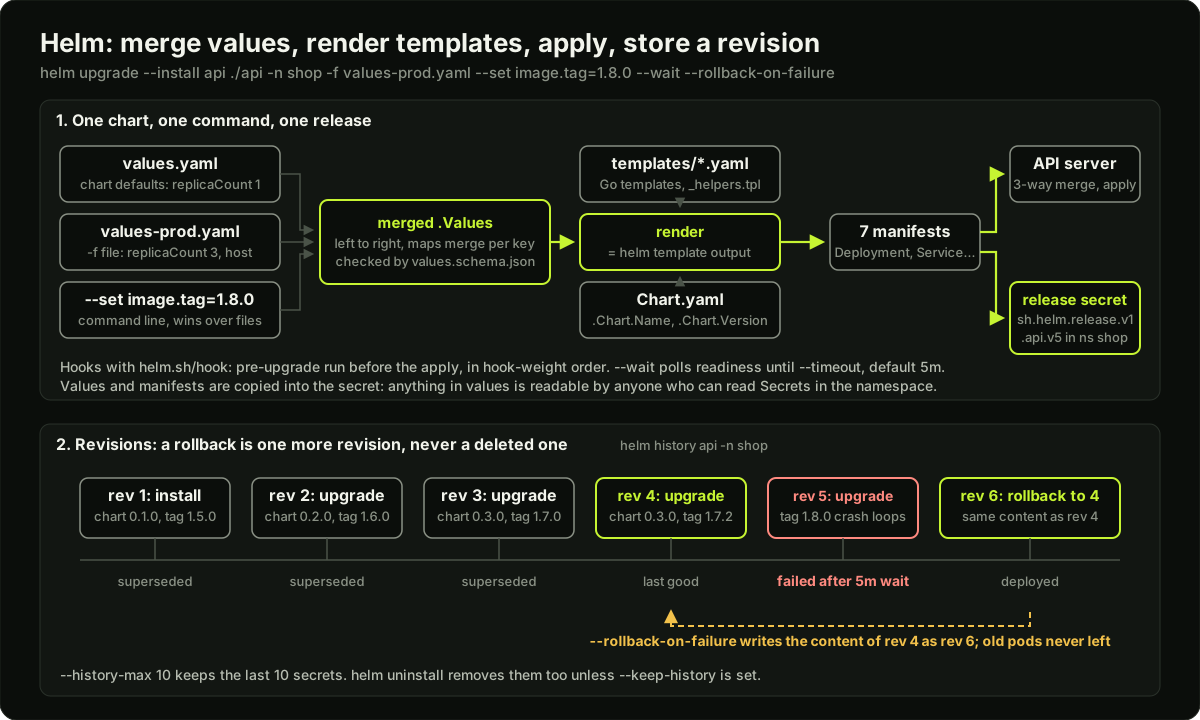 Values files merged into one values object, rendered through the chart templates into manifests, applied to the API server and recorded as a release secret, with a revision timeline for install, upgrade, failed upgrade and rollback
A release is one installed instance of a chart in one namespace. Helm stores every revision of every release as a Secret in the release's namespace, named sh.helm.release.v1.<release>.v<N> with type helm.sh/release.v1. The secret holds the chart, the merged values and the rendered manifests, gzip-compressed and base64-encoded. There is no server component; Helm 3 removed Tiller, and helm is a client that talks to the API server with your kubeconfig and your RBAC.
helm install api ./api -n shop --create-namespace -f values-prod.yaml      # revision 1
helm upgrade api ./api -n shop -f values-prod.yaml --set image.tag=1.8.0   # revision 2
helm upgrade --install api ./api -n shop -f values-prod.yaml \
  --wait --timeout 5m --rollback-on-failure                                 # CI-friendly: install or upgrade, wait, undo on failure
helm history api -n shop            # every revision with status and description
helm rollback api 1 -n shop         # creates revision 3 with the content of revision 1
helm status api -n shop             # NOTES.txt and the last state
helm get values api -n shop         # the values used, without the defaults
helm get manifest api -n shop       # what was sent to the cluster
helm uninstall api -n shop          # deletes the objects and the release secrets
helm uninstall api -n shop --keep-history   # keeps the secrets so rollback is still possible
The flags that matter in CI: --wait makes Helm block until Deployments have their ready replicas, Services have endpoints and Jobs finish, up to --timeout (default 5m0s). --rollback-on-failure (Helm 4; the Helm 3 name was --atomic) rolls back to the last good revision if the upgrade fails. --history-max limits how many revision secrets are kept (default 10). On upgrade Helm computes a three-way merge between the last rendered manifest, the live object and the new manifest, so a field another controller added (an injected sidecar, an HPA-owned replica count) survives the upgrade.
Hooks are templates with the helm.sh/hook annotation that run at a point in the lifecycle: pre-install, post-install, pre-upgrade, post-upgrade, pre-delete, post-delete, pre-rollback, post-rollback and test. The typical hook is a database migration Job:
# templates/migrate-job.yaml
apiVersion: batch/v1
kind: Job
metadata:
  name: {{ include "api.fullname" . }}-migrate
  annotations:
    "helm.sh/hook": pre-install,pre-upgrade
    "helm.sh/hook-weight": "-5"                      # lower runs first; default 0
    "helm.sh/hook-delete-policy": before-hook-creation,hook-succeeded
spec:
  backoffLimit: 1
  template:
    spec:
      restartPolicy: Never
      containers:
        - name: migrate
          image: "{{ .Values.image.repository }}:{{ .Values.image.tag | default .Chart.AppVersion }}"
          command: ["./migrate", "up"]
Helm waits for a hook Job to finish before applying the rest; a failed Job fails the release. Hook resources are not part of the release, so helm uninstall does not delete them: the delete policy (before-hook-creation, hook-succeeded, hook-failed) does.
Dependencies and umbrella charts
A chart can depend on others, listed in Chart.yaml and fetched into charts/ by helm dependency update:
# Chart.yaml (dependencies section)
dependencies:
  - name: redis
    version: "20.x.x"
    repository: oci://registry-1.docker.io/bitnamicharts
    condition: redis.enabled      # a values key that turns the subchart on or off
    tags: [cache]
Values for a subchart live under its name: redis.auth.enabled: false. condition points at a boolean values path; if it is set, it wins over tags, which enable a group of subcharts at once. An umbrella chart is a chart with no templates of its own that lists a whole system (api, worker, redis) as dependencies, so one helm install brings up the stack. It is convenient for demos and risky in production, because one upgrade touches everything.
Publishing: OCI registries and ECR
Chart repositories used to be an index.yaml on an HTTP server. The current way is an OCI registry, the same kind that holds container images, and ECR supports it:
helm package ./api                                          # api-0.3.0.tgz
aws ecr create-repository --repository-name api --region ap-south-1   # repo name must equal the chart name
aws ecr get-login-password --region ap-south-1 | \
  helm registry login --username AWS --password-stdin 123456789012.dkr.ecr.ap-south-1.amazonaws.com
helm push api-0.3.0.tgz oci://123456789012.dkr.ecr.ap-south-1.amazonaws.com/
helm install api oci://123456789012.dkr.ecr.ap-south-1.amazonaws.com/api --version 0.3.0 -n shop
The chart version becomes the OCI tag, which is why it must change on every edit. Provenance: helm package --sign produces a .prov file signed with a GPG key, and helm install --verify refuses a chart whose signature does not match. Teams on a supply-chain track sign the OCI artifact with cosign instead.
Testing a chart
Helm with Argo CD
Argo CD can take a chart as an Application source. It does not run helm install. It runs helm template with the values from the Application (valueFiles, values, valuesObject, parameters, in that order of increasing precedence) and applies the rendered manifests itself. There is no release secret, so helm ls shows nothing, and helm rollback does not exist: rollback is a Git revert. Helm hooks are mapped onto Argo CD hooks (pre-install and pre-upgrade both become PreSync, helm.sh/hook-weight becomes a sync wave); test hooks are skipped. The release name defaults to the Application name, and Argo CD 3.5 and later render with the Helm 4 binary. In this model values files live in the GitOps repository and every environment change is a reviewed commit, which is the subject of the next lesson.
Diagram
Worked example
An upgrade that fails and the rollback timeline. The api release is at revision 4, chart 0.3.0, image tag 1.7.2, 3 replicas, with maxUnavailable: 0. At 10:00 CI runs:
helm upgrade --install api oci://123456789012.dkr.ecr.ap-south-1.amazonaws.com/api \
  --version 0.3.1 -n shop -f values-prod.yaml --set image.tag=1.8.0 \
  --wait --timeout 5m --rollback-on-failure
Step 1 (10:00:00). Helm merges values: values.yaml from chart 0.3.1, then values-prod.yaml, then the --set. Schema passes. It renders 7 manifests and finds one pre-upgrade hook, the migrate Job with weight -5.
Step 2 (10:00:02). Helm creates the Job and waits. The migration adds an index and finishes in 40 seconds with exit code 0. Policy hook-succeeded deletes the Job.
Step 3 (10:00:42). Helm applies the manifests. Only the Deployment changed (new image, new chart label), so the API server starts a rolling update: new ReplicaSet, 1 surge pod.
Step 4 (10:00:42 to 10:05:42). The new pod starts, but 1.8.0 reads a config key that does not exist in prod and exits. CrashLoopBackOff. Because maxUnavailable is 0, the 3 old pods stay ready and users see nothing. --wait keeps polling the Deployment: it wants 3 ready replicas on the new ReplicaSet and never gets them.
Step 5 (10:05:42). The 5 minute timeout fires. Helm marks revision 5 as failed and, because of --rollback-on-failure, performs a rollback: it writes revision 6 with the manifests of revision 4 (image 1.7.2) and applies them. The Deployment's pod template is now identical to the old ReplicaSet, so Kubernetes scales it back to 3 and deletes the crashing ReplicaSet. No pre-rollback hooks exist, so the migration is not reversed; adding an index is backwards compatible, which is the rule for migrations that run before a rollout.
Step 6 (10:05:50). helm history api -n shop shows: 4 deployed-then-superseded, 5 failed, 6 deployed with description "Rollback to 4". Total user-facing impact: zero errors, about 6 minutes of CI time.
Count the cost of the alternative. Without --wait, Helm returns "deployed" at 10:00:43, CI goes green, and the broken ReplicaSet sits in the cluster until a human reads kubectl get pods. Without maxUnavailable: 0, the controller could have removed one old pod first and run on 2 of 3 for 5 minutes, which is a 33 percent capacity cut during the window. The flags and the Deployment strategy together are what made the failure invisible.
Runnable code
// A tiny "helm template" in Go, standard library only.
//
// Helm templates are Go text/template files with extra functions. This
// program defines the few functions a Deployment template needs (default,
// quote, indent, nindent, toYaml), merges a base values map with a
// per-environment override (what -f values-prod.yaml does), renders the
// same template for dev and prod, and prints a diff summary. Running it
// shows that one chart plus two values files gives two different manifests.
package main

import (
	"bytes"
	"fmt"
	"sort"
	"strings"
	"text/template"
)

// deploymentTemplate is what templates/deployment.yaml looks like in a chart.
// {{- and -}} trim the whitespace around an action, exactly as in Helm.
const deploymentTemplate = `apiVersion: apps/v1
kind: Deployment
metadata:
  name: {{ .Release.Name }}-{{ .Chart.Name }}
  labels:
    app.kubernetes.io/name: {{ .Chart.Name }}
    app.kubernetes.io/instance: {{ .Release.Name }}
    app.kubernetes.io/version: {{ .Chart.AppVersion | quote }}
spec:
  replicas: {{ .Values.replicaCount | default 1 }}
  selector:
    matchLabels:
      app.kubernetes.io/name: {{ .Chart.Name }}
      app.kubernetes.io/instance: {{ .Release.Name }}
  template:
    metadata:
      labels:
        app.kubernetes.io/name: {{ .Chart.Name }}
        app.kubernetes.io/instance: {{ .Release.Name }}
    spec:
      containers:
        - name: {{ .Chart.Name }}
          image: "{{ .Values.image.repository }}:{{ .Values.image.tag | default .Chart.AppVersion }}"
          ports:
            - containerPort: {{ .Values.service.port }}
          {{- if .Values.env }}
          env:
            {{- range $k, $v := .Values.env }}
            - name: {{ $k }}
              value: {{ $v | quote }}
            {{- end }}
          {{- end }}
          resources:
            {{- toYaml .Values.resources | nindent 12 }}
`

// Values is a nested map, like the result of parsing values.yaml.
type Values map[string]any

// merge copies overrides on top of base, recursing into nested maps.
// This is the same rule Helm uses when it layers -f files: a later file
// wins per key, and maps are merged rather than replaced.
func merge(base, overrides Values) Values {
	out := Values{}
	for k, v := range base {
		out[k] = v
	}
	for k, v := range overrides {
		if bm, ok := out[k].(Values); ok {
			if om, ok := v.(Values); ok {
				out[k] = merge(bm, om)
				continue
			}
		}
		out[k] = v
	}
	return out
}

// toYaml renders a value as YAML. It handles the three shapes a values file
// uses: scalars, lists, and nested maps, with keys sorted for stable output.
func toYaml(v any) string {
	var b strings.Builder
	writeYaml(&b, v, 0)
	return strings.TrimRight(b.String(), "\n")
}

func writeYaml(b *strings.Builder, v any, depth int) {
	pad := strings.Repeat("  ", depth)
	switch t := v.(type) {
	case Values:
		keys := make([]string, 0, len(t))
		for k := range t {
			keys = append(keys, k)
		}
		sort.Strings(keys)
		for _, k := range keys {
			switch t[k].(type) {
			case Values, []any:
				fmt.Fprintf(b, "%s%s:\n", pad, k)
				writeYaml(b, t[k], depth+1)
			default:
				fmt.Fprintf(b, "%s%s: %v\n", pad, k, t[k])
			}
		}
	case []any:
		for _, item := range t {
			fmt.Fprintf(b, "%s- %v\n", pad, item)
		}
	default:
		fmt.Fprintf(b, "%s%v\n", pad, t)
	}
}

// The function map: what Helm adds on top of text/template (a subset).
var funcs = template.FuncMap{
	// default takes the fallback FIRST so it works in a pipeline: {{ x | default 1 }}
	"default": func(def any, val any) any {
		if val == nil || val == "" || val == 0 {
			return def
		}
		return val
	},
	"quote": func(v any) string { return fmt.Sprintf("%q", fmt.Sprint(v)) },
	"indent": func(n int, s string) string {
		pad := strings.Repeat(" ", n)
		return pad + strings.ReplaceAll(s, "\n", "\n"+pad)
	},
	"nindent": func(n int, s string) string {
		pad := strings.Repeat(" ", n)
		return "\n" + pad + strings.ReplaceAll(s, "\n", "\n"+pad)
	},
	"toYaml": toYaml,
}

// render is the core of "helm template": build the context (.Release, .Chart,
// .Values), parse the template with the function map, and execute it.
func render(releaseName string, values Values) (string, error) {
	tmpl, err := template.New("deployment.yaml").Funcs(funcs).Parse(deploymentTemplate)
	if err != nil {
		return "", err
	}
	ctx := map[string]any{
		"Release": map[string]any{"Name": releaseName, "Namespace": "shop"},
		"Chart":   map[string]any{"Name": "api", "Version": "0.3.0", "AppVersion": "1.7.2"},
		"Values":  values,
	}
	var buf bytes.Buffer
	if err := tmpl.Execute(&buf, ctx); err != nil {
		return "", err
	}
	return buf.String(), nil
}

// diffLines is the "helm diff" idea in ten lines: report lines that differ.
func diffLines(a, b string) []string {
	al, bl := strings.Split(a, "\n"), strings.Split(b, "\n")
	n := len(al)
	if len(bl) > n {
		n = len(bl)
	}
	var out []string
	for i := 0; i < n; i++ {
		var x, y string
		if i < len(al) {
			x = al[i]
		}
		if i < len(bl) {
			y = bl[i]
		}
		if x != y {
			out = append(out, fmt.Sprintf("line %2d: dev  %q\n         prod %q", i+1, strings.TrimSpace(x), strings.TrimSpace(y)))
		}
	}
	return out
}

func replicasOf(manifest string) string {
	for _, line := range strings.Split(manifest, "\n") {
		if strings.HasPrefix(strings.TrimSpace(line), "replicas:") {
			return strings.TrimSpace(strings.TrimPrefix(strings.TrimSpace(line), "replicas:"))
		}
	}
	return ""
}

func main() {
	// values.yaml: sane defaults that work for a developer laptop.
	base := Values{
		"replicaCount": 1,
		"image":        Values{"repository": "123456789012.dkr.ecr.ap-south-1.amazonaws.com/api", "tag": ""},
		"service":      Values{"port": 8080},
		"env":          Values{"LOG_LEVEL": "debug"},
		"resources": Values{
			"requests": Values{"cpu": "100m", "memory": "128Mi"},
			"limits":   Values{"memory": "256Mi"},
		},
	}
	// values-prod.yaml: only the keys that differ in production.
	prodOverrides := Values{
		"replicaCount": 3,
		"env":          Values{"LOG_LEVEL": "info"},
		"resources": Values{
			"requests": Values{"cpu": "500m", "memory": "512Mi"},
			"limits":   Values{"memory": "1Gi"},
		},
	}

	dev, err := render("api-dev", base)
	if err != nil {
		panic(err)
	}
	prod, err := render("api-prod", merge(base, prodOverrides))
	if err != nil {
		panic(err)
	}

	fmt.Println("# helm template api-dev ./api")
	fmt.Print(dev)
	fmt.Println("---")
	fmt.Println("# helm template api-prod ./api -f values-prod.yaml")
	fmt.Print(prod)
	fmt.Println("---")
	fmt.Println("# diff summary (dev vs prod)")
	changes := diffLines(dev, prod)
	for _, c := range changes {
		fmt.Println(c)
	}

	// Self-checks: the things an interviewer would ask you to prove.
	if got := replicasOf(dev); got != "1" {
		panic("dev replicas should be 1, got " + got)
	}
	if got := replicasOf(prod); got != "3" {
		panic("prod replicas should be 3, got " + got)
	}
	if !strings.Contains(dev, `image: "123456789012.dkr.ecr.ap-south-1.amazonaws.com/api:1.7.2"`) {
		panic("empty image.tag should fall back to Chart.AppVersion")
	}
	if !strings.Contains(prod, "memory: 1Gi") || !strings.Contains(dev, "memory: 256Mi") {
		panic("resources override did not merge per key")
	}
	if strings.Contains(prod, "containerPort: 8080\n\n") {
		panic("whitespace control failed: blank line after ports")
	}
	fmt.Printf("\nself-check OK: dev replicas=1, prod replicas=3, %d lines differ, image tag fell back to appVersion\n", len(changes))
}
Key takeaways
A chart is templates plus defaults; a release is one installed copy of a chart with a numbered history stored as Secrets in its namespace.
Chart
versionchanges on every edit and becomes the OCI tag;appVersionis only the software version and the default image tag.Values merge left to right across
-ffiles,--setwins, maps merge per key and lists are replaced;values.schema.jsonvalidates the final result.{{-andnindentare how you control whitespace;includenottemplate;requiredanddefaultfor safety.helm upgrade --install --wait --timeout 5m --rollback-on-failureis the CI invocation; a rollback is a new revision, never a deleted one.Hooks run Jobs at lifecycle points by weight; hook resources are not part of the release, so set a delete policy.
A ConfigMap change only restarts pods if a checksum annotation puts it into the pod template.
Argo CD renders charts with
helm templateand applies them itself: no release secrets, rollback by Git revert, values in the GitOps repo.
Common mistakes
Using
indentwherenindentis needed, or forgetting{{-, and shipping YAML with a value on the wrong line or an empty line inside a list.Changing the labels in
spec.selectorof a Deployment in a chart upgrade. Selectors are immutable; the upgrade fails and the usual fix is uninstall and reinstall, which is downtime.Putting
replicasin the Deployment while an HPA manages it, so every upgrade snaps the count back to the value in values.yaml.Committing passwords in values-prod.yaml. They end up in Git history and in every release secret.
Not bumping
versionin Chart.yaml, sohelm pushto ECR overwrites a tag that other teams have already pulled.Running
helm upgradewithout--waitin CI and treating a green pipeline as a successful deploy.
Practice
Run
helm create api, replace the templates with the chart from this lesson, and confirmhelm template api ./api -f values-prod.yaml | kubectl apply --dry-run=server -f -passes on a kind cluster. Count the rendered documents with and withoutingress.enabled=true.Install the chart, change LOG_LEVEL in values, upgrade, and prove with
kubectl get pods -wthat pods restarted because of the checksum annotation. Remove the annotation, repeat, and confirm they do not.Add a pre-upgrade Job hook that runs
exit 1, upgrade with--rollback-on-failure --wait --timeout 60s, and readhelm historyto see the failed revision and the rollback revision. Measure how long Helm waited.Write a values.schema.json that requires image.repository and limits replicaCount to 1 through 20, then run
helm lintwith a values file that sets replicaCount to 50 and confirm the error message names the field.
Interview questions (11)
1.How do you deploy the same application to dev, staging and prod with Helm without copying YAML?Easy
One chart, three small values files. The chart's values.yaml holds defaults that work on a laptop: one replica, no ingress, small resources. Each environment file overrides only what differs, so values-prod.yaml sets replicaCount 3, autoscaling on, the real hostname and the production resource sizes. The install command is the same everywhere with a different -f file, and CI passes the image tag with --set image.tag=. I keep a values.schema.json so a typo in an environment file fails helm lint before it reaches a cluster, and I run helm template with each file in CI and diff the output so a chart change is reviewed as rendered YAML, not as template syntax.
2.What happens, step by step, when you run helm upgrade?Medium
Helm loads the chart, merges values from the chart defaults, the -f files left to right and --set, validates them against the schema, and renders every template into manifests. It reads the last release secret to get the previous manifest, fetches the live objects, and computes a three-way merge so fields other controllers added survive. If there are pre-upgrade hooks it creates them in weight order and waits for the Jobs to finish; a failing Job fails the upgrade. It then applies the manifests through the API server. With --wait it polls until the workloads are ready or the timeout expires. Finally it writes a new revision secret, sh.helm.release.v1.NAME.vN, with status deployed or failed. With --rollback-on-failure a failure triggers a rollback that creates one more revision copying the last good one.
3.Where does Helm store release state, and what does that mean for access control?Easy
In Secrets in the release's own namespace, one per revision, named sh.helm.release.v1.<release>.v<N> with type helm.sh/release.v1, holding the chart, the values and the rendered manifests compressed and base64-encoded. There is no server component since Helm 3 removed Tiller, so Helm acts with the caller's kubeconfig and RBAC: if I cannot create Secrets and Deployments in the namespace, I cannot install there. Two consequences: anything in values ends up readable by anyone who can read Secrets in that namespace, so real secrets must come from an external manager, and --history-max matters because each revision is another Secret in etcd.
4.Your ConfigMap changed and helm upgrade succeeded, but pods still show the old config. Why?Medium
A Deployment only rolls its pods when the pod template changes. The ConfigMap object was updated, but the pod template still references it by name, which is unchanged, so no rollout happens. Pods that mount it as a volume will see the new file eventually, but environment variables from envFrom are read at container start and never change. The fix is a checksum annotation on the pod template, checksum/config: {{ include (print $.Template.BasePath "/configmap.yaml") . | sha256sum }}, so any change to the rendered ConfigMap changes the template and triggers a rolling update. The alternative is a tool like Reloader that watches ConfigMaps and restarts Deployments, but the annotation is the standard Helm answer.
5.What is the difference between chart version and appVersion, and when do you bump each?Easy
version in Chart.yaml is the version of the chart itself: the templates, the defaults, the dependencies. It follows semver and must change whenever any file in the chart changes, because it becomes the tag of the packaged artifact in the registry; pushing a different chart under the same version breaks every consumer who cached it. appVersion is the version of the application the chart deploys, is only informational, and in the standard template is the default image tag. Releasing a new application build bumps appVersion and usually the chart patch version too; fixing a template bug bumps only the chart version.
6.How do Helm hooks work, and what would you use one for?Medium
A hook is any template carrying the helm.sh/hook annotation with a lifecycle point: pre-install, post-install, pre-upgrade, post-upgrade, pre-delete, post-delete, pre-rollback, post-rollback or test. Helm creates hook resources at that point, in helm.sh/hook-weight order from lowest to highest, and for Jobs and Pods it waits for completion; a failure fails the release. The common use is a pre-upgrade Job that runs database migrations before the new pods start. Hook resources are not tracked as part of the release, so I always set helm.sh/hook-delete-policy, usually before-hook-creation,hook-succeeded, so a finished Job is cleaned up and a stale one from a failed run is replaced next time.
7.An upgrade fails with "field is immutable" on a Deployment selector. What happened and how do you fix it?Hard
Someone changed the labels that feed spec.selector.matchLabels, often by changing the chart name or by adding a version label to the selector template. Kubernetes does not allow a Deployment's selector to change after creation, so the apply is rejected and Helm marks the revision failed. The clean fix is to never put mutable labels in the selector: only app.kubernetes.io/name and app.kubernetes.io/instance, never the version. To recover, there are two paths. For a stateless service with little traffic, uninstall and reinstall, which is downtime. For production, create the new Deployment under a new name in the chart first, let it become ready behind the same Service selector, then remove the old one in a second release. Argo CD users can set the Replace sync option, which deletes and recreates the object, with the same downtime.
8.How does Argo CD use Helm differently from running helm install yourself?Medium
Argo CD treats the chart as a manifest generator. The repo server runs helm template with the values from the Application spec (valueFiles, values, valuesObject and parameters, in rising precedence) and the application controller applies the rendered manifests and tracks them with its own labels. Nothing calls helm install, so no release secret exists and helm ls shows nothing. Helm hooks are mapped onto Argo CD hooks: pre-install and pre-upgrade both become PreSync, hook-weight becomes a sync wave, and test hooks are skipped. Rollback is a Git revert, not helm rollback. The benefit is that the values for every environment live in the GitOps repo and every change is a reviewed commit; the cost is that Helm's own features that depend on release state, such as lookup and the three-way merge from the last release, do not apply.
9.You are given a third-party chart that hardcodes something you need to change. What are your options?Medium
First check whether a value already covers it, since large charts expose almost everything; helm show values chart lists them. If not, the options in order of preference: a post-renderer, which is any program that reads the rendered manifests on stdin and writes patched ones to stdout, usually Kustomize, so I keep the upstream chart unchanged and apply a small patch; wrapping the chart as a dependency of my own chart and adding the extra objects I need next to it; and last, forking the chart, which means I now own its upgrades. I would also open an issue or pull request upstream to turn the hardcoded field into a value, which is the kind of small contribution that gets people started in open source.
10.What goes in values.yaml and what must never go there?Easy
Everything a template reads should have a default in values.yaml that produces a working install: image repository, an empty tag that falls back to appVersion, ports, probes, resource requests, feature switches like ingress.enabled and autoscaling.enabled, and the structures the templates pipe through toYaml such as resources and nodeSelector. What must never be there is any secret: database passwords, API keys, TLS private keys. Values files sit in Git and are copied into every release secret, so a password in values is a password in the repo history and in etcd twice. The chart should instead render an ExternalSecret that pulls from AWS Secrets Manager, or reference a Secret created outside the chart by name.
11.How would you publish a chart so other teams can install it, and how do they get upgrades?Medium
I bump the chart version, run helm lint and helm template in CI, package it with helm package, and push it to an OCI registry: on AWS that is an ECR repository with the same name as the chart, after aws ecr get-login-password | helm registry login --username AWS --password-stdin. The pipeline runs ct lint-and-install against a kind cluster on every pull request so a broken template never gets a version. Consumers install with helm install name oci://account.dkr.ecr.region.amazonaws.com/api --version 0.3.0 or list it as a dependency with a version range in their Chart.yaml. Upgrades are a version bump in their values or Chart.yaml, reviewed as a pull request, and helm diff upgrade in CI shows exactly what will change in the cluster.
Quiz
1.Which file must change on every edit to a chart's templates?
2.Values are given as `-f base.yaml -f prod.yaml --set replicaCount=5`. prod.yaml sets replicaCount 3. What is the rendered value?
3.Where does Helm 3 and later store the history of a release?
4.A pre-upgrade hook Job fails. What happens to the release?
5.Why does a Deployment template omit replicas when autoscaling is enabled?
Practice these problems
Further reading
My notes
Your notes
Autosaves to this browser.