Kubernetes architecture and core objects
Kubernetes runs containers across a fleet of machines. You describe the state you want in YAML (three copies of this image, reachable on port 80) and a set of control loops makes the cluster match it and keeps it matched when things fail. This lesson covers the control plane, the worker node, the core objects (Pod, Deployment, Service, ConfigMap, Secret, Namespace) and the kubectl commands interviewers expect you to know cold.
Why it matters
Kubernetes appears in almost every DevOps, SRE and platform engineering job post, and in Indian interviews it is the topic most likely to decide the outcome. The questions are rarely "what is a pod". They are "what happens when you run kubectl apply", "why does the pod say Running when the app is broken", "what does a Service actually do". Every one of those has a precise answer that comes from the architecture, and every troubleshooting scenario in later lessons starts from the same picture. Learn the picture once and the rest follows.
Read first: Containers and Docker, Networking for DevOps - TCP/IP, DNS, HTTP, TLS, SSH, AWS managed platforms - EKS, ECS, Fargate, Lambda, SQS, ElastiCache, CloudFront
Lesson
What Kubernetes is for
Docker runs one container on one machine. Production needs more: run many copies, spread them over machines, restart them when they die, replace them during a release, give them a stable address, and scale them with load. Kubernetes (K8s, with 8 letters between the K and the s) is the system that does all of that. It grew out of two Google systems, Borg and Omega, which had done the same job for Google's own services for a decade.
The core idea is declarative state. You do not tell Kubernetes "start a container". You write down the state you want and Kubernetes keeps the cluster in that state. If a machine dies, the system notices that the real state no longer matches the desired state and starts replacements elsewhere. You never issue the repair command.
The control plane
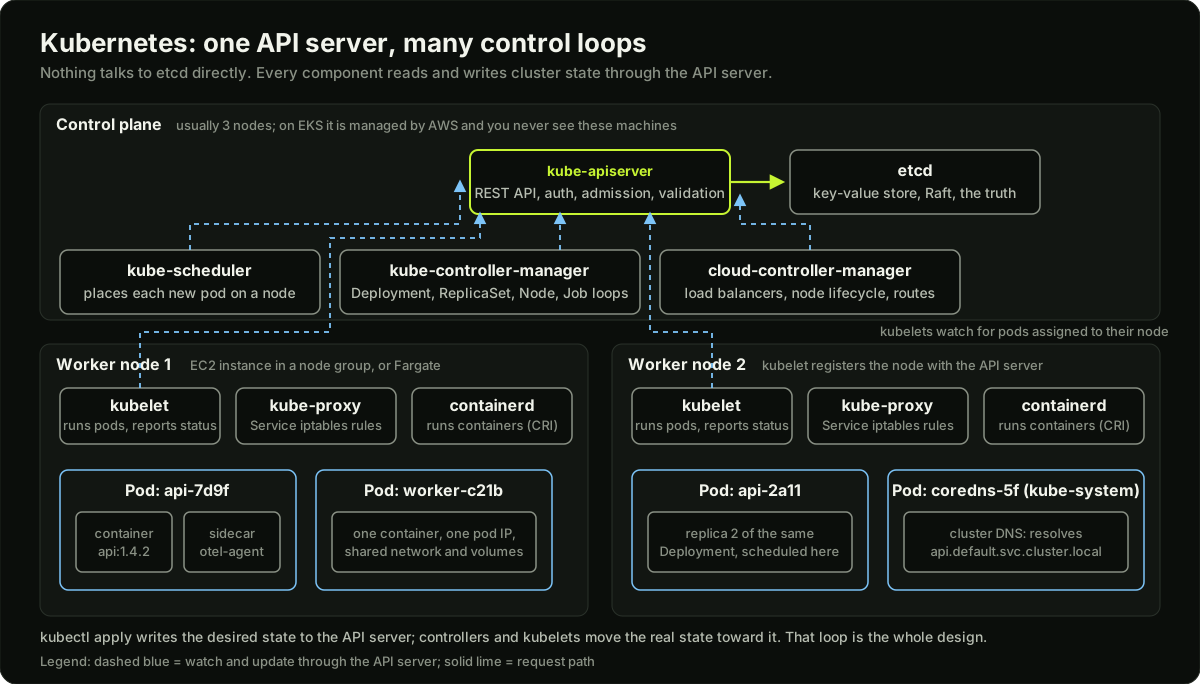 Kubernetes control plane components above two worker nodes, with every component talking to the API server
The control plane is the set of processes that hold the desired state and run the control loops. On a managed service such as Amazon EKS, AWS runs these for you and you only see an API endpoint. On a self-managed cluster they run on three machines so the cluster survives one failing.
The single rule that explains the whole design: nothing talks to etcd except the API server, and every other component is a client of the API server. The scheduler, the controllers and every kubelet all do the same thing: watch for objects they care about and act when they change.
The worker node
A worker node is a machine (an EC2 instance in an EKS node group, a VM, or a bare-metal host) that runs pods. Three processes live on every node.
- kubelet registers the node with the API server, watches for pods assigned to that node, asks the container runtime to start them, runs the liveness and readiness probes, and reports pod status back.
- container runtime does the actual work of pulling images and starting containers. Kubernetes talks to it through the Container Runtime Interface (CRI); containerd is the usual runtime today. Docker as a runtime was removed from the kubelet in version 1.24, which is why "Kubernetes runs Docker" is now a wrong answer.
- kube-proxy programs the node's networking (iptables rules by default, nftables as the newer mode) so that traffic to a Service's virtual IP is sent to one of the healthy pods behind it. Some network plugins (Cilium) replace it with eBPF programs.
The Pod
A Pod is the smallest thing Kubernetes schedules: one or more containers that share a network namespace (one IP address, one set of ports) and can share volumes. Most pods have one container. A second container in the same pod is a sidecar: a log shipper, a proxy, an agent. Containers in a pod are always scheduled together on the same node.
Pods are disposable. A pod is never moved or repaired; when its node dies, the pod is gone and a controller creates a new one with a new name and IP. This is why you almost never create a bare pod by hand and why nothing should depend on a pod's IP.
The pod lifecycle, as kubectl get pods shows it:
"Running" means a process started. It says nothing about whether the application works. That is what probes are for.
Deployments and ReplicaSets
A ReplicaSet keeps N identical pods running. Its controller counts pods matching a label selector; too few, it creates; too many, it deletes. A Deployment owns ReplicaSets and handles change. When you update the image in a Deployment, the Deployment controller creates a new ReplicaSet and shifts pods from old to new in steps, bounded by two settings.
apiVersion: apps/v1
kind: Deployment
metadata:
  name: api
  labels:
    app: api
spec:
  replicas: 3
  selector:
    matchLabels:
      app: api
  strategy:
    type: RollingUpdate
    rollingUpdate:
      maxSurge: 1          # up to 4 pods during the rollout
      maxUnavailable: 0    # never drop below 3 ready pods
  template:
    metadata:
      labels:
        app: api
    spec:
      containers:
        - name: api
          image: 123456789012.dkr.ecr.ap-south-1.amazonaws.com/api:1.4.2
          ports:
            - containerPort: 8080
          resources:
            requests:
              cpu: 250m
              memory: 256Mi
            limits:
              memory: 512Mi
          readinessProbe:
            httpGet:
              path: /healthz
              port: 8080
            periodSeconds: 5
          livenessProbe:
            httpGet:
              path: /healthz
              port: 8080
            initialDelaySeconds: 20
            periodSeconds: 10
Three parts of this file matter in every interview. The selector must match the template labels, or the Deployment cannot find its own pods. requests are what the scheduler uses to place the pod and limits are what the kernel enforces. The readiness probe decides whether the pod receives traffic; the liveness probe decides whether kubelet restarts it. A liveness probe that is too aggressive is the classic self-inflicted outage: the app is slow to start, liveness fails, kubelet restarts it, and it never finishes starting.
kubectl rollout status deployment/api follows a rollout, kubectl rollout history lists revisions, and kubectl rollout undo goes back one revision, which is the fastest rollback in Kubernetes because the old ReplicaSet still exists at zero replicas.
Services: a stable address for disposable pods
Pods come and go with new IPs, so clients need something stable. A Service is a virtual IP and a DNS name that load-balances across the pods selected by a label. The EndpointSlice controller keeps the list of ready pod IPs behind the Service current; kube-proxy turns that list into forwarding rules on every node. Only pods that pass their readiness probe are in the list.
Most clusters expose many HTTP services through one load balancer plus an Ingress (or the newer Gateway API), which routes by host and path. That is the next lesson.
ConfigMaps, Secrets and Namespaces
A ConfigMap holds non-secret configuration (key-value pairs or whole files) and a Secret holds credentials. Both reach a pod as environment variables or as files in a mounted volume. A Secret is base64-encoded in the API, which is encoding, not encryption: anyone with read access to Secrets in a namespace can read every value. Real protection comes from RBAC, from encrypting etcd at rest, and from pulling secrets from a manager such as AWS Secrets Manager with the External Secrets Operator.
A Namespace is a scope for names and for access control. api in payments and api in search are different objects. Namespaces are where you attach RBAC roles, resource quotas and network policies, so one team's mistake stays inside its namespace.
Other objects you will meet soon: DaemonSet (one pod per node, used for log and metrics agents), StatefulSet (pods with stable names and their own disks, for databases and Kafka), Job and CronJob (run to completion), HorizontalPodAutoscaler (change replicas from metrics), PersistentVolumeClaim (ask for a disk).
What happens when you run kubectl apply
This is the question that separates people who have used Kubernetes from people who understand it. The sequence diagram below is the answer; in words:
- kubectl reads your YAML, authenticates with the cluster from your kubeconfig, and sends a request to the API server.
- The API server authenticates and authorises you, runs admission controllers (which can reject or mutate the object), validates the schema and writes the Deployment to etcd.
- The Deployment controller sees a new Deployment and creates a ReplicaSet. The ReplicaSet controller sees it and creates three Pod objects with no node assigned.
- The scheduler sees three unscheduled pods, filters nodes that have room and match constraints, scores the rest and writes the chosen node name into each pod.
- The kubelet on each chosen node sees a pod assigned to it, pulls the image through containerd, sets up networking through the CNI plugin, starts the containers and begins probing.
- Once a pod's readiness probe passes, the EndpointSlice controller adds its IP behind the Service, kube-proxy updates the rules on every node, and traffic flows.
Nothing in that chain is a direct call from one component to the next. Each step is a component noticing a change in the API server and acting on it. That is why a crashed controller does not lose work: when it restarts, it reads the current state and continues.
The kubectl commands to know cold
kubectl get pods -n payments -o wide            # phase, restarts, node, IP
kubectl describe pod api-7d9f6b7c5-x2k4p         # events at the bottom tell you why
kubectl logs api-7d9f6b7c5-x2k4p --previous      # logs of the last crashed container
kubectl exec -it api-7d9f6b7c5-x2k4p -- sh       # a shell inside the container
kubectl get events --sort-by=.lastTimestamp      # what the cluster did recently
kubectl rollout status deployment/api            # follow a release
kubectl rollout undo deployment/api              # fastest rollback
kubectl scale deployment/api --replicas=5
kubectl get svc,endpointslices -n payments       # is anything behind the Service?
kubectl top pods                                 # CPU and memory, needs metrics-server
kubectl explain deployment.spec.strategy         # built-in reference for any field
Backing up and restoring etcd on a self-managed cluster
On EKS you never touch etcd. On a cluster you run yourself (kubeadm, on-prem, CKA exam style), backing it up is your job, because losing etcd means losing every object in the cluster. The client tool is etcdctl; since etcd 3.5 the offline tasks (checking and restoring a snapshot) moved to etcdutl, and the etcdctl versions of those commands are deprecated.
# Take a snapshot from a running member (kubeadm certificate paths)
ETCDCTL_API=3 etcdctl --endpoints=https://127.0.0.1:2379 \
  --cacert=/etc/kubernetes/pki/etcd/ca.crt \
  --cert=/etc/kubernetes/pki/etcd/server.crt \
  --key=/etc/kubernetes/pki/etcd/server.key \
  snapshot save /backup/etcd-$(date +%F).db

# Check the file: hash, revision, number of keys, size
etcdutl --write-out=table snapshot status /backup/etcd-2026-11-04.db

# Restore into a NEW data directory, then point etcd at it
etcdutl --data-dir /var/lib/etcd-restore snapshot restore /backup/etcd-2026-11-04.db
# kubeadm: edit /etc/kubernetes/manifests/etcd.yaml so the etcd-data hostPath
# is /var/lib/etcd-restore; kubelet restarts the static etcd pod by itself
Three rules matter. Restore into a new directory, or stop etcd and delete the old one first. Copy snapshots off the machine, because a backup on the node that died is no backup. And test a restore on a scratch cluster, since a snapshot nobody restored is only a hope. A snapshot holds Secrets, so encrypt it and treat it like a credential.
Where EKS differs
On Amazon EKS, AWS runs the control plane across three availability zones and you pay a flat hourly fee for it. You choose how worker nodes run: managed node groups (EC2 instances AWS creates and upgrades for you), self-managed nodes, or Fargate (no nodes at all; each pod gets its own micro VM). Identity is tied to IAM: your kubectl token comes from your AWS credentials, and pods get AWS permissions through IAM Roles for Service Accounts (IRSA) or the newer EKS Pod Identity, so a pod can read an S3 bucket without any access key in a Secret. Networking uses the VPC CNI plugin, which gives each pod a real VPC IP address. The details are in the production lesson; for now, remember that the architecture is identical and only who operates each part changes.
Diagram
Worked example
A rolling update with maxSurge 1 and maxUnavailable 0. The Deployment above runs 3 replicas of api:1.4.2. You change the image to api:1.5.0 and apply.
Step 1. The Deployment controller creates ReplicaSet api-6c8d (new) with 0 pods and keeps api-7d9f (old) at 3. The rules allow at most 3 + 1 = 4 pods in total and require at least 3 - 0 = 3 ready pods at all times.
Step 2. New ReplicaSet scales to 1. Total pods: 4. The new pod is scheduled, pulls the image and starts probing. Until its readiness probe passes it is not in the Service, so users still only reach the 3 old pods.
Step 3. The new pod becomes ready. Now 4 pods are ready, which is more than the required 3, so the old ReplicaSet scales from 3 to 2. The terminated pod gets SIGTERM, is removed from the Service endpoints, and has terminationGracePeriodSeconds (default 30) to finish in-flight requests before SIGKILL.
Step 4. Total is back to 3, so the new ReplicaSet may surge again to 2. Repeat: new ready, old down to 1; new up to 3, old down to 0.
Count the stages: the rollout takes 3 surge-and-shrink cycles. If a pod takes 40 seconds to pull and become ready, the release takes about 2 minutes. With maxUnavailable: 1 instead, the controller could delete an old pod first and run the rollout with 2 ready pods at times, which is faster but drops capacity by a third. With 30 replicas and the defaults, maxSurge: 25% (rounded up to 8) and maxUnavailable: 25% (rounded down to 7), the controller may run up to 38 pods and must keep at least 23 ready, so it moves 7 to 8 pods per cycle and the rollout finishes in about 4 cycles.
Now suppose api:1.5.0 crashes on start. The new pod enters CrashLoopBackOff and never becomes ready. The old ReplicaSet never shrinks, because the "at least 3 ready" rule holds it at 3. Users see no error. After progressDeadlineSeconds (default 600) the Deployment reports ProgressDeadlineExceeded, and kubectl rollout undo scales the old ReplicaSet back and removes the bad one. This is the property interviewers want you to state: with maxUnavailable: 0 and a working readiness probe, a broken image cannot take down the running version.
Runnable code
"""A toy ReplicaSet controller and a rolling update, to make the control loop concrete.

Everything is in memory: 'nodes' are dicts, 'pods' are dicts. The reconcile
function does exactly what the real controller does: compare desired to
actual, then create or delete. The rollout obeys maxSurge and maxUnavailable.
"""
import itertools

counter = itertools.count(1)


def new_pod(rs_name, image):
    return {"name": f"{rs_name}-{next(counter):04d}", "rs": rs_name, "image": image, "ready": False}


def reconcile_replicaset(pods, rs_name, image, desired):
    """One pass of the ReplicaSet control loop. Returns the actions it took."""
    mine = [p for p in pods if p["rs"] == rs_name]
    actions = []
    while len(mine) < desired:
        p = new_pod(rs_name, image)
        pods.append(p)
        mine.append(p)
        actions.append(f"create {p['name']}")
    while len(mine) > desired:
        victim = sorted(mine, key=lambda p: p["ready"])[0]  # not-ready pods are deleted first
        pods.remove(victim)
        mine.remove(victim)
        actions.append(f"delete {victim['name']}")
    return actions


def ready_count(pods):
    return sum(p["ready"] for p in pods)


def rolling_update(pods, old_rs, new_rs, new_image, replicas, max_surge, max_unavailable, image_works=True):
    """Shift pods from old_rs to new_rs without breaking the two bounds."""
    max_total = replicas + max_surge
    min_ready = replicas - max_unavailable
    old_desired, new_desired = replicas, 0
    for step in range(1, 20):
        # Scale the new ReplicaSet up as far as the surge bound allows.
        new_desired = min(replicas, max_total - old_desired)
        acts = reconcile_replicaset(pods, new_rs, new_image, new_desired)
        # kubelet starts the new pods; readiness depends on whether the image works.
        for p in pods:
            if p["rs"] == new_rs and not p["ready"] and image_works:
                p["ready"] = True
        # Scale the old ReplicaSet down only while the ready bound holds.
        while old_desired > 0 and ready_count(pods) - 1 >= min_ready:
            old_desired -= 1
            acts += reconcile_replicaset(pods, old_rs, "old", old_desired)
        print(f"step {step}: ready={ready_count(pods)} total={len(pods)} "
              f"old={old_desired} new={new_desired} | {', '.join(acts) or 'no change'}")
        if old_desired == 0 and new_desired == replicas:
            return True
        if not acts and not image_works:
            print("   stuck: new pods never become ready, old pods stay; this is where rollout undo helps")
            return False
    return False


if __name__ == "__main__":
    pods = []
    print("initial reconcile:", reconcile_replicaset(pods, "api-7d9f", "api:1.4.2", 3))
    for p in pods:
        p["ready"] = True

    print("\nnode failure: two pods vanish")
    pods[:] = pods[1:2]
    print("reconcile:", reconcile_replicaset(pods, "api-7d9f", "api:1.4.2", 3))
    for p in pods:
        p["ready"] = True
    assert len(pods) == 3 and ready_count(pods) == 3

    print("\nrolling update 1.4.2 -> 1.5.0, maxSurge=1, maxUnavailable=0")
    ok = rolling_update(pods, "api-7d9f", "api-6c8d", "api:1.5.0", 3, 1, 0)
    assert ok and all(p["image"] == "api:1.5.0" for p in pods)
    assert ready_count(pods) == 3

    print("\nrolling update to a broken image 1.5.1")
    ok = rolling_update(pods, "api-6c8d", "api-9a1e", "api:1.5.1", 3, 1, 0, image_works=False)
    assert not ok
    assert sum(p["image"] == "api:1.5.0" and p["ready"] for p in pods) == 3
    print("\nthe three working pods were never touched: maxUnavailable=0 protected the service")
Key takeaways
Kubernetes is declarative: you write desired state to the API server and control loops make the cluster match it.
Every component is a client of the API server; only the API server talks to etcd. Back up etcd.
A Pod is one or more containers sharing an IP and volumes; it is disposable and is never repaired, only replaced.
A Deployment manages ReplicaSets and rolls out changes within maxSurge and maxUnavailable; rollout undo is the fastest rollback.
A Service is a stable virtual IP and DNS name in front of pods that pass their readiness probe.
Running means a process started; readiness means it can take traffic; liveness means kubelet should restart it if it fails.
Secrets are base64, not encrypted: protect them with RBAC, etcd encryption and an external secrets manager.
On EKS the architecture is identical; AWS runs the control plane and IAM provides identity for users and pods.
Common mistakes
Saying "Kubernetes runs Docker". Kubernetes talks to a runtime through CRI, and containerd is the common one; the Docker shim was removed in 1.24.
A liveness probe with a short timeout on a slow-starting app, which restarts a healthy container forever.
A Deployment with no resource requests, which the scheduler treats as needing nothing and packs onto an overloaded node.
Treating base64 Secrets as encryption.
Using a pod IP or a pod name in configuration; both change on every restart.
Debugging with
kubectl get podsalone and never reading the Events inkubectl describe.
Practice
Install a local cluster (kind or minikube), apply the Deployment from this lesson, and watch
kubectl get pods -wwhile you change the image tag. Note how many pods exist at the peak and confirm it matches maxSurge.Break the image tag on purpose, watch the rollout stall, run
kubectl rollout undo, and time how long the recovery takes.Delete a pod by hand and confirm the ReplicaSet replaces it within seconds; then scale the Deployment to 0 and back to 3.
Create a ClusterIP Service and a busybox pod, and resolve
api.default.svc.cluster.localfrom inside it with nslookup. Then remove the readiness probe path and confirm the pod leaves the EndpointSlice.
Interview questions (12)
1.Walk me through what happens when you run kubectl apply on a Deployment.Medium
kubectl sends the object to the API server, which authenticates me, checks RBAC, runs admission controllers, validates the schema and stores it in etcd. The Deployment controller notices the new object and creates a ReplicaSet; the ReplicaSet controller creates the pods with no node set. The scheduler sees unscheduled pods, filters and scores nodes using the resource requests and constraints, and writes a node name into each pod. The kubelet on that node sees the pod, pulls the image through the container runtime, sets up networking with the CNI plugin, starts the containers and runs the probes. When readiness passes, the EndpointSlice controller adds the pod IP to the Service and kube-proxy updates the forwarding rules on every node. Each step is a component watching the API server, not a direct call between components.
2.What is the difference between a Pod, a ReplicaSet and a Deployment?Easy
A Pod is the unit of scheduling: one or more containers sharing a network namespace and volumes. A ReplicaSet keeps a fixed number of identical pods running by comparing the count of pods matching a label selector with the number it wants. A Deployment owns ReplicaSets and adds change management: when you update the template, it creates a new ReplicaSet and shifts pods over in steps bounded by maxSurge and maxUnavailable, and it keeps old ReplicaSets so you can roll back. You almost always write Deployments and let them manage the other two.
3.A pod shows Running but users get errors. What do you check?Medium
Running only means a container process started. First I check readiness: kubectl get endpointslices for the Service shows whether this pod's IP is in the list; if the readiness probe fails the pod gets no traffic, and if there is no readiness probe a broken app gets traffic. Then logs with kubectl logs, and kubectl describe for restarts and OOMKilled in the last state. Then the path to the pod: does the Service selector match the pod labels, is the targetPort the port the app listens on, and does the ingress route to the right Service. If all of that is right, the app itself is returning errors and I look at its dependencies.
4.What does a Service do, and what is the difference between ClusterIP, NodePort and LoadBalancer?Easy
A Service gives a stable virtual IP and DNS name to a changing set of pods selected by labels, and load-balances across the ones that are ready. ClusterIP is reachable only inside the cluster and is the default for service-to-service traffic. NodePort opens the same port on every node, which is useful for demos and some on-prem setups but rarely in production. LoadBalancer asks the cloud controller to create an external load balancer, on EKS an NLB, that forwards to the pods. In practice you expose many HTTP services through one LoadBalancer plus an Ingress that routes by host and path.
5.Explain readiness and liveness probes and the common mistake with them.Medium
A readiness probe tells Kubernetes whether the pod can take traffic; while it fails the pod is removed from the Service endpoints but not restarted. A liveness probe tells kubelet whether the process is stuck; when it fails kubelet restarts the container. The common mistake is a liveness probe that is stricter than the application: a short initialDelaySeconds on an app that takes a minute to warm up, or a liveness check that calls the database, so a database slowdown causes every pod to restart and the outage gets worse. Liveness should check only that the process itself is alive; readiness can check dependencies. Startup probes exist for slow starters.
6.Why do you set resource requests and limits, and what happens without them?Medium
Requests are what the scheduler reserves when placing the pod, so without them the scheduler thinks the pod needs nothing and can pack a node past what it can handle. Limits are enforced at runtime: a memory limit makes the kernel OOM-kill the container when it is exceeded, and a CPU limit throttles it. Requests also decide the QoS class, which decides which pods are evicted first when a node runs out of memory. A good default is to set memory requests equal to limits, to set CPU requests from measurement, and to be careful with CPU limits because throttling causes latency that is hard to see.
7.How does a rolling update avoid downtime?Medium
The Deployment controller creates a new ReplicaSet and moves pods over within two bounds: maxSurge, the extra pods allowed above the desired count, and maxUnavailable, how far below the desired count the ready pods may fall. With maxUnavailable 0 the controller only removes an old pod after a new one has passed its readiness probe, so the ready count never drops. If the new image crashes, the new pods never become ready, the old ones are never removed, and after progressDeadlineSeconds the rollout is marked failed. The release needs a correct readiness probe and graceful shutdown on SIGTERM to be truly zero-downtime.
8.How do you back up and restore etcd on a self-managed cluster?Medium
I take a snapshot from a running member with etcdctl snapshot save, passing the endpoint and the CA, client certificate and key (on kubeadm they live in /etc/kubernetes/pki/etcd/). I check it with etcdutl snapshot status, copy it off the node, encrypt it because it contains Secrets, and run this on a schedule. To restore, I use etcdutl snapshot restore into a new data directory, then change the etcd static pod manifest so its data hostPath points there, and kubelet restarts etcd. If the etcd addresses changed, the API servers need the new --etcd-servers. Since etcd 3.5 the restore and status commands in etcdctl are deprecated in favour of etcdutl. I test restores on a scratch cluster, because an untested backup is not a backup. On EKS none of this is my job; AWS runs etcd.
9.What is etcd and why does it matter to you as an operator?Easy
etcd is the consistent key-value store that holds every Kubernetes object; it is the only stateful part of the control plane. It uses the Raft consensus protocol, so it runs as 3 or 5 members and keeps working while a minority is down. As an operator it matters in three ways: it must be backed up, because losing it means losing the cluster's state; its disk latency sets the speed of the whole API; and its contents include Secrets, so it should be encrypted at rest. On EKS, AWS runs and backs up etcd, which is a large part of what the control plane fee pays for.
10.What is the difference between a ConfigMap and a Secret?Easy
Both hold configuration that pods consume as environment variables or mounted files, and both are stored in etcd. A ConfigMap is for non-sensitive values. A Secret is for credentials and its values are base64-encoded in the API, which is only an encoding, so anyone who can read Secrets in the namespace can read the values. The actual protection is RBAC on the Secret resource, encryption of etcd at rest, and not storing the real secret in Git at all: sync it from AWS Secrets Manager or Vault with the External Secrets Operator.
11.How does EKS differ from running Kubernetes yourself?Medium
The architecture is the same; AWS operates the control plane across three zones and you never log in to those machines. You run worker nodes as managed node groups, self-managed instances, or Fargate where each pod gets its own micro VM. Authentication maps IAM identities to Kubernetes users, and pods get AWS permissions through IAM Roles for Service Accounts or Pod Identity instead of access keys. The VPC CNI gives each pod a VPC IP, which affects how many pods fit on a node. You still own upgrades of nodes and add-ons, cluster autoscaling, observability, cost and everything inside the cluster.
12.What is a Namespace for, and what does it not do?Easy
A Namespace scopes names, RBAC roles, resource quotas and network policies, so teams or environments can share one cluster without colliding. The same name can exist in two namespaces as two different objects. It does not isolate the network by itself: pods in different namespaces can reach each other unless a NetworkPolicy says otherwise. It also does not isolate nodes or the kernel, so it is not a security boundary against a malicious workload; for that you need separate clusters or node pools with runtime sandboxing.
Quiz
1.Which component is the only one that reads and writes etcd?
2.A Deployment has replicas 3, maxSurge 1 and maxUnavailable 0. What is the minimum number of ready pods during a rollout?
3.A container keeps exiting and the pod shows CrashLoopBackOff. Which command shows why it crashed?
4.Which statement about Kubernetes Secrets is true?
5.Which probe failure causes kubelet to restart the container?
Practice these problems
- DESIGNProduction EKS cluster for a 30-engineer startupHard
- OPSPod stuck in CrashLoopBackOffEasy
- OPSPods Pending and ImagePullBackOff after a node group changeEasy
- OPSDeploy rolled out, users see errors, readiness probes flappingMedium
- CODEKubernetes manifests: Deployment, Service, Ingress and HPA with probes and limitsMedium
Further reading
My notes
Your notes
Autosaves to this browser.