AWS managed platforms - EKS, ECS, Fargate, Lambda, SQS, ElastiCache, CloudFront
AWS offers five ways to run a workload: EC2 with an Auto Scaling group, ECS, EKS, Fargate, and Lambda. This lesson is about choosing between them and about EKS as an AWS product: node groups and Auto Mode, the VPC CNI, Pod Identity, access entries, add-ons and the load balancer controller. It also covers the services that sit beside the cluster: SQS and SNS, ElastiCache, CloudFront, and Secrets Manager through the External Secrets Operator.
Why it matters
Interviewers rarely ask "what is EKS". They ask "ECS or EKS for this team, and why", "how does a pod get AWS permissions", "why are your pods stuck Pending with no IPs", "what happens to a message when the consumer crashes". Each has a precise answer tied to a specific AWS feature. On the job, the same features decide the monthly bill (control plane, NAT, extended support), the upgrade plan (support windows, node group rollouts) and whether a traffic spike turns into a queue backlog or a cold-start storm. The resume this site targets lists EKS, ECS, Aurora, ElastiCache and Cloudflare at the edge; this lesson is that list.
Read first: Containers and Docker, AWS core - IAM, VPC, EC2, S3, RDS, load balancers, autoscaling
Lesson
Choosing a compute platform
The honest rule: a team of three with five services should not run EKS; ECS on Fargate gives them rolling deploys, load balancing and logs with a tenth of the surface area. A company with 30 services, several teams, Helm charts and operators needs the Kubernetes API and should pay the EKS tax. Lambda is for the edges of a system (webhooks, S3 triggers, scheduled jobs), not for a long-running API at a steady 500 requests per second, where it costs more than a few Fargate tasks.
ECS: enough for most teams
An ECS cluster is a logical group. A task definition is the unit of deployment: one or more containers with image, CPU and memory, ports, environment, secrets (from Secrets Manager or Parameter Store by ARN), the log driver and the task role (the IAM role the application uses) plus the execution role (the role ECS uses to pull the image and fetch secrets). A task is a running copy. A service keeps N tasks running, registers them in a load balancer target group, and replaces failed ones. The launch type is Fargate (AWS runs the hosts, one task per micro VM, you pick a CPU and memory pair such as 1 vCPU with 2 GB) or EC2 (your instances join the cluster through the ECS agent). Images come from ECR; private subnets need the ecr.api, ecr.dkr and S3 gateway endpoints to pull without a NAT, and Fargate tasks logging with awslogs need the CloudWatch Logs endpoint too.
Rolling updates are controlled by minimumHealthyPercent and maximumPercent (defaults 100 and 200 for a replica service), and the deployment circuit breaker stops a deployment whose tasks keep failing and rolls back to the last good revision. Since July 2025, ECS also has a built-in blue/green strategy with lifecycle hooks, so CodeDeploy is no longer required for it. Service Connect gives tasks a service mesh style DNS name and metrics without a sidecar you manage. The week 30 project is exactly this: push an image to ECR, write a task definition, create a service behind an ALB, and watch it roll.
{
  "family": "api",
  "requiresCompatibilities": ["FARGATE"],
  "networkMode": "awsvpc",
  "cpu": "1024",
  "memory": "2048",
  "taskRoleArn": "arn:aws:iam::123456789012:role/api-task",
  "executionRoleArn": "arn:aws:iam::123456789012:role/ecs-exec",
  "containerDefinitions": [{
    "name": "api",
    "image": "123456789012.dkr.ecr.ap-south-1.amazonaws.com/api@sha256:9f1c2e3a4b5c6d7e8f901234567890abcdef1234567890abcdef1234567890ab",
    "portMappings": [{"containerPort": 8080}],
    "secrets": [{"name": "DB_PASSWORD", "valueFrom": "arn:aws:secretsmanager:ap-south-1:123456789012:secret:prod/api/db-AbCdEf"}],
    "healthCheck": {"command": ["CMD-SHELL", "curl -sf localhost:8080/healthz || exit 1"], "interval": 30, "retries": 3},
    "logConfiguration": {"logDriver": "awslogs", "options": {"awslogs-group": "/ecs/api", "awslogs-region": "ap-south-1", "awslogs-stream-prefix": "api"}}
  }]
}
EKS as a product
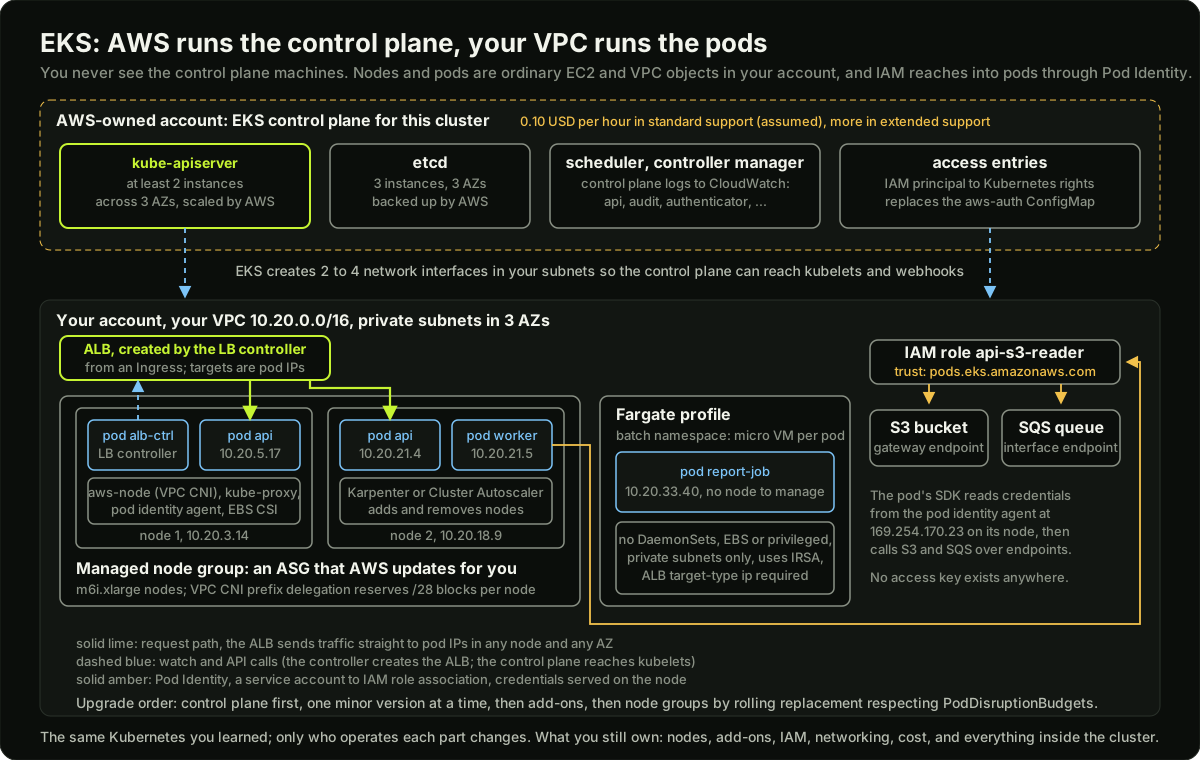 EKS control plane in an AWS-owned account above a customer VPC that holds a managed node group, a Fargate profile, an ALB created by the load balancer controller, and a Pod Identity path from a pod to an IAM role and on to S3 and SQS
Control plane. EKS runs at least two API server instances and three etcd instances across three AZs, in an account AWS owns, and creates two to four network interfaces in your subnets so it can reach kubelets and admission webhooks. Your subnets must span at least two AZs with at least six free IPs each (16 recommended). The control plane costs a flat hourly fee (an assumed 0.10 USD per hour, about 73 USD a month) and the API endpoint can be public, private, or both; production uses private plus a public endpoint restricted to office and CI ranges.
Versions and support. A Kubernetes minor version gets 14 months of standard support on EKS, then 12 months of extended support at a higher hourly price (an assumed 0.60 USD per hour), and a cluster that is still on the version when extended support ends is upgraded automatically with no notice. Extended support is on by default; turn it off if you would rather be forced to upgrade than pay six times the control plane fee. Upgrade order: control plane one minor at a time, then add-ons, then nodes.
Where nodes come from.
Networking: the VPC CNI. Every pod gets a real VPC IP from the node's subnet. A node can only attach so many network interfaces and each interface only so many IPs, so an m6i.xlarge is capped at a few dozen pods and a cluster can run out of subnet addresses long before it runs out of CPU. Prefix delegation fixes both: the CNI attaches /28 blocks (16 addresses) instead of single IPs, so the pod limit per node rises to the managed node group cap of 110 (250 for instances with 30 or more vCPUs). It needs Nitro instances and contiguous free /28 blocks in the subnet, which is why pod subnets are large and separate.
kubectl set env daemonset aws-node -n kube-system ENABLE_PREFIX_DELEGATION=true
kubectl describe node ip-10-20-5-17.ap-south-1.compute.internal | grep -E 'pods|PrivateIPv4Address'
Identity. Humans and CI get into the cluster through access entries: an IAM principal is mapped to a Kubernetes group or to an AWS access policy (AmazonEKSClusterAdminPolicy, AmazonEKSAdminPolicy, AmazonEKSEditPolicy, AmazonEKSViewPolicy), managed through the EKS API and Terraform, with the authentication mode API or API_AND_CONFIG_MAP. This replaces the aws-auth ConfigMap, whose one typo could lock everyone out. Pods get AWS permissions in one of two ways:
- IRSA (IAM Roles for Service Accounts): the cluster has an OIDC issuer; a role's trust policy names that issuer and the service account; the pod gets a projected token that the SDK exchanges for credentials. Works on Fargate and outside EKS, but every new cluster means editing every trust policy.
- Pod Identity: install the
eks-pod-identity-agentadd-on, create a role whose trust policy namespods.eks.amazonaws.comonce, and create an association between the role and a service account. The agent on each node hands out credentials at169.254.170.23. Simpler, one trust policy for every cluster, but EC2 nodes only.
aws eks create-pod-identity-association --cluster-name prod \
  --namespace payments --service-account api \
  --role-arn arn:aws:iam::123456789012:role/payments-api
Add-ons. vpc-cni, coredns and kube-proxy are installed on every cluster; aws-ebs-csi-driver (PersistentVolumes on EBS, one AZ each), aws-efs-csi-driver (shared ReadWriteMany), eks-pod-identity-agent, amazon-cloudwatch-observability and adot are AWS add-ons you turn on, and metrics-server, cert-manager, external-dns and kube-state-metrics are community add-ons managed the same way. The AWS Load Balancer Controller is installed with Helm (an IAM policy plus Pod Identity for its service account): an Ingress with ingressClassName: alb becomes an ALB, a Service of type LoadBalancer becomes an NLB, and alb.ingress.kubernetes.io/target-type: ip sends traffic straight to pod IPs across any node. Subnets need the tags kubernetes.io/role/elb=1 (public) and kubernetes.io/role/internal-elb=1 (private) for discovery. Karpenter runs on a small managed node group or Fargate (never on nodes it manages) and launches right-sized instances from a NodePool and EC2NodeClass, with consolidation and Spot interruption handling; Auto Mode is Karpenter run by AWS.
Logging and cost. Control plane logs (api, audit, authenticator, controllerManager, scheduler) are off by default; turn on at least audit and authenticator and they land in /aws/eks/<cluster>/cluster. The bill is control plane plus nodes plus the NAT and load balancers around them; the control plane is the smallest line. eksctl creates a working cluster in one command and is fine for a lab; production clusters are Terraform, so the VPC, IAM, access entries and add-ons are reviewed in a pull request.
Kubernetes concept to AWS resource
Lambda and serverless
A Lambda function is code with a handler, a runtime, memory from 128 MB to 10,240 MB (CPU scales with memory; 1,769 MB is one vCPU), a timeout up to 15 minutes, 512 MB of /tmp by default, and an execution role. A cold start is the time to create a new execution environment and run the initialisation code before the first request; it hits the first request after idle and every new concurrent request during a burst. Concurrency is the number of requests in flight at once, equal to requests per second times average duration in seconds; the default account limit is 1,000 per Region, reserved concurrency fences a function off, and provisioned concurrency keeps environments warm for a charge. API Gateway puts an HTTPS endpoint in front (HTTP APIs are cheaper and simpler; REST APIs add usage plans, API keys, WAF, caching and request validation). EventBridge routes events on a schedule or from AWS services to a function or a queue. The week 33 material is this: a function behind API Gateway, one triggered by an S3 upload, one on a schedule, each with its own role.
Messaging: SQS, SNS, and where streams fit
An SQS standard queue gives at-least-once delivery, best-effort ordering and nearly unlimited throughput; a FIFO queue gives exactly-once processing and strict order within a message group at 300 operations per second per API action (3,000 with batching, more in high-throughput mode). A consumer calls ReceiveMessage with WaitTimeSeconds=20 (long polling, fewer empty responses) and gets a receipt handle. The message is then hidden for the visibility timeout (default 30 seconds, maximum 12 hours); if the consumer deletes it in time it is gone, otherwise it reappears and another consumer gets it. Set the visibility timeout to the longest honest processing time, or extend it with ChangeMessageVisibility as a heartbeat. A redrive policy with maxReceiveCount moves a message that keeps coming back to a dead-letter queue (same type, same account and Region, longer retention than the source), where you inspect it and redrive it when the bug is fixed. Because delivery is at-least-once, handlers must be idempotent.
SNS is fan-out: one publish, many subscribers (queues, Lambda, HTTP, email); SNS into several SQS queues is how one event reaches several services. Redis streams (the week 31 project: workers and pushers) fit when the producer and consumers already share a Redis and you want consumer groups with sub-millisecond latency; Kafka (MSK) fits when you need replayable logs, ordering per partition at high volume, and many consumer groups reading the same history. SQS is the default for work queues on AWS because there is nothing to size or patch.
ElastiCache, CloudFront and the edge
ElastiCache runs Valkey, Redis OSS and Memcached, either serverless or as node-based clusters you size. The common pattern is cache-aside: read the cache, on a miss read the database and write the value back with a TTL so stale data expires on its own; put a small random jitter on TTLs so a thousand keys do not expire together and stampede the database. Cluster mode disabled is one shard with up to 5 replicas, one primary endpoint for writes and a reader endpoint; cluster mode enabled shards the key space across up to 500 shards, each with its own replicas, and clients connect through the configuration endpoint with a cluster-aware library. Use it for sessions, rate-limit counters and hot reads; watch evictions, and never make it the only copy of anything.
CloudFront is the CDN: edge locations cache objects from an origin (S3 with origin access control so the bucket stays private, or an ALB) and serve them close to users; objects stay 24 hours by default unless Cache-Control says otherwise. AWS WAF attaches to CloudFront or an ALB with managed rule sets and rate-based rules; Shield absorbs network-layer DDoS. CloudFront Functions run sub-millisecond JavaScript at the edge on viewer requests and responses (header rewrites, redirects, simple auth); Lambda@Edge runs Node.js or Python on origin requests too, with up to 30 seconds and network access. The pattern on the target resume is a CDN or edge worker (Cloudflare Workers do the same job) in front of the origin: TLS, caching, WAF, rate limiting and bot rules happen before a request reaches the ALB, and the origin only accepts traffic from the CDN.
Secrets Manager through the External Secrets Operator
Application code should not call Secrets Manager directly, and Kubernetes Secrets should not be committed to Git. The External Secrets Operator (ESO) runs in the cluster, authenticates to AWS with Pod Identity or IRSA on its own service account, and syncs a SecretStore or ClusterSecretStore into ordinary Kubernetes Secret objects from ExternalSecret resources, refreshing on an interval so rotation in Secrets Manager reaches the pod on the next restart or reload. With Pod Identity, the store has no auth block at all.
apiVersion: external-secrets.io/v1
kind: ClusterSecretStore
metadata:
  name: aws-secrets-manager
spec:
  provider:
    aws:
      service: SecretsManager
      region: ap-south-1
---
apiVersion: external-secrets.io/v1
kind: ExternalSecret
metadata:
  name: api-db
  namespace: payments
spec:
  refreshInterval: 1h
  secretStoreRef:
    name: aws-secrets-manager
    kind: ClusterSecretStore
  target:
    name: api-db          # the Kubernetes Secret that gets created
    creationPolicy: Owner
  data:
    - secretKey: DB_PASSWORD
      remoteRef:
        key: prod/api/db      # the Secrets Manager secret name
        property: password    # a key inside its JSON value
Diagram
Worked example
One service at 500 requests per second, three ways. The service is a stateless API; each request takes 50 ms of CPU-bound work and about 0.5 GB of memory is resident. A load test shows one 1 vCPU task holds 200 requests per second at 70 percent CPU. Every price below is an assumption for the arithmetic, not a quote.
ECS on Fargate. 500 / 200 = 2.5, so 3 tasks, plus one for an AZ loss and deploy headroom: 4 tasks of 1 vCPU and 2 GB. Assumed Fargate prices: 0.0405 USD per vCPU-hour and 0.00445 USD per GB-hour. One task per hour: 0.0405 + 2 x 0.00445 = 0.0494 USD. Four tasks: 0.1976 USD per hour, times 730 hours = 144 USD per month. Add an ALB (assumed 20 USD plus traffic) and the NAT and endpoints shared with everything else. Scaling: ECS service auto scaling adds a task in about a minute; a bad image is stopped by the circuit breaker.
EKS with managed nodes. The same 4 pods need 4 vCPU and 8 GB; with the CNI, kube-proxy, CoreDNS, a log agent and 30 percent headroom, that is three m6i.large nodes (2 vCPU, 8 GiB each, one per AZ) at an assumed 0.096 USD per hour: 3 x 0.096 x 730 = 210 USD. Add the control plane, an assumed 0.10 USD per hour = 73 USD. Total 283 USD, twice the Fargate number for one service, and that is the point: the cluster's fixed cost is only worth it once ten services share those nodes, at which point the per-service cost falls below Fargate's. Scaling: HPA adds pods in seconds; Karpenter adds a node in 1 to 2 minutes.
Lambda. Concurrency = 500 requests per second x 0.05 s = 25, far below the 1,000 default. Requests per month: 500 x 86,400 x 30 = 1,296,000,000, or 1,296 million. At an assumed 0.20 USD per million: 259 USD. Duration: 1,296,000,000 x 0.05 s x 0.5 GB = 32,400,000 GB-seconds, at an assumed 0.0000166667 USD per GB-second: 540 USD. Total about 799 USD per month, five times Fargate, before API Gateway's per-request charge, and with cold starts on every burst.
The flip. If the same service only takes traffic 2 hours a day, Lambda costs 799 / 12 = 67 USD, while Fargate still pays for at least 2 tasks around the clock (2 x 0.0494 x 730 = 72 USD) or 4 tasks for 2 hours and 2 for 22: about 77 USD. At that point they are equal and Lambda wins on operations. Steady load favours containers; idle time favours functions; many services favour a shared cluster.
Runnable code
"""An SQS-style queue in memory: visibility timeout, receive count, a redrive
policy with maxReceiveCount, and a dead-letter queue, consumed by 3 worker
threads. One message is a poison message (it always fails), one is slow enough
that its visibility timeout expires once, so it is delivered twice.

No network. Time is real but scaled down: 1 "second" of visibility is 0.05 s.
"""
import threading
import time
from collections import deque

TICK = 0.05                 # one simulated second
VISIBILITY_TIMEOUT = 4      # simulated seconds, like the queue attribute
MAX_RECEIVE_COUNT = 3       # the redrive policy
WORKERS = 3


class Queue:
    """A standard queue: at-least-once delivery, messages hidden while in flight."""

    def __init__(self, name, dlq=None):
        self.name = name
        self.dlq = dlq
        self.lock = threading.Lock()
        self.visible = deque()        # messages anyone may receive
        self.inflight = {}            # receipt_handle -> (message, visible_again_at)
        self.trace = []

    def log(self, line):
        with self.lock:
            self.trace.append(f"{time.monotonic() - T0:5.2f}s  {line}")

    def send(self, body):
        with self.lock:
            self.visible.append({"id": f"m{len(self.visible) + len(self.inflight) + 1}",
                                 "body": body, "receive_count": 0})

    def _expire(self):
        """Messages whose visibility timeout passed become visible again."""
        now = time.monotonic()
        for handle, (msg, until) in list(self.inflight.items()):
            if now >= until:
                del self.inflight[handle]
                self.visible.append(msg)
                self.trace.append(f"{now - T0:5.2f}s  {msg['id']} visibility timeout expired, back in queue")

    def receive(self):
        """Like ReceiveMessage with MaxNumberOfMessages=1. Applies the redrive policy."""
        with self.lock:
            self._expire()
            while self.visible:
                msg = self.visible.popleft()
                msg["receive_count"] += 1
                if self.dlq is not None and msg["receive_count"] > MAX_RECEIVE_COUNT:
                    # SQS moves the message when the receive count passes maxReceiveCount.
                    self.dlq.visible.append(msg)
                    self.trace.append(f"{time.monotonic() - T0:5.2f}s  {msg['id']} receive_count={msg['receive_count']} > {MAX_RECEIVE_COUNT}: moved to {self.dlq.name}")
                    continue
                handle = f"rh-{msg['id']}-{msg['receive_count']}"
                self.inflight[handle] = (msg, time.monotonic() + VISIBILITY_TIMEOUT * TICK)
                return handle, msg
            return None, None

    def delete(self, handle):
        """DeleteMessage: only a deleted message is gone for good."""
        with self.lock:
            self.inflight.pop(handle, None)

    def empty(self):
        with self.lock:
            self._expire()
            return not self.visible and not self.inflight


def handle_message(msg):
    """The business logic. Raises for the poison message; sleeps for the slow one."""
    body = msg["body"]
    if body == "poison":
        raise ValueError("cannot parse order payload")
    if body == "slow" and msg["receive_count"] == 1:
        time.sleep(6 * TICK)      # first attempt is slower than the 4 s visibility timeout
    else:
        time.sleep(1 * TICK)
    return body


def worker(name, queue, processed):
    while True:
        handle, msg = queue.receive()
        if msg is None:
            if queue.empty():
                return
            time.sleep(TICK)      # short poll; real code would use WaitTimeSeconds=20
            continue
        queue.log(f"{name} received {msg['id']} ({msg['body']}) attempt {msg['receive_count']}")
        try:
            result = handle_message(msg)
        except Exception as e:     # noqa: BLE001
            queue.log(f"{name} failed {msg['id']}: {e}; not deleting, it will reappear")
            continue               # no delete: the message comes back after the timeout
        queue.delete(handle)
        with queue.lock:
            processed.append(result)
        queue.log(f"{name} processed and deleted {msg['id']}")


if __name__ == "__main__":
    T0 = time.monotonic()
    dlq = Queue("orders-dlq")
    q = Queue("orders", dlq=dlq)
    for body in ["order-1", "order-2", "poison", "slow", "order-5", "order-6"]:
        q.send(body)

    processed = []
    threads = [threading.Thread(target=worker, args=(f"worker-{i}", q, processed)) for i in range(1, WORKERS + 1)]
    for t in threads:
        t.start()
    for t in threads:
        t.join()

    print("\n".join(q.trace))
    print()
    print("processed:", sorted(processed))
    print("dead-letter queue:", [(m["id"], m["body"], m["receive_count"]) for m in dlq.visible])

    # Self-checks.
    # "slow" appears twice: the first attempt finished after its timeout, so its
    # delete used a stale receipt handle and a second worker had already taken it.
    assert sorted(processed) == ["order-1", "order-2", "order-5", "order-6", "slow", "slow"]
    assert [m["body"] for m in dlq.visible] == ["poison"]
    assert dlq.visible[0]["receive_count"] == MAX_RECEIVE_COUNT + 1
    slow_receives = [l for l in q.trace if "received" in l and "(slow)" in l]
    assert len(slow_receives) == 2, "the slow message must be delivered twice (at-least-once)"
    print("\nself-checks passed: poison message landed in the DLQ after "
          f"{MAX_RECEIVE_COUNT} failed receives; the slow message was processed twice, "
          "which is why handlers must be idempotent")
Key takeaways
Pick the platform by team and workload shape: Lambda for event-driven and bursty, ECS on Fargate for a small team with a few services, EKS when many services and teams need the Kubernetes API, EC2 when you need the box.
EKS runs the API server and etcd for you across three AZs for a flat hourly fee; you run nodes (managed node groups, Fargate, or Auto Mode), add-ons, IAM and networking.
Every pod gets a VPC IP from the VPC CNI; prefix delegation with /28 blocks is what lets a node reach 110 pods and is why pod subnets must be large.
Access entries map IAM principals to cluster rights and replace aws-auth; Pod Identity (or IRSA on Fargate) gives pods an IAM role with no keys.
A Kubernetes version gets 14 months standard plus 12 months extended support on EKS; extended support costs more and is on by default.
SQS hides a received message for the visibility timeout; no delete means redelivery; maxReceiveCount sends repeat failures to a dead-letter queue; handlers must be idempotent.
ElastiCache is cache-aside with TTLs and jitter; cluster mode enabled shards the key space; it is never the only copy of data.
Put CloudFront or an edge worker with WAF and rate limiting in front of the origin, and sync Secrets Manager into the cluster with the External Secrets Operator.
Common mistakes
Choosing EKS for three services and one engineer, then spending the quarter on upgrades and add-ons instead of the product.
Pods stuck Pending with "failed to assign an IP address to pod": the subnet is out of addresses or prefix delegation has no contiguous /28; fixed by bigger pod subnets, not bigger nodes.
Editing the aws-auth ConfigMap by hand on a cluster that uses access entries, or deleting the cluster creator's access and locking everyone out.
Leaving the SQS visibility timeout at 30 seconds for a 2-minute job, so every message is processed twice or three times and the dead-letter queue fills with messages that were actually fine.
Using a Lambda function for a steady high-throughput API and discovering it costs several times what two Fargate tasks would.
Letting a cluster sit in extended support for a year because nobody noticed the control plane line in the bill went up six times.
Practice
Create an EKS cluster with eksctl in a free-tier-friendly size (one small managed node group, two nodes), enable the audit and authenticator control plane logs, install the Pod Identity Agent add-on, and give a pod read access to one S3 bucket through an association; run
aws s3 lsfrom inside the pod and confirm it works with no key in the environment. Delete the cluster when done and check the bill for the control plane hours.On the same cluster, enable prefix delegation and record
podscapacity fromkubectl describe nodebefore and after. Then install the AWS Load Balancer Controller with Helm, tag the subnets, and expose a Deployment through an Ingress withtarget-type: ip; confirm the target group lists pod IPs.Deploy the same container to ECS on Fargate with a task definition that reads a secret from Secrets Manager, behind an ALB, with the circuit breaker on; push a broken image and watch the rollback.
Run the code example, then set
VISIBILITY_TIMEOUTto 8 andMAX_RECEIVE_COUNTto 1 and explain the two changes in the trace; then write a two-line idempotency check inhandle_messageso "slow" is counted once.
Interview questions (11)
1.ECS or EKS for a startup with five services and two DevOps engineers?Medium
ECS on Fargate. Five services need rolling deploys, a load balancer, logs, secrets and auto scaling, and ECS gives all of that with task definitions and services, no nodes to patch, no add-ons to upgrade, and the deployment circuit breaker for rollback. EKS adds a control plane fee, Kubernetes version upgrades every year, the VPC CNI's IP planning, access entries and Pod Identity to set up, and a dozen add-ons to keep current. That is a good trade when there are many teams, Helm charts, operators or a plan to move clouds, and a bad trade for two engineers. I would say so, and name the point at which I would revisit it: around 20 services or when the team wants GitOps with Argo CD.
2.How does a pod on EKS get permission to read an S3 bucket without any access key?Medium
With EKS Pod Identity. I create an IAM role whose trust policy allows pods.eks.amazonaws.com to assume it, attach an S3 read policy scoped to the bucket, and create a pod identity association between that role and the service account in the namespace. The Pod Identity Agent add-on runs on every node and serves credentials at a link-local address; the AWS SDK in the pod finds them through its default credential chain. The older way is IRSA: the cluster's OIDC issuer is registered in IAM, the role's trust policy names the issuer and the service account, and the pod exchanges a projected token for credentials. IRSA still matters on Fargate and outside EKS; Pod Identity is simpler because one trust policy works for every cluster.
3.Pods are stuck Pending and the event says the CNI failed to assign an IP. What happened and how do you fix it?Medium
Every pod needs a VPC IP, and the VPC CNI gets them from the node's subnet. Either the subnet has run out of addresses or the node has hit its interface and IP limit. I check kubectl describe node for the pod capacity and aws ec2 describe-subnets for available IPs. The fix is to give pods more address space: enable prefix delegation so the CNI takes /28 blocks instead of single IPs, which raises the per-node limit toward 110, and create larger dedicated pod subnets, because prefixes need contiguous free blocks and a fragmented subnet fails with InsufficientCidrBlocks. Adding bigger nodes does not help if the subnet is the limit.
4.What does EKS Auto Mode manage, and when would you still choose managed node groups?Medium
Auto Mode runs the data plane for you: it launches Bottlerocket nodes with Karpenter-style scaling, handles pod networking, load balancing for Services and Ingress, EBS storage, DNS, GPU drivers, and patches nodes with a 21-day maximum lifetime, respecting PodDisruptionBudgets. You cannot SSH or SSM to those nodes and you pay a management fee per instance on top of EC2. I would still use managed node groups when I need a custom AMI or kernel setting, a custom CNI such as Cilium, node-level agents that Auto Mode does not allow, or when the fee matters at scale and the platform team is happy to run Karpenter and the add-ons itself.
5.Explain the EKS version support window and what it means for your upgrade plan.Easy
Each Kubernetes minor version gets 14 months of standard support on EKS, then 12 months of extended support at a higher control plane price, and when extended support ends the control plane is upgraded automatically with no notice. Extended support is on by default. So my plan is to upgrade one minor at a time, roughly every six months, in the order control plane, add-ons, then node groups, testing in staging first. I set an alarm on the end-of-standard-support date and treat extended support as an emergency buffer, not a strategy, because the fee is several times the normal one.
6.A worker crashes halfway through processing an SQS message. What happens to the message?Easy
Nothing is lost. When the worker received the message, SQS hid it for the visibility timeout rather than deleting it. The worker never called DeleteMessage, so when the timeout expires the message becomes visible again and another worker receives it, with its receive count incremented. If a message fails repeatedly and the queue has a redrive policy, after maxReceiveCount receives SQS moves it to the dead-letter queue, where I can look at it and redrive it later. The consequence is that the message can be processed more than once, so the handler must be idempotent, for example by recording the message ID or using an idempotency key in the database write.
7.How do you size the visibility timeout and the dead-letter queue?Medium
The visibility timeout should cover the longest honest processing time for one message; if a job normally takes 90 seconds I set 3 minutes, and for variable jobs I extend the timeout from the worker with ChangeMessageVisibility as a heartbeat. Too short and every slow message is processed twice. For the dead-letter queue I set maxReceiveCount to something like 3 to 5 so a transient failure gets retries but a poison message does not loop forever, and I give the DLQ a longer retention than the source queue, because a standard queue's expiry is measured from the original send time. Then I alarm on ApproximateNumberOfMessagesVisible on the DLQ, because a growing DLQ is a bug report.
8.When does Lambda cost more than containers?Medium
When the load is steady and high. Lambda bills per request and per GB-second, so a service doing 500 requests per second around the clock at 50 ms and 512 MB pays for about 1.3 billion requests and 32 million GB-seconds a month, roughly five times what four Fargate tasks cost at the same throughput, and it adds cold starts on every burst. Lambda wins when the function is idle most of the time, because then you pay nothing, and when the work is event-driven glue: S3 triggers, webhooks, scheduled jobs. The rule of thumb is steady traffic favours containers and idle time favours functions; I would do the arithmetic for the real traffic curve before choosing.
9.Walk me through putting a CDN in front of an API and what moves to the edge.Medium
I create a CloudFront distribution (or a Cloudflare zone) with the ALB as the origin and a custom header or origin access setting so the ALB only accepts requests from the CDN. Static assets and cacheable GET responses are cached at the edge with Cache-Control headers from the origin; dynamic requests pass through but still benefit from the CDN's TLS termination and connection reuse. WAF attaches at the edge with managed rules and a rate-based rule per client IP, so abuse is dropped before it costs origin capacity. Small logic such as redirects, header normalisation or signed-cookie checks runs in an edge function. The origin's security group then allows only the CDN's address ranges, so nobody can bypass the protections by hitting the ALB directly.
10.How do application secrets get from Secrets Manager into a pod?Easy
Through the External Secrets Operator. It runs in the cluster with its own service account bound to an IAM role through Pod Identity, with permission to read specific secrets. A ClusterSecretStore points at Secrets Manager in the region, and each application has an ExternalSecret that names the remote secret and the keys to pull and the Kubernetes Secret to create. ESO syncs on the refresh interval, so a rotation in Secrets Manager shows up in the cluster within that window and pods pick it up on restart or by watching the mounted file. Nothing secret is in Git, the application reads an ordinary Secret, and the IAM policy is the audit trail of who can read what.
11.Cluster mode enabled or disabled for ElastiCache, and what is cache-aside?Easy
Cluster mode disabled is one shard with a primary and up to 5 read replicas; all data must fit on one node, and you scale reads with replicas and writes by going to a bigger node. Cluster mode enabled splits the key space across up to 500 shards, each with its own primary and replicas, so writes and memory scale horizontally, but clients must be cluster-aware and multi-key operations must stay in one hash slot. Cache-aside is the usual access pattern: read the cache first; on a miss read the database and store the value with a TTL. Add jitter to TTLs so keys do not expire together and stampede the database, and treat the cache as disposable.
Quiz
1.Which statement about EKS Pod Identity is correct?
2.A node on EKS can run far fewer pods than its CPU would allow. What is the usual reason?
3.A consumer receives an SQS message, takes 3 minutes to process it, and then calls DeleteMessage. The visibility timeout is 30 seconds. What happened?
4.How long does a Kubernetes minor version stay in standard support on EKS before extended support begins?
5.Which workload is the best fit for Lambda rather than ECS or EKS?
Practice these problems
- DESIGNProduction EKS cluster for a 30-engineer startupHard
- DESIGNSecrets management across CI, Kubernetes and runtimeMedium
- DESIGNAutoscaling for a web app: ASG, HPA and cluster autoscalingMedium
- DESIGNCut the AWS bill by 40 percentMedium
- DESIGNGPU inference platform on EKS for OpenAI-compatible LLM servingHard
Further reading
My notes
Your notes
Autosaves to this browser.