AWS core - IAM, VPC, EC2, S3, RDS, load balancers, autoscaling
AWS is the cloud most Indian DevOps jobs ask for. This lesson covers the services every platform is built from and the one setting people get wrong in each: accounts and IAM (who may do what), VPC (where things live on the network), EC2 and Auto Scaling groups (the machines), load balancers (the front door), S3, RDS and Aurora (data), Route 53, CloudWatch, Systems Manager and Secrets Manager.
Why it matters
"Design a highly available web app on AWS" is the most common cloud design question in DevOps interviews, and the follow-ups are precise: why a NAT gateway per zone, why a role instead of an access key, what an explicit deny does, how target tracking picks a number. In real work the same facts decide whether a release is safe (instance refresh, health checks), whether the bill is sane (NAT data processing, cross-zone transfer) and whether an audit passes (no long-lived keys, IMDSv2, block public access). Kubernetes on EKS sits on top of all of this, so the next lesson assumes it.
Read first: Linux for operators, Networking for DevOps - TCP/IP, DNS, HTTP, TLS, SSH, Web servers, reverse proxies and TLS - Nginx, certificates, process managers
Lesson
Accounts, regions and the shared responsibility model
An AWS account is the hard boundary for permissions, billing and blast radius. Put production in its own account, separate from dev and staging, and group accounts with AWS Organizations: a management account, organisational units (OUs) and service control policies (SCPs). An SCP sets the maximum permissions available in an account; it never grants anything. A classic SCP denies every region except the ones you use, so a leaked key cannot start miners elsewhere. One account per environment means a wrong terraform destroy in staging cannot touch production data.
A region (ap-south-1 is Mumbai) is a set of Availability Zones (AZs): separate data centres with separate power and network, close enough for synchronous replication. Everything here spreads across three AZs because losing one AZ is the failure AWS designs for.
The shared responsibility model: AWS is responsible for security of the cloud (hardware, regions, the hypervisor, the managed service software). You are responsible for security in the cloud: your data, IAM, OS patches on EC2, security groups and encryption settings. "RDS is managed" does not mean AWS chose your password or backup window.
IAM: identities, policies and how a decision is made
- Users are long-lived identities with a password or access keys. Avoid them. Humans sign in through IAM Identity Center (formerly AWS SSO) with the company identity provider and get short-lived credentials for a permission set in an account;
aws configure ssosets this up for the CLI. - Roles are identities that are assumed, not logged into. An EC2 instance assumes its instance role through the metadata service, a CI job through OIDC, a Lambda function through its execution role. The credentials are temporary and rotate by themselves, so there is nothing to leak.
- Identity-based policies attach to users, groups and roles and say what that identity may do. Resource-based policies attach to a resource (an S3 bucket policy, a KMS key policy, a role's trust policy) and say who may use it.
The evaluation logic, in the order AWS applies it. Everything starts as an implicit deny. Then:
- An explicit
Denyin any applicable policy (SCP, resource policy, identity policy, permissions boundary, session policy) ends it as Deny. Nothing overrides an explicit deny. - The organisation's SCPs (and resource control policies, if used) must allow the action.
- A resource-based policy that allows the principal can be enough on its own within the same account.
- Otherwise an identity-based policy must allow it.
- A permissions boundary on the identity, and a session policy passed at assume time, must each allow it too.
The interview version: "explicit deny wins, then the request needs an allow from every layer that applies, and the default is deny."
Least privilege is a practice, not a flag. Start from an AWS managed policy, let IAM Access Analyzer generate a policy from what the identity actually used, scope Resource to ARNs, and add conditions such as aws:RequestedRegion or s3:prefix.
CI through OIDC, no keys. You create an OIDC identity provider in IAM for https://token.actions.githubusercontent.com with audience sts.amazonaws.com. The role's trust policy allows sts:AssumeRoleWithWebIdentity only for a sub claim such as repo:my-org/my-repo:ref:refs/heads/main. The workflow sets permissions: id-token: write and calls aws-actions/configure-aws-credentials with role-to-assume. No secret is stored anywhere.
VPC: the network you own
A VPC is a private network in one region with an IPv4 range from /16 to /28. Pick a /16 (65,536 addresses) that does not overlap any VPC or office network you may ever peer with. A subnet is a slice of it in one AZ; AWS reserves the first four and the last address of every subnet, so a /24 has 251 usable addresses. Three tiers per AZ:
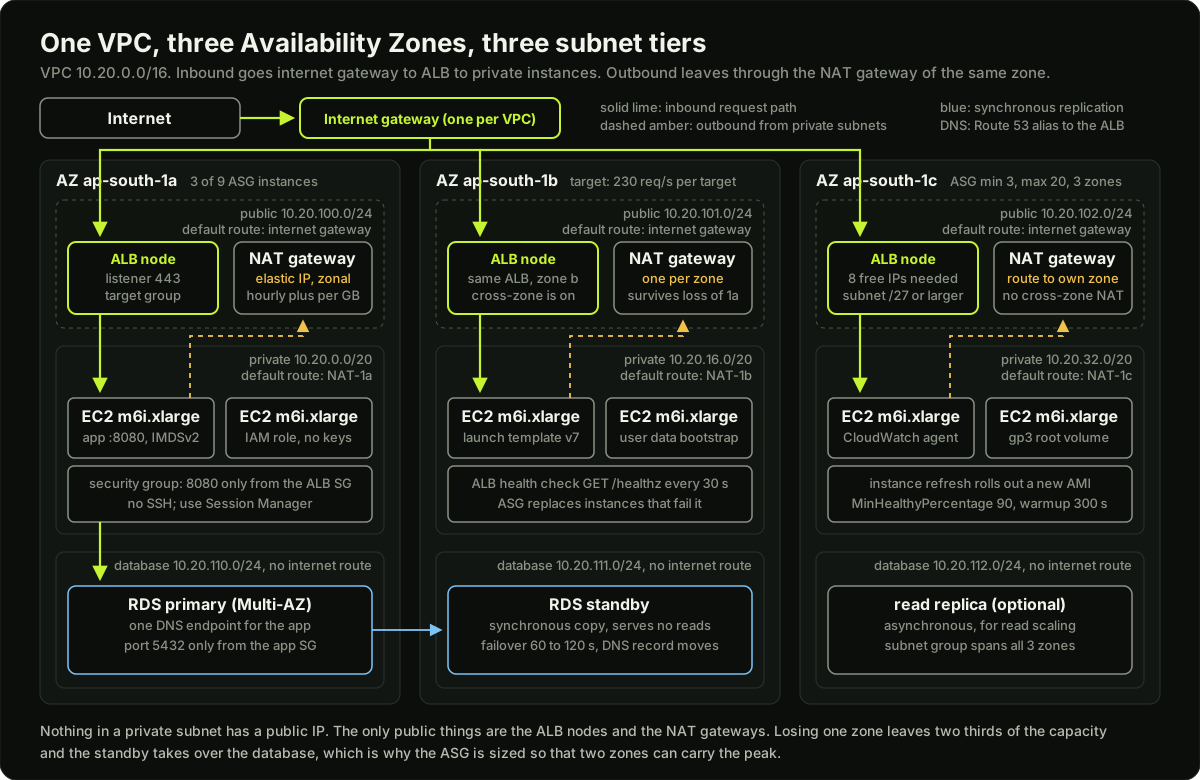 A VPC across three Availability Zones with public subnets holding ALB nodes and NAT gateways, private subnets holding Auto Scaling group instances, and database subnets holding an RDS primary and its synchronous standby
- Public subnets have a route table whose default route (
0.0.0.0/0) points at the internet gateway (one per VPC). Only load balancer nodes and NAT gateways live here. - Private subnets have a default route to a NAT gateway, so instances can reach the internet (package updates, third-party APIs) without being reachable from it.
- Database subnets have no default route at all.
A NAT gateway is zonal. If every private subnet routes to the NAT in zone a and zone a fails, zones b and c lose internet access too, so the documented pattern is one NAT gateway per AZ with each private route table pointing at its own zone's NAT. NAT gateways are billed per hour and per GB processed (an assumed 0.045 USD per hour and 0.045 USD per GB), which adds up when nodes pull images through them. Two cheap fixes: a gateway VPC endpoint for S3 (free, one route table entry) and interface endpoints for ECR (ecr.api and ecr.dkr, billed hourly). Image layers live in S3, so ECR needs the S3 gateway endpoint as well.
Security groups are stateful firewalls on network interfaces: allow rules only, return traffic allowed automatically, and a rule can reference another security group ("allow 8080 from the ALB's security group") so you never hard-code IPs. Network ACLs are stateless rules on a subnet, evaluated in number order, with allow and deny; being stateless, they need the ephemeral return ports opened by hand. Use security groups for almost everything and NACLs as a coarse second layer, such as denying a known bad range at the subnet edge.
VPC peering joins two VPCs one-to-one with non-overlapping CIDRs and is not transitive; Transit Gateway is the hub for many VPCs or an on-premises link.
EC2: the machines
An instance type name encodes family, generation and options: m6i.xlarge is general purpose (m), generation 6, Intel (i), size xlarge (4 vCPU, 16 GiB). c is compute optimised, r memory optimised, t burstable (fine for dev, a trap for steady load because it runs out of CPU credits); after the generation, g means Graviton (Arm), a AMD, d local NVMe disk, n more network. An AMI is the disk image an instance boots from; build your own with Packer, or take Amazon Linux 2023 and configure it with user data, a script run once on first boot as root.
The instance metadata service at 169.254.169.254 is how a process on the instance learns its own ID, region and, most importantly, the temporary credentials of the instance role. IMDSv2 requires a session token from a PUT request, and the default hop limit of 1 stops a container or an SSRF through a proxy from reaching it. Always set HttpTokens=required in the launch template.
# IMDSv2: get a token (TTL up to 21600 s), then use it
TOKEN=$(curl -sX PUT 169.254.169.254/latest/api/token \
  -H "X-aws-ec2-metadata-token-ttl-seconds: 21600")
curl -s -H "X-aws-ec2-metadata-token: $TOKEN" 169.254.169.254/latest/meta-data/instance-id
# require IMDSv2 on an existing instance
aws ec2 modify-instance-metadata-options --instance-id i-0123456789abcdef0 --http-tokens required
EBS volumes are network-attached disks in one AZ. Use gp3: 3,000 IOPS and 125 MiB/s are included and you can raise either independently of size (gp2 ties IOPS to size, 3 per GiB, and bursts from credits). Snapshots are incremental copies to S3 and the basis of AMIs and backups. Placement groups: cluster packs instances for low latency, spread puts each on separate hardware (up to 7 per AZ), partition splits a fleet into groups that share no racks.
Auto Scaling groups
An Auto Scaling group (ASG) keeps a fleet of instances built from a launch template (AMI, instance type, security groups, instance role, user data, IMDSv2 setting) across the subnets you give it, with min, desired and max counts, replacing instances that fail health checks. EC2 status checks are on by default; turn on ELB health checks too so an instance whose app is dead but whose kernel is fine is replaced. The health check grace period (300 s in the console, 0 through the CLI) stops a slow-booting instance being killed before it is up; the default instance warmup keeps a new instance's CPU out of the group average until it settles.
- Target tracking is the one to use. You name a metric and a target (
ASGAverageCPUUtilizationat 60, orALBRequestCountPerTargetat a number you measured); AWS creates the CloudWatch alarms and computes the capacity. The metric must move in proportion to instance count (CPU per instance does; total request count does not). Scale-out is fast; scale-in is deliberately slow and gradual. - Step scaling adds N instances when an alarm crosses a threshold; simple scaling is the old form with a cooldown (default 300 s). Scheduled actions handle the 9 am ramp you know is coming.
# target tracking: hold average CPU near 60 percent
aws autoscaling put-scaling-policy --auto-scaling-group-name web-asg \
  --policy-name cpu60 --policy-type TargetTrackingScaling \
  --target-tracking-configuration '{"TargetValue": 60.0,
    "PredefinedMetricSpecification": {"PredefinedMetricType": "ASGAverageCPUUtilization"}}'
Lifecycle hooks pause an instance in Pending:Wait (configure before it serves) or Terminating:Wait (drain, ship logs) until you call complete-lifecycle-action or the heartbeat timeout (default 1 hour) expires. Instance refresh rolls a new launch template version through the group in batches, keeping at least MinHealthyPercentage (default 90) of desired capacity in service and growing to at most MaxHealthyPercentage (default 100); set 100 and above to launch before terminating, and turn on AutoRollback so failed health checks revert it. Vertical scaling (a bigger instance) is a restart with a ceiling; horizontal scaling (more instances behind a load balancer) is what an ASG gives you. Building one yourself is the week 29 project: a loop that reads a metric, computes a desired count, and starts or stops VMs.
Load balancers
A target group holds the targets (instances, IP addresses, or a Lambda) and the health check: HTTP GET on a path every 30 s, timeout 5 s, healthy after 5 passes, unhealthy after 2 failures, success on 200 by default. If every target is unhealthy the ALB fails open and sends traffic to all of them. Deregistration delay (default 300 s) lets in-flight requests finish before removal. Sticky sessions pin a client to one target with a cookie; session state in Redis is the better fix. An ALB needs subnets in at least two AZs, each /27 or larger with eight free addresses.
S3
An S3 bucket has a globally unique name and lives in one region. Objects have keys; "folders" are prefixes. Turn on versioning (overwrites and deletes become recoverable) and add lifecycle rules: logs to STANDARD_IA after 30 days, to GLACIER_IR or DEEP_ARCHIVE after 90, expire after 400, abort incomplete multipart uploads after 7 days. Intelligent-Tiering moves objects between tiers for a small fee. Keep Block Public Access on at the account level; a public website goes behind CloudFront with origin access control. A presigned URL lets a client upload or download one object for a limited time with the signer's permissions: up to 7 days with IAM user keys, but one signed with a role's temporary credentials dies when those credentials expire, the usual surprise.
RDS and Aurora
RDS runs PostgreSQL, MySQL and others on an instance you size. Multi-AZ keeps a synchronous standby in another AZ; it serves no reads, and on failure RDS flips the DNS record to the standby in typically 60 to 120 seconds, so the app must reconnect and must not cache DNS forever. A read replica is asynchronous and serves reads: scaling, not failover. Backups: daily snapshots plus transaction logs for point-in-time restore within the retention window. A parameter group is the engine config (max_connections, shared_buffers, log_min_duration_statement); the default max_connections is derived from instance memory, which is why a small instance falls over at a few hundred connections and why PgBouncer or RDS Proxy sits in front of it.
Aurora separates compute from a storage layer replicated across three AZs; up to 15 replicas share that storage, failover promotes a replica fast, and there is a writer endpoint and a reader endpoint (which points at the writer if there are no replicas). For the profile this site targets (many services, one shared relational database, strict availability), Aurora PostgreSQL is the default answer: three-AZ durability without an idle standby, fast failover, and read scaling through the reader endpoint.
Route 53, CloudWatch, Systems Manager, Secrets Manager
Route 53 hosts a hosted zone per domain. An alias record points a name, even the zone apex example.com, at an AWS resource (ALB, CloudFront, S3 website) and is free to query; a CNAME cannot sit at the apex. Routing policies: simple, weighted (5 percent to a new stack), latency, failover (health check on the primary), geolocation, multivalue.
CloudWatch holds metrics (EC2 sends CPU, network and disk every 5 minutes; detailed monitoring makes it 1 minute for a charge; memory and disk usage need the CloudWatch agent inside the instance), logs (log groups with retention, shipped by the agent), alarms (a metric over a threshold for N periods triggers SNS, an ASG policy or EventBridge) and dashboards.
Systems Manager Session Manager gives a shell on an instance through the SSM agent and IAM, with no inbound port 22, no bastion and no key pairs, and sessions can be logged to S3 or CloudWatch: aws ssm start-session --target i-0123456789abcdef0. Parameter Store holds configuration as a path hierarchy (/prod/api/db_host), SecureString encrypted with KMS, standard tier free up to 4 KB per value. Secrets Manager is for credentials: it rotates them with a Lambda function, replicates across regions, and costs per secret per month, so non-secret config stays in Parameter Store.
The CLI and profiles. ~/.aws/config holds [profile name] sections with region, output and the SSO session; ~/.aws/credentials holds [name] sections with keys and should be nearly empty on a modern laptop. --profile prod or AWS_PROFILE=prod selects one; run aws sts get-caller-identity before anything destructive.
The one setting people get wrong
Diagram
Worked example
Subnet plan. VPC 10.20.0.0/16 in ap-south-1, three AZs, three tiers. Private subnets carry the instances and later the EKS pods, so they get the big blocks: 10.20.0.0/20, 10.20.16.0/20, 10.20.32.0/20, each 4,096 addresses, 4,091 usable after the five AWS reserves. Public subnets hold only ALB nodes and a NAT gateway: 10.20.100.0/24, 10.20.101.0/24, 10.20.102.0/24 (251 usable each, well above the eight free addresses an ALB needs per subnet). Database subnets: 10.20.110.0/24 to 10.20.112.0/24. Total used: 3 x 4,096 + 6 x 256 = 13,824 of 65,536, leaving 51,712 addresses for pod subnets or a second cluster. None of the nine blocks overlap, and the /16 does not overlap the office range 192.168.0.0/16, so peering later is possible.
ASG sizing. Peak is 2,000 requests per second. A load test shows one m6i.xlarge handles 300 requests per second before p99 latency climbs. Raw need: 2,000 / 300 = 6.67, so 7 instances. Add 30 percent headroom so a traffic spike or a slow deploy does not push instances to their limit: 2,000 x 1.3 / 300 = 8.67, so 9 instances, 3 per AZ. That is desired = 9.
Express the same thing as a target-tracking target: 300 / 1.3 = 230 requests per target. With ALBRequestCountPerTarget at 230, the policy computes 2,000 / 230 = 8.7 and rounds up to 9, the same number, and at night with 400 requests per second it computes 400 / 230 = 1.7, rounded up to 2, which the min = 3 below holds at 3.
Set min = 3 (one per AZ, so the service is never in one zone) and max = 20 (about twice the peak need, a ceiling against a runaway loop).
Now the AZ-loss test. Lose one zone and 6 instances remain: 6 x 300 = 1,800 requests per second, 200 short of the peak. Two choices: accept that the ASG will add instances in the surviving zones within about 5 minutes (launch plus warmup), or set desired = 15 (5 per AZ) so any two zones carry 10 x 300 = 3,000. At an assumed 0.192 USD per hour, 9 instances cost 9 x 0.192 x 730 = 1,261 USD per month and 15 cost 2,102 USD; the difference, 841 USD, is the price of surviving a zone loss at peak without waiting for a scale-out. Most teams choose 9 and a fast scale-out; a payment system chooses 15.
Runnable code
"""A model of an EC2 Auto Scaling group with a target-tracking policy on CPU.

No network, no AWS. The point is to see how target tracking behaves minute by
minute: scale-out is quick, scale-in is slow, new instances warm up before they
count, and min/max bound everything. The numbers (3 minutes above target to
scale out, 15 minutes below to scale in) are this model's assumptions, chosen
to look like the CloudWatch alarms the real policy creates; tune them and watch.
"""
import math

CAPACITY_RPS = 300.0      # one instance at 100 percent CPU handles 300 req/s
TARGET_CPU = 60.0         # the target-tracking target value (percent)
WARMUP_MIN = 3            # default instance warmup: new instances serve no traffic
SCALE_OUT_AFTER = 3       # minutes above target before a scale-out
SCALE_IN_AFTER = 15       # minutes below target before a scale-in
SCALE_IN_COOLDOWN = 5     # minutes after any activity before a scale-in may start


def traffic_curve():
    """Requests per second for each minute of a 3-hour window: a quiet start,
    a sharp ramp to a 2,000 req/s peak, a plateau, and a slow decline."""
    curve = []
    for minute in range(180):
        if minute < 30:
            rps = 400
        elif minute < 45:
            rps = 400 + (2000 - 400) * (minute - 30) / 15   # ramp over 15 minutes
        elif minute < 100:
            rps = 2000
        else:
            rps = max(400, 2000 - (minute - 100) * 25)      # decline 25 req/s per minute
        curve.append(rps)
    return curve


def cpu_percent(rps, in_service):
    """Average CPU of the instances that actually serve traffic."""
    if in_service == 0:
        return 100.0
    return min(100.0, rps / in_service / CAPACITY_RPS * 100)


def simulate(curve, minimum, maximum, desired, verbose=True):
    # Each instance is a dict with the minute it was launched.
    instances = [{"launched": -WARMUP_MIN} for _ in range(desired)]  # already warm
    above = below = 0
    last_activity = -SCALE_IN_COOLDOWN
    peak = len(instances)
    overloaded_minutes = 0
    if verbose:
        print(f"{'min':>3} {'req/s':>6} {'total':>5} {'warm':>4} {'cpu%':>5}  action")
    for minute, rps in enumerate(curve):
        warm = [i for i in instances if minute - i["launched"] >= WARMUP_MIN]
        cpu = cpu_percent(rps, len(warm))
        if cpu >= 95:
            overloaded_minutes += 1
        action = ""
        # Track consecutive minutes above and below target, like an alarm.
        above = above + 1 if cpu > TARGET_CPU else 0
        below = below + 1 if cpu < TARGET_CPU else 0
        total = len(instances)
        if above >= SCALE_OUT_AFTER:
            # Proportional estimate of what is needed, counting warming instances
            # against desired capacity so the group does not overshoot.
            needed = math.ceil(len(warm) * cpu / TARGET_CPU)
            needed = min(maximum, max(needed, total))
            if needed > total:
                for _ in range(needed - total):
                    instances.append({"launched": minute})
                action = f"scale out {total} -> {needed}"
                last_activity = minute
                above = 0
        elif (below >= SCALE_IN_AFTER and minute - last_activity >= SCALE_IN_COOLDOWN
              and len(warm) == total):
            needed = math.ceil(total * cpu / TARGET_CPU)
            needed = max(minimum, min(needed, total))
            if needed < total:
                # Scale in gradually: one instance per activity, then wait for
                # the cooldown. The alarm stays in ALARM while CPU is below target,
                # so the 15-minute wait is not paid again.
                instances.pop()
                action = f"scale in {total} -> {total - 1}"
                last_activity = minute
        peak = max(peak, len(instances))
        if verbose and (action or minute % 10 == 0):
            print(f"{minute:>3} {rps:>6.0f} {len(instances):>5} {len(warm):>4} {cpu:>5.0f}  {action}")
    return peak, overloaded_minutes, len(instances)


if __name__ == "__main__":
    curve = traffic_curve()
    print("target-tracking on CPU, target 60 percent, min 3, max 20, desired 3\n")
    peak, hot, final = simulate(curve, minimum=3, maximum=20, desired=3)
    print(f"\npeak instances: {peak}; minutes at 95 percent CPU or more: {hot}; final size: {final}")

    # Self-checks: the model must reach the arithmetic from the worked example.
    ideal = math.ceil(2000 / (CAPACITY_RPS * TARGET_CPU / 100))  # 2000 / 180 -> 12
    assert peak == ideal, (peak, ideal)
    assert final == 3, final                     # scaled all the way back to min
    assert hot > 0, "a 15-minute ramp with a 3-minute warmup should overload briefly"

    # Same curve with a larger minimum: the overload disappears, the peak is the same.
    peak2, hot2, final2 = simulate(curve, minimum=6, maximum=20, desired=6, verbose=False)
    assert peak2 == ideal and hot2 == 0 and final2 == 6
    print(f"with min 6: peak {peak2}, overloaded minutes {hot2}; the floor absorbs the ramp")

    # A max below the need: the group is capped and stays hot at the plateau.
    peak3, hot3, _ = simulate(curve, minimum=3, maximum=6, desired=3, verbose=False)
    assert peak3 == 6 and hot3 > hot
    print(f"with max 6: peak {peak3}, overloaded minutes {hot3}; max is a hard ceiling")
    print("\nself-checks passed")
Key takeaways
Production gets its own account; SCPs cap what any identity in it can do; one region deny-list SCP stops most key-leak damage.
IAM: explicit deny wins, then every applicable layer must allow, and the default is deny. Roles with temporary credentials for everything; OIDC for CI; Identity Center for humans; no long-lived keys.
A VPC is three tiers across three AZs: public (ALB, NAT), private (instances, pods), database (no internet route). One NAT gateway per AZ, VPC endpoints for S3 and ECR.
Security groups are stateful and reference each other; NACLs are stateless and rarely needed.
IMDSv2 required, gp3 volumes, user data for bootstrap, an instance role instead of keys.
An ASG with a launch template, target tracking on CPU or ALB requests per target, ELB health checks, a warmup, and instance refresh for AMI rollouts is the "autoscaling orchestrator".
ALB for HTTP with listener rules and health checks; NLB for TCP and static IPs; cross-zone is on by default for ALB (off only per target group) and off by default for NLB.
RDS Multi-AZ is for availability (synchronous, no reads); read replicas are for scaling (asynchronous); Aurora gives both with shared storage across three AZs.
Common mistakes
Answering "I would create an IAM user for the app and put the keys in a Secret". The answer is an instance role, Pod Identity, or an OIDC role.
Saying a read replica is the high-availability plan. It is asynchronous and must be promoted by hand; Multi-AZ is the HA plan.
One NAT gateway for the whole VPC, or no VPC endpoints, so a zone failure cuts outbound traffic and image pulls run up the NAT bill.
An ASG with EC2 health checks only and a health check on
/that returns 200 while the app's database is unreachable, so broken instances stay in service.Forgetting that security groups are stateful and writing outbound rules for every inbound rule, or treating NACLs as the main firewall.
Caching the RDS endpoint's IP in the application (JVM DNS cache set to forever), so a Multi-AZ failover that took 90 seconds becomes an outage until restart.
Practice
In a free-tier account, build the three-tier VPC from the worked example with the console or Terraform: three AZs, public, private and database subnets, one internet gateway, one NAT gateway (or three if you accept the cost for an hour), and an S3 gateway endpoint. Launch a t3.micro in a private subnet with no key pair, connect with Session Manager, and prove
curl https://s3.ap-south-1.amazonaws.comworks while the NAT route is removed. Delete everything after.Create a launch template with IMDSv2 required and user data that installs nginx returning the instance ID, an ASG with min 2 and max 4 across two AZs behind an ALB with a health check on
/, and a target-tracking policy on CPU at 50 percent. Runstress-ngon one instance and time how long until a third instance is in service. Then publish a new template version and run an instance refresh with MinHealthyPercentage 100; watch the target group during the refresh.Set up GitHub Actions OIDC to a role that may only list one S3 bucket; run
aws sts get-caller-identityfrom a workflow, then change thesubcondition to a different branch and confirm the job fails with AccessDenied.Run the code example, then change
WARMUP_MINto 1 andSCALE_OUT_AFTERto 1 and compare the peak instance count and the overloaded minutes; explain in two sentences why the real policy is deliberately slower to scale in than to scale out. Then write your own autoscaling orchestrator (the 100xDevs exercise) in about 40 lines of Python: a loop that reads a fake metric each tick, computesdesired = ceil(current * usage / target), clamps it between min and max, applies a cooldown so it does not scale twice inside 5 ticks, and calls a fakescale(n)function that prints the change. Feed it a usage series that rises from 20 to 90 percent and back, and check that the instance count never changes more than once per cooldown.
Interview questions (12)
1.Why is production in a separate AWS account, and how do you keep that account safe?Easy
An account is the hardest boundary AWS has: separate IAM, separate limits, separate bill, and a mistake in one cannot reach another. A destroy in staging cannot touch production tables. I put every environment in its own account under AWS Organizations, attach service control policies to the production OU that deny regions we do not use and deny deleting CloudTrail, and give humans access through IAM Identity Center permission sets with MFA instead of IAM users. Cross-account access for CI is a role with a trust policy, not shared keys.
2.Explain how AWS decides whether a request is allowed.Medium
Everything starts as an implicit deny. First AWS looks for an explicit deny in any policy that applies: SCPs, resource policies, identity policies, permissions boundaries, session policies. One matching deny ends it; nothing overrides it. Then the SCPs must allow the action. Then a resource-based policy that names the principal can allow it on its own within the same account; otherwise an identity-based policy must allow it. If a permissions boundary or a session policy exists, each must allow it too. So the short version is: explicit deny wins, then you need an allow from every layer that applies, and the default is deny.
3.How does a GitHub Actions job deploy to AWS without a stored secret?Medium
Through OIDC. In IAM I create an identity provider for token.actions.githubusercontent.com with audience sts.amazonaws.com. I create a role whose trust policy allows sts:AssumeRoleWithWebIdentity only when the token's sub claim equals repo:org/repo:ref:refs/heads/main, so only the main branch of that one repository can assume it. The workflow sets permissions: id-token: write, and aws-actions/configure-aws-credentials exchanges the GitHub token for temporary credentials. No access key exists anywhere, and the credentials expire with the job. The common mistake is leaving out the sub condition, which lets any repo in the organisation assume the role.
4.Draw the VPC for a three-tier web app and explain the route tables.Medium
A /16 VPC, three Availability Zones, three subnets per zone. Public subnets have a route table with 0.0.0.0/0 to the internet gateway; only ALB nodes and NAT gateways live there. Private subnets hold the application instances or pods; each zone's private route table sends 0.0.0.0/0 to the NAT gateway in the same zone, so a zone failure does not cut outbound traffic for the other zones. Database subnets have no default route at all. I add a gateway endpoint for S3 and interface endpoints for ECR so image pulls and object traffic never cross the NAT. Security groups chain: the database allows 5432 only from the app security group, the app allows 8080 only from the ALB security group.
5.Security groups versus network ACLs: when do you use which?Easy
Security groups are stateful and attach to network interfaces. They have allow rules only, return traffic is allowed automatically, and a rule can reference another security group instead of an IP range, which is how you say "only the load balancer can reach the app". Network ACLs are stateless, attach to a subnet, have numbered allow and deny rules evaluated in order, and need the ephemeral return ports opened explicitly. I use security groups for all real access control and keep the default NACL open, adding a deny rule only for a coarse case like blocking a known abusive range at the subnet edge.
6.What is IMDSv2 and why do you require it?Medium
The instance metadata service at 169.254.169.254 hands out the instance's role credentials to any process that asks. With IMDSv1 a simple GET works, so a server-side request forgery bug in the app can fetch the credentials. IMDSv2 requires a PUT to get a session token first and then that token in a header on each GET, and the token response has a hop limit of 1 by default so it cannot pass through a container's NAT or a proxy. I set HttpTokens=required in the launch template and the SDKs use it transparently.
7.How does a target-tracking scaling policy decide how many instances to run?Medium
I give it a metric that moves in proportion to the number of instances, like average CPU or ALB requests per target, and a target value. AWS creates the CloudWatch alarms and, when the metric is above target for a few minutes, computes the capacity that would bring it back, roughly current count times metric over target, rounded up, bounded by min and max. New instances sit out of the average during the warmup period so their startup CPU does not cause a second scale-out. Scale-in is slower and more gradual on purpose, so a short dip does not drop capacity right before the next spike. For 2,000 requests per second with 230 per target it settles at 9 instances.
8.You have a new AMI. How do you roll it through an Auto Scaling group with no downtime?Medium
Publish a new launch template version with the AMI and start an instance refresh. It replaces instances in batches while keeping at least MinHealthyPercentage of the desired capacity in service, 90 by default; with MinHealthyPercentage 100 and MaxHealthyPercentage above it, the group launches each replacement before terminating the old one. Each new instance must pass the ELB health check and finish the instance warmup before the next batch starts. With AutoRollback on, a failed batch reverts to the old template. I would also set a Terminating lifecycle hook so an instance drains from the target group before it is killed.
9.ALB or NLB for this service?Easy
ALB when the traffic is HTTP: it terminates TLS, routes on host, path and headers, supports WebSockets and gRPC, integrates with WAF, and one ALB can front many services. NLB when I need layer 4: raw TCP or UDP, a static IP or Elastic IP per zone for a customer's allow-list, very high connection rates, or TLS passthrough to the backend. Cross-zone is on by default for an ALB, and can only be turned off per target group, while it is off by default for an NLB, which matters when targets are unevenly spread across zones.
10.Multi-AZ RDS versus a read replica: what is each for?Easy
Multi-AZ is availability. RDS keeps a synchronous standby in another zone; it cannot serve reads, and when the primary fails RDS points the same DNS name at the standby in about 60 to 120 seconds. The app just needs to reconnect and not cache DNS. A read replica is scaling. It replicates asynchronously, serves read queries on its own endpoint, and can lag; promoting it is a manual, lossy operation. Aurora blurs the two: replicas share the storage layer, so a replica can be promoted in seconds and the reader endpoint load-balances reads across them.
11.An EC2 instance in a private subnet cannot reach the internet. What do you check?Medium
First the route table of its subnet: is there a 0.0.0.0/0 route and does it point at a NAT gateway, not at an internet gateway, which does nothing for an instance with no public IP. Then the NAT gateway itself: is it in a public subnet whose route table points at the internet gateway, does it have an Elastic IP, is it in the same zone or at least reachable. Then the security group's outbound rules and the NACL's outbound and inbound ephemeral ports. Then DNS: enableDnsSupport on the VPC. If it only needs S3 or ECR, I add VPC endpoints and avoid the NAT entirely.
12.How do you get a shell on a production instance without opening SSH?Easy
Systems Manager Session Manager. The SSM agent on the instance makes an outbound connection to the SSM service, so no inbound port is open, no bastion exists and no key pairs are distributed. Access is an IAM permission on ssm:StartSession scoped to tagged instances, and the session commands can be logged to CloudWatch Logs or S3. From the laptop it is aws ssm start-session --target i-..., and port forwarding through the same channel reaches an RDS instance in a private subnet for a one-off query.
Quiz
1.A role's identity policy allows s3:GetObject on a bucket, and an SCP on the account denies all S3 actions. What happens?
2.Which statement about a NAT gateway is correct?
3.A /24 subnet has how many usable IP addresses in a VPC?
4.Which health check setup makes an ASG replace an instance whose application process has crashed but whose kernel is fine?
5.What does an RDS Multi-AZ standby do during normal operation?
Practice these problems
Further reading
My notes
Your notes
Autosaves to this browser.