Terraform - infrastructure as code
Infrastructure as code (IaC) means your VPCs, clusters, databases and IAM roles are written in files, reviewed in pull requests and created by a tool, not clicked together in a console. Terraform is the most common IaC tool. You write HCL, run plan to see the diff, run apply to make it real, and a state file remembers what Terraform owns. This lesson covers the language, state, modules, environments, CI and the moments where Terraform can destroy production.
Why it matters
Every DevOps and platform job post lists Terraform, and in Indian service-company interviews (Infosys, Wipro, TCS) it is one of the three tools you will certainly be asked about. The questions are concrete: what is in the state file, what happens if two people apply at once, how do you handle dev, staging and prod, what do you do when plan says it will destroy the database. In real work, Terraform is where the biggest mistakes happen: one wrong apply can delete a cluster. Knowing the safe workflow is the difference between a junior and someone trusted with the prod account.
Read first: Git and trunk-based workflows, CI/CD with GitHub Actions and GitLab CI, AWS core - IAM, VPC, EC2, S3, RDS, load balancers, autoscaling, AWS managed platforms - EKS, ECS, Fargate, Lambda, SQS, ElastiCache, CloudFront
Lesson
Why infrastructure as code
Click a VPC together in the console and nobody can repeat it in a second account, review it first, or see what it looked like yesterday. IaC fixes all three: infrastructure is files in Git, so it is repeatable (apply the same code to a new account), reviewable (the pull request shows the diff) and recoverable (check out last week's commit and apply it).
Imperative code says what to do, step by step: a shell script of AWS CLI calls, which creates everything twice if run twice. Declarative code says what should exist: "a subnet with this CIDR". The tool works out the API calls, and a second run finds nothing to do. Terraform is declarative.
The core workflow
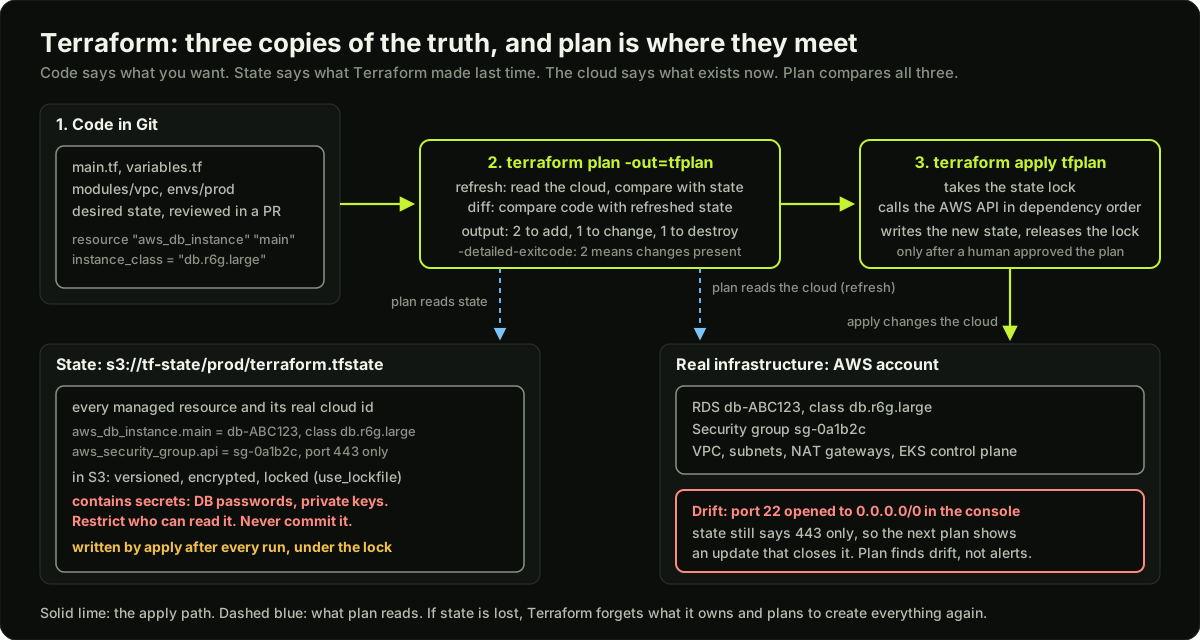 Terraform code, plan and apply across the top; the state file in S3 and the real AWS account below, with a drifted security group rule
terraform init               # download providers and modules, set up the backend,
                             # write .terraform.lock.hcl (commit it: it pins provider versions)
terraform fmt -check         # formatting; CI fails if a file is not formatted
terraform validate           # syntax and types, no cloud calls
terraform plan -out=tfplan   # refresh state from the cloud, diff against code, save the plan
terraform show -json tfplan  # the same plan as JSON, for scripts and policy tools
terraform apply tfplan       # execute exactly that saved plan, nothing else
terraform destroy            # plan and apply the removal of everything in this state
plan does two comparisons: it reads the real cloud and compares it with the state file (refresh), then compares the refreshed state with your code. The output lists every resource to add, change or destroy, with the attribute that caused it and, for a replacement, "forces replacement". plan -detailed-exitcode returns 0 for no changes, 1 for an error, 2 for changes present.
Always apply a saved plan file. terraform apply without a file plans again; if someone merged in between, you apply a diff nobody reviewed. In prod, CI must never be able to destroy.
HCL: the language
One trimmed root module that shows every block type you must recognise:
terraform {
  required_version = ">= 1.11"
  required_providers {
    aws = {
      source  = "hashicorp/aws"
      version = "~> 6.0"
    }
  }
  backend "s3" {
    bucket       = "acme-tf-state"   # versioning and SSE on, public access blocked
    key          = "prod/network/terraform.tfstate"
    region       = "ap-south-1"
    encrypt      = true
    use_lockfile = true              # S3 native lock, no DynamoDB table needed
  }
}

provider "aws" {
  region = "ap-south-1"
}

variable "environment" {
  type        = string
  description = "dev, staging or prod; used in names and tags"
  validation {
    condition     = contains(["dev", "staging", "prod"], var.environment)
    error_message = "environment must be dev, staging or prod."
  }
}

variable "db_password" {
  type      = string
  sensitive = true   # hidden in plan output; still written to state unless ephemeral
}

variable "subnets" {
  type    = map(string)   # key = short name, value = CIDR
  default = { a = "10.0.1.0/24", b = "10.0.2.0/24" }
}

locals {
  name_prefix = "${var.environment}-orders"
}

resource "aws_vpc" "main" {
  cidr_block           = "10.0.0.0/16"
  enable_dns_hostnames = true
}

resource "aws_subnet" "private" {
  for_each   = var.subnets   # addresses: aws_subnet.private["a"], ["b"]
  vpc_id     = aws_vpc.main.id
  cidr_block = each.value
  tags       = { Name = "${local.name_prefix}-${each.key}" }
}

resource "aws_db_instance" "main" {
  identifier                = "${local.name_prefix}-db"
  engine                    = "postgres"
  instance_class            = var.environment == "prod" ? "db.r6g.large" : "db.t4g.micro"
  allocated_storage         = 20
  username                  = "app"
  password                  = var.db_password
  skip_final_snapshot       = false
  final_snapshot_identifier = "${local.name_prefix}-final"
  depends_on                = [aws_vpc.main]   # only when Terraform cannot see the dependency
  lifecycle {
    prevent_destroy = true        # plan errors instead of destroying this
    ignore_changes  = [password]  # rotated outside Terraform, do not fight it
  }
}

resource "aws_security_group" "api" {
  name   = "${local.name_prefix}-api"
  vpc_id = aws_vpc.main.id
  dynamic "ingress" {
    for_each = [443, 8443]
    content {
      from_port   = ingress.value
      to_port     = ingress.value
      protocol    = "tcp"
      cidr_blocks = ["10.0.0.0/8"]
    }
  }
  lifecycle {
    create_before_destroy = true  # new SG exists before the old one is removed
  }
}

output "vpc_id" {
  value = aws_vpc.main.id
}
- provider: a plugin that knows one API.
required_providerspins its version;.terraform.lock.hclrecords the exact one. - resource: one thing Terraform creates and owns, addressed as
type.name. References such asaws_vpc.main.idbuild the dependency graph, so the VPC is created before the subnet.depends_onis only for dependencies that are real but invisible in the arguments. - data blocks (
data "aws_ami" "al2023" {...}) read something that exists without owning it. - variable: an input with a
type, adescriptionand optionalvalidation. Values come from-varand-var-file, then*.auto.tfvars, thenterraform.tfvars, thenTF_VAR_nameenvironment variables, then the default, highest precedence first. - locals name an expression once; output exposes a value to other root modules.
- expressions:
"${a}-${b}",cond ? x : y,[for k, v in var.subnets : v], functions such asmerge,cidrsubnet,toset. - for_each vs count:
count = 3createsthing[0..2]. Remove the middle item of the source list and[1]changes and[2]disappears: Terraform recreates resources that only moved position.for_eachover a map or set gives each instance a stable key, so removingatouches onlya. Usecountonly for a zero-or-one toggle.for_eachkeys must be known at plan time and cannot be sensitive. - lifecycle:
create_before_destroyfor things that must not have a gap (security groups, launch templates);prevent_destroymakes any plan that would destroy the resource fail;ignore_changesleaves listed attributes to another system (an autoscaler'sdesired_capacity). - dynamic blocks generate repeated nested blocks from a collection. The docs warn that overuse hurts readability: use them inside modules, and write nested blocks out literally elsewhere.
State: the file that makes Terraform work
State is a JSON file that maps every resource address in your code to the real object in the cloud. Lose it and the next plan wants to create everything again while the originals keep running and costing money.
- State is remote. A file on one laptop cannot be shared. On AWS: an S3 bucket with versioning (roll back a bad write), encryption and public access blocked.
- State is locked. Two applies at once both change the cloud and the second state write overwrites the first.
use_lockfile = truemakes the S3 backend write a.tflockobject next to the state; a second apply fails at once. DynamoDB locking (dynamodb_table) still works but is deprecated. If a run dies holding the lock,terraform force-unlock LOCK_IDremoves it, after you confirm nothing is running. - State is sensitive. It holds every attribute, including database passwords, in plain text. Restrict bucket reads with IAM, log access, never commit
.tfstate. Terraform 1.10 added ephemeral values and 1.11 added write-only arguments (password_wo) that are never written to state; prefer them for new secrets.
terraform state list                                  # every address Terraform owns
terraform state show aws_db_instance.main             # stored attributes of one resource
terraform state rm aws_instance.legacy                # forget it; the real object keeps running
terraform import aws_s3_bucket.logs orders-prod-logs  # adopt an existing object; prefer an import block
terraform plan -refresh-only                          # show drift without planning any change
Drift is the gap between state and the cloud: a port opened in the console, a count changed by an autoscaler. Every plan refreshes first, so drift appears as an update back to what the code says; -refresh-only shows only the drift. A nightly plan with -detailed-exitcode that alerts on exit 2 catches drift early.
Modules
A module is a directory of .tf files with inputs, resources and outputs. The directory you run Terraform in is the root module; it calls child modules with a module block. This is how a platform team hands out a VPC or EKS cluster with company defaults built in.
module "vpc" {
  source  = "terraform-aws-modules/vpc/aws"
  version = "~> 6.0"

  name            = "prod-orders"
  cidr            = "10.0.0.0/16"
  azs             = ["ap-south-1a", "ap-south-1b", "ap-south-1c"]
  private_subnets = ["10.0.0.0/20", "10.0.16.0/20", "10.0.32.0/20"]
  public_subnets  = ["10.0.48.0/24", "10.0.49.0/24", "10.0.50.0/24"]

  enable_nat_gateway   = true
  single_nat_gateway   = false   # one NAT per AZ in prod; true in dev to save money
  enable_dns_hostnames = true

  private_subnet_tags = { "kubernetes.io/role/internal-elb" = "1" }
  public_subnet_tags  = { "kubernetes.io/role/elb" = "1" }
}

module "eks" {
  source  = "terraform-aws-modules/eks/aws"
  version = "~> 21.0"

  name                                     = "prod-orders"
  kubernetes_version                       = "1.35"   # a version in standard support
  vpc_id                                   = module.vpc.vpc_id
  subnet_ids                               = module.vpc.private_subnets
  enable_cluster_creator_admin_permissions = true

  eks_managed_node_groups = {
    general = { instance_types = ["m6i.large"], min_size = 2, max_size = 10 }
  }
}
source is a local path, a Git URL with a ref= tag, or a registry address; only registry sources take version. Pin with ~> and read the changelog before a major bump: the eks module renamed inputs between major versions, and a blind upgrade plans a cluster replacement. Companies publish their own modules through a private registry or tagged Git repos, each with a README, typed variables, outputs, examples/ and tests/.
One code base, three environments
Dev, staging and prod share code and differ only in values.
Recommend directories plus shared modules:
infra/
  modules/
    vpc/            # variables.tf, main.tf, outputs.tf, README.md, tests/
    eks/
  envs/
    dev/            # backend key dev/terraform.tfstate, account 1111..., small instances
      main.tf       # module "vpc" { source = "../../modules/vpc" ... }
      dev.tfvars
    prod/           # backend key prod/terraform.tfstate, account 2222...
When prod grows, split it into layers with separate states: network, data, cluster, apps. An IAM change should not refresh 400 network resources, and a mistake in one layer cannot destroy another. Layers read each other's outputs with terraform_remote_state or data sources.
CI for Terraform
Nobody applies to prod from a laptop. On a pull request: fmt -check, validate, a linter, a policy scanner, then plan, posted as a comment so reviewers approve the diff and not only the HCL. On merge: apply the saved plan. Credentials come from OIDC, not stored access keys.
name: terraform-prod
on:
  pull_request:
    paths: ["infra/**"]
  push:
    branches: [main]
    paths: ["infra/**"]

permissions:
  id-token: write        # request the GitHub OIDC token
  contents: read
  pull-requests: write   # post the plan as a comment

jobs:
  plan:
    runs-on: ubuntu-latest
    steps:
      - uses: actions/checkout@v7
      - uses: aws-actions/configure-aws-credentials@v6.2.3
        with:
          role-to-assume: arn:aws:iam::222222222222:role/terraform-plan   # read-only
          aws-region: ap-south-1
      - uses: hashicorp/setup-terraform@v4
      - run: terraform fmt -check -recursive
      - run: terraform init -input=false
      - run: terraform validate
      - run: tflint --init && tflint
      - run: checkov -d .
      - id: plan
        run: terraform plan -input=false -no-color -out=tfplan
      - run: terraform show -json tfplan > plan.json && python3 plan_guard.py plan.json
      - uses: actions/github-script@v7     # post the plan as a PR comment
        if: github.event_name == 'pull_request'
        with:
          script: |
            await github.rest.issues.createComment({
              owner: context.repo.owner, repo: context.repo.repo,
              issue_number: context.issue.number,
              body: "```\n" + process.env.PLAN.slice(0, 60000) + "\n```"
            });
        env:
          PLAN: ${{ steps.plan.outputs.stdout }}
      - uses: actions/upload-artifact@v4
        with: { name: tfplan, path: tfplan }

  apply:
    needs: plan
    if: github.event_name == 'push'
    runs-on: ubuntu-latest
    environment: prod    # required reviewers on the environment = manual approval
    steps:
      - uses: actions/checkout@v7
      - uses: aws-actions/configure-aws-credentials@v6.2.3
        with:
          role-to-assume: arn:aws:iam::222222222222:role/terraform-apply
          aws-region: ap-south-1
      - uses: hashicorp/setup-terraform@v4
      - uses: actions/download-artifact@v4
        with: { name: tfplan }
      - run: terraform init -input=false && terraform apply -input=false tfplan
By name: tflint catches invalid instance types and unused declarations; checkov flags an open security group or an unencrypted bucket; Infracost posts the monthly cost difference as a PR comment, so a reviewer sees "+412 USD/month" before approving; Atlantis is a self-hosted server that plans on every PR and applies when someone comments atlantis apply; HCP Terraform (Terraform Cloud until April 2024) adds remote runs, state storage and policy as code. The plan role is read-only plus state access; only the apply role writes.
Testing
terraform test runs .tftest.hcl files. Each run block executes a plan or an apply (the default) and checks assert blocks, each with a condition and an error_message. A command = plan test is a unit test with no cloud, for example asserting that aws_db_instance.main.instance_class == "db.t4g.micro" when environment = "dev"; an apply test creates real resources and destroys them at the end.
Terratest is a Go library that applies a module, checks the cloud with the SDK and destroys it; module authors use it.
The dangerous moments
Secrets in Terraform
In order of preference. First, keep the secret out of Terraform: manage_master_user_password = true lets RDS generate the password into Secrets Manager, and the application reads it at runtime. Second, read it from the secret store with a data source so it never sits in a .tfvars file:
data "aws_secretsmanager_secret_version" "db" {
  secret_id = "prod/orders/db"
}

locals {
  db_password = jsondecode(data.aws_secretsmanager_secret_version.db.secret_string)["password"]
}
Third, mark variables and outputs sensitive = true so plan output is redacted; the value is still in state unless it is ephemeral or write-only. Fourth, lock down the state bucket like a secret store, because it is one.
Terraform with EKS, and where GitOps takes over
The eks module creates the control plane, node groups, the OIDC provider for IRSA, access entries mapping IAM roles to Kubernetes groups, and the add-ons (vpc-cni, coredns, kube-proxy, eks-pod-identity-agent). All of that is long-lived AWS API state with IAM in the middle: Terraform's job.
Inside the cluster, stop. A Deployment managed by the Terraform Kubernetes provider changes only when someone runs apply, drifts when a developer uses kubectl, and ties application releases to the VPC pipeline. The boundary that works: Terraform creates the cluster and one bootstrap Helm release, Argo CD, which then syncs everything else from Git: ingress controller, monitoring, applications. Terraform owns "the cluster exists and can be reached"; GitOps owns "what runs on it". An IAM role an application needs stays in Terraform, and its ARN is passed to the chart through values.
Diagram
Worked example
The plan that wants to replace the production database. A pull request changes one line in envs/prod/main.tf: storage_encrypted = true on aws_db_instance.main, because a security audit asked for encryption at rest. The plan comment reads:
  # aws_db_instance.main must be replaced
-/+ resource "aws_db_instance" "main" {
      ~ storage_encrypted = false -> true # forces replacement
        identifier        = "orders-prod"
        instance_class    = "db.r6g.large"
    }
Plan: 1 to add, 0 to change, 1 to destroy.
Step 1: read why. -/+ means destroy then create. Encryption is set at creation time in RDS, so the provider marks the attribute as forcing a new resource. Applying this deletes the 50 GB production database and creates an empty encrypted one. If skip_final_snapshot were true there would not even be a snapshot.
Step 2: the guard rails that should have fired. lifecycle { prevent_destroy = true } makes Terraform refuse this plan with an error. The CI script in this lesson's code example parses terraform show -json tfplan, sees actions: ["delete", "create"] with replace_paths: [["storage_encrypted"]] on a protected address, and exits 3. Either one stops the apply.
Step 3: the right procedure. Encryption of an existing RDS instance is done by snapshot, not in place: take a snapshot (about 50 GB, a few minutes), copy the snapshot with --kms-key-id to get an encrypted copy, restore a new instance from it, switch the application's endpoint during a maintenance window, then bring the new instance under Terraform. In HCL that is a new aws_db_instance with snapshot_identifier pointing at the encrypted copy, and the old one removed with a removed block plus destroy = false until the switch is proven, then destroyed on purpose.
Step 4: the numbers for the write-up. Snapshot copy of 50 GB: assume 10 to 15 minutes. Restore: assume 10 to 20 minutes. Downtime is only the endpoint switch plus the application reconnecting, under 5 minutes if the endpoint is behind a DNS CNAME with a 60-second TTL. Compare with the accidental apply: full data loss back to the last automated backup, typically up to 24 hours of orders, and an RTO of an hour or more to restore. That comparison is the answer the interviewer wants when they ask "plan says it will destroy the database, what do you do".
Runnable code
"""A CI gate for Terraform plans: parse `terraform show -json tfplan` and block dangerous ones.

No network. The sample plan JSON below has the same shape as real output
(format_version, resource_changes[].change.actions, replace_paths, action_reason)
and includes a forced replacement of an RDS instance, which is exactly the
change this script exists to catch.

Exit codes, the way a CI job would use them:
  0  safe: only create, update, read or no-op
  2  review needed: something is destroyed or replaced (the job fails and a human must approve)
  3  policy violation: a resource that the team protected is in the delete list
"""
import json
import sys

# Resource addresses the team never wants destroyed by a pipeline. In the real
# configuration they carry `lifecycle { prevent_destroy = true }`; Terraform
# would refuse the plan, but a second check in CI costs nothing and also
# protects resources where someone removed the lifecycle block in the same PR.
PROTECTED = {"aws_db_instance.main", "aws_s3_bucket.tf_state", "module.eks.aws_eks_cluster.this[0]"}

SAMPLE_PLAN = {
    "format_version": "1.2",
    "terraform_version": "1.13.0",
    "resource_changes": [
        {
            "address": "aws_security_group_rule.api_https",
            "mode": "managed", "type": "aws_security_group_rule", "name": "api_https",
            "change": {"actions": ["create"], "before": None,
                       "after": {"from_port": 443, "to_port": 443, "cidr_blocks": ["10.0.0.0/8"]}},
        },
        {
            "address": "aws_iam_role.ci_deploy",
            "mode": "managed", "type": "aws_iam_role", "name": "ci_deploy",
            "change": {"actions": ["create"], "before": None, "after": {"name": "ci-deploy"}},
        },
        {
            "address": "module.vpc.aws_nat_gateway.this[0]",
            "module_address": "module.vpc",
            "mode": "managed", "type": "aws_nat_gateway", "name": "this", "index": 0,
            "change": {"actions": ["update"],
                       "before": {"tags": {"Environment": "prod"}},
                       "after": {"tags": {"Environment": "prod", "Team": "platform"}}},
        },
        {
            # The dangerous one. storage_encrypted forces a new RDS instance:
            # the provider cannot change it in place, so Terraform plans delete + create.
            "address": "aws_db_instance.main",
            "mode": "managed", "type": "aws_db_instance", "name": "main",
            "change": {"actions": ["delete", "create"],
                       "before": {"identifier": "orders-prod", "engine": "postgres",
                                  "instance_class": "db.r6g.large", "storage_encrypted": False},
                       "after": {"identifier": "orders-prod", "engine": "postgres",
                                 "instance_class": "db.r6g.large", "storage_encrypted": True},
                       "replace_paths": [["storage_encrypted"]]},
            "action_reason": "replace_because_cannot_update",
        },
        {
            "address": "aws_launch_template.api",
            "mode": "managed", "type": "aws_launch_template", "name": "api",
            "change": {"actions": ["create", "delete"],  # create_before_destroy replacement
                       "before": {"name": "api-lt", "image_id": "ami-0aaa"},
                       "after": {"name": "api-lt-v2", "image_id": "ami-0bbb"},
                       "replace_paths": [["name"]]},
            "action_reason": "replace_because_cannot_update",
        },
        {
            "address": "aws_instance.bastion_old",
            "mode": "managed", "type": "aws_instance", "name": "bastion_old",
            "change": {"actions": ["delete"], "before": {"id": "i-0123", "instance_type": "t3.micro"}, "after": None},
            "action_reason": "delete_because_no_resource_config",
        },
        {
            "address": "aws_s3_bucket.logs",
            "mode": "managed", "type": "aws_s3_bucket", "name": "logs",
            "change": {"actions": ["no-op"], "before": {"bucket": "orders-logs"}, "after": {"bucket": "orders-logs"}},
        },
    ],
}


def classify(actions):
    """Map the actions list to one word. Replacement is encoded as two actions."""
    if actions == ["delete", "create"] or actions == ["create", "delete"]:
        return "replace"
    if actions == ["no-op"]:
        return "no-op"
    return actions[0]  # create, update, delete, read


def forced_by(change):
    """Human-readable attribute paths that forced a replacement, or 'unknown'."""
    paths = change.get("replace_paths") or []
    if not paths:
        return "unknown (tainted or -replace)"
    return ", ".join(".".join(str(p) for p in path) for path in paths)


def safety_report(plan):
    counts = {"create": 0, "update": 0, "replace": 0, "delete": 0, "read": 0, "no-op": 0}
    flagged, violations = [], []
    for rc in plan.get("resource_changes", []):
        kind = classify(rc["change"]["actions"])
        counts[kind] += 1
        addr = rc["address"]
        if kind == "replace":
            order = "destroy then create" if rc["change"]["actions"][0] == "delete" else "create then destroy"
            flagged.append(f"REPLACE {addr}: forced by {forced_by(rc['change'])} ({order})")
        elif kind == "delete":
            flagged.append(f"DESTROY {addr}: {rc.get('action_reason', 'no reason given')}")
        if kind in ("replace", "delete") and addr in PROTECTED:
            violations.append(addr)
    return counts, flagged, violations


def exit_code(counts, violations):
    if violations:
        return 3
    if counts["delete"] or counts["replace"]:
        return 2
    return 0


def main(plan):
    major = int(str(plan.get("format_version", "1.0")).split(".")[0])
    if major != 1:
        print(f"unsupported plan format_version {plan.get('format_version')}; refusing to judge it")
        return 1
    counts, flagged, violations = safety_report(plan)
    print("Plan summary:", ", ".join(f"{k}={v}" for k, v in counts.items() if v))
    for line in flagged:
        print("  " + line)
    for addr in violations:
        print(f"  BLOCKED {addr} is protected (prevent_destroy) and the plan removes it")
    code = exit_code(counts, violations)
    verdict = {0: "safe to auto-apply", 2: "needs human approval", 3: "policy violation, do not apply"}[code]
    print(f"verdict: {verdict} (exit {code})")
    return code


if __name__ == "__main__":
    # Self-checks on the sample, then run the report the way CI would.
    counts, flagged, violations = safety_report(SAMPLE_PLAN)
    assert counts == {"create": 2, "update": 1, "replace": 2, "delete": 1, "read": 0, "no-op": 1}, counts
    assert any("aws_db_instance.main" in f and "storage_encrypted" in f for f in flagged)
    assert violations == ["aws_db_instance.main"]
    assert exit_code(counts, violations) == 3

    # The same plan without the RDS replacement should only need review (exit 2),
    # and a plan with only creates and updates should pass (exit 0).
    without_db = {"format_version": "1.2",
                  "resource_changes": [r for r in SAMPLE_PLAN["resource_changes"] if r["address"] != "aws_db_instance.main"]}
    c2, _, v2 = safety_report(without_db)
    assert exit_code(c2, v2) == 2
    only_safe = {"format_version": "1.2",
                 "resource_changes": [r for r in SAMPLE_PLAN["resource_changes"]
                                      if classify(r["change"]["actions"]) in ("create", "update", "no-op")]}
    c3, _, v3 = safety_report(only_safe)
    assert exit_code(c3, v3) == 0
    print("self-checks passed: counts, replace detection, protected-resource check, exit codes\n")

    # A real CI job would do: terraform show -json tfplan > plan.json; python3 plan_guard.py plan.json
    plan = json.load(open(sys.argv[1])) if len(sys.argv) > 1 else SAMPLE_PLAN
    code = main(plan)
    # Exit 0 here so the lesson's validator sees a clean run; in CI you would `sys.exit(code)`.
    print(f"\nin CI this script would exit with {code}")
Key takeaways
IaC makes infrastructure repeatable, reviewable and recoverable; Terraform is declarative, so running it twice is safe.
The workflow is init, plan, apply with a saved plan file; plan refreshes from the cloud, diffs against code and shows every destroy and forced replacement.
State maps code addresses to real objects. Keep it in S3 with versioning, encryption and
use_lockfile = true; treat it as a secret.Use
for_eachfor collections andcountonly for on/off; renaming is done withmovedblocks, retiring withremoved, adoption withimportblocks.prevent_destroyon data stores,create_before_destroyon things that must not have a gap,ignore_changesfor attributes another system owns.One directory per environment calling shared, version-pinned modules beats workspaces: separate state, separate credentials, smaller blast radius.
CI: plan on PR posted as a comment, policy and cost checks, apply on merge with OIDC roles, never from a laptop.
Terraform builds the EKS cluster and installs Argo CD; everything inside the cluster is GitOps.
Common mistakes
Applying without reading the plan, or running
terraform applyinteractively so the applied diff is not the reviewed one.Local state, or a shared S3 bucket without locking, and then two engineers apply at the same time.
Using
countover a list of names, then deleting one name and recreating every resource after it.Renaming a resource or moving it into a module without a
movedblock, which plans a destroy and create.Putting passwords in
.tfvarscommitted to Git, or believingsensitive = truekeeps them out of state.Managing Kubernetes Deployments with the Terraform Kubernetes provider instead of handing the inside of the cluster to Argo CD.
Practice
In a free-tier account, create an S3 bucket for state with versioning and
use_lockfile = true, then write a root module with oneaws_s3_bucketand run init, plan, apply. Open two terminals and start two applies; confirm the second fails with a lock error.Change a resource from
countover a list of three names tofor_eachover a set, write the threemovedblocks, and confirmterraform planreports no changes.Add a security group rule in the console by hand, run
terraform plan -refresh-onlyand then a normal plan; write down which one proposes to undo the change.Run the plan-guard script from this lesson against a real plan:
terraform show -json tfplan > plan.json, then addlifecycle { prevent_destroy = true }to a resource and try a plan that removes it; compare Terraform's error with the script's exit code.
Interview questions (11)
1.What is in the Terraform state file and why does it matter?Easy
State is a JSON file that maps each resource address in the code, such as aws_db_instance.main, to the real object in the cloud with all its attributes. Terraform needs it to know what it already owns: without state, plan compares code with nothing and tries to create everything again while the originals keep running. It also holds dependencies and sensitive attributes like database passwords in plain text, so it must live in a remote backend with encryption and restricted access, never in Git. On AWS that is an S3 bucket with versioning and S3 native locking.
2.Two engineers run terraform apply at the same time. What happens and how do you prevent it?Medium
Without locking, both read the same state, both change the cloud, and the second write overwrites the first, so state no longer matches reality and the next plan is wrong. With the S3 backend, set use_lockfile = true: the first apply writes a .tflock object next to the state and the second apply fails immediately with a lock error. DynamoDB locking still works but is deprecated. Better still, nobody applies from a laptop: CI applies on merge, so runs are serialised by the pipeline and the lock is only a safety net. If a run dies holding the lock, force-unlock removes it, after confirming nothing is running.
3.Explain the difference between count and for_each and when you would use each.Medium
Both create several instances of one resource. count gives numeric addresses, thing[0], thing[1]; for_each over a map or set gives keyed addresses, thing["a"]. The problem with count is that instances are identified by position: delete the first item of a list and every later instance shifts, so Terraform destroys and recreates resources that only moved. for_each keys are stable, so removing "a" touches only "a". I use for_each for any collection, such as subnets per AZ or IAM users, and count only for a zero-or-one toggle like count = var.create_bastion ? 1 : 0. Migrating from count to for_each needs moved blocks so nothing is recreated.
4.Plan says it will destroy the production database. What do you do?Hard
Stop and read why. The plan marks the attribute with "forces replacement"; for RDS that is usually engine, storage_encrypted or availability_zone, things RDS cannot change in place. I never apply it. First I make sure guard rails exist: prevent_destroy on the instance, deletion_protection true, skip_final_snapshot false, and a CI check that fails on any delete or replace. Then I find the safe path for the real goal. For encryption that is snapshot, encrypted copy, restore to a new instance, switch the endpoint in a maintenance window, and bring the new instance under Terraform with snapshot_identifier while the old block is retired with a removed block. If the change was not intended, I revert the code or use ignore_changes.
5.How do you structure Terraform for dev, staging and prod?Medium
One directory per environment under envs/, each a small root module with its own backend key and its own AWS account or role, calling shared modules under modules/ with a version pin and an environment tfvars file. The code is the same, the values differ, and prod can lag a module version behind dev while a change is tested. Workspaces look simpler but share one backend and one set of credentials, and a wrong workspace select applies dev values to prod; the docs say they are not for deployments that need separate access controls. In prod I split further into layers, network, data, cluster, apps, each with its own state so a small change does not refresh hundreds of resources.
6.Walk me through a safe CI pipeline for Terraform.Medium
On a pull request: checkout, assume a read-only AWS role through OIDC so there are no stored keys, terraform fmt -check, init, validate, tflint, checkov for misconfigurations, then plan -out=tfplan. The plan text is posted as a PR comment and Infracost posts the cost difference, so reviewers approve the diff. A script parses the plan JSON and fails the job on any destroy or replace unless a human approves. On merge to main: assume the apply role, download the same plan artifact, apply it. The apply job uses a GitHub environment with required reviewers for prod. Atlantis or HCP Terraform give the same flow as a product.
7.You renamed a resource in code and plan wants to destroy and recreate it. How do you fix that?Easy
Terraform identifies resources by address, so a rename looks like one resource gone and a new one added. I add a moved block with from set to the old address and to set to the new one. On the next plan Terraform updates the address in state and reports no change to the infrastructure. The same block handles moving a resource into a module and converting count to for_each, with the index on one side and the key on the other. terraform state mv does the same thing by hand, but the moved block is in code, reviewed and repeatable in every environment.
8.How do you bring infrastructure that was created by hand under Terraform?Medium
With an import block: to is the address in my code, id is the cloud identifier, for an S3 bucket the bucket name. Then terraform plan -generate-config-out=generated.tf writes HCL for the imported resource, I review it, move it into the right file, remove attributes I do not want to manage, and apply. The test of success is that the next plan is empty. For a large account I import in layers, network first, and I put the import blocks in the pull request so the adoption is reviewed like any other change. The older terraform import command does the same for one resource from the CLI.
9.Where does Terraform stop and GitOps start on an EKS cluster?Medium
Terraform owns everything that is AWS API state: the VPC, the EKS control plane, node groups, the OIDC provider, access entries, IAM roles for service accounts and the managed add-ons. It also installs one bootstrap Helm release, Argo CD. From there Argo CD syncs the rest from Git: ingress controller, monitoring, the applications. The reason is that in-cluster objects change often, drift when someone uses kubectl, and should not share a pipeline with the VPC. The boundary is "the cluster exists and can be reached" on the Terraform side and "what runs on it" on the GitOps side, with IAM role ARNs passed from Terraform outputs into chart values.
10.How do you keep secrets out of Terraform?Medium
In order: avoid the secret entirely, for example manage_master_user_password lets RDS generate and store the password in Secrets Manager and the app reads it at runtime. Otherwise read it with a data source such as aws_secretsmanager_secret_version so it never sits in a tfvars file. Mark variables and outputs sensitive so plan output is redacted, but remember that redaction is only for the terminal: the value is still in state. Newer Terraform has ephemeral values and write-only arguments like password_wo that are never written to state. And lock the state bucket down as if it were the secret store, because it is one.
11.What is drift and how do you detect it?Easy
Drift is a difference between what the state file says and what actually exists in the cloud, caused by changes made outside Terraform, such as a security group rule added in the console or a count changed by an autoscaler. Every plan starts with a refresh that reads the cloud, so drift shows up as an update that puts things back to what the code says. terraform plan -refresh-only shows only the drift and lets you accept it into state. I run a scheduled plan with -detailed-exitcode nightly and alert on exit code 2, so drift is found before a release, not during it.
Quiz
1.Which backend setting gives the S3 backend state locking without a DynamoDB table?
2.A plan line reads "-/+ resource ... storage_encrypted = false -> true # forces replacement". What will apply do?
3.You delete the first entry from a list used with count = length(var.names). What happens to the other instances?
4.Which block lets you rename a resource without destroying it?
5.sensitive = true on a variable means its value is
6.What does the plan job's AWS role need that the apply job's role does not?
Practice these problems
Further reading
My notes
Your notes
Autosaves to this browser.