Containers and Docker
A container is a normal Linux process that the kernel isolates with namespaces and limits with cgroups, started from an image made of read-only layers. This lesson covers images and the build cache, a production multi-stage Dockerfile, base image choices, tags versus digests, registries, the docker run flags that matter, networking and volumes, Compose for local stacks, deploying a monorepo to VMs with Docker and why that stops scaling, container security basics, troubleshooting, and how containerd and the OCI standards fit under Kubernetes.
Why it matters
"Write a Dockerfile for this service" and "what is the difference between a container and a VM" are in almost every DevOps screening round, including the Infosys, Wipro and TCS basics. On the job, image size, build time and image security are the first things a platform team is asked to fix, and "works on my machine" is the bug containers exist to kill. Kubernetes, ECS and every CI system assume you can build a small, non-root, reproducible image; the next six lessons stand on this one.
Read first: Linux for operators, Web servers, reverse proxies and TLS - Nginx, certificates, process managers
Lesson
What a container really is
A container is not a small virtual machine. It is an ordinary process that the kernel shows a different view of the system. Three kernel features do the work:
- Namespaces change what the process can see: its own process tree, network stack, mount table, hostname, users and IPC. Inside the container
psshows your app as PID 1; on the host it is PID 48213. - cgroups (control groups) limit what it can use: CPU, memory, PIDs, I/O.
--memory=512mis a cgroup limit that the kernel's OOM killer enforces. - A layered filesystem (overlayfs) gives it a root directory assembled from read-only image layers plus one writable layer on top.
Because the container shares the host kernel, it starts in milliseconds and costs almost nothing beyond the process. That is also the security caveat: a kernel bug is a shared bug.
Docker Desktop on a Mac or Windows laptop runs a small Linux VM with the containers inside it, which is why localhost behaves differently there.
Images, layers and the build cache
An image is an ordered list of read-only layers plus a JSON config (entrypoint, env, exposed ports). Each instruction that changes the filesystem (FROM, RUN, COPY, ADD) produces a layer; ENV, WORKDIR, USER, EXPOSE, CMD only change the config. At run time the union filesystem stacks the layers: the process sees one tree, the top layer wins for any path, and a file deleted in a higher layer is hidden by a whiteout while the bytes below still exist. That explains two classics: RUN apt-get install followed by a separate RUN rm -rf /var/lib/apt/lists does not shrink the image (do both in one RUN), and a secret copied in one layer and deleted in the next is still in the image.
The build cache works per layer. BuildKit reuses a layer when the instruction and its inputs (the files a COPY reads, the command string of a RUN) are identical and every layer before it was reused. One miss invalidates everything after it, so order instructions from least to most often changed: base image, system packages, dependency manifest, dependency install, source, build.
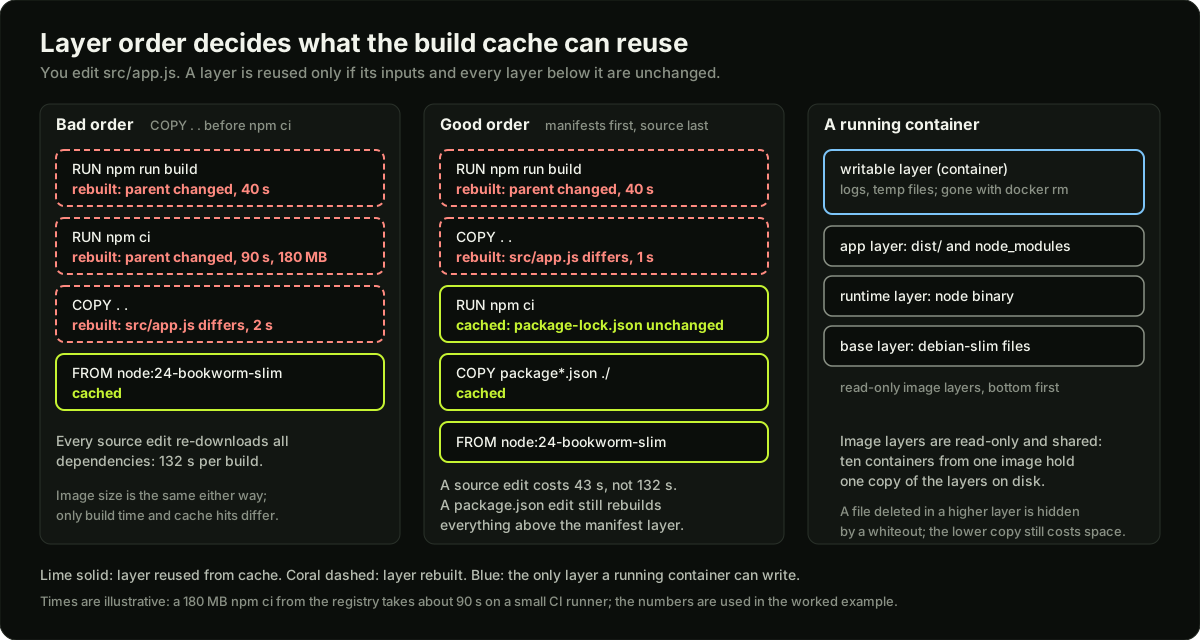 Two stacks of image layers showing which layers rebuild after a source edit in a bad and a good Dockerfile order, next to a running container with its writable layer on top of read-only image layers
A production multi-stage Dockerfile
One stage compiles with all the tools; a second, smaller stage copies only the result, so the compiler, dev dependencies and source never reach the final image.
# syntax=docker/dockerfile:1
# ---- build stage: has npm, dev dependencies and the TypeScript compiler ----
# Pinned major and OS. Node 24 is an LTS line (checked October 2026).
FROM node:24-bookworm-slim AS build
WORKDIR /app
# Manifests only, so the install layer below stays cached until a dependency changes.
COPY package.json package-lock.json ./
# Exact versions from the lock file; the cache mount keeps npm's download cache between builds.
RUN --mount=type=cache,target=/root/.npm npm ci
# Source last: edits here never re-run npm ci.
COPY . .
# Compile, then drop dev dependencies from node_modules.
RUN npm run build && npm prune --omit=dev

# ---- runtime stage: only node, the built app and production dependencies ----
FROM node:24-bookworm-slim
ENV NODE_ENV=production
WORKDIR /app
COPY --from=build --chown=node:node /app/dist ./dist
COPY --from=build --chown=node:node /app/node_modules ./node_modules
COPY --from=build --chown=node:node /app/package.json ./
# The official image ships this unprivileged user, uid 1000.
USER node
# Documentation only; -p or the orchestrator publishes the port.
EXPOSE 3000
# healthcheck.js is a 10-line script that GETs /healthz on localhost and exits 0 or 1.
HEALTHCHECK --interval=30s --timeout=3s --start-period=10s --retries=3 CMD ["node", "dist/healthcheck.js"]
# Exec form: node is PID 1 and receives SIGTERM directly.
CMD ["node", "dist/server.js"]
The .dockerignore next to it; without it COPY . . drags node_modules, .git and .env into the build context (slow upload, cache misses, leaked secrets):
node_modules
.git
.env
*.log
dist
Dockerfile
In Go the output is one static binary: build in golang:1.27-bookworm with CGO_ENABLED=0 go build -o /server ./cmd/server, then FROM gcr.io/distroless/static-debian13:nonroot and COPY --from=build /server /server: a few megabytes. HEALTHCHECK defaults are interval 30s, timeout 30s, start-period 0s, retries 3; exit code 0 means healthy, 1 unhealthy.
Base images and size
The musl gotcha: Alpine uses musl instead of glibc. Prebuilt native binaries (Node addons like sharp, Python wheels built for glibc, Go programs with CGO) either fail to load or must be compiled against musl. If a build suddenly needs apk add build-base python3 and takes five minutes, slim Debian is the better trade: 50 MB more, no surprises. Sizes above are rough classes for the Node family, not measurements; docker history <image> shows which layer costs what.
Tags, digests and registries
A tag (api:1.4.2) is a mutable pointer; whoever pushes next moves it. A digest (api@sha256:9f86d0...) is the content hash and cannot change. Humans use tags; automation that must be reproducible pins digests: production Kubernetes manifests, base images in regulated builds. The rule that prevents most "it changed under us" incidents: never deploy latest, tag every build with the git SHA, and let the deploy tool resolve the tag to a digest.
A registry stores images. Docker Hub is the public default. Private options: Amazon ECR (IAM auth, scanning, lifecycle rules that delete old tags), GitHub Container Registry (GHCR, authenticated by the Actions token, so CI needs no secret) and GitLab's registry. Pushing to ECR:
REPO=123456789012.dkr.ecr.ap-south-1.amazonaws.com/api
aws ecr get-login-password --region ap-south-1 | \
  docker login --username AWS --password-stdin "${REPO%/*}"      # token valid 12 hours
docker build -t "$REPO:$(git rev-parse --short HEAD)" .
docker push "$REPO:$(git rev-parse --short HEAD)"
docker buildx build --platform linux/amd64,linux/arm64 -t ghcr.io/example/api:1.4.2 --push .   # multi-arch for Graviton and x86
An ImagePullBackOff in Kubernetes is almost always a tag typo, no pull secret or node role for the registry, or an amd64-only image on an arm64 node.
docker run flags that matter
docker run -d --name api \
  -p 127.0.0.1:3000:3000 \          # host:container; bind to localhost so only Nginx reaches it
  --env-file /etc/app/env \         # secrets from a host file, never baked into the image
  -e NODE_ENV=production \
  -v api-data:/app/data \           # named volume: survives the container
  -v /srv/app/config:/app/config:ro \   # bind mount: a host path, read-only
  --memory=512m --cpus=1.0 \        # cgroup limits; over memory means SIGKILL, exit code 137
  --restart=unless-stopped \        # restart on crash and daemon start, not after docker stop
  --network app-net \               # user-defined bridge: containers resolve each other by name
  --read-only --tmpfs /tmp \        # immutable root filesystem; scratch space in memory
  --user 1000:1000 \                # override the image's user if it forgot USER
  --cap-drop ALL \                  # no Linux capabilities; add back only what the app needs
  api:1.4.2
Restart policies are no (default), on-failure[:max-retries], always and unless-stopped. --init adds a tiny PID 1 that forwards signals and reaps zombies, useful when the entrypoint is a shell script. docker run itself exits 125 when the daemon fails to start the container, 126 when the command cannot be invoked and 127 when it is not found; anything else is the app's exit code.
Networking modes
Each container on a bridge gets its own IP on a private subnet (172.17.0.0/16 by default), and -p 8080:80 is an iptables rule forwarding host port 8080 into it. From a container, the host is host.docker.internal on Docker Desktop; on Linux add --add-host host.docker.internal:host-gateway.
Volumes, bind mounts and logs
The writable layer dies with the container, so anything that must survive goes in a volume. A named volume (-v pgdata:/var/lib/postgresql/data) lives under /var/lib/docker/volumes/ and is right for database files: Docker manages it, it works the same on every OS, and the container's user owns it. A bind mount (-v $(pwd)/src:/app/src) maps a host path and is right for development (edit on the host, the container sees it) and config files. The permission trap: the container process runs as uid 1000 (node) but the host directory is owned by uid 501 on a Mac or root on a server, so writes fail with EACCES. Fix it by matching uids (--user $(id -u):$(id -g)), by chown on the host, or with a named volume. A tmpfs mount (--tmpfs /tmp) keeps scratch data in memory.
Logs: a container writes to stdout and stderr, nothing else. The default json-file driver stores them under /var/lib/docker/containers/, growing without limit unless you set --log-opt max-size=10m --log-opt max-file=3 or the same in /etc/docker/daemon.json. Full disks from container logs are a common VM outage. Looking inside:
docker logs -f --since 10m api                 # stdout and stderr of the main process
docker exec -it api sh                         # a shell inside (not on distroless; use the :debug image)
docker inspect api --format '{{.State.ExitCode}} {{.State.OOMKilled}} {{.RestartCount}}'
docker stats --no-stream                       # live CPU, memory and I/O per container
docker system df                               # disk used by images, containers, volumes, build cache
Docker Compose for a local multi-service stack
Compose describes several containers, their network and volumes in one file and starts them with docker compose up -d. Services share a user-defined network, so the app reaches the database at the hostname postgres.
# compose.yaml
services:
  api:
    build:
      context: .
      target: build            # the build stage, with dev dependencies, for local work
    command: npm run dev
    ports:
      - "127.0.0.1:3000:3000"
    env_file: .env
    environment:
      DATABASE_URL: postgres://app:app@postgres:5432/app
      REDIS_URL: redis://redis:6379
    volumes:
      - ./src:/app/src         # bind mount: edits on the host reload in the container
    depends_on:
      postgres:
        condition: service_healthy     # wait for the health check, not only for the process
      redis:
        condition: service_started
    restart: unless-stopped

  postgres:
    image: postgres:18-bookworm
    environment:
      POSTGRES_USER: app
      POSTGRES_PASSWORD: app           # local only; production uses a secrets manager
      POSTGRES_DB: app
    volumes:
      - pgdata:/var/lib/postgresql/data    # named volume: the database survives docker compose down
    healthcheck:
      test: ["CMD-SHELL", "pg_isready -U app -d app"]
      interval: 5s
      timeout: 3s
      retries: 10
      start_period: 10s

  redis:
    image: redis:8-bookworm
    command: ["redis-server", "--maxmemory", "256mb", "--maxmemory-policy", "allkeys-lru"]
    volumes:
      - redisdata:/data

volumes:
  pgdata:
  redisdata:
depends_on with condition: service_healthy fixes the classic first-run failure where the app starts before Postgres accepts connections. docker compose down -v also deletes the named volumes: a clean database. docker compose logs -f api and docker compose exec api sh mirror the single-container commands.
Deploying a monorepo to VMs with Docker, and its limits
The 100xDevs week 27 pattern for a monorepo (web, api, worker in one repo): one Dockerfile per service with the repo root as build context; CI builds all three images on every merge to main, tags them with the git SHA and pushes to ECR or GHCR; each VM has a compose.yaml referencing the images by tag; the deploy step is ssh vm "export TAG=abc123 && docker compose pull && docker compose up -d". Nginx on the VM or an ALB routes traffic. For a small team on two or three VMs it is the right amount of machinery.
Its limits are what Kubernetes is for. Scaling means editing a Compose file on every VM by hand. A VM failure takes its containers with it and nothing reschedules them. Rolling updates with health gating are a shell script you now own. Secrets are files per VM. Service discovery across VMs does not exist, so every cross-VM address is hard-coded. When two of these hurt, you have rebuilt a worse scheduler, and the Kubernetes lessons start here.
Container security basics
- Non-root:
USER nodein the image, or--userat run time. A root process that escapes is root on the host, and it can write to every bind mount. - Read-only root filesystem:
--read-only --tmpfs /tmp; an attacker with code execution cannot drop a binary. - No secrets in the image: not in
ENVorARG(visible indocker history), not in a copied.env. Pass them at run time with--env-file, Composesecretsor a secrets manager; at build time useRUN --mount=type=secret. - Drop capabilities (
--cap-drop ALL) and never--privilegedfor an app. - Scan:
trivy image --severity HIGH,CRITICAL --exit-code 1 api:1.4.2in CI fails the build on known vulnerabilities;--ignore-unfixedhides those without a fix yet. Small bases mean fewer findings, which is the real argument for distroless. - Pin and sign: pin base images and production digests, sign with cosign, verify at admission. The supply-chain problem in the related list goes further.
Troubleshooting: the patterns
containerd, the OCI standards and Kubernetes
Docker is three things: a CLI, a daemon (dockerd) with the build and run API, and underneath it containerd, the runtime that pulls images, manages layers and starts containers through runc, which does the namespace and cgroup setup. The Open Container Initiative (OCI) standardised the image format, the runtime spec and the distribution (registry) API, so these parts can be swapped: an image built with Docker, Buildah or ko is an OCI image and any OCI runtime can run it.
Kubernetes talks to a runtime through the Container Runtime Interface (CRI). containerd implements CRI directly, so nodes run containerd and no Docker daemon; the Docker shim was removed from the kubelet in 1.24. On an EKS node you use crictl ps and crictl logs, not docker ps. The split: Docker (or Podman) is the developer tool for building and running locally, containerd is the production runtime, and the image is the contract between them.
Diagram
Worked example
Build time for a Node monorepo service, bad order versus good order. The api service has a 180 MB node_modules from npm ci, which takes 90 s on the CI runner; npm run build takes 40 s; copying the source into the image takes 2 s. The team merges 22 pull requests a day and CI builds the image on every merge. Most merges touch only source; about one in ten changes a dependency.
Step 1, the bad Dockerfile: COPY . . then RUN npm ci then RUN npm run build. Any source change invalidates COPY . ., and every layer after it is rebuilt. Cost per source-only merge: 2 + 90 + 40 = 132 s. Dependency merges cost the same 132 s. Daily: 22 x 132 = 2,904 s, about 48 minutes of build time.
Step 2, the good Dockerfile: COPY package.json package-lock.json ./, RUN npm ci, COPY . ., RUN npm run build. A source-only merge leaves the manifest layer and the npm ci layer cached; it rebuilds COPY . . (1 s, fewer files than the manifest-plus-source copy of the bad order) and the build (40 s): 1 + 2 + 40 = 43 s, counting the 2 s for the cached checks and copy. A dependency merge still rebuilds from the manifest layer: about 133 s. Daily: 20 source merges x 43 s + 2 dependency merges x 133 s = 860 + 266 = 1,126 s, about 19 minutes. Saving: 29 minutes of runner time a day, and each developer waits 43 s instead of 132 s for the build step.
Step 3, the cache must survive between builds. On a laptop the local BuildKit cache does this by default. On a fresh CI runner every build starts cold, so the good order alone gains nothing; you also need a remote cache: docker buildx build --cache-from type=registry,ref=ghcr.io/example/api:buildcache --cache-to type=registry,ref=ghcr.io/example/api:buildcache,mode=max. With it, the runner downloads the cached npm ci layer (180 MB, roughly 10 s on a fast link) instead of running the install (90 s).
Step 4, size. Both orders produce the same final image, because order changes cache hits, not content. Size comes from the multi-stage split: the build stage holds node_modules with dev dependencies (say 420 MB) and the TypeScript source; the runtime stage copies only dist/ and the pruned production node_modules (180 MB) onto node:24-bookworm-slim (about 200 MB). Final image about 380 MB instead of about 1.2 GB for a single-stage build on the full node:24-bookworm base, and the pull on each new node is three times faster. The numbers here are assumptions for the arithmetic; measure yours with docker history.
Runnable code
"""A tiny model of image layers and the build cache, plus a Dockerfile best-practice checker.

Part 1 models an image as a list of layers. Each layer records the files it adds
and the files it deletes (a whiteout). The container sees the union, top layer wins.
Part 2 models BuildKit's cache rule: a layer is reused only if its instruction and
its inputs are unchanged AND every layer before it was reused. It prints which
layers rebuild for a source change versus a dependency change, in good and bad order.
Part 3 parses a Dockerfile string and checks the 7 practices from the lesson.
No network, standard library only.
"""
import hashlib
import re


# ---------- part 1: layers and the union view ----------

def union_view(layers):
    """Merge layers bottom to top. A delete in a higher layer hides the file below."""
    files = {}
    for layer in layers:
        for path in layer.get("deletes", ()):
            files.pop(path, None)          # whiteout: the file is hidden, not removed from the lower layer
        files.update(layer.get("adds", {}))
    return files


def layer_size(layer):
    return sum(len(v) for v in layer.get("adds", {}).values())


# ---------- part 2: build cache simulation ----------

def build(instructions, context, cache):
    """Run a Dockerfile (list of (instruction, inputs)) against a cache.

    inputs is the content the instruction depends on: for COPY the files copied,
    for RUN the command string. The cache key of a step is the hash of the parent
    key plus the instruction plus its inputs, which is why one miss invalidates
    every later step.
    """
    parent = "scratch"
    rebuilt, reused = [], []
    for instr, src in instructions:
        if instr.startswith("COPY"):
            inputs = "".join(f"{p}={context[p]}" for p in sorted(context) if p.startswith(src))
        else:
            inputs = src
        key = hashlib.sha256(f"{parent}|{instr}|{inputs}".encode()).hexdigest()[:12]
        if key in cache:
            reused.append(instr)
        else:
            cache[key] = True
            rebuilt.append(instr)
        parent = key
    return rebuilt, reused


BAD_ORDER = [
    ("FROM node:24-bookworm-slim", "base"),
    ("COPY . .", "./"),                 # everything first: any file change invalidates npm ci
    ("RUN npm ci", "npm ci"),
    ("RUN npm run build", "npm run build"),
]

GOOD_ORDER = [
    ("FROM node:24-bookworm-slim", "base"),
    ("COPY package.json package-lock.json ./", "./package"),   # only the two manifests
    ("RUN npm ci", "npm ci"),           # cached until a dependency changes
    ("COPY . .", "./"),
    ("RUN npm run build", "npm run build"),
]


def show(title, instructions, change):
    cache = {}
    ctx = {"./package.json": "deps-v1", "./package-lock.json": "lock-v1", "./src/app.js": "src-v1"}
    build(instructions, ctx, cache)                       # first build warms the cache
    ctx = dict(ctx, **change)
    rebuilt, reused = build(instructions, ctx, cache)
    print(f"  {title}: {len(reused)} cached, {len(rebuilt)} rebuilt -> {rebuilt}")
    return rebuilt


# ---------- part 3: Dockerfile checker ----------

SAMPLE_DOCKERFILE = """
# syntax=docker/dockerfile:1
FROM node:24-bookworm-slim AS build
WORKDIR /app
COPY package.json package-lock.json ./
RUN npm ci
COPY . .
RUN npm run build

FROM node:24-bookworm-slim
ENV NODE_ENV=production
# practice 6: a secret baked into the image
ENV API_KEY=sk-live-123
WORKDIR /app
COPY --from=build /app/dist ./dist
COPY --from=build /app/node_modules ./node_modules
# practice 5: ADD where COPY is meant
ADD config.tar.gz /app/
EXPOSE 3000
# no USER line: practice 3
# no HEALTHCHECK: practice 4
CMD ["node", "dist/server.js"]
"""


def parse_dockerfile(text):
    """Return a list of (instruction, argument) with comments and blank lines removed, continuations joined."""
    lines, buf = [], ""
    for raw in text.splitlines():
        line = "" if raw.lstrip().startswith("#") else raw.rstrip()   # only a line starting with # is a comment
        if not line.strip():
            continue
        buf += line.rstrip("\\") + " "
        if not line.endswith("\\"):
            parts = buf.strip().split(None, 1)
            lines.append((parts[0].upper(), parts[1] if len(parts) > 1 else ""))
            buf = ""
    return lines


SECRET_HINT = re.compile(r"(key|secret|token|password|passwd)\s*=", re.I)


def check_dockerfile(text):
    steps = parse_dockerfile(text)
    findings = []
    froms = [(i, arg) for i, (ins, arg) in enumerate(steps) if ins == "FROM"]
    # 1. pinned base image: a tag, and not latest
    for _, arg in froms:
        image = arg.split()[0]
        if image.lower() in ("scratch",):
            continue
        tag = image.split("@")[0].split("/")[-1]
        if ":" not in tag or tag.endswith(":latest"):
            findings.append(f"1 pin the base image: '{image}' has no tag or uses latest; builds will change under you")
    # 2. dependency manifest copied before the source tree, in every stage that installs
    for s, (start, _) in enumerate(froms):
        end = froms[s + 1][0] if s + 1 < len(froms) else len(steps)
        stage = steps[start:end]
        copy_all = next((i for i, (ins, arg) in enumerate(stage) if ins == "COPY" and re.fullmatch(r"\.\s+\S+", arg)), None)
        install = next((i for i, (ins, arg) in enumerate(stage) if ins == "RUN" and re.search(r"npm ci|npm install|pip install|go mod download", arg)), None)
        if install is not None and copy_all is not None and copy_all < install:
            findings.append("2 copy the dependency manifest first: 'COPY . .' comes before the install step, so every source edit reinstalls dependencies")
    # 3. non-root user in the final stage
    final = steps[froms[-1][0]:] if froms else steps
    users = [arg for ins, arg in final if ins == "USER"]
    if not users or users[-1].split(":")[0] in ("root", "0"):
        findings.append("3 run as a non-root user: the final stage has no USER, so the process runs as root inside the container")
    # 4. healthcheck
    if not any(ins == "HEALTHCHECK" for ins, _ in final):
        findings.append("4 add a HEALTHCHECK so docker ps and Compose depends_on can tell 'running' from 'working'")
    # 5. COPY not ADD for local files
    for ins, arg in steps:
        if ins == "ADD" and not re.match(r"https?://|git@", arg):
            findings.append(f"5 use COPY instead of ADD for local files: 'ADD {arg}' silently extracts archives and fetches URLs")
    # 6. no secrets in ENV or ARG
    for ins, arg in steps:
        if ins in ("ENV", "ARG") and SECRET_HINT.search(arg):
            findings.append(f"6 no secrets in the image: '{ins} {arg.split('=')[0]}=...' is stored in every layer and visible in docker history")
    # 7. multi-stage: build tools must not ship in the final image
    if len(froms) < 2:
        findings.append("7 use a multi-stage build so compilers and dev dependencies stay out of the final image")
    return findings


if __name__ == "__main__":
    print("part 1: layers and the union filesystem")
    layers = [
        {"name": "base: debian-slim", "adds": {"/bin/sh": "x" * 120, "/etc/os-release": "debian"}},
        {"name": "RUN apt-get install curl", "adds": {"/usr/bin/curl": "x" * 300, "/var/cache/apt/pkgs.bin": "x" * 500}},
        {"name": "RUN rm -rf /var/cache/apt", "deletes": ["/var/cache/apt/pkgs.bin"]},
        {"name": "COPY dist/ /app", "adds": {"/app/server.js": "x" * 80}},
    ]
    view = union_view(layers)
    total = sum(layer_size(l) for l in layers)
    print(f"  files visible in the container: {sorted(view)}")
    print(f"  bytes the container can see: {sum(len(v) for v in view.values())}, bytes stored in layers: {total}")
    print("  the apt cache deleted in layer 3 still costs 500 bytes: a delete in a later layer hides, it does not shrink")
    assert "/var/cache/apt/pkgs.bin" not in view and total == 1006

    print("\npart 2: what the build cache rebuilds")
    print(" source change (src/app.js edited):")
    bad_src = show("bad order ", BAD_ORDER, {"./src/app.js": "src-v2"})
    good_src = show("good order", GOOD_ORDER, {"./src/app.js": "src-v2"})
    print(" dependency change (package.json edited):")
    bad_dep = show("bad order ", BAD_ORDER, {"./package.json": "deps-v2", "./package-lock.json": "lock-v2"})
    good_dep = show("good order", GOOD_ORDER, {"./package.json": "deps-v2", "./package-lock.json": "lock-v2"})
    assert "RUN npm ci" in bad_src and "RUN npm ci" not in good_src
    assert "RUN npm ci" in bad_dep and "RUN npm ci" in good_dep
    print("  with the manifest copied first, a source edit never re-runs npm ci; a dependency edit always does")

    print("\npart 3: Dockerfile checker")
    findings = check_dockerfile(SAMPLE_DOCKERFILE)
    for f in findings:
        print(f"  practice {f}")
    assert sorted(f[0] for f in findings) == ["3", "4", "5", "6"], findings

    fixed = SAMPLE_DOCKERFILE.replace("ENV API_KEY=sk-live-123\n", "")
    fixed = fixed.replace("ADD config.tar.gz /app/", "COPY config/ /app/config/")
    fixed = fixed.replace("EXPOSE 3000", "USER node\nEXPOSE 3000\nHEALTHCHECK --interval=30s --timeout=3s --start-period=10s --retries=3 CMD node dist/healthcheck.js")
    assert check_dockerfile(fixed) == [], check_dockerfile(fixed)
    unpinned = fixed.replace("node:24-bookworm-slim AS build", "node AS build").replace("FROM node:24-bookworm-slim\n", "FROM node:latest\n")
    bad_order = fixed.replace("COPY package.json package-lock.json ./\nRUN npm ci\nCOPY . .", "COPY . .\nRUN npm ci")
    assert [f[0] for f in check_dockerfile(unpinned)] == ["1", "1"]
    assert [f[0] for f in check_dockerfile(bad_order)] == ["2"]
    assert [f[0] for f in check_dockerfile("FROM node:24-bookworm-slim\nUSER node\nHEALTHCHECK CMD true\nCMD node")] == ["7"]
    print("  self-check: sample has findings 3, 4, 5, 6; fixed file is clean; practices 1, 2 and 7 are caught on purpose-built inputs")
Key takeaways
A container is a process with namespaces (what it sees), cgroups (what it may use) and a union filesystem (what it has); it shares the host kernel, which is why it is fast and why isolation is weaker than a VM.
Images are read-only layers plus config; a layer is cached only if its inputs and every layer below it are unchanged, so copy dependency manifests before source.
Multi-stage builds keep compilers and dev dependencies out of the final image; pin the base tag, run as a non-root USER, add a HEALTHCHECK, keep a .dockerignore.
Slim Debian is the safe default; Alpine is smaller but musl breaks native modules; distroless has no shell and is the target for Go binaries.
Tags move, digests do not: tag builds with the git SHA, never deploy latest, pin digests where reproducibility matters.
Named volumes for data, bind mounts for development, stdout for logs, and log rotation on the json-file driver or the disk fills.
Compose with depends_on condition service_healthy is the local stack; the same images deployed by Compose on VMs work for small teams and stop scaling at rescheduling, rolling updates and service discovery, which is where Kubernetes starts.
Kubernetes runs containerd through CRI, not Docker; the OCI image is the contract between the build tool and the runtime.
Common mistakes
Writing
COPY . .before the dependency install, so every source change reinstalls everything.Deleting files in a later layer (apt lists, a build cache, a secret) and believing the image got smaller or the secret is gone.
Using
node:latestorpython:3as a base, then debugging a build that changed because the tag moved.Running as root in the final image and mounting a host directory, so an app bug can rewrite host files.
Putting secrets in
ENV,ARGor a copied.env, wheredocker historyand any registry reader can see them.Treating
docker psshowingUpas "working": without a HEALTHCHECK and a readiness check, a hung process looks identical to a healthy one.
Practice
Write the multi-stage Dockerfile from this lesson for any small Node or Go app, build it, and compare
docker imagessizes for the single-stage and multi-stage versions. Then edit one source file, rebuild, and read the build output to confirm thenpm ciorgo mod downloadlayer says CACHED. No Docker on your laptop? Play with Docker (docker.com/play-with-docker) gives you a free browser terminal with Docker installed for a few hours, enough for this task.Bring up the Compose stack (app, Postgres, Redis) and watch
docker compose psuntil Postgres is healthy before the app starts. Remove the healthcheck condition, rundocker compose upfrom scratch, and observe the first-connection failure it was preventing.Run the app with
--memory=64mand a route that allocates a large array; confirm the exit code is 137 anddocker inspectshows OOMKilled true. Then run it with--read-only --tmpfs /tmp --cap-drop ALL --user 1000:1000and fix whatever breaks.Scan your image with
trivy image --severity HIGH,CRITICAL <image>, then rebuild on a distroless or slim base and compare the number of findings. Push the image to GHCR or ECR by git SHA and pull it on a second machine or a kind cluster.
Interview questions (10)
1.What is the difference between a container and a virtual machine?Easy
A VM runs its own kernel on a hypervisor and boots a full operating system, so it is isolated by hardware virtualisation, takes tens of seconds to start and its disk image is gigabytes. A container is an ordinary process on the host kernel that the kernel isolates with namespaces, which control what the process can see, and limits with cgroups, which control what it can use, and it gets its filesystem from read-only image layers. It starts in milliseconds and the image is megabytes, so you can run hundreds on one host. The trade-off is that the kernel is shared: a kernel exploit affects every container, which is why multi-tenant platforms still put untrusted workloads in VMs or micro-VMs.
2.Why does the order of instructions in a Dockerfile matter?Easy
Because each instruction produces a layer and the build cache works top down: a layer is reused only when its instruction and inputs are unchanged and every layer before it was also reused. One cache miss rebuilds everything after it. So I order from least to most frequently changing: base image, system packages, the dependency manifest, the dependency install, then the source, then the build step. If I copy the whole source tree before npm ci, every one-line edit re-downloads all dependencies. With the manifest copied first, a source edit reuses the install layer and the build takes a third of the time. The same rule explains why apt-get update and install must be in one RUN: split, the update layer is cached forever and you install stale packages.
3.Explain multi-stage builds and what they achieve.Easy
A multi-stage build has more than one FROM. The first stage has everything needed to compile: the full SDK, dev dependencies, the source. A later stage starts from a small runtime base and uses COPY --from=build to bring in only the build output, such as the dist folder and production node_modules, or a single Go binary. The compiler, the dev dependencies and the source never reach the final image, so it is smaller, pulls faster and has fewer packages for a scanner to flag. For Go the final stage can be distroless static, a few megabytes. It also removes the temptation to delete build tools in a later layer, which does not shrink an image anyway because lower layers keep the bytes.
4.A container exits with code 137. What happened and what do you do?Medium
137 is 128 plus 9, so the process was killed with SIGKILL. In a container that almost always means the memory cgroup limit was hit and the kernel's OOM killer fired. I confirm with docker inspect and look at State.OOMKilled, or on Kubernetes the last state says OOMKilled. Then I compare the limit with real usage from docker stats or metrics. The fix is one of: raise the limit if the usage is legitimate, fix a leak if usage grows without bound, or configure the runtime so it stays under the limit, for example NODE_OPTIONS=--max-old-space-size set below the container limit or Java's container-aware heap settings. A restart policy hides the symptom but not the cause, and if the limit is too low the container restarts in a loop.
5.The app works on your laptop but fails in the container with "permission denied" writing to a mounted directory. Why?Medium
The container process runs as a specific uid, usually 1000 for the node user or whatever USER set, and a bind mount keeps the host directory's ownership. If the host directory is owned by root on a server or by uid 501 on a Mac, uid 1000 inside the container has no write permission. Linux checks numeric ids, not names, so the username inside the image is irrelevant. I check with ls -ln on the host and id inside the container, then fix by matching the ids: chown 1000:1000 on the host directory, or run the container with --user $(id -u):$(id -g), or use a named volume instead of a bind mount, which Docker creates with the container user's ownership. On a Mac, Docker Desktop maps file ownership for you, which is why it only shows up on Linux.
6.What is the difference between an image tag and a digest, and when would you use each?Medium
A tag such as api:1.4.2 is a mutable name: whoever pushes to the registry next can point it at a different image, and latest moves on every push. A digest such as api@sha256:... is the hash of the image manifest and identifies exactly one content forever. Humans and CI use tags, and I tag every build with the git SHA so a tag maps to one commit. Where reproducibility or security matters I pin digests: base images in a regulated build, production Kubernetes manifests after the deploy tool resolves the tag, and anything a signature verification depends on. Deploying latest is the mistake every team makes once: a rollback becomes impossible because nobody knows which image was running.
7.How do two containers on the same host talk to each other by name?Easy
On the default bridge network they cannot resolve names; they only have IPs. On a user-defined bridge network, created with docker network create or automatically by Compose, Docker runs an embedded DNS server, so a container named postgres is reachable as postgres from any container on that network, on the container's own port, not a published one. Publishing with -p is only for reaching a container from the host or outside. In Compose every service joins the project network by default, so the app's connection string uses the service name as the hostname. Across hosts this does not work, which is one of the reasons orchestration exists.
8.Why does Kubernetes use containerd instead of Docker, and does it matter for your images?Medium
Kubernetes talks to a container runtime through the CRI interface. Docker's daemon did not implement CRI, so the kubelet needed a shim called dockershim, which was removed in Kubernetes 1.24. containerd, which was always the component underneath Docker that actually pulls images and starts containers through runc, implements CRI directly, so nodes run containerd with no Docker daemon. It does not matter for images, because images follow the OCI image specification: anything built with docker build, Buildah or ko runs on containerd unchanged. It matters for debugging: on a node you use crictl ps and crictl logs, not docker ps, and Docker-specific features such as the json-file log driver options do not apply.
9.How would you make a Dockerfile for a Node service production-ready?Medium
Multi-stage: build in node:24-bookworm-slim with npm ci after copying only package.json and package-lock.json, then copy the source and build. The runtime stage starts from the same slim base, copies dist and the pruned production node_modules with --chown=node:node, sets NODE_ENV=production, switches to USER node, adds a HEALTHCHECK hitting /healthz, and uses the exec form of CMD so node is PID 1 and receives SIGTERM. A .dockerignore excludes node_modules, .git and .env. No secrets in ENV. I tag the image with the git SHA, scan it with Trivy in CI and fail on high or critical findings, and push to ECR or GHCR. For a Go service the runtime stage would be distroless static with one binary.
10.You deploy a monorepo with Docker Compose on three VMs. What breaks first as the team grows?Medium
Four things, in roughly this order. Scaling and placement: adding a replica means editing a Compose file on a specific VM and remembering which VM has capacity. Failure handling: when a VM dies, nothing restarts its containers elsewhere; someone does it by hand. Rolling updates: docker compose up -d replaces containers without health gating across VMs, so I end up writing and maintaining a deploy script that drains, updates and checks each one. Service discovery and secrets: every cross-VM address and every secret is a file on a VM, and config drifts between machines. Each of those is a feature Kubernetes provides: a scheduler, a controller that reschedules, a Deployment with rolling updates, Services with DNS, and Secrets. Compose on VMs is right until two of those four hurt.
Quiz
1.Which kernel feature limits how much memory a container may use?
2.In a Dockerfile, which order gives the best cache behaviour for a Node service?
3.A Dockerfile runs apt-get install in one RUN and rm -rf /var/lib/apt/lists in the next RUN. What is the image size effect?
4.Which docker run flag makes a container restart after a crash and after a daemon restart, but not after you stop it on purpose?
5.Your Node app with a native image library crashes with a segfault only in the Alpine-based image. Most likely cause?
Practice these problems
Further reading
My notes
Your notes
Autosaves to this browser.