Web servers, reverse proxies and TLS - Nginx, certificates, process managers
The first real deployment most people do is a Node or Python app on one Linux VM: clone, build, run it under a process manager, and put Nginx in front. This lesson covers why the proxy is there, how an Nginx config is structured, the server block you will copy for years, load balancing across app processes, static files, rate limiting, TLS with Let's Encrypt and certbot, systemd versus PM2, and how to read Nginx logs and status codes.
Why it matters
Interviewers for junior DevOps roles ask "how would you deploy this Node app on an EC2 instance" and "what is a reverse proxy" because the answer shows whether you have ever run something for real. On the job, the same Nginx ideas come back as the Kubernetes ingress controller, the AWS ALB and the Cloudflare edge: headers, timeouts, upstream health, rate limits and certificates. A 502 at 2 a.m. is the most common page a new on-call engineer gets, and most of them are explained by one line in this lesson. Expired certificates are the second most common.
Read first: Linux for operators, Networking for DevOps - TCP/IP, DNS, HTTP, TLS, SSH
Lesson
The plain-VM deploy, step by step
One Ubuntu VM, one app, one domain. A static frontend (the React or Next.js build) may live on Vercel, Netlify or CloudFront plus S3; this lesson is about the API behind it.
# on the VM, once
sudo apt-get update && sudo apt-get install -y nginx git            # web server and git
curl -fsSL https://deb.nodesource.com/setup_24.x | sudo -E bash -    # Node 24 LTS repo
sudo apt-get install -y nodejs && sudo npm install -g pm2            # runtime and process manager

# every deploy
cd /srv/app && git pull                # first time: git clone <repo> /srv/app
npm ci && npm run build                # install exactly what package-lock.json says, then compile
for p in 3000 3001 3002; do PORT=$p pm2 start dist/server.js --name "api-$p"; done   # one process per port
pm2 save                               # remember the process list across reboots
sudo nginx -t && sudo systemctl reload nginx   # test the config, then apply without dropping connections
The app listens on 127.0.0.1:3000 (and 3001, 3002). The security group allows only 22, 80 and 443, so nothing outside can reach those ports. Nginx listens on 80 and 443 and forwards to the app: that forwarding is the reverse proxy. (PM2 cluster mode, -i 3, is the alternative: three workers share port 3000.)
What a reverse proxy is and why the app is never exposed directly
A forward proxy works for the client (a corporate proxy filtering outgoing traffic). A reverse proxy works for the server: clients talk to it, it talks to the app. Nginx is one; so are HAProxy, Envoy, the AWS ALB and every Kubernetes ingress controller. Why not point the domain at port 3000? Because the app runtime is bad at the jobs Nginx does well:
The second reason is security: only Nginx needs ports 80 and 443, so the app runs as an unprivileged user on a localhost port.
Nginx config structure
The main file is /etc/nginx/nginx.conf: an events block and an http block that ends with include /etc/nginx/sites-enabled/*; on Ubuntu, so each site is one file. Inside http:
upstream name { server host:port; ... }defines a pool of backends.server { listen; server_name; ... }is one virtual host. Nginx picks it by theHostheader (exact name, then wildcards, then regular expressions in file order). Two blocks with the same name on the same port make Nginx logconflicting server nameand ignore the second.locationinsideserverpicks the rules for a path. An exact matchlocation = /healthwins first; otherwise the longest prefix is remembered; regular-expression locations (~case-sensitive,~*case-insensitive) are then tried in file order and the first wins;^~on a prefix stops the regex search.
Directives inherit downward: a proxy_read_timeout in server applies to every location without its own. A proxy_set_header in a location replaces the whole inherited set.
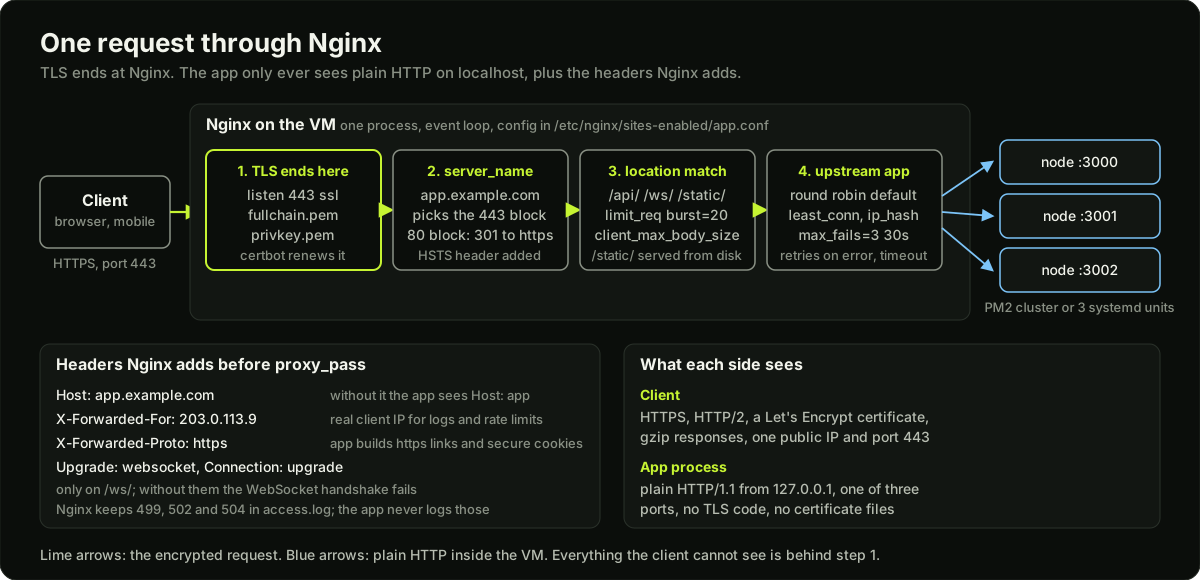 One request passing through Nginx: TLS termination, server block, location match, upstream pool, three Node processes, with the headers Nginx adds
The complete server block for a Node app
Every line here has a reason.
# /etc/nginx/sites-enabled/app.conf

# Turns the client's Upgrade header into the Connection header WebSockets need.
map $http_upgrade $connection_upgrade {
    default upgrade;
    ''      close;
}

# 10 MB of shared memory holds about 80,000 client-IP states; 10 requests per second each.
limit_req_zone $binary_remote_addr zone=api:10m rate=10r/s;

upstream app {
    least_conn;                                  # the process with the fewest open requests
    server 127.0.0.1:3000 max_fails=3 fail_timeout=30s;
    server 127.0.0.1:3001 max_fails=3 fail_timeout=30s;
    server 127.0.0.1:3002 max_fails=3 fail_timeout=30s;
    keepalive 32;                                # reuse connections to the app
}

server {
    listen 80;
    listen [::]:80;
    server_name app.example.com;
    # certbot answers the HTTP-01 challenge here; everything else redirects
    location /.well-known/acme-challenge/ { root /var/www/certbot; }
    location / { return 301 https://$host$request_uri; }
}

server {
    listen 443 ssl;
    listen [::]:443 ssl;
    http2 on;                                    # 1.25.1 or newer; older: listen 443 ssl http2;
    server_name app.example.com;

    ssl_certificate     /etc/letsencrypt/live/app.example.com/fullchain.pem;
    ssl_certificate_key /etc/letsencrypt/live/app.example.com/privkey.pem;
    ssl_protocols TLSv1.2 TLSv1.3;               # the default since 1.23.4
    ssl_session_cache shared:SSL:10m;            # about 40,000 resumable sessions
    add_header Strict-Transport-Security "max-age=31536000; includeSubDomains" always;

    gzip on;
    gzip_types text/plain text/css application/json application/javascript image/svg+xml;
    gzip_min_length 1024;                        # tiny responses get bigger when compressed
    gzip_proxied any;                            # compress proxied responses too; default off

    client_max_body_size 1m;                     # the default; the upload location overrides it
    access_log /var/log/nginx/app.access.log timed;   # 'timed' is defined in nginx.conf, see logs

    # Headers every proxied location needs; set once here, inherited below.
    proxy_set_header Host              $host;                       # otherwise the app sees "app"
    proxy_set_header X-Forwarded-For   $proxy_add_x_forwarded_for;  # appends the client IP
    proxy_set_header X-Forwarded-Proto $scheme;                     # the app learns it was https
    proxy_connect_timeout 5s;                    # a dead process should fail fast
    proxy_read_timeout    60s;                   # the default; raise it per location

    location /static/ {
        alias /srv/app/dist/static/;
        expires 30d;                             # Cache-Control: max-age=2592000; use hashed file names
        add_header Cache-Control "public, immutable";
        access_log off;
    }

    location /api/ {
        limit_req zone=api burst=20 nodelay;     # 10 r/s steady, 20 extra at once, then reject
        limit_req_status 429;                    # the default is 503; 429 tells clients to back off
        proxy_pass HTTP://app;
    }

    location /api/upload {
        client_max_body_size 50m;                # only here; a 60 MB file still gets 413
        proxy_request_buffering off;             # stream the body instead of spooling it to disk
        proxy_pass HTTP://app;
    }

    location /ws/ {
        proxy_pass HTTP://app;
        proxy_http_version 1.1;                  # needed before 1.29.7 (default was 1.0)
        proxy_set_header Upgrade    $http_upgrade;
        proxy_set_header Connection $connection_upgrade;
        proxy_set_header Host       $host;       # a location-level set replaces the server-level set
        proxy_set_header X-Forwarded-For $proxy_add_x_forwarded_for;
        proxy_read_timeout 3600s;                # an idle socket would otherwise close after 60 s
    }

    location / {
        proxy_pass HTTP://app;
    }
}
(The examples spell the scheme HTTP:// because this site rejects plain-http links in lesson text; Nginx accepts either case.)
Three details decide whether this works. proxy_set_header Host $host is needed because the default is $proxy_host, the upstream name app; frameworks use Host for redirect URLs and tenant lookups. X-Forwarded-Proto is how the app knows to set Secure cookies and https links when it only sees plain HTTP. And proxy_next_upstream defaults to error timeout, so if process 3000 refuses the connection Nginx silently tries 3001, as long as nothing was sent to the client yet.
Static files and caching at Nginx
The /static/ location above serves files from disk with long Cache-Control headers. Nginx can also cache responses from the app, so one database read serves every client that asks within the window:
# http block: 10 MB of keys (about 80,000 entries), 1 GB on disk, unused entries dropped after 60 minutes
proxy_cache_path /var/cache/nginx/api levels=1:2 keys_zone=api_cache:10m max_size=1g inactive=60m use_temp_path=off;
# inside location /api/catalog/
proxy_cache api_cache;
proxy_cache_valid 200 5m;                       # cache 200s for five minutes; other codes are not cached
proxy_cache_use_stale error timeout updating;   # serve the old copy while the app is down or refreshing
Cache at Nginx when the content is the same for every user and the app is the bottleneck; use a CDN (CloudFront, Cloudflare) when users are far from the server, because it caches at hundreds of edge locations and absorbs traffic before it reaches your VM.
Upstream load balancing
Health is passive in open-source Nginx: a server that fails max_fails times (default 1) inside fail_timeout (default 10s) is skipped for fail_timeout, then tried again. Active health checks need NGINX Plus; the Kubernetes readiness probe is the real answer. backup marks a server used only when every primary is down.
Rate limiting with limit_req
limit_req_zone $binary_remote_addr zone=api:10m rate=10r/s; creates a shared-memory table keyed by client IP. Each state costs 128 bytes on 64-bit, so 10 MB holds about 80,000; when it fills, the oldest state is evicted. The algorithm is a leaky bucket: at 10 r/s a request is "on time" every 100 ms. burst=20 lets 20 early requests queue; without nodelay they are released one every 100 ms, with nodelay they pass at once and only the 21st early request is rejected. The rejection code is 503 by default; limit_req_status 429 makes clients and dashboards see "too many requests" instead of "service down". Behind a load balancer or Cloudflare every request carries the balancer's IP, so key on the real client address ($http_cf_connecting_ip, or X-Forwarded-For after set_real_ip_from).
TLS: certificates, ACME and certbot
A TLS certificate is a signed statement from a certificate authority (CA) that the holder of a private key controls a domain name. The browser trusts the CA, the CA checked your domain, so the browser trusts your key. Let's Encrypt is a free CA that automates the check through the ACME protocol. An ACME client (certbot is the standard one) must pass a challenge:
Let's Encrypt certificates are valid for 90 days today. The announced plan (checked on letsencrypt.org) shortens that: 64 days from 10 February 2027, 45 days from 16 February 2028, and optional 6-day certificates already exist. Short lifetimes force automation, and certbot installs it: a systemd timer or cron entry runs certbot renew twice a day, and a certificate is renewed once less than a third of its lifetime remains (day 60 of 90).
sudo certbot --nginx -d app.example.com                 # edits the server block, gets the certificate, sets up renewal
sudo certbot certonly --webroot -w /var/www/certbot -d app.example.com   # if you keep your own Nginx config
sudo certbot renew --dry-run                            # rehearse renewal against the staging CA
sudo certbot renew --deploy-hook "systemctl reload nginx"   # runs only after a successful renewal
sudo openssl x509 -in /etc/letsencrypt/live/app.example.com/fullchain.pem -noout -dates   # notBefore, notAfter
Files land in /etc/letsencrypt/live/<domain>/: fullchain.pem (your certificate then the intermediate, which is what ssl_certificate needs) and privkey.pem. The classic outage is a renewed file that Nginx never loaded: the deploy hook must reload Nginx, or the old certificate is served until someone restarts it. Three more parts of the TLS block matter: the port 80 block only answers the ACME challenge and redirects everything else with 301; listen 443 ssl is the modern form (ssl on was removed in 1.25.1); and Strict-Transport-Security (HSTS) tells browsers to use HTTPS for the next 31,536,000 seconds (one year) without asking, so enable it only after HTTPS works.
Where certificates live in a cloud design
On one VM, Nginx owns the certificate. In a cloud design, termination moves to the edge and you stop handling key files. On AWS, an Application Load Balancer terminates TLS with a certificate from AWS Certificate Manager (ACM): ACM validates by DNS, renews automatically, and the private key never leaves AWS. In Kubernetes, cert-manager is the ACME client: a Certificate object plus a ClusterIssuer for Let's Encrypt produces a Secret that the ingress controller or Gateway mounts, and cert-manager renews it. Same idea each time: a controller renews, the reload is automatic, and an expiry alert is the backstop.
Process managers: systemd and PM2
Use systemd when the program is not Node, when you need cgroup limits and ordering, or when you want one tool for Nginx, the app and a worker. Use PM2 for a Node app where cluster mode and reload save you a rolling-restart script.
# /etc/systemd/system/api.service
[Unit]
Description=Example API
After=network-online.target
Wants=network-online.target

[Service]
Type=simple
User=app
WorkingDirectory=/srv/app
# the env file holds PORT=3000 and DATABASE_URL; it is not in git
EnvironmentFile=/etc/app/env
ExecStart=/usr/bin/node dist/server.js
Restart=on-failure
RestartSec=2
MemoryMax=512M

[Install]
WantedBy=multi-user.target
sudo systemctl daemon-reload && sudo systemctl enable --now api loads and starts it. Containers replace both tools later: the orchestrator restarts and scales, and logs go to stdout.
Logs: where to look and what to read
Nginx writes an access log (one line per request in the combined format by default) and an error log (/var/log/nginx/error.log: upstream failures, config errors). Add timing to the access log and most 502 and 504 investigations become one grep.
# in the http block of nginx.conf
log_format timed '$remote_addr - $remote_user [$time_local] "$request" '
                 '$status $body_bytes_sent "$http_referer" "$http_user_agent" '
                 'rt=$request_time urt=$upstream_response_time us=$upstream_status up=$upstream_addr';
rt is the total time, urt how long the app took, us what the app answered and up which process served it. urt=- with status 502 means Nginx never got a response. The first question on a 502 is "does the app log show the request at all": if not, the problem is between Nginx and the process.
Status codes that tell you where the failure is
Diagram
Worked example
Sizing the rate limit and the upstream for a 3-process Node API. The API runs under PM2 with 3 processes on ports 3000 to 3002. Requirement: a normal user makes at most 5 requests per second, a page load fires up to 15 at once, and a stuck process must not cause user-visible errors.
Step 1, the zone. limit_req_zone $binary_remote_addr zone=api:10m rate=10r/s; gives each IP 10 requests per second, twice the normal user rate. Each state is 128 bytes on a 64-bit server, so a 1 MB zone holds about 8,000 states and 10 MB holds 10 x 8,000 = 80,000 client IPs before the oldest are evicted. That covers a site with 50,000 daily users.
Step 2, the burst. At 10 r/s a request is on time every 100 ms. A page load sends 15 requests in the same millisecond, so without a burst 14 of them would be rejected. burst=20 nodelay allows 20 early requests: the first request plus 20 burst slots means 21 requests at once pass and the 22nd gets 429. Check it with an attacker that sends 40 at once: 21 pass, 19 are rejected. After that, every slot refills at 100 ms, so a client that then sends exactly 10 per second passes forever, and one that sends 11 per second loses 1 of every 11 once its burst is used up. Without nodelay, the 21st request would be held for 20 x 100 ms = 2 s before being sent to the app, which is why APIs use nodelay.
Step 3, the upstream. max_fails=3 fail_timeout=30s on each server. Process 3001 crashes at 10:00:00. PM2 restarts it in about 1 to 2 s. In that window Nginx picks 3001 for roughly a third of requests, gets connection refused, and because proxy_next_upstream defaults to error timeout it retries on 3000 or 3002: the user sees a few milliseconds more latency and no error. After the third refusal within 30 s, 3001 is skipped for 30 s, then tried again. If PM2 had failed to restart it, the error log shows connect() failed (111: Connection refused) while connecting to upstream with the port, which is the line you grep for.
Step 4, the timeouts. proxy_connect_timeout 5s means a process whose port is firewalled (packets dropped, not refused) costs 5 s rather than the default 60 s before Nginx tries the next one. proxy_read_timeout 60s is fine for the API, but the /api/reports endpoint takes 90 s to build a PDF. With the default, every report is a 504 at second 60 while the app keeps working for 30 more seconds, which is the worst of both. Either proxy_read_timeout 120s on that one location, or, better, return a job id in 50 ms and let the client poll.
Runnable code
"""Parse an Nginx-style config into a tree and check the six things that most often go wrong.

No network, standard library only. The parser handles the real syntax well enough
for server blocks: directives end with ';', blocks are '{ ... }', '#' starts a comment,
and quoted strings may contain spaces or semicolons.
"""
import re

SAMPLE = r"""
http {
    map $http_upgrade $connection_upgrade { default upgrade; '' close; }
    upstream app { server 127.0.0.1:3000; server 127.0.0.1:3001; server 127.0.0.1:3002; }

    server {
        listen 80;
        server_name app.example.com;
        return 301 https://$host$request_uri;
    }

    server {
        listen 443;                              # BUG 3: no 'ssl' parameter
        server_name app.example.com;             # BUG 5: same name as the block below
        ssl_certificate /etc/letsencrypt/live/app.example.com/fullchain.pem;
        ssl_certificate_key /etc/letsencrypt/live/app.example.com/privkey.pem;

        location / {
            proxy_pass HTTP://app;               # BUG 1: no proxy_set_header Host
            proxy_set_header X-Forwarded-For $proxy_add_x_forwarded_for;
            proxy_read_timeout 5s;               # BUG 6: too low for slow endpoints
        }
        location /ws/ {
            proxy_pass HTTP://app;               # BUG 2: no Upgrade and Connection headers
            proxy_set_header Host $host;
        }
        location /upload {
            proxy_pass HTTP://app;               # BUG 4: no client_max_body_size (default 1m)
            proxy_set_header Host $host;
        }
    }

    server {
        listen 443 ssl;
        server_name app.example.com;
        location / { proxy_pass HTTP://app; proxy_set_header Host $host; }
    }
}
"""

TOKEN = re.compile(r"""\s*(?:(#[^\n]*)|("(?:[^"\\]|\\.)*"|'(?:[^'\\]|\\.)*')|([{};])|([^\s{};"']+))""")


def tokenize(text):
    """Yield tokens: comments are dropped, quoted strings keep their content."""
    pos = 0
    while pos < len(text):
        m = TOKEN.match(text, pos)
        if not m or m.end() == pos:
            pos += 1
            continue
        pos = m.end()
        comment, quoted, punct, word = m.groups()
        if comment:
            continue
        if quoted:
            yield quoted[1:-1]
        elif punct:
            yield punct
        elif word:
            yield word


def parse(text):
    """Return a list of nodes. A node is {'name', 'args', 'block'} where block is None or a list."""
    tokens = list(tokenize(text))
    root = []
    stack = [root]          # the innermost open block is stack[-1]
    i = 0
    while i < len(tokens):
        tok = tokens[i]
        i += 1
        if tok == "}":
            if len(stack) == 1:
                raise ValueError("unexpected '}'")
            stack.pop()
            continue
        args = []
        while i < len(tokens) and tokens[i] not in (";", "{"):
            args.append(tokens[i])
            i += 1
        if i >= len(tokens):
            raise ValueError(f"directive {tok!r} has no ';' or '{{'")
        end = tokens[i]
        i += 1
        node = {"name": tok, "args": args, "block": [] if end == "{" else None}
        stack[-1].append(node)
        if end == "{":
            stack.append(node["block"])
    if len(stack) != 1:
        raise ValueError("unbalanced braces")
    return root


def find(nodes, name):
    return [n for n in nodes if n["name"] == name]


def headers_set(nodes):
    """Names of headers set with proxy_set_header in this block, lower-cased."""
    return {n["args"][0].lower() for n in find(nodes, "proxy_set_header") if n["args"]}


def to_seconds(value):
    """'5s' -> 5, '2m' -> 120, '500ms' -> 0.5, '60' -> 60 (nginx default unit is seconds)."""
    m = re.fullmatch(r"(\d+)(ms|s|m|h)?", value)
    if not m:
        return None
    n, unit = int(m.group(1)), m.group(2) or "s"
    return n * {"ms": 0.001, "s": 1, "m": 60, "h": 3600}[unit]


def check(tree, upload_paths=("/upload",), min_read_timeout=30):
    findings = []
    http = find(tree, "http")
    servers = find(http[0]["block"], "server") if http else find(tree, "server")
    seen_names = {}
    for s in servers:
        names = tuple(sorted(a for n in find(s["block"], "server_name") for a in n["args"]))
        listens = [n["args"] for n in find(s["block"], "listen")]
        ports = [l[0].split(":")[-1] for l in listens if l]
        label = f"server {' '.join(names) or '(no name)'} on {','.join(ports) or '80'}"
        # 3. listen 443 without ssl
        for l in listens:
            if l and l[0].split(":")[-1] == "443" and "ssl" not in l:
                findings.append(f"{label}: 'listen {' '.join(l)}' has no 'ssl' parameter; nginx will speak plain HTTP on 443 and browsers show a protocol error")
        # 5. duplicate server_name on the same port
        for port in ports:
            for nm in names:
                key = (port, nm)
                if key in seen_names:
                    findings.append(f"{label}: server_name {nm} on port {port} already used by an earlier block; nginx warns 'conflicting server name' and ignores this one")
                seen_names.setdefault(key, label)
        # per-location checks
        for loc in find(s["block"], "location"):
            path = loc["args"][-1] if loc["args"] else "?"
            body = loc["block"]
            if not find(body, "proxy_pass"):
                continue
            # a proxy_set_header in the location replaces the whole server-level set
            hdrs = headers_set(body) if find(body, "proxy_set_header") else headers_set(s["block"])
            # 1. Host header
            if "host" not in hdrs:
                findings.append(f"{label} location {path}: no 'proxy_set_header Host'; the app sees Host as the upstream name and redirects or virtual hosts break")
            # 2. websocket upgrade headers
            if "ws" in path.lower() or "socket" in path.lower():
                if not {"upgrade", "connection"} <= hdrs:
                    findings.append(f"{label} location {path}: looks like a WebSocket path but Upgrade and Connection headers are not set; handshake returns 400 or 426")
            # 4. upload path body size
            if any(path.startswith(u) for u in upload_paths):
                sizes = find(body, "client_max_body_size") + find(s["block"], "client_max_body_size")
                if not sizes:
                    findings.append(f"{label} location {path}: no client_max_body_size; the default 1m makes every larger upload fail with 413")
            # 6. read timeout too low
            for t in find(body, "proxy_read_timeout") + find(s["block"], "proxy_read_timeout"):
                secs = to_seconds(t["args"][0]) if t["args"] else None
                if secs is not None and secs < min_read_timeout:
                    findings.append(f"{label} location {path}: proxy_read_timeout {t['args'][0]} is under {min_read_timeout}s; slow responses will be cut off with 504")
                    break
    return findings


if __name__ == "__main__":
    tree = parse(SAMPLE)
    http = find(tree, "http")[0]["block"]
    print(f"parsed: {len(find(http, 'server'))} server blocks, "
          f"{len(find(http, 'upstream'))} upstream, "
          f"{sum(len(find(s['block'], 'location')) for s in find(http, 'server'))} locations")
    findings = check(tree)
    print(f"\n{len(findings)} findings:")
    for i, f in enumerate(findings, 1):
        print(f"  {i}. {f}")

    # self-checks: every planted bug is found, and a fixed config has no findings
    joined = "\n".join(findings)
    assert "no 'proxy_set_header Host'" in joined, "bug 1 missed"
    assert "WebSocket path" in joined, "bug 2 missed"
    assert "no 'ssl' parameter" in joined, "bug 3 missed"
    assert "client_max_body_size" in joined, "bug 4 missed"
    assert "conflicting server name" in joined, "bug 5 missed"
    assert "proxy_read_timeout 5s" in joined, "bug 6 missed"
    assert len(findings) == 6, f"expected exactly 6 findings, got {len(findings)}"

    fixed_text = SAMPLE.replace("listen 443;", "listen 443 ssl;")
    fixed_text = fixed_text.replace("proxy_read_timeout 5s;",
                                    "proxy_read_timeout 60s;\n            proxy_set_header Host $host;")
    fixed_text = fixed_text.replace("location /ws/ {\n            proxy_pass HTTP://app;",
                                    "location /ws/ {\n            proxy_pass HTTP://app;\n"
                                    "            proxy_set_header Upgrade $http_upgrade;\n"
                                    "            proxy_set_header Connection $connection_upgrade;")
    fixed_text = fixed_text.replace("location /upload {\n            proxy_pass HTTP://app;",
                                    "location /upload {\n            client_max_body_size 50m;\n"
                                    "            proxy_pass HTTP://app;")
    fixed_text = fixed_text[:fixed_text.rfind("    server {")] + "}\n"   # drop the duplicate block
    fixed = check(parse(fixed_text))
    assert fixed == [], fixed
    assert to_seconds("500ms") == 0.5 and to_seconds("2m") == 120 and to_seconds("60") == 60
    print("\nself-check: all 6 planted bugs found; fixed config has 0 findings; time parsing ok")
Key takeaways
A reverse proxy takes TLS, static files, slow clients, compression and abuse control away from the app; the app listens only on localhost.
Nginx picks a server block by Host, then a location by path (exact, then longest prefix, then first regex); directives inherit downward, but a location-level proxy_set_header replaces the whole parent set.
Every proxied location needs Host, X-Forwarded-For and X-Forwarded-Proto; WebSocket locations also need Upgrade and Connection, and a long proxy_read_timeout.
Open-source Nginx health is passive: max_fails and fail_timeout plus proxy_next_upstream retries. Real health checks come from the orchestrator.
limit_req is a leaky bucket keyed by $binary_remote_addr; burst with nodelay is the normal API setting, and 429 is a clearer rejection code than the default 503.
Let's Encrypt certificates last 90 days today and will get shorter; certbot renews at two-thirds of the lifetime and a deploy hook must reload Nginx. In the cloud, ACM on an ALB or cert-manager in Kubernetes does the same job.
systemd runs any program with restarts, cgroup limits and journald; PM2 adds cluster mode and rolling reload for Node. Containers replace both.
502 means no valid response from the process, 504 means it was too slow, 499 means the client left, 413 means the body limit. Timing fields in the access log tell them apart in one grep.
Common mistakes
Forgetting
proxy_set_header Host $host, so the app seesHost: appand every redirect or tenant lookup breaks.Adding one
proxy_set_headerinside a location and losing the X-Forwarded headers set at server level, because the whole set is replaced.Renewing the certificate on disk without a reload hook, then getting paged on expiry day even though
certbot renewsucceeded.Raising
proxy_read_timeoutglobally to hide one slow endpoint, which turns a stuck process into a 60 s wait for every user instead of a fast retry on the next process.Setting
client_max_body_sizeonly inhttpand wondering why uploads fail: aserverorlocationvalue, including the 1m default, wins over it.Running
pm2 startand neverpm2 savepluspm2 startup, so the app is gone after the first reboot.
Practice
On a VM or a local Ubuntu container, run a Node or Python hello-world on 127.0.0.1:3000 under systemd, put Nginx in front with the server block from this lesson (minus TLS), and confirm with
curl -i localhostthat the app receives Host and X-Forwarded-For by logging them. Kill the process and confirm systemd restarts it within RestartSec.Add the limit_req zone with rate=5r/s burst=10 nodelay, fire 30 requests at once with a bash loop, and count the 429s in the access log. Predict the number before you run it (it should be 19).
Get a real certificate: point a cheap domain at a free-tier instance, run
certbot --nginx, thencertbot renew --dry-run, and read the systemd timer withsystemctl list-timers. Check the expiry from outside withopenssl s_client -connect yourdomain:443 -servername yourdomain | openssl x509 -noout -dates.Start three app processes on ports 3000 to 3002 with one
pm2 startper port, add them as an upstream with max_fails=3 fail_timeout=30s, run a load loop, andpm2 stop api-3001in the middle. Count the non-200 responses in the access log; with proxy_next_upstream defaults there should be none.
Interview questions (11)
1.What is a reverse proxy and why would you not expose the Node app on port 3000 directly?Easy
A reverse proxy is a server that accepts client connections and forwards them to the real application, so clients only ever talk to the proxy. I put Nginx in front of a Node app for six reasons: it terminates TLS so the app never handles certificates; it spreads requests over several app processes; it serves static files from disk much faster than the event loop; it buffers slow clients so a worker is busy for milliseconds rather than the whole transfer; it enforces body size, rate and connection limits; and it reloads config without dropping connections. There is also the security point: only Nginx needs ports 80 and 443, so the app runs as an unprivileged user on a localhost port that the security group never exposes.
2.Users report that the site is down and the browser shows 502 Bad Gateway. What do you check first?Medium
502 means Nginx could not get a valid response from the upstream, so the problem is between Nginx and the app process, not in the browser and usually not in the business logic. First the error log: tail /var/log/nginx/error.log will say connect() failed (111: Connection refused) with the port, which means nothing is listening, or upstream prematurely closed connection, which means the app crashed mid-request. Then pm2 list or systemctl status api to see whether the process is up and restarting, and ss -ltnp to confirm who owns port 3000. If the process is up and the port is right, I look at the app's own logs for the crash. The fix is usually a crashed process or a deploy that changed the port; the prevention is a restart policy and a readiness check before the deploy switches traffic.
3.Walk me through how Let's Encrypt issues a certificate and how renewal works.Medium
Let's Encrypt is a free certificate authority that uses the ACME protocol. The client, usually certbot, generates an account key and asks for a certificate for my domain. The CA sends a challenge: for HTTP-01 I serve a token at /.well-known/acme-challenge/ on port 80; for DNS-01 I create a TXT record at _acme-challenge.mydomain, which is also the only way to get a wildcard. The CA checks the challenge from several network locations, then signs my certificate and logs it in Certificate Transparency. Certificates are valid for 90 days today, and Let's Encrypt has announced shorter lifetimes, so renewal has to be automatic: certbot installs a timer that runs twice a day and renews once less than a third of the lifetime is left, around day 60. The last step people forget is the deploy hook that reloads Nginx, because Nginx keeps the old certificate in memory until it is reloaded.
4.The certificate was renewed by certbot last week but the browser still says it expired today. What happened?Medium
Renewal only writes new files to /etc/letsencrypt/live/. Nginx read the old files when it started and does not watch the disk, so it keeps serving the old certificate until it is reloaded. I would confirm with openssl x509 -in fullchain.pem -noout -dates on disk, which shows the new date, and openssl s_client -connect host:443 from outside, which shows the old one. The fix is nginx -t && systemctl reload nginx. The prevention is a certbot deploy hook that reloads Nginx after every successful renewal, plus an uptime check that alerts when fewer than 14 days remain on the certificate that is actually being served, not the one on disk.
5.What is the difference between a 502 and a 504, and what causes each?Easy
Both come from Nginx when the upstream fails, but they mean different things. 502 Bad Gateway means Nginx got no valid response: the connection was refused because nothing is listening on the port, the process closed the connection mid-response because it crashed, or the response headers were too large for the proxy buffer. 504 Gateway Timeout means the upstream accepted the connection but did not send data within proxy_read_timeout, 60 seconds by default, or did not accept within proxy_connect_timeout. So 502 points at a dead or crashing process, 504 at a slow one or at a firewall that drops packets instead of refusing them. The access log with $upstream_response_time and $upstream_addr tells me which process and how long.
6.How does rate limiting with limit_req work, and what do burst and nodelay change?Medium
limit_req_zone declares a shared-memory table keyed by something, usually $binary_remote_addr, with a rate like 10 requests per second. Nginx runs a leaky bucket per key: at 10 per second a request is on time every 100 milliseconds, and an early request is excess. With no burst, every early request is rejected. burst=20 allows 20 excess requests to queue, and by default they are released one every 100 milliseconds, which adds latency. nodelay passes them immediately and only rejects when the bucket is full, so a page load that fires 15 requests at once works but a flood of 40 loses 19. The rejection code is 503 unless I set limit_req_status 429. Behind a load balancer I have to key on the real client IP from X-Forwarded-For, otherwise every user shares one bucket.
7.Your WebSocket connections fail through Nginx but work when you connect to the app directly. Why?Medium
A WebSocket starts as an HTTP request with Upgrade: websocket and Connection: Upgrade. Nginx does not pass those headers by default: its default Connection header to the upstream is close, so the app sees a normal request and the handshake fails with 400 or 426. The fix is a location with proxy_set_header Upgrade $http_upgrade and proxy_set_header Connection $connection_upgrade using the map from the docs, plus proxy_http_version 1.1 on versions before 1.29.7. The second failure is later: an idle socket is closed after proxy_read_timeout, 60 seconds by default, so I either raise it on that location or have the app send ping frames. If the app lives on a load balancer in AWS, I also need an ALB rather than a classic HTTP proxy that does not understand Upgrade.
8.systemd or PM2 for a Node service on a VM? When would you pick each?Easy
Both keep the process running, restart it on crash and start it on boot. PM2 is Node-specific and gives me cluster mode, which forks one worker per CPU sharing the same port, and pm2 reload for a rolling restart with no dropped requests, so for a Node API on a VM it is the quick answer. systemd runs anything, gives me cgroup limits like MemoryMax, ordering like After=network-online.target, and logs in journald next to Nginx and everything else, so for a Python worker or a Go binary I write a unit. In practice PM2 runs under a systemd unit that pm2 startup generates. Both become unnecessary once the app is a container, because the image fixes the start command and the orchestrator restarts and scales it.
9.Which headers must Nginx add before proxying, and what breaks without each one?Medium
Three for every proxied location. Host $host: the default is the upstream name, so without it the app builds redirect URLs pointing at app and tenant lookups by hostname fail. X-Forwarded-For $proxy_add_x_forwarded_for: without it every request appears to come from 127.0.0.1, so app-level rate limits and audit logs see one client. X-Forwarded-Proto $scheme: without it the app thinks it is on plain HTTP, sets cookies without the Secure flag and redirects to https in a loop with Nginx. WebSocket locations need two more, Upgrade and Connection. And because a proxy_set_header in a location replaces the whole set inherited from the server block, I repeat the first three in any location that sets its own.
10.What does HSTS do and why do people say to be careful enabling it?Easy
HSTS is the Strict-Transport-Security response header. It tells the browser to use HTTPS for this host for max-age seconds without ever trying HTTP first, and with includeSubDomains the rule covers every subdomain. It closes the window where a user types the bare domain and an attacker on the network intercepts the plain-HTTP redirect. The caution is that it is cached in the browser: if I set a one-year max-age and later a subdomain only works on HTTP, or my certificate breaks, users cannot click through the error for a year. So I turn it on only after HTTPS works everywhere, start with a short max-age, and only add preload if I am sure.
11.How would certificate management change if this moved from one VM to AWS or Kubernetes?Medium
On the VM, Nginx owns the key files and certbot renews them. On AWS I would terminate TLS at an Application Load Balancer with a certificate from AWS Certificate Manager: ACM validates by a DNS record, renews on its own, and the private key never exists on any of my machines; the ALB forwards plain HTTP to targets in a private subnet. In Kubernetes, cert-manager plays the certbot role: a ClusterIssuer for Let's Encrypt and a Certificate object produce a TLS Secret that the ingress controller or Gateway serves, and cert-manager renews it. In both cases the lesson is the same as on the VM: renewal must be automatic and the reload must be automatic, and I keep an external uptime check on expiry as the backstop.
Quiz
1.Nginx returns 504 for one endpoint while the process is healthy. Which setting is involved?
2.An upload of 5 MB fails with 413. What is the default value of the limit that rejected it?
3.With rate=10r/s and burst=20 nodelay, a client sends 40 requests in the same millisecond. How many pass?
4.certbot renew succeeded yesterday but clients still see the old certificate. What is the most likely cause?
5.Which header must you set so the app knows the original request was HTTPS?
Practice these problems
Further reading
My notes
Your notes
Autosaves to this browser.