Git and trunk-based workflows
Git is the database every DevOps workflow is built on: application code, Terraform, Helm values, Kubernetes manifests and CI pipelines all live in it, and in GitOps a Git commit is the deploy. This lesson covers the Git model (snapshots, the DAG, branches as pointers), merge versus rebase versus squash, trunk-based development versus GitFlow, the pull request workflow, releases and hotfixes, bisect, hooks, monorepos, signed commits, and the ten Git situations that come up on call with the exact command for each.
Why it matters
Interviewers rarely ask "what is Git". They ask "a bad commit is on main and already deployed, what do you do", "merge or rebase, and why", "how would you structure branches for a team of 30 shipping daily", or "someone force-pushed over main, recover it". Each has a precise answer. In real work, Git is where DevOps decisions are enforced: branch protection, required checks, CODEOWNERS and signed commits are the controls auditors ask about, and the branching model decides how often you can deploy. The DORA research ties short-lived branches to higher delivery performance, so this is not a style question.
Read first: Linux for operators, Bash scripting and the terminal toolkit
Lesson
The Git model: snapshots, a DAG, and pointers
A Git commit is a snapshot of the whole tree, not a diff. It stores a tree object (the directory listing with file hashes), the hash of its parent commit or commits, the author, the committer and the message. The commit's name is the SHA-256 or SHA-1 hash of all that, so changing anything in a commit produces a new commit with a new hash. That one fact explains why "editing history" always means "creating new commits and moving pointers".
Commits point at their parents, so the history is a directed acyclic graph (DAG). A merge commit has two parents. A branch is only a file containing one commit hash (look in .git/refs/heads/main), and HEAD is a pointer to the current branch. Creating a branch costs nothing. A tag is the same kind of pointer that does not move.
Between your working directory and the repository sits the index (staging area). git add copies a file's current content into the index; git commit turns the index into a tree and a commit. This is why you can commit half of your changes and why git diff (working tree against index) and git diff --staged (index against HEAD) show different things.
Merge, rebase or squash
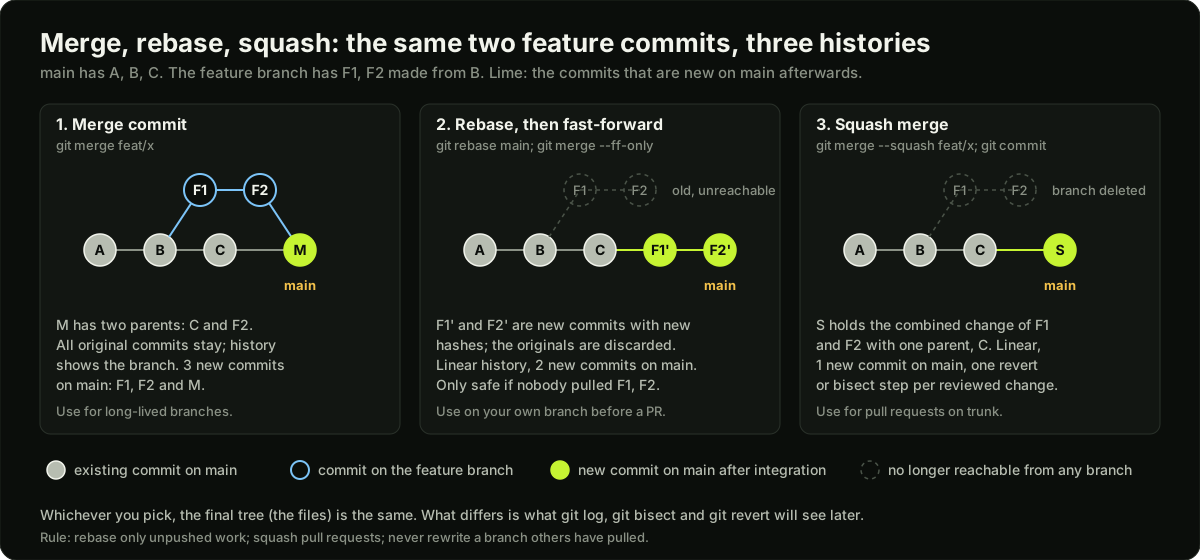 Three commit graphs side by side showing the same feature branch integrated with a merge commit, with a rebase, and with a squash
All three integrate a feature branch into main. They differ in what history looks like afterwards.
The rule most teams settle on: rebase your own unpushed work to keep it current, squash-merge pull requests so main has one commit per reviewed change, and use a real merge only when both sides are long-lived and you want the join recorded. Never rebase a branch someone else has pulled.
Trunk-based development versus GitFlow
GitFlow keeps develop, release/*, hotfix/* and main branches plus long feature branches, with merges flowing between them. It made sense when releases were boxed and quarterly. Its cost is integration pain: a feature branch that lives three weeks has three weeks of conflicts waiting, and nobody tests the combination until the end.
Trunk-based development (TBD) means everyone commits to one branch, main (the trunk), in small pieces, at least daily, and the trunk is always releasable. Larger teams use short-lived branches only for review and CI, and delete them on merge. The Trunk Based Development site describes release branches as cut from trunk just in time and deleted after the release, or skipped entirely by fixing forward. Features that are not ready hide behind feature flags. The DORA capability page on trunk-based development recommends three or fewer active branches per repository, merging to trunk at least once a day, and no code freezes or integration phases, and reports that teams who do this achieve higher software delivery and operational performance.
The reason it works is arithmetic. If 10 developers each merge once a day, every conflict is at most a day old and a few lines wide. If they each merge once every three weeks, the first merge is easy and the tenth is a disaster.
The pull request workflow
A short-lived branch still gets a review. The controls live on the repository, not in people's memory:
# .github/workflows/ci.yml: the checks branch protection will require
name: ci
on:
  pull_request:
    branches: [main]
jobs:
  test:
    runs-on: ubuntu-latest
    steps:
      - uses: actions/checkout@v7
      - run: make test
  lint:
    runs-on: ubuntu-latest
    steps:
      - uses: actions/checkout@v7
      - run: make lint
- Branch protection (or a ruleset) on
main: no direct pushes, no force pushes, required status checks (test,lint) must pass, at least one approving review, and the branch must be up to date with main before merge so the checks ran against what will actually land. - CODEOWNERS: a file mapping paths to teams. A line
infra/terraform/ @org/platformmeans a PR touching Terraform needs a platform team approval. This is how a small DevOps team reviews every infrastructure change without reviewing every application change. - Conventional commits: messages like
feat: add retry to health checker,fix: close leaked socket,feat!: drop Python 3.9(the!marks a breaking change). Tooling can then generate changelogs and decide the next version. - Semantic versioning:
MAJOR.MINOR.PATCH. Breaking changes bump MAJOR, new features bump MINOR, fixes bump PATCH. A release is an annotated tag:git tag -a v1.4.2 -m "release 1.4.2", pushed withgit push origin v1.4.2. CI builds the imageapi:1.4.2from that tag, and the tag is the only thing that is ever deployed to production.
# CODEOWNERS: last matching line wins
*                    @org/app-team
infra/               @org/platform
charts/              @org/platform
.github/workflows/   @org/platform @org/security
Release branches and hotfixes
Teams that ship to customers on a schedule still cut release/1.4 from main when they freeze, apply only fixes to it, tag v1.4.0, v1.4.1 from it, and delete it when 1.5 ships. A hotfix for production is made on the release branch (or on main if you release from trunk), tagged, deployed, and then merged or cherry-picked back to main so the fix is not lost in the next release. The classic failure is fixing on the release branch and forgetting main, so the bug returns a month later. Trunk-based teams avoid this by fixing on main first and cherry-picking to the release branch with git cherry-pick -x SHA (the -x records where it came from).
GitOps in one paragraph
GitOps means the desired state of your infrastructure and deployments is declared in files in a Git repository, and an agent in the cluster (Argo CD or Flux) continuously pulls that repository and makes the cluster match it. Nobody runs kubectl apply by hand; a deploy is a pull request that changes an image tag in a values file, and a rollback is git revert. Git's history becomes the audit log of every change to production, branch protection becomes the change-approval process, and the agent fixes drift when someone edits the cluster directly. Lesson 19 covers it in full.
Revert, reset, bisect
On a shared branch you revert: git revert SHA adds a new commit that undoes the old one, history stays intact, and everyone's clones stay valid. On your own unpushed branch you reset: git reset --soft HEAD~1 to uncommit but keep the change staged, git reset --hard HEAD~1 to throw it away. If a reset or a deleted branch loses something, git reflog lists where HEAD has been for the last 90 days and git branch recovered SHA brings it back.
Bisect finds which commit broke something by binary search. Give it a known good commit and a known bad one and a command that exits 0 when things work:
git bisect start HEAD v1.4.2          # bad first, then good
git bisect run ./scripts/check.sh     # exit 0 = good, 125 = skip, anything else = bad
git bisect reset                      # back to where you were
Over 1024 commits it needs about 10 checkouts. This only works if each commit on main builds, which is one more reason to squash-merge.
Hooks and pre-commit
Git runs scripts from .git/hooks/ at points like pre-commit, commit-msg and pre-push. They are not versioned, so teams use the pre-commit framework: a .pre-commit-config.yaml in the repository lists checks (terraform fmt, yamllint, gitleaks for secrets, helm lint) and every developer runs pre-commit install once. Hooks catch the cheap mistakes before CI does; CI still runs the same checks because a hook can be skipped with --no-verify.
# .pre-commit-config.yaml
repos:
  - repo: https://github.com/gitleaks/gitleaks
    rev: v8.30.1
    hooks:
      - id: gitleaks
  - repo: https://github.com/antonbabenko/pre-commit-terraform
    rev: v1.109.3
    hooks:
      - id: terraform_fmt
      - id: terraform_validate
Monorepo versus polyrepo for DevOps
The DevOps-specific decision is usually about pipelines: a monorepo makes one well-tested pipeline cheap to share but forces you to build change detection so a docs fix does not rebuild 15 images.
Stash, cherry-pick and merge conflicts
Three everyday tools that interviewers ask about directly.
Stash parks uncommitted work so you can switch branches, for example to fix production while half a feature is open.
git stash push -m "half done retry logic"   # saves tracked changes; add -u for untracked files
git switch main && git switch -c hotfix/timeout
# ... fix, commit, push ...
git switch feature/retry
git stash list                              # stash@{0}: On feature/retry: half done retry logic
git stash pop                               # re-apply and drop; "apply" keeps it in the list
Cherry-pick copies one commit onto another branch as a new commit with a new hash. Use it to bring a hotfix from main into a release branch; do not use it to move whole features, because the same change then exists twice and later merges get confusing.
git switch release/1.4
git cherry-pick -x 3f9c2ab      # -x adds "(cherry picked from commit 3f9c2ab)" to the message
A merge conflict happens when two branches changed the same lines. Git stops, marks the file, and waits for you:
<<<<<<< HEAD
timeout_seconds: 30
=======
timeout_seconds: 10
>>>>>>> feature/fast-fail
The fix is always the same five steps: git status to list the conflicted files; open each one and choose the right content (sometimes both sides, never just "mine" without reading); delete the markers; run the tests; then git add the file and git commit (or git rebase --continue during a rebase). git merge --abort or git rebase --abort takes you back to the start if you need to. Small, frequent merges to trunk are what keep conflicts small, which is one more argument for trunk-based development.
Signed commits
A commit's author field is free text; anyone can set user.email to your address. Signing attaches a cryptographic signature with a GPG key, an SSH key (git config gpg.format ssh), or a short-lived certificate through Sigstore gitsign. Branch protection can require signed commits, GitHub shows a "Verified" badge, and supply-chain frameworks such as SLSA expect it. Turn it on with git config commit.gpgsign true and register the key with your Git host.
The ten situations that come up on call
The order in the last row matters: once a secret has been pushed, treat it as leaked. Rotate it before you touch history, because history rewriting does not reach the forks and clones that already have it.
Diagram
Worked example
A team of 10 moves from GitFlow to trunk-based development. They ship a Go API to EKS. Under GitFlow they had develop, three feature branches that lived two to four weeks, and a release/2.3 branch that was open for 11 days while QA tested. Measure what they had.
Step 1, the integration cost. Three feature branches, average age 21 days, each touching 40 files. When the second branch merged into develop it conflicted in 6 files and the conflict took one developer 3 hours. The third branch, merged last, conflicted in 14 files and took a day. Call it 11 hours of conflict work per cycle, repeated every release, roughly 2 cycles a month: 22 hours a month of pure merging, plus the bugs that come from resolving conflicts by hand.
Step 2, the new rules. One branch, main, protected: required checks test, lint, build, one approving review, CODEOWNERS for infra/ and charts/, squash merge only, branches deleted on merge. Every developer merges at least once a day. Work that takes longer than a day ships behind a feature flag read from a ConfigMap.
Step 3, the branch budget. 10 developers merging daily means at most 10 open branches at any moment, each under a day old. The DORA target is three or fewer active branches; they measure it with a weekly query of open PRs older than 24 hours and the number drops from 9 to 2 after a month, because the rule "if it is not merged by tomorrow, split it" is enforced in review.
Step 4, releases. Instead of an 11-day release branch, CI tags main automatically: every merged PR produces api:<short-sha> and a nightly job tags v2.4.N from the tip of main if the end-to-end suite passes. A production deploy is a PR in the config repo changing image.tag: v2.4.17 to v2.4.18, reviewed by a platform team member, synced by Argo CD. The PR takes 4 minutes from open to merge; Argo CD syncs in under a minute.
Step 5, a bad release. v2.4.18 raises error rates at 14:05. The on-call reverts the config commit at 14:09 with git revert and merges it; Argo CD rolls the Deployment back to v2.4.17 by 14:10. Five minutes of impact, no kubectl by hand, and the revert is itself a reviewed commit in the audit log. Under GitFlow the same incident meant deciding whether to hotfix release/2.3, cherry-pick to develop, and rebuild, which took 40 minutes the last time.
Step 6, the result after a quarter. Merge conflict time falls from about 22 hours a month to under 2. Deploys go from 2 a month to several a day. The numbers in this example are illustrative, but the direction matches what the DORA research reports for teams with short-lived branches.
Runnable code
#!/usr/bin/env bash
# Trunk-based flow in a throwaway repo: feature branch, squash merge, tag,
# revert, then git bisect over 8 commits to find the one that broke a check.
# Needs only git and bash. Nothing touches the network or your real repos.
set -euo pipefail

work=$(mktemp -d)
trap 'rm -rf "$work"' EXIT
cd "$work"

step() { printf '\n== %s\n' "$*"; }

# Identity and defaults for this repo only (no global config is touched).
git init -q -b main .
git config user.name "ci-bot"
git config user.email "ci-bot@example.invalid"
git config commit.gpgsign false

# ---------- 1. trunk with one commit ----------
step "1. initial commit on main (trunk)"
printf 'threshold=10\n' > config.txt
printf '#!/usr/bin/env bash\nset -eu\nt=$(grep "^threshold=" config.txt | cut -d= -f2)\n[ "$t" -le 20 ]\n' > check.sh
chmod +x check.sh
git add -A
git commit -qm "chore: initial config and check script"
git log --oneline

# ---------- 2. short-lived feature branch, squash merged ----------
step "2. feature branch with two small commits"
git switch -qc feat/raise-threshold
printf 'threshold=12\n' > config.txt
git commit -qam "feat: raise threshold to 12"
printf 'threshold=12\nowner=payments\n' > config.txt
git commit -qam "feat: record owner"
git log --oneline --graph --all

step "3. squash merge into main: one commit on trunk, branch deleted"
git switch -q main
git merge -q --squash feat/raise-threshold >/dev/null
git commit -qm "feat: raise threshold and record owner (#1)"
git branch -qD feat/raise-threshold
git log --oneline
[ "$(git rev-list --count main)" -eq 2 ] && echo "ok: main has 2 commits, the feature's 2 commits became 1"

# ---------- 3. tag a release ----------
step "4. annotated tag for the release"
git tag -a v1.0.0 -m "release 1.0.0"
git describe --tags

# ---------- 4. eight more commits, one of them bad ----------
step "5. eight commits land on trunk; commit 5 of 8 breaks the check"
for i in 1 2 3 4 5 6 7 8; do
  if [ "$i" -eq 5 ]; then
    printf 'threshold=25\nowner=payments\n' > config.txt   # 25 > 20: check.sh fails
  else
    printf 'note %s\n' "$i" >> notes.txt
  fi
  git add -A
  git commit -qm "chore: change $i"
done
bad_sha=$(git log --format=%H --grep='chore: change 5')
git log --oneline -3
echo "the bad commit is $(git rev-parse --short "$bad_sha") (we pretend not to know this)"

# ---------- 5. bisect ----------
step "6. git bisect run between v1.0.0 (good) and HEAD (bad)"
git bisect start HEAD v1.0.0 >/dev/null
# 'bisect run' calls the script on each checkout: exit 0 = good, 125 = skip,
# any other code up to 127 = bad.
out=$(git bisect run ./check.sh 2>&1)
found=$(printf '%s\n' "$out" | grep -o '^[0-9a-f]\{40\} is the first bad commit' | cut -c1-40)
git bisect reset >/dev/null 2>&1
echo "bisect says: $(git rev-parse --short "$found") is the first bad commit"
steps=$(printf '%s\n' "$out" | grep -c "^running './check.sh'" || true)
echo "bisect ran the check $steps times for 8 commits (log2 of 8 is 3)"
[ "$found" = "$bad_sha" ] && echo "ok: bisect found exactly the commit we planted"

# ---------- 6. revert on a shared branch ----------
step "7. revert the bad commit (a new commit; history is not rewritten)"
git revert --no-edit "$found" >/dev/null
./check.sh && echo "ok: check passes again after the revert"
git log --oneline -2
[ "$(git rev-list --count main)" -eq 11 ] && echo "ok: 11 commits on main, nothing was deleted"

# ---------- 7. the on-call moves ----------
step "8. undo the last commit but keep the change (soft reset) on a private branch"
git switch -qc hotfix/typo
printf 'typo\n' >> notes.txt
git commit -qam "fix: typo"
git reset -q --soft HEAD~1
echo "after reset --soft the commit is gone but the change is still staged:"
git status --short
git reset -q --hard HEAD        # throw the staged change away for this demo
git switch -q main
git branch -qD hotfix/typo

step "9. recover a deleted branch tip from the reflog"
lost=$(git reflog | grep 'commit: fix: typo' | head -1 | cut -d' ' -f1)
git branch recovered "$lost"
git log --oneline -1 recovered
echo "ok: the 'deleted' commit was still in the reflog"

step "10. who last changed the threshold line (blame points at the revert)"
git blame -L 1,1 --date=short config.txt | sed 's/^\([0-9a-f]*\) .*(\([^ ]*\).*/\1 by \2/'
echo "the commit that introduced the bad value: $(git log -S'threshold=25' --format='%h %s' | tail -1)"

printf '\nall steps completed\n'
Key takeaways
A commit is a snapshot with parent pointers; branches and tags are pointers; "rewriting history" always means new commits and moved pointers.
Rebase your own unpushed work, squash-merge pull requests, never rewrite a branch others have pulled.
Trunk-based development: one branch, small merges at least daily, feature flags for unfinished work, three or fewer active branches. DORA links this to higher delivery performance.
Enforce the workflow in the repository: branch protection, required checks, CODEOWNERS, signed commits.
Release from annotated tags; semantic versioning and conventional commits make the tag and the changelog automatic.
On a shared branch, revert; on a private branch, reset; when something is lost, reflog.
Bisect finds a bad commit in log2(N) steps, which is why every commit on main should build.
GitOps makes a Git commit the deploy and a revert the rollback; the full story is lesson 19.
Common mistakes
Rebasing or force-pushing a branch that teammates have already pulled, which gives everyone duplicate commits and conflicts.
Using
git reset --hardon main to remove a deployed commit instead ofgit revert, so the nextgit pullon another machine brings the bad commit back.Fixing a bug on the release branch and forgetting to cherry-pick it to main, so the bug returns in the next release.
Rewriting history to remove a leaked secret without rotating the secret first.
Feature branches that live for weeks "to keep main clean", which is the opposite of what keeps main clean.
Running checks only in pre-commit hooks; a hook can be skipped with
--no-verify, so CI must run the same checks.
Practice
Run the code example, then extend it: plant a second bad commit and show that bisect finds the first one only, and that reverting both fixes the check.
Create a GitHub repository, protect main with required checks and one review, add a CODEOWNERS file, and prove with a pull request that a change under
infra/cannot merge without the owner's approval.Make a 300-commit repository with a loop, break a test at a random commit, and time
git bisect runby hand; confirm it takes about 9 steps.Set up pre-commit with gitleaks and terraform_fmt, commit a fake AWS key in a test file, and confirm the hook blocks the commit.
Interview questions (12)
1.You are halfway through a feature and production breaks. How do you switch to fix it without losing work?Easy
I run git stash push -m "wip retry" (with -u if there are new untracked files), which saves my changes and leaves a clean working tree. I switch to main, create hotfix/..., fix, test, open the PR and get it merged. Then I switch back to my feature branch and run git stash pop to bring the work back. If the hotfix also has to go to a release branch, I cherry-pick that one commit with git cherry-pick -x <sha> so the message records where it came from. An alternative to stash is a quick "wip" commit on the feature branch that I squash later; both are fine, the point is to never lose uncommitted work.
2.How do you resolve a merge conflict, and how do you keep them rare?Easy
Git stops and marks the conflicted files. I run git status to list them, open each one, and decide the correct content between the <<<<<<<, ======= and >>>>>>> markers. Often the right answer combines both sides, so I read the other change before choosing. I remove the markers, run the tests, then git add the files and git commit, or git rebase --continue if I was rebasing. If it goes wrong, git merge --abort or git rebase --abort resets to the start. To keep conflicts rare: small pull requests, merging to trunk at least daily, rebasing my branch on main often, and clear code ownership so two people are not rewriting the same file.
3.A bad commit is on main and already deployed. What do you do?Easy
I revert it, not reset it. git revert SHA creates a new commit that undoes the change, I push it through the normal pull request path with the checks running, and the deploy pipeline or Argo CD rolls the environment back. History is untouched, so nobody's clone breaks and the audit log shows both the mistake and the fix. Resetting main would require a force push, which branch protection should block, and would reintroduce the bad commit the next time anyone pulls from a clone that still has it. If the deploy is GitOps, the fastest rollback is reverting the commit that bumped the image tag in the config repository.
4.Explain merge, rebase and squash, and which your team should use.Medium
Merge creates a commit with two parents and keeps every feature commit; the history shows the branch. Rebase replays the feature commits on top of main as new commits, so history is linear but the original hashes are gone. Squash collapses the feature branch into one new commit on main. I rebase my own unpushed branch to keep it current, and the team squash-merges pull requests so main has exactly one commit per reviewed change, which makes bisect and revert clean. True merge commits are for long-lived branches like a release branch, where recording the join matters. The hard rule is never to rebase a branch others have pulled, because it rewrites commits they already have.
5.What is trunk-based development and why do people prefer it to GitFlow?Medium
Everyone works on one branch, main, and merges small changes at least once a day, using short-lived branches only for review and CI. Unfinished features hide behind flags, and release branches, if used at all, are cut just before a release and deleted after. GitFlow's long feature and develop branches postpone integration, so conflicts pile up and the combination is tested only at the end. The DORA research recommends three or fewer active branches, daily merges to trunk, and no code freezes, and reports that teams who work this way have higher delivery and operational performance. The practical argument is that ten one-day merges are cheap and one three-week merge is expensive.
6.How do you protect main so that nobody can break production by accident?Easy
With branch protection or a ruleset on main: no direct pushes, no force pushes, no deletion, required status checks for test, lint and build that must pass on the latest commit, at least one approving review, dismissal of stale reviews when new commits arrive, and CODEOWNERS so changes under infra or charts need the platform team. I also require signed commits where the organisation cares about provenance, and I make the same rule apply to administrators. The checks themselves live in CI, not in hooks, because a local hook can be skipped. Then the only way into main is a reviewed, green pull request.
7.Someone force-pushed over main and 20 commits are gone. Recover them.Hard
First I stop anyone else from pushing. Then I find the old tip: any clone that fetched before the force push still has it as origin/main in its reflog (git reflog show origin/main), and most Git hosts keep branch history or an activity log with the previous SHA. With the SHA in hand I verify it with git log SHA -20, then restore main with git push --force-with-lease origin SHA:main, which refuses to overwrite if someone pushed in the meantime. After that I check whether the force-pusher had real work that must be re-applied on top, and I turn on "block force pushes" in the branch protection, which should have been on already.
8.Explain CODEOWNERS and how a small platform team uses it.Easy
CODEOWNERS is a file in the repository that maps path patterns to users or teams, last matching line wins. When a pull request touches a path, the matching owners are requested as reviewers, and branch protection can require their approval. A platform team of three cannot review every application change, so they own only infra/, charts/, .github/workflows/ and the Dockerfiles. Application teams own their own directories. That way every Terraform, Helm or pipeline change gets a platform review automatically and nothing else waits on the platform team.
9.How does git bisect work and what does it need from your history?Medium
Bisect does a binary search between a commit you know is good and one you know is bad. You run git bisect start BAD GOOD, and either test each checkout by hand and say git bisect good or bad, or give it a script with git bisect run that exits 0 for good and non-zero for bad; 125 means skip this commit. For 1000 commits it needs about ten steps. It needs every commit in the range to build and be testable, which is the practical argument for squash-merging pull requests: a feature branch full of "wip" commits that do not compile makes bisect land on commits you have to skip.
10.What is the difference between a lightweight and an annotated tag, and which do you use for releases?Easy
A lightweight tag is just a pointer to a commit, like a branch that does not move. An annotated tag is a full object with a tagger, a date, a message and optionally a signature, created with git tag -a v1.4.2 -m "...". Releases use annotated tags, because they record who cut the release and when, they can be signed, and git describe finds them. CI typically triggers the release build on a pushed tag matching v*, builds the image with that version, and the tag becomes the one immutable name for what is in production.
11.A developer committed an AWS access key and pushed it. Walk me through the response.Medium
The key is compromised the moment it was pushed, regardless of what we do to Git, because forks, clones and CI caches already have it, and scanners watch public repositories. So step one is to rotate: deactivate the key in IAM, create a new one, update wherever it is used. Step two is to check CloudTrail for use of the old key. Only then do we clean the repository: remove the file from tracking, add the path to .gitignore, and if it must be purged from history, rewrite with git filter-repo and force-push, which requires coordinating every clone. Step three is prevention: a secret scanner like gitleaks in pre-commit and in CI, and no long-lived keys at all, using OIDC from the CI provider to assume a role instead.
12.Monorepo or one repo per service for a platform team? What changes in CI?Medium
A monorepo gives one pipeline definition, atomic cross-service changes and CODEOWNERS by directory, but every pull request would build everything unless CI detects what changed, so you need path filters or a build tool that understands the dependency graph, and clones get slow without sparse checkout. Polyrepos keep each pipeline small and fast but the pipeline definition is copied or imported as a reusable workflow, and copies drift. For a platform team the usual answer is a monorepo for application code with path-filtered jobs, plus a separate GitOps config repository that holds the manifests and Helm values for every environment, so the deploy history is in one place.
Quiz
1.Which Git operation is safe on a branch that other people have already pulled?
2.After a squash merge of a 5-commit feature branch, how many new commits does main have?
3.What does the DORA guidance on trunk-based development recommend?
4.You ran git reset --hard HEAD~3 on your own branch and need those commits back. Which command?
5.Which file lets a platform team be a required reviewer only for infrastructure paths?
Practice these problems
Further reading
My notes
Your notes
Autosaves to this browser.