Deployment strategies and release engineering
A deployment strategy is the plan for moving user traffic from the running version of a service to a new one without breaking anything. This lesson compares recreate, rolling, blue-green, canary, A/B and shadow, then covers what cannot be rolled back (data), database migrations that stay backward compatible, graceful shutdown, feature flags, release trains and versioning, the deploy checklist, the Friday question, and how DORA measures whether your releases are good.
Why it matters
"How do you deploy with zero downtime" and "a deploy went bad, what do you do" are asked in almost every DevOps and SRE interview, from Infosys screening rounds to product-company system design loops. The strong answer is not the name of a strategy; it is knowing that a rollback of the image takes seconds while a rollback of a schema change may be impossible, that a readiness probe and SIGTERM handling decide whether a rolling update is really zero-downtime, and that a canary is only as good as the metric it compares. In real work, releases are where most incidents start, so this is the lesson that keeps you off the postmortem list.
Read first: CI/CD with GitHub Actions and GitLab CI, Containers and Docker, Git and trunk-based workflows
Lesson
The six strategies
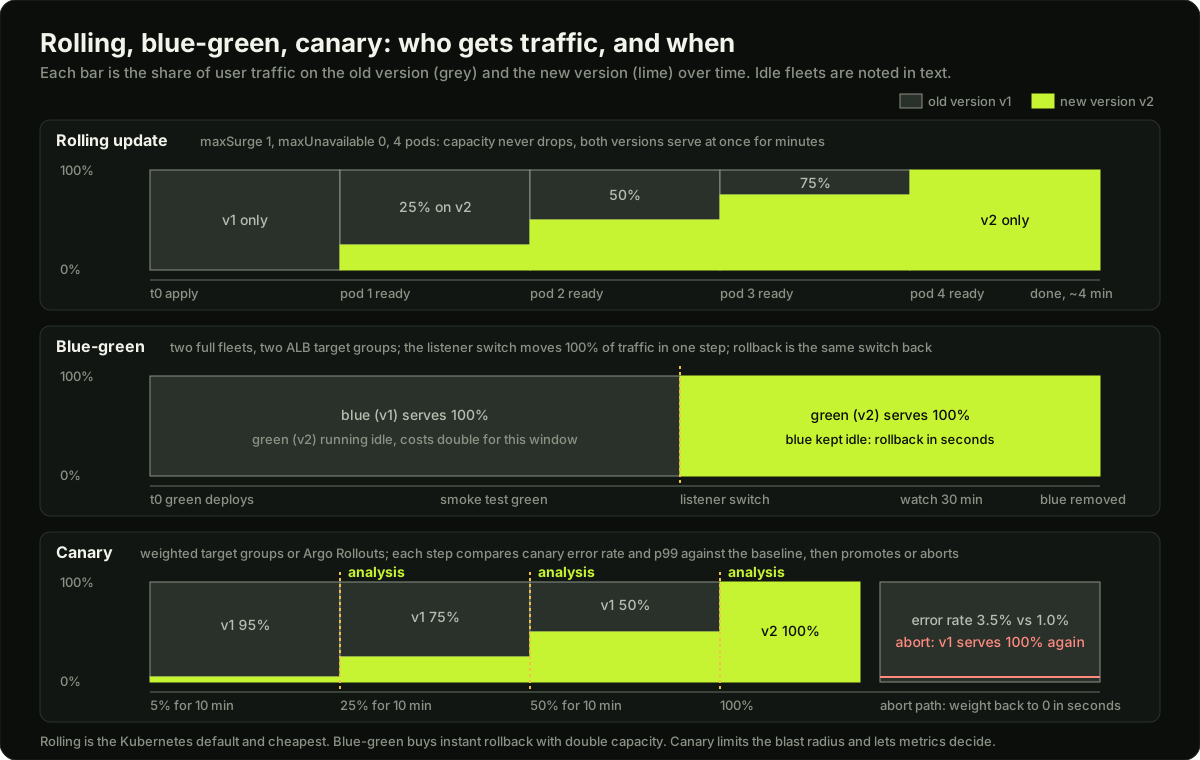 Three timelines showing the share of traffic on the old and new version over time for a rolling update, a blue-green switch and a canary with analysis gates and an abort path
Recreate is for things that cannot run two versions at once (a singleton with a lock, a schema it cannot share) and for dev environments. Rolling is the default in Kubernetes and in EC2 Auto Scaling instance refresh. Blue-green suits VM fleets and services where instant undo matters more than cost. Canary is what mature teams use for anything user-facing. A/B is a product experiment, not a safety mechanism, and shadow is for testing a rewrite against real traffic before any user sees it.
Rolling updates in Kubernetes, briefly
A Deployment with strategy.type: RollingUpdate creates a new ReplicaSet and shifts pods over within two bounds. maxSurge is how many pods may exist above replicas (default 25 percent, rounded up); maxUnavailable is how many may be missing below it (default 25 percent, rounded down). maxSurge: 1, maxUnavailable: 0 is the zero-downtime setting: a new pod must pass its readiness probe before an old one is removed. minReadySeconds (default 0) makes a pod count as available only after it has been ready for that long, which catches pods that crash 10 seconds after start. If no progress happens for progressDeadlineSeconds (default 600) the rollout is marked failed, and kubectl rollout undo goes back to the previous ReplicaSet, which still exists because revisionHistoryLimit (default 10) keeps it. The Kubernetes lesson walks through the full timeline; here, the point is that rolling is only zero-downtime when the readiness probe is honest and the container handles SIGTERM.
Blue-green on AWS
Two Auto Scaling groups (or two ECS services, or two Deployments) sit behind one Application Load Balancer, each registered in its own target group. Blue is live. You deploy green, wait for its targets to pass the health check, run the smoke test against green's own test listener or through a test host header, then change the production listener's default action to forward to green.
# Switch production traffic from blue to green on an ALB. Rollback is the same command with the ARNs swapped.
aws elbv2 modify-listener \
  --listener-arn "$LISTENER_ARN" \
  --default-actions Type=forward,TargetGroupArn="$GREEN_TG_ARN"

# Watch for 30 minutes, then scale blue to zero. Keep blue's launch template so rollback stays one command.
aws elbv2 describe-target-health --target-group-arn "$GREEN_TG_ARN" \
  --query 'TargetHealthDescriptions[].TargetHealth.State'
Blue's targets go into the draining state when deregistered, and the ALB waits deregistration_delay.timeout_seconds (default 300, range 0 to 3600) for in-flight requests to finish. Set it to something like 30 for an API with short requests. The ALB can also forward to two target groups with weights from 0 to 999, which is how a canary is done on AWS without a service mesh.
The database question is the one interviewers wait for. Blue and green cannot each have their own database, because writes must be shared. Both versions use the same database, so the schema must work for both versions at the same time. That is the expand-and-contract rule below, and it is why blue-green does not make the migration problem go away.
Canary with automated analysis
A canary sends a slice of traffic to the new version and compares its behaviour with the baseline, the old version serving the rest, over the same window. The comparison is the whole point: an absolute threshold ("error rate under 1 percent") fails on a day when the database is slow for everyone, while a comparison against the baseline isolates what the new code changed.
The steps are usually 5, 25, 50, 100 percent, each held for 5 to 15 minutes. At each step an analysis checks at least two signals: the error rate (5xx responses divided by requests) and latency (p99 or p95) of canary against baseline, with a minimum number of requests before judging, because 2 errors in 40 requests tells you nothing. If the canary is clearly worse, the weight goes back to 0 and the release is marked failed; nobody has to wake up.
Argo Rollouts replaces a Deployment with a Rollout resource that has strategy.canary.steps of setWeight and pause, and an AnalysisTemplate that runs a Prometheus query at an interval with a successCondition. It moves traffic with the AWS Load Balancer Controller (ALB weighted target groups), NGINX, Istio and others; without a traffic router it approximates the weight by scaling pod counts, so 10 percent of 10 pods is 1 canary pod. Flagger does the same job from the Flux side, with Gateway API, Istio, Linkerd and NGINX among its routers.
apiVersion: argoproj.io/v1alpha1
kind: Rollout
metadata:
  name: api
spec:
  replicas: 10
  strategy:
    canary:
      steps:
        - setWeight: 5
        - pause: {duration: 10m}
        - analysis:                      # abort automatically if the template fails
            templates:
              - templateName: error-rate-vs-baseline
        - setWeight: 25
        - pause: {duration: 10m}
        - setWeight: 50
        - pause: {}                      # indefinite: a human runs kubectl argo rollouts promote api
  selector:
    matchLabels:
      app: api
  template:
    metadata:
      labels:
        app: api
    spec:
      containers:
        - name: api
          image: 123456789012.dkr.ecr.ap-south-1.amazonaws.com/api@sha256:4f1c0e9d7a2b8c6e5d3f1a0b9c8d7e6f5a4b3c2d1e0f9a8b7c6d5e4f3a2b1c0d
          readinessProbe:
            httpGet: {path: /healthz, port: 8080}
          resources:
            requests: {cpu: 250m, memory: 256Mi}
            limits: {memory: 512Mi}
Deploy is not release: feature flags
A deploy puts new code on servers. A release lets users see new behaviour. Feature flags separate the two: the code ships dark behind if flags.enabled("new-checkout", user), and the release is a config change that turns it on for 1 percent of users, then 10, then everyone. This gives you a rollback that touches no servers (turn the flag off), lets you ship half-finished work to main without exposing it, and lets a product team release on their own schedule. The costs: every flag is a branch in the code that must be tested in both states, old flags must be deleted on a schedule, and the flag service itself is now on the critical path, so it needs a safe default when it is unreachable.
Rollback: what can and cannot be undone
The forward-fix case: when the new version has written data in a new shape, or a column is gone, rolling back the code makes things worse because the old code does not understand the new data. The right move is a small fix on top of the new version, through the normal pipeline, with the fast path (skip the canary pauses, keep the tests). This is why teams keep the pipeline fast: a 40-minute pipeline makes forward fixes painful and pushes people toward risky manual changes.
Database migrations that survive a rollback
The rule: every schema change must work with both the previous and the next version of the code, because during a rolling or canary deploy both run at once, and because a rollback must work against the new schema. The pattern is expand and contract, shown here for renaming users.name to users.full_name.
- Expand: add the column.
ALTER TABLE users ADD COLUMN full_name text NULL;Nullable, no default that rewrites the table, no index yet. Old code ignores it. - Dual write. Deploy code that writes both
nameandfull_nameon every insert and update, and still readsname. - Backfill old rows in batches of a few thousand with a sleep between them, so the table lock and replication lag stay small:
UPDATE users SET full_name = name WHERE full_name IS NULL AND id BETWEEN $a AND $b; - Switch reads. Deploy code that reads
full_name, falling back tonamefor safety. Rollback to step 2's code still works:nameis still written. - Stop old writes. Deploy code that writes only
full_name. From here a rollback to code that readsnamewould see stale values, so hold here for a day or two before the next step. - Contract: drop the column.
ALTER TABLE users DROP COLUMN name;This step is the one you cannot undo, so it is a separate change, days after step 5, with a backup taken first.
Never ship a destructive migration in the same deploy as the code that needs it. Index creation on a big table uses CREATE INDEX CONCURRENTLY in Postgres; adding a NOT NULL constraint is done after the backfill, not before. The code example below encodes this order as a state machine that refuses unsafe steps.
Graceful shutdown
A zero-downtime strategy still drops requests if the old process dies badly. When Kubernetes deletes a pod it does two things at once: it marks the pod terminating, so the EndpointSlice controller flags its endpoint as not ready and kube-proxy and the load balancer stop sending new connections, and it runs the shutdown sequence on the node: the preStop hook, then SIGTERM to process 1 in each container, then SIGKILL when terminationGracePeriodSeconds (default 30) runs out. The two paths are not synchronised, so for a second or two after SIGTERM, new requests may still arrive.
# Inside a pod spec: give the network time to forget the pod, then shut down cleanly.
terminationGracePeriodSeconds: 45
containers:
  - name: api
    image: api@sha256:4f1c0e9d7a2b8c6e5d3f1a0b9c8d7e6f5a4b3c2d1e0f9a8b7c6d5e4f3a2b1c0d
    lifecycle:
      preStop:
        exec:
          command: ["sh", "-c", "sleep 5"]   # endpoint removal propagates before SIGTERM arrives
    readinessProbe:
      httpGet: {path: /healthz, port: 8080}
    resources:
      requests: {cpu: 250m, memory: 256Mi}
      limits: {memory: 512Mi}
The application's job on SIGTERM: stop accepting new connections, finish in-flight requests, close the database pool, exit 0. A process that ignores SIGTERM gets SIGKILL after the grace period and drops whatever it was doing; a shell wrapper that does not forward signals (sh -c "python app.py" without exec) is the usual cause. On an ALB the equivalent is the deregistration delay. Readiness gates let an external controller add a condition to pod readiness: the AWS Load Balancer Controller uses one so a pod counts as ready only after the ALB target is healthy, which closes the gap between "pod ready" and "load balancer sends traffic".
Release trains, versioning, changelogs
A release train leaves on a schedule (every Tuesday, every two weeks) with whatever is merged and green; a change that misses it waits for the next. It removes the "is it ready yet" negotiation and makes each release small. Continuous deployment is a train that leaves on every merge.
Version with semantic versioning for libraries and APIs (MAJOR.MINOR.PATCH, where MAJOR means a breaking change) and with the git SHA or a date for services, where the version is just a name for an image digest. Tag the release in git, and attach the changelog to the tag. Generate the changelog from commit messages written in a convention (feat:, fix:, BREAKING CHANGE:) so it is free; release notes for users are a short human-written summary on top of it.
The deploy checklist and the Friday question
Before a production deploy, the answers to five questions should be written down, usually in the pull request or the deploy ticket:
- Who approves: the required reviewer on the production environment; for risky changes, the on-call engineer as well.
- When: inside business hours for the team that owns it, outside a known traffic peak, not during a freeze (end-of-quarter billing, a sale).
- What to watch: the service's SLO dashboard, error rate and p99 latency split by version, and one business metric (orders per minute).
- When to abort: a number, written in advance: "error rate above 2 times baseline for 5 minutes, or p99 above 800 ms, or any 5xx on the checkout path".
- How to roll back: the exact command, tested in staging, and whether the change has a data part that makes rollback unsafe.
"Should you deploy on Friday?" The weak answer is "never". The real answer: a deploy is safe on any day when it is small, goes through a canary with automated analysis, can be rolled back in seconds, and someone who knows the change is reachable for the next few hours. If any of those is false, Friday evening is the worst time to find out, so the rule for that team is no deploys after Friday noon until the pipeline earns it. The goal is to make the day not matter.
Measuring releases: DORA
DORA's metrics are the standard way to judge a delivery process. Two are throughput: deployment frequency and change lead time (commit to running in production). Two are stability: change failure rate, the share of deployments that need a rollback, hotfix or incident response, and failed deployment recovery time, how long it takes to recover from such a failure. DORA also tracks deployment rework rate, the share of deployments that are unplanned and caused by an incident. A team that deploys daily with a 5 percent change failure rate and a 15-minute recovery time is in better shape than a team that deploys monthly with a 20 percent failure rate and a four-hour recovery, even though the second team "deploys less often, so it is safer". Smaller, more frequent changes are easier to diagnose and undo.
Post-deploy verification
Right after the deploy, before you walk away, run synthetic checks: a scripted user journey (open the home page, log in, add to cart, pay with a test card) from outside the cluster every minute, with alerts on failure. Compare the new version's error rate and latency against the previous hour. Check that log volume and the count of a known log line did not jump. Check the queue depth of any worker. A deploy is done when these are green for the watch window you wrote in the checklist, not when the pipeline turns green.
Diagram
Worked example
Timing a canary and sizing its steps for a service at 400 requests per second. The baseline error rate is 1.0 percent and the team wants to catch a release that doubles it to 2.0 percent before it reaches more than a quarter of users.
Step 1, how many canary requests does a step need? To tell 2.0 percent from 1.0 percent with reasonable confidence, a rough rule for comparing two proportions is that the standard error of the difference must be well under the difference itself. With n canary requests at p near 0.01, the standard error is about the square root of p(1 - p) / n; for n = 1,000 that is sqrt(0.0099 / 1000) = 0.00315, so a 1.0 percentage point difference is about 3 standard errors: detectable. For n = 200 it is 0.0070, under 1.5 standard errors: a coin flip. So the minimum sample per step is about 1,000 canary requests.
Step 2, how long is the 5 percent step? At 400 rps, 5 percent is 20 rps to the canary, so 1,000 requests take 50 seconds. A 5-minute hold gives 6,000 canary requests, more than enough, and also covers a few scrape intervals of the metrics system (15 s each). The 25 percent step gets 100 rps, so 5 minutes gives 30,000 requests; this step mostly checks latency under more load. The 50 percent step is the same length.
Step 3, the whole timeline. Three holds of 5 minutes plus about 1 minute of pod startup per step: 5 + 1 + 5 + 1 + 5 + 1 = 18 minutes to the 100 percent step, then a 30-minute watch with synthetic checks. If the release is bad at 2.0 percent, the 5 percent step sees about 6,000 x 0.02 = 120 errors against an expected 60, and the analysis aborts at minute 6 having exposed 5 percent of users for 5 minutes: 400 x 0.05 x 300 = 6,000 requests, of which about 60 extra failed. Without a canary, a rolling update would have put the bad version on 100 percent of traffic within about 4 minutes, so by minute 6 there would have been roughly 400 x 0.01 x 120 = 480 extra failures and still no automatic abort.
Step 4, what to do with 10 replicas and no traffic router. Argo Rollouts approximates 5 percent by running 1 canary pod against 9 old pods, which is really 10 percent. Either accept 10 percent as the first step or install the ALB integration so the weight is enforced by the load balancer. For a low-traffic service at 20 rps the maths flips: 5 percent is 1 rps, and 1,000 requests take 17 minutes, so the first step must be longer or start at 20 percent. Sample size, not a fixed percentage, decides the step.
Runnable code
"""Two simulations for release engineering.

1. A canary rollout: traffic moves through 5, 25, 50 and 100 percent. At each step the
   canary's error rate is compared with the baseline's over the same window. A step is
   promoted only when there is enough data and the canary is not clearly worse. A good
   release and a bad release are run from fixed seeds so the output is repeatable.

2. The expand-and-contract migration as a state machine. Each step is allowed only from
   the right state, so an unsafe order (dropping the old column while the old code still
   reads it) is refused instead of taking production down.

Standard library only; no network.
"""
import math
import random

STEPS = [5, 25, 50, 100]          # percent of traffic sent to the canary at each step
REQUESTS_PER_STEP = 20000          # total requests observed during one step's window
MIN_CANARY_SAMPLES = 500           # do not judge the canary on fewer requests than this
MAX_ABS_INCREASE = 0.002           # ignore differences smaller than 0.2 percentage points
Z = 2.58                           # about 99.5 percent one-sided confidence for a two-proportion test


def observe(rng, requests, error_rate):
    """Count errors in `requests` calls when each one fails with probability error_rate."""
    return sum(1 for _ in range(requests) if rng.random() < error_rate)


def judge(base_err, base_n, can_err, can_n):
    """Return (verdict, reason). Promote unless the canary is significantly worse."""
    if can_n < MIN_CANARY_SAMPLES:
        return "wait", f"only {can_n} canary requests, need {MIN_CANARY_SAMPLES}"
    p_b, p_c = base_err / base_n, can_err / can_n
    diff = p_c - p_b
    if diff <= MAX_ABS_INCREASE:
        return "promote", f"canary {p_c:.2%} vs baseline {p_b:.2%}, within tolerance"
    # Two-proportion z-test: is the canary's error rate higher than the baseline's?
    pooled = (base_err + can_err) / (base_n + can_n)
    se = math.sqrt(pooled * (1 - pooled) * (1 / base_n + 1 / can_n))
    z = diff / se if se > 0 else float("inf")
    if z > Z:
        return "abort", f"canary {p_c:.2%} vs baseline {p_b:.2%}, z={z:.1f} > {Z}"
    return "promote", f"canary {p_c:.2%} vs baseline {p_b:.2%}, z={z:.1f} not significant"


def rollout(name, baseline_rate, canary_rate, seed):
    rng = random.Random(seed)
    print(f"\n{name}: baseline error rate {baseline_rate:.2%}, canary true error rate {canary_rate:.2%}")
    for pct in STEPS:
        can_n = REQUESTS_PER_STEP * pct // 100
        base_n = REQUESTS_PER_STEP - can_n
        if pct == 100:
            print(f"  step {pct:>3}%: all traffic on the new version; rollout complete")
            return "promoted"
        can_err = observe(rng, can_n, canary_rate)
        base_err = observe(rng, base_n, baseline_rate)
        verdict, reason = judge(base_err, base_n, can_err, can_n)
        print(f"  step {pct:>3}%: canary {can_err}/{can_n}, baseline {base_err}/{base_n} -> {verdict}: {reason}")
        if verdict == "abort":
            print("  traffic weight set back to 0, old version keeps serving, release marked failed")
            return "aborted"
    return "promoted"


class Migration:
    """Expand-and-contract for renaming users.name to users.full_name.

    Steps must happen in this order; each is safe to roll back from, because the schema
    at every state works with both the previous and the next version of the code.
    """
    ORDER = ["add_column", "dual_write", "backfill", "switch_reads", "stop_old_writes", "drop_column"]

    def __init__(self):
        self.done = []

    def apply(self, step):
        expected = self.ORDER[len(self.done)] if len(self.done) < len(self.ORDER) else None
        if step != expected:
            print(f"  REFUSED {step}: next safe step is {expected}; state={self.done}")
            return False
        self.done.append(step)
        print(f"  ok {step:<16} state: {', '.join(self.done)}")
        return True

    def rollback_safe(self):
        """Can the previous code version still run against the current schema?"""
        return "drop_column" not in self.done


if __name__ == "__main__":
    good = rollout("good release", baseline_rate=0.0100, canary_rate=0.0105, seed=7)
    bad = rollout("bad release", baseline_rate=0.0100, canary_rate=0.0300, seed=7)
    assert good == "promoted", good
    assert bad == "aborted", bad

    print("\nexpand and contract, correct order")
    m = Migration()
    for s in Migration.ORDER[:4]:
        assert m.apply(s)
    assert m.rollback_safe(), "old code reads users.name, which still exists and is still written"
    print("  rollback to previous code is safe here:", m.rollback_safe())

    print("\nexpand and contract, unsafe shortcut")
    m2 = Migration()
    assert m2.apply("add_column")
    assert not m2.apply("drop_column"), "dropping before switching reads must be refused"
    assert not m2.apply("switch_reads"), "switching reads before the backfill must be refused"
    assert m2.rollback_safe()

    for s in Migration.ORDER[4:]:
        assert m.apply(s)
    assert not m.rollback_safe()
    print("  after drop_column, rollback to the old code is impossible:", not m.rollback_safe())
    print("\nself-checks passed: good release promoted, bad release aborted, unsafe migration steps refused")
Key takeaways
Rolling is the cheap default, blue-green buys instant rollback with double capacity, canary limits the blast radius and lets metrics decide; pick by rollback speed and cost, not fashion.
A canary compares the new version against the baseline over the same window, with a minimum sample size; an absolute threshold is fooled by a bad day.
Deploy is not release: feature flags let code ship dark and turn on by percentage, with a rollback that touches no servers.
Images roll back in seconds, infrastructure in minutes, data never; when the new code has written new-shaped data, fix forward through the pipeline.
Expand and contract: add column, dual write, backfill, switch reads, stop old writes, drop; the destructive step is its own change, days later.
Zero downtime needs an honest readiness probe, a preStop sleep so endpoint removal propagates, SIGTERM handling that drains in-flight requests, and a grace period longer than the slowest request.
Write the abort condition and the rollback command before the deploy, not during the incident.
Judge the process with DORA: frequent small deploys with a low change failure rate and fast recovery beat rare big ones.
Common mistakes
Calling a rolling update zero-downtime without a readiness probe, so new pods receive traffic before the app listens and old pods are killed mid-request.
Shipping the schema drop in the same deploy as the code change, which makes rollback impossible the moment it runs.
Canary analysis with a fixed threshold instead of a baseline comparison, or judging on 50 requests.
Running the whole app behind
sh -cwithoutexec, so SIGTERM reaches the shell and not the server, and every pod is SIGKILLed after 30 seconds.Treating blue-green as a database solution; both colours share one database and the schema must serve both versions.
Leaving feature flags in the code forever, so nobody knows which branches are live.
Practice
On kind or minikube, deploy a small HTTP server with 4 replicas and
maxUnavailable: 0; run a load generator (hey or a bash loop with curl) duringkubectl set imageand count non-2xx responses. Then add apreStopsleep and SIGTERM handling and show the count drop to zero.Install Argo Rollouts on the local cluster, convert the Deployment to a Rollout with steps 20, 50 and a pause, deploy a version that returns 500 on 3 percent of requests, and watch
kubectl argo rollouts get rolloutas the analysis aborts it.With a local Postgres in Docker, carry out the six expand-and-contract steps for renaming a column with a 100,000-row table, timing each ALTER and the batched backfill; confirm the previous application version still works at every step before the drop.
Write a 10-line synthetic check script that logs in to your practice app and places an order, run it every minute from a CronJob, and make it page you (print loudly) when two consecutive runs fail.
Interview questions (11)
1.Compare blue-green and canary. When would you pick each?Easy
Blue-green runs two full fleets and switches all traffic at the load balancer in one step; rollback is the same switch back, in seconds, but you pay for two fleets during the overlap and 100 percent of users hit the new version at once. Canary sends 5 or 10 percent of traffic to a few new instances, compares error rate and latency against the old version, and grows the share step by step; the blast radius is the slice, and abort is setting the weight to zero. I pick blue-green for VM fleets, stateful-ish services, or when the switch itself must be atomic; canary for user-facing services with enough traffic to make the comparison meaningful, which is most of them.
2.How do you make a Kubernetes rolling update truly zero-downtime?Medium
Four things. First maxUnavailable: 0 with maxSurge: 1, so capacity never drops. Second a readiness probe that fails until the app can really serve, so a pod joins the Service only when ready. Third graceful shutdown: a preStop sleep of a few seconds so endpoint removal propagates before SIGTERM, the server stops accepting and drains in-flight requests on SIGTERM, and terminationGracePeriodSeconds longer than the slowest request. Fourth, if it is behind an ALB, a readiness gate from the AWS Load Balancer Controller so the pod is ready only once the target is healthy. Then I verify by running a load test during a rollout and checking for zero non-2xx responses.
3.A canary at 10 percent shows a 1.8 percent error rate. Baseline is 1.0 percent. Promote or abort?Medium
I ask how many requests that is. If the canary saw 200 requests, 1.8 percent is 3 or 4 errors against an expected 2, which is noise; I hold the step and keep collecting. If it saw 5,000 requests, 90 errors against an expected 50 is a real difference, roughly four standard errors, so I abort. The rule in the pipeline should already encode this: a minimum sample size, then a comparison against the baseline over the same window, not against a fixed number, because if the database is slow both versions get worse together and only the difference tells you what the new code did. I would also look at p99 latency and at which endpoints produce the extra errors before deciding to retry.
4.What can and cannot be rolled back?Medium
The image and its config roll back in seconds: kubectl rollout undo, a listener switch, a canary weight to zero, a flag off. Infrastructure rolls back in minutes with Terraform, though some resources get replaced instead of edited. Data does not roll back: rows the new code wrote in a new shape, a dropped column, messages already consumed in a new format. For those you fix forward, a small patch on the new version through the normal pipeline. That is why destructive migrations are separate changes shipped days after the code, and why a fast pipeline matters: it is what makes forward fixes safer than manual surgery.
5.Explain expand and contract for renaming a column.Hard
Rename name to full_name without a moment where either version of the code breaks. Expand: add full_name as a nullable column, no rewrite. Deploy code that writes both columns and still reads name. Backfill old rows in batches with pauses so locks and replication lag stay small. Deploy code that reads full_name with a fallback. Deploy code that stops writing name, and hold there for a day or two. Contract: drop name as its own change, with a backup first. At every step before the drop, the previous code still works against the schema, so any deploy in the sequence can be rolled back. The drop is the only step you cannot undo, which is why it is last and separate. Indexes are created concurrently and NOT NULL is added after the backfill.
6.What happens to a pod when a Deployment scales it down, and how do requests get dropped?Medium
The API server marks the pod terminating. Two things start in parallel: the EndpointSlice controller marks the endpoint not ready so kube-proxy and the load balancer stop sending new connections, and the kubelet runs the shutdown: the preStop hook, then SIGTERM to process 1, then SIGKILL after terminationGracePeriodSeconds, 30 by default. Requests get dropped in three ways: the endpoint removal has not reached every node yet when the server already closed its socket, so a preStop sleep fixes that; the server ignores SIGTERM because a shell wrapper swallowed it, so it is SIGKILLed mid-request; or the grace period is shorter than a long request. Fix the three and a rolling update drops nothing.
7.Should we deploy on Friday?Easy
Depends on what the pipeline earns. If the change is small, goes through a canary with automated analysis, can be rolled back in seconds, and someone who knows it is reachable for a few hours, the day does not matter, and refusing Fridays just batches more risk into Monday. If any of those is false, Friday evening is the worst time to learn it, so that team should stop deploys at Friday noon and spend the saved time making the first list true. The goal is to make the question go away, not to pick a day.
8.What is the difference between a deploy and a release?Easy
A deploy puts new code on production servers. A release makes new behaviour visible to users. With feature flags the two are separate: the code ships dark, then the flag turns it on for 1 percent, 10 percent, everyone. That gives a rollback that touches no servers, lets unfinished work merge to main without exposing it, and lets product decide the timing. The costs are that every flag doubles the states to test, flags need an expiry so the code does not fill with dead branches, and the flag service must have a safe default when it is down.
9.How would you set up a canary on AWS without a service mesh?Medium
The ALB listener can forward to multiple target groups with weights from 0 to 999. I register the old version in one target group and the new one in another, start with weights 95 and 5, and have the pipeline step the weights while a job queries CloudWatch or Prometheus for 5xx rate and p99 per target group and compares them. Abort sets the new weight to 0. On EKS, Argo Rollouts with the AWS Load Balancer Controller does exactly this automatically: the Rollout's setWeight steps become ALB weights and an AnalysisTemplate runs the comparison. Stickiness on the target group keeps a user on one version during the test.
10.How do you measure whether your release process is good?Easy
With DORA's metrics. Throughput: deployment frequency and change lead time from commit to production. Stability: change failure rate, the share of deploys that needed a rollback, hotfix or incident, and failed deployment recovery time. DORA also tracks deployment rework rate, the share of deploys that were unplanned reactions to incidents. I look at the stability pair first because they show whether frequency is coming at a cost. A good sign is that frequency goes up while change failure rate stays flat or drops, which happens when changes are small and the pipeline catches problems before users do.
11.After the deploy says green, how do you know the release worked?Easy
The pipeline turning green means the pods are running, not that users are served. I run synthetic checks: a scripted journey from outside the cluster every minute, home page, login, add to cart, pay with a test card. I compare the new version's error rate and p99 against the last hour, split by version label. I check log volume and a known error line count, and the depth of any work queue. I watch one business metric, like orders per minute. The release is done when all of that is green for the watch window written in the checklist, usually 30 minutes, and the abort condition never fired.
Quiz
1.Which rollback can never be done by redeploying the previous version?
2.In expand and contract, when is the old column dropped?
3.Why does a canary compare against the baseline instead of a fixed error threshold?
4.A server inside a pod ignores SIGTERM. What happens during a rolling update?
5.What does DORA's change failure rate measure?
Practice these problems
Further reading
My notes
Your notes
Autosaves to this browser.