Security and DevSecOps - secrets, least privilege, supply chain, policy as code
DevSecOps means security is a property of the pipeline and the platform, not a review at the end. This lesson covers the controls a DevOps engineer owns: short-lived identity for humans, CI and pods; secrets that never touch Git; a supply chain where every image is scanned, pinned, signed and verified at admission; hardened pods and clusters enforced by policy as code; cloud hardening with private endpoints and audit logs; and the edge controls (TLS, WAF, rate limits, SSRF protection) that stop abuse before it reaches the application.
Why it matters
Security questions are in every DevOps interview now, and they are concrete: "how does your pipeline get AWS credentials", "where do your secrets live", "what stops someone deploying a root container", "what do you do when a key leaks". A candidate who answers "we use IAM" loses to one who says "GitHub Actions assumes a role through OIDC, the trust policy pins the repo and branch, no key exists to leak". The same controls are what a platform team is hired to build. Audits (an access review, a SOC 2 or ISO question, a customer security questionnaire) ask for the table at the end of this lesson, layer by layer.
Read first: CI/CD with GitHub Actions and GitLab CI, AWS core - IAM, VPC, EC2, S3, RDS, load balancers, autoscaling, Kubernetes architecture and core objects, Kubernetes in production - resources, autoscaling, RBAC, upgrades, EKS, GitOps with Argo CD and progressive delivery
Lesson
Shift left: security as a pipeline property
"Shift left" means the check happens where the change is made, as a failing build, not as a finding six weeks later. The order of controls follows the artifact: secret scanning on every push, dependency and image scanning on every build, policy checks on every manifest and every Terraform plan, signature verification at admission, detection at runtime. Each control is cheap on its own; together they make the common attacks (a leaked key, a vulnerable base image, a root container with the node's disk mounted) impossible to deploy by accident.
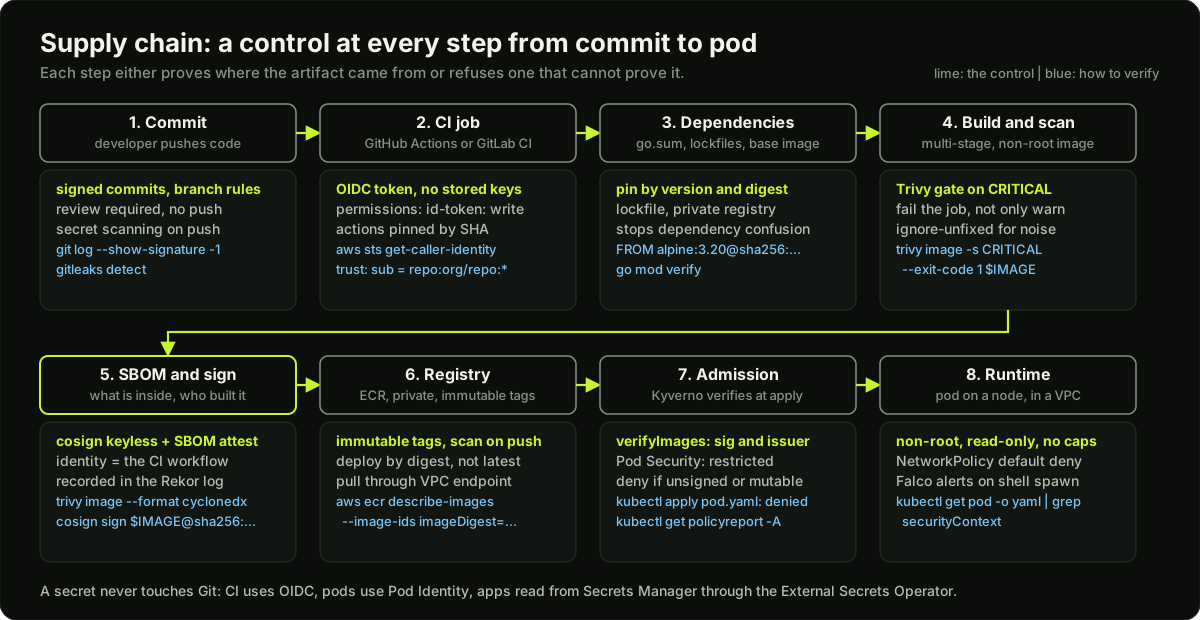 The software supply chain from commit through CI, dependencies, build and scan, SBOM and signing, registry, admission and runtime, with the security control and the verification command at each step
Identity and access: short-lived credentials everywhere
Least privilege means every identity (human, pipeline, pod) can do exactly what its job needs and nothing more. The second rule matters as much: no long-lived keys. A static access key in a CI secret is a credential that never expires, is copied into logs and laptops, and is the first thing an attacker looks for. The replacement is a token that proves identity to the cloud and is exchanged for credentials that expire in an hour.
The CI side in GitHub Actions: the workflow requests a token with permissions: id-token: write, and the AWS role's trust policy pins the subject claim so only one repository and branch can assume it.
# .github/workflows/deploy.yaml (the job that touches AWS)
permissions:
  id-token: write    # required to request the OIDC JWT
  contents: read
jobs:
  deploy:
    runs-on: ubuntu-24.04
    steps:
      - uses: actions/checkout@<40-character-commit-sha>   # pin every action by commit SHA, not by a movable tag
      - uses: aws-actions/configure-aws-credentials@e3dd6a429d7300a6a4c196c26e071d42e0343502
        with:
          role-to-assume: arn:aws:iam::123456789012:role/gha-shop-deploy
          aws-region: ap-south-1
{
  "Version": "2012-10-17",
  "Statement": [{
    "Effect": "Allow",
    "Principal": {"Federated": "arn:aws:iam::123456789012:oidc-provider/token.actions.githubusercontent.com"},
    "Action": "sts:AssumeRoleWithWebIdentity",
    "Condition": {
      "StringEquals": {"token.actions.githubusercontent.com:aud": "sts.amazonaws.com"},
      "StringLike": {"token.actions.githubusercontent.com:sub": "repo:shop-org/shop-api:ref:refs/heads/main"}
    }
  }]
}
Without the sub condition, any GitHub repository in the world could assume the role. That single line is the most common OIDC mistake.
Secrets management
A secret is anything that grants access: passwords, API keys, tokens, private keys, certificates, database connection strings with a password inside, webhook signing secrets, and the kubeconfig itself. Rules: a secret lives in one place (AWS Secrets Manager or HashiCorp Vault), is written to Git never, reaches the workload at runtime, and rotates on a schedule.
apiVersion: external-secrets.io/v1
kind: ExternalSecret
metadata:
  name: payments-provider
  namespace: payments
spec:
  refreshInterval: 1h
  secretStoreRef:
    name: aws-secrets-manager
    kind: ClusterSecretStore
  target:
    name: payments-provider        # the Kubernetes Secret ESO creates
    creationPolicy: Owner
  data:
    - secretKey: PAYMENT_PROVIDER_KEY
      remoteRef:
        key: prod/payments/provider  # the name in Secrets Manager
        property: api_key
Scan every repository for leaked secrets, in CI and on the history: gitleaks detect --source . --redact fails the build on a match, and GitHub secret scanning with push protection blocks the push itself. When a key leaks: rotate first, then investigate. The order matters because the investigation takes hours and the attacker needs minutes. Revoke the key, issue a new one, deploy it, then read CloudTrail for every call the old key made (aws cloudtrail lookup-events --lookup-attributes AttributeKey=AccessKeyId,AttributeValue=AKIA...), then remove it from Git history and write the incident note. Deleting the commit is not rotation; the key is already in a dozen clones.
Supply chain security
The supply chain is every step between a developer's commit and a running container. Each step can be attacked: a typosquatted package, a compromised CI action, a registry tag that someone re-pushed. The controls, in pipeline order:
- SBOM (software bill of materials): a list of every package in the image, generated at build time with
trivy image --format cyclonedx --output sbom.json IMAGEand attached to the image as an attestation. When the next log4j happens, you query SBOMs instead of rebuilding everything to find out. - Image scanning: the gate policy is fail on CRITICAL, warn on HIGH.
trivy image --severity CRITICAL --ignore-unfixed --exit-code 1 IMAGEin CI fails the build on a fixable critical vulnerability, and a second run with--severity HIGH --exit-code 0prints HIGH findings as warnings; ECR scan-on-push catches images that arrive another way. Scan the base image and the Terraform and Kubernetes manifests too (trivy config .). - Pinning by digest:
FROM python:3.12-slim@sha256:...anduses: actions/checkout@<40-char SHA>. A tag can be moved; a digest cannot. Renovate or Dependabot updates the pins with a pull request you can review. - Signing and verification:
cosign sign IMAGE@DIGESTin CI uses keyless signing, where the signature is tied to the CI job's OIDC identity and recorded in the public Rekor transparency log. At admission, Kyverno verifies:cosign verify IMAGE --certificate-identity-regexp '^https://github.com/shop-org/shop-api/' --certificate-oidc-issuer https://token.actions.githubusercontent.com. - SLSA levels (Supply-chain Levels for Software Artifacts, build track, from the v1.2 specification): L0 no guarantees; L1 provenance exists, generated by the build platform, showing how the package was built (prevents mistakes, trivial to forge); L2 builds run on a hosted platform that generates and signs the provenance, and consumers validate it (forging requires an explicit attack); L3 a hardened hosted platform that prevents builds from influencing one another and keeps the signing secrets away from user-defined build steps. GitHub Actions with the official SLSA generator workflow reaches L3 for provenance.
Dependency confusion and typosquatting. Dependency confusion is when a package manager configured with both a private and a public registry fetches a public package with the same name as your internal one, because the public version number is higher. Typosquatting is a public package named reqeusts or colourama that someone installs by mistake. Both are stopped by a lockfile with hashes, a private registry that proxies and pins the public one, scoping internal names (@shop/ in npm), and go mod verify or pip install --require-hashes.
Container and Kubernetes hardening
The Pod Security Standards define three profiles: privileged, baseline, restricted. The restricted profile is what every application namespace should enforce, through the namespace label pod-security.kubernetes.io/enforce: restricted. A pod that passes it:
apiVersion: v1
kind: Pod
metadata:
  name: api
spec:
  securityContext:
    runAsNonRoot: true                 # the image must declare a non-root USER
    runAsUser: 10001
    seccompProfile:
      type: RuntimeDefault             # the runtime's default syscall filter
  containers:
    - name: api
      image: 123456789012.dkr.ecr.ap-south-1.amazonaws.com/api@sha256:9f86d081884c7d659a2feaa0c55ad015a3bf4f1b2b0b822cd15d6c15b0f00a08
      securityContext:
        allowPrivilegeEscalation: false  # no setuid binaries gain root
        readOnlyRootFilesystem: true     # writes go to an emptyDir, not the image layer
        capabilities:
          drop: ["ALL"]                  # add back only NET_BIND_SERVICE if you must bind 80
      resources:
        requests: {cpu: 250m, memory: 256Mi}
        limits: {memory: 512Mi}
      volumeMounts:
        - {name: tmp, mountPath: /tmp}
  volumes:
    - {name: tmp, emptyDir: {}}
Beyond the pod: no privileged pods (privileged: true is root on the node), no hostPath (mounting / or the container socket is the standard container escape), no hostNetwork, hostPID, hostIPC, NetworkPolicy default deny per namespace with explicit allow rules for DNS, the services the app calls, and the ingress controller. Admission policies with Kyverno enforce all of this and more (a required registry, no latest tag, required labels, signature verification):
apiVersion: kyverno.io/v1
kind: ClusterPolicy
metadata:
  name: require-digest-from-ecr
spec:
  rules:
    - name: image-from-ecr-by-digest
      match:
        any:
          - resources:
              kinds: ["Pod"]
      validate:
        failureAction: Enforce         # Audit only writes a PolicyReport
        message: "images must come from our ECR and be pinned by digest"
        pattern:
          spec:
            containers:
              - image: "123456789012.dkr.ecr.ap-south-1.amazonaws.com/*@sha256:*"
The OWASP Kubernetes Top Ten (2025 edition) as a checklist, with the control for each: K01 insecure workload configurations (restricted profile), K02 overly permissive authorization (RBAC with named verbs, no cluster-admin for workloads), K03 secrets management failures (ESO, etcd encryption, no secrets in env dumps), K04 lack of cluster-level policy enforcement (Kyverno or Gatekeeper), K05 missing network segmentation (NetworkPolicy default deny), K06 overly exposed components (private API endpoint, no public kubelet or dashboard), K07 misconfigured and vulnerable components (upgrade cadence, add-on versions), K08 cluster-to-cloud lateral movement (block IMDS from pods, Pod Identity with least privilege), K09 broken authentication (SSO, no static tokens), K10 inadequate logging and monitoring (audit logs on, Falco, CloudTrail).
Cloud hardening
- Private clusters and VPC endpoints: the EKS API endpoint is private (or public with a CIDR allow-list), nodes have no public IP, and traffic to ECR, S3, STS and Secrets Manager goes through VPC endpoints so it never crosses the internet and the NAT bill drops.
- Security groups are stateful allow-lists per ENI: the database group allows 5432 from the node or pod security group only, not from a CIDR.
- Encryption at rest with KMS: EBS volumes, S3 buckets, RDS and Aurora, and EKS Secrets envelope encryption, each with a customer-managed key so you control rotation and the key policy.
- CloudTrail records every API call in every region to an S3 bucket with object lock; GuardDuty reads CloudTrail, VPC flow logs and DNS logs and raises findings such as a credential used from an unusual IP or an EKS pod talking to a known bad host. Both are on in every account, by Organizations policy.
- IMDSv2 and the hop limit: a pod that can reach
169.254.169.254can read the node's IAM credentials. Set the node launch template tohttp_tokens = "required"andhttp_put_response_hop_limit = 1, so the metadata response does not survive the extra hop into the pod network. Workloads then get credentials only through Pod Identity.
Application-side controls DevOps owns
TLS everywhere: cert-manager issues certificates from Let's Encrypt or a private CA, the ingress or Gateway terminates TLS 1.2 and 1.3 only, and inside the cluster a mesh or application TLS covers service-to-service traffic. A WAF (AWS WAF or Cloudflare) in front of the load balancer blocks known injection patterns and bots. Rate limits at the edge and the gateway, per IP and per API token, with quotas per customer, are the first abuse control; the full design is in the scaling lesson. SSRF protection (server-side request forgery, where the app is tricked into making a request on the attacker's behalf) is partly application code and partly network: block pod egress to the metadata endpoint and to the VPC CIDR except the services the app needs, through NetworkPolicy and the IMDS hop limit. A typical application security audit covers exactly these: cross-tenant access (a request with tenant A's token reading tenant B's rows, found by replaying requests with swapped IDs), SSRF through a URL parameter, and reconnect storms where clients hammered a recovering service; the fixes were authorization checks at the data layer, egress policy, and jittered reconnect backoff with a rate limit.
Policy as code, runtime detection, compliance
Compliance basics the auditor asks for: audit logs enabled (EKS control plane audit logs to CloudWatch, CloudTrail, application access logs) with a stated retention (90 days hot, one year cold is a common choice; label it as yours); quarterly access reviews where every IAM role, GitHub team and RBAC binding has an owner who confirms it is still needed; and evidence, which means the policy report, the scan output and the review ticket, not a promise.
Layer, control, how to verify
Diagram
Worked example
A leaked AWS key, from alert to closed ticket. At 11:20 GitHub secret scanning emails you: an AKIA... access key was found in a commit to shop-org/data-tools, pushed at 11:04. The key belongs to the IAM user etl-batch, created two years ago, with AmazonS3FullAccess.
Step 1, rotate first (11:22). aws iam create-access-key --user-name etl-batch makes a new key, you put it into Secrets Manager, the ETL job reads it at its next start, and at 11:31 aws iam update-access-key --user-name etl-batch --access-key-id AKIA...OLD --status Inactive, then delete it. Elapsed exposure: 11:04 to 11:31, 27 minutes.
Step 2, scope the damage (11:35). aws cloudtrail lookup-events --lookup-attributes AttributeKey=AccessKeyId,AttributeValue=AKIA...OLD --start-time 2026-11-03T11:00:00Z lists every call the key made in the window. You see the usual 14 PutObject calls from the ETL host's IP, and 3 ListBuckets and 1 GetObject from an IP in another country at 11:19. The repository was public for 15 minutes. One object was read: exports/customers-2026-10.csv, 48,000 rows. That is a data breach and needs the privacy process, not just an engineering fix.
Step 3, shrink the blast radius (same day). The user had full S3 access to 31 buckets; the job needs s3:PutObject on one prefix. Replace the IAM user with a role assumed by the ETL runner through Pod Identity, with a policy for arn:aws:s3:::shop-exports/etl/* only. Now there is no key to leak, and a repeat exposes one prefix instead of 31 buckets.
Step 4, stop the next one. Enable push protection on every repository in the organization so the push is blocked, not reported after. Add gitleaks to the CI template. Route GuardDuty's credential exfiltration and anomalous-location findings to the on-call channel, which would have paged you at 11:19 instead of 11:20 by email.
Step 5, the numbers for the note. Exposure window 27 minutes; 4 unauthorized calls; 1 object, 48,000 customer rows; root cause: a long-lived key with 31 buckets of access in a repository with no push protection; fixes: rotation in 9 minutes, key removed, role with one prefix, push protection organization-wide.
Runnable code
"""A mini admission controller, to make policy as code concrete.

A real validating webhook (Kyverno, Gatekeeper) receives an AdmissionReview
with the object inside, runs rules, and answers allowed: true or false with a
message. This script does the same for five Pod manifests held as YAML
strings: 8 rules, each a small function that returns a reason or None.
"""
import re

import yaml

ALLOWED_REGISTRY = "123456789012.dkr.ecr.ap-south-1.amazonaws.com/"
DIGEST = re.compile(r"@sha256:[0-9a-f]{64}$")


def containers(pod):
    spec = pod.get("spec", {})
    return spec.get("containers", []) + spec.get("initContainers", [])


def sc(pod, c):
    """Effective securityContext: container level wins over pod level."""
    merged = dict(pod.get("spec", {}).get("securityContext", {}) or {})
    merged.update(c.get("securityContext", {}) or {})
    return merged


# Each policy returns None when the pod passes, or a short reason when it fails.

def non_root(pod):
    for c in containers(pod):
        s = sc(pod, c)
        if s.get("runAsNonRoot") is not True or s.get("runAsUser") == 0:
            return f"{c['name']}: runAsNonRoot must be true and runAsUser must not be 0"


def no_latest_tag(pod):
    for c in containers(pod):
        image = c.get("image", "")
        if ":" not in image.split("/")[-1] and "@" not in image or image.endswith(":latest"):
            return f"{c['name']}: image {image} uses the latest tag or no tag"


def allowed_registry_by_digest(pod):
    for c in containers(pod):
        image = c.get("image", "")
        if not image.startswith(ALLOWED_REGISTRY):
            return f"{c['name']}: image must come from {ALLOWED_REGISTRY}"
        if not DIGEST.search(image):
            return f"{c['name']}: image must be pinned by sha256 digest"


def resources_set(pod):
    for c in containers(pod):
        r = c.get("resources", {}) or {}
        req, lim = r.get("requests", {}) or {}, r.get("limits", {}) or {}
        if not (req.get("cpu") and req.get("memory") and lim.get("memory")):
            return f"{c['name']}: set requests.cpu, requests.memory and limits.memory"


def no_privileged(pod):
    for c in containers(pod):
        if sc(pod, c).get("privileged") is True:
            return f"{c['name']}: privileged containers are forbidden"


def read_only_root_fs(pod):
    for c in containers(pod):
        if sc(pod, c).get("readOnlyRootFilesystem") is not True:
            return f"{c['name']}: readOnlyRootFilesystem must be true (use an emptyDir for scratch)"


def no_host_path(pod):
    for v in pod.get("spec", {}).get("volumes", []) or []:
        if "hostPath" in v:
            return f"volume {v['name']}: hostPath mounts the node's disk; forbidden"


def drop_all_capabilities(pod):
    for c in containers(pod):
        caps = sc(pod, c).get("capabilities", {}) or {}
        if "ALL" not in (caps.get("drop") or []):
            return f"{c['name']}: capabilities.drop must include ALL"
        extra = set(caps.get("add") or []) - {"NET_BIND_SERVICE"}
        if extra:
            return f"{c['name']}: added capabilities {sorted(extra)} are not allowed"


POLICIES = [non_root, no_latest_tag, allowed_registry_by_digest, resources_set,
            no_privileged, read_only_root_fs, no_host_path, drop_all_capabilities]


def admit(pod):
    """Run every policy; deny if any fails, and report all reasons at once."""
    reasons = [r for p in POLICIES if (r := p(pod))]
    return (not reasons), reasons


GOOD_IMAGE = (ALLOWED_REGISTRY + "api:1.4.2@sha256:" + "a" * 64)

MANIFESTS = """
# 1. Follows every rule: this is what the Restricted profile plus registry rules look like
apiVersion: v1
kind: Pod
metadata: {name: api-good}
spec:
  securityContext: {runAsNonRoot: true, runAsUser: 10001, seccompProfile: {type: RuntimeDefault}}
  containers:
    - name: api
      image: GOOD_IMAGE
      resources: {requests: {cpu: 250m, memory: 256Mi}, limits: {memory: 512Mi}}
      securityContext:
        readOnlyRootFilesystem: true
        allowPrivilegeEscalation: false
        capabilities: {drop: [ALL]}
      volumeMounts: [{name: tmp, mountPath: /tmp}]
  volumes: [{name: tmp, emptyDir: {}}]
---
# 2. The classic developer pod: latest tag from Docker Hub, root, no resources
apiVersion: v1
kind: Pod
metadata: {name: api-latest}
spec:
  containers:
    - name: api
      image: nginx:latest
---
# 3. Right registry and tag but no digest; everything else fine
apiVersion: v1
kind: Pod
metadata: {name: api-tag-only}
spec:
  securityContext: {runAsNonRoot: true, runAsUser: 10001}
  containers:
    - name: api
      image: 123456789012.dkr.ecr.ap-south-1.amazonaws.com/api:1.4.2
      resources: {requests: {cpu: 100m, memory: 128Mi}, limits: {memory: 256Mi}}
      securityContext: {readOnlyRootFilesystem: true, capabilities: {drop: [ALL]}}
---
# 4. A 'debug' pod someone wants in production: privileged, hostPath to the node's root
apiVersion: v1
kind: Pod
metadata: {name: node-shell}
spec:
  securityContext: {runAsNonRoot: true, runAsUser: 1000}
  containers:
    - name: shell
      image: GOOD_IMAGE
      resources: {requests: {cpu: 100m, memory: 64Mi}, limits: {memory: 128Mi}}
      securityContext:
        privileged: true
        readOnlyRootFilesystem: true
        capabilities: {drop: [ALL], add: [SYS_ADMIN]}
      volumeMounts: [{name: host, mountPath: /host}]
  volumes: [{name: host, hostPath: {path: /}}]
---
# 5. Good image and resources but writes to its root filesystem and keeps default capabilities
apiVersion: v1
kind: Pod
metadata: {name: api-writable}
spec:
  securityContext: {runAsNonRoot: true, runAsUser: 10001}
  containers:
    - name: api
      image: GOOD_IMAGE
      resources: {requests: {cpu: 250m, memory: 256Mi}, limits: {memory: 512Mi}}
      securityContext: {readOnlyRootFilesystem: false}
""".replace("GOOD_IMAGE", GOOD_IMAGE)


if __name__ == "__main__":
    pods = [p for p in yaml.safe_load_all(MANIFESTS) if p]
    allowed, denied = 0, 0
    for pod in pods:
        ok, reasons = admit(pod)
        verdict = "ALLOW" if ok else "DENY "
        print(f"{verdict} {pod['metadata']['name']}")
        for r in reasons:
            print(f"      - {r}")
        allowed += ok
        denied += not ok
    print(f"\n{len(pods)} pods checked against {len(POLICIES)} policies: {allowed} allowed, {denied} denied")
    assert (allowed, denied) == (1, 4)
    # The 'latest' pod should fail at least 6 of the 8 rules; the writable pod exactly 2.
    assert len(admit(pods[1])[1]) >= 6
    assert len(admit(pods[4])[1]) == 2
    assert admit(pods[2])[1] == ["api: image must be pinned by sha256 digest"]
    print("self-checks passed: counts and reasons are as expected")
Key takeaways
No long-lived keys: humans use SSO, CI uses OIDC with a pinned
subclaim, pods use Pod Identity, databases use IAM auth or rotated secrets.A secret lives in Secrets Manager or Vault, reaches the pod through ESO or the CSI driver, and never touches Git; SOPS or Sealed Secrets only when GitOps needs an encrypted file.
When a key leaks: rotate first, then read CloudTrail, then clean history. Deleting the commit is not rotation.
Supply chain: scan with Trivy and fail the build, pin base images and actions by digest, attach an SBOM, sign with cosign, verify at admission with Kyverno.
SLSA build levels: L1 provenance exists, L2 a hosted platform signs it, L3 a hardened platform isolates builds and protects the signing secret.
Every application namespace enforces the restricted Pod Security profile: non-root, no privilege escalation, drop ALL capabilities, seccomp RuntimeDefault, no hostPath; plus read-only root fs and NetworkPolicy default deny.
Block IMDS from pods (IMDSv2, hop limit 1) so a pod cannot steal the node's role; that is the SSRF-to-cloud path.
Policy as code is Kyverno or Gatekeeper in the cluster, Checkov on Terraform in CI, Falco at runtime; compliance is audit logs with retention and access reviews with evidence.
Common mistakes
An OIDC trust policy without the
subcondition, which lets any repository on GitHub assume the role.Treating a Kubernetes Secret as secure because it is "encrypted": it is base64; the protection is RBAC, etcd encryption and an external manager.
Rotating a leaked key after the investigation instead of before it; or deleting the commit and calling it done.
Pinning actions and base images by tag (
@v4,python:3.12), which can be moved; pin by SHA or digest and let Renovate update them.Scanning images in CI as a report nobody reads; the scan must fail the build on fixable CRITICAL findings and warn on HIGH.
Running Kyverno policies in Audit mode forever, so a PolicyReport fills up and nothing is actually blocked.
Practice
On kind, label a namespace
pod-security.kubernetes.io/enforce=restricted, try to run the official nginx image, read the rejection, then write a pod that passes (non-root, read-only root, drop ALL, seccomp RuntimeDefault, emptyDir for cache) and confirm it serves on port 8080.Install Kyverno, write a ClusterPolicy in Audit mode that requires images from one registry by digest, apply three pods, read
kubectl get policyreport -A, then switch to Enforce and watch the apply fail with your message.Build an image, generate a CycloneDX SBOM with Trivy, run
trivy image --severity CRITICAL --ignore-unfixed --exit-code 1on it (fail on CRITICAL, warn on HIGH), and fix the base image until it passes. Record the before and after counts.In a free-tier AWS account, create an IAM role with an OIDC trust to one of your GitHub repositories, pin the
subto the main branch, and prove withaws sts get-caller-identityin a workflow that it works from main and fails from a feature branch.
Interview questions (10)
1.How does your CI pipeline get AWS credentials?Easy
Through OIDC, with no stored key. The workflow sets permissions: id-token: write, GitHub issues a short-lived JWT that states the repository, branch and workflow, and the configure-aws-credentials action exchanges it with sts:AssumeRoleWithWebIdentity for one-hour credentials. The IAM role's trust policy allows the GitHub OIDC provider and pins the sub claim to repo:org/repo:ref:refs/heads/main, so only that repository and branch can assume it, and the role's permissions are scoped to that pipeline's job, such as push to one ECR repository and update one EKS deployment. Nothing exists in repository secrets that could leak.
2.A developer accidentally committed an API key to a public repository. What do you do, in order?Medium
Rotate first. I revoke the key and issue a new one through the secrets manager so the workload picks it up, within minutes, because the attacker's scanners are faster than any investigation. Second, scope: CloudTrail or the provider's audit log for every call the old key made since the push, and whether any of them came from an IP or an action we do not recognise. If data was read, that becomes a breach process with legal and the customers. Third, clean up: remove it from history, but knowing clones already exist. Fourth, prevent: push protection so the next push is blocked, gitleaks in CI, and replace the static key with a role so there is nothing to leak next time. Then the incident note with the exposure window in minutes.
3.What stops someone deploying a root container with the node's filesystem mounted?Medium
Two admission layers. The namespace carries the Pod Security label pod-security.kubernetes.io/enforce: restricted, so the built-in Pod Security Admission rejects runAsNonRoot missing, privileged containers, hostPath volumes, host namespaces, added capabilities and a missing seccomp profile before the object is stored. On top of that, Kyverno ClusterPolicies in Enforce mode add our own rules: images only from our ECR and pinned by digest, no latest, resources set, and signature verification with the CI identity as the expected signer. A denied apply returns the policy message to the developer, and the policy report shows what Audit-mode rules would have blocked.
4.Explain image signing and why keyless signing is practical.Medium
Signing proves that this exact image digest was produced by our pipeline and not pushed by someone with registry access. With cosign keyless, the CI job gets an OIDC identity token, Sigstore issues a short-lived certificate for that identity, the job signs the digest, and the signature and certificate are recorded in the Rekor transparency log. There is no private key to store or rotate, which is what made signing practical. At admission, Kyverno's verifyImages rule checks that the signature exists, that the certificate's subject matches our workflow and the issuer is GitHub's OIDC provider, and rejects anything else. We also attach the SBOM as an attestation so the same check proves what is inside.
5.Where do your application secrets live and how do they reach a pod?Easy
In AWS Secrets Manager, one entry per secret, with rotation enabled where the backend supports it. In the cluster, the External Secrets Operator has a ClusterSecretStore that authenticates to Secrets Manager with Pod Identity, and each application has an ExternalSecret that names the remote key and the refresh interval. ESO creates and refreshes a normal Kubernetes Secret, which the pod mounts as a file or an environment variable. Git contains the ExternalSecret manifest, which is only a reference, never a value. For things that must be in Git, such as a bootstrap secret for Argo CD, we use SOPS with a KMS key so the file is ciphertext.
6.What is SLSA and what level should a team aim for?Hard
SLSA is a framework of levels for how trustworthy a built artifact's provenance is. In the build track, L0 is nothing; L1 means provenance exists and is generated by the build, which catches mistakes but is trivial to forge; L2 means the build runs on a hosted platform that generates and signs the provenance and consumers verify it, so forging needs a deliberate attack; L3 adds a hardened platform where builds cannot influence each other and the signing secrets are out of reach of user-defined steps. A team on GitHub Actions can reach L3 provenance with the official generator workflow and keyless signing, and should pair it with admission verification, because provenance nobody checks protects nothing.
7.Why block the instance metadata endpoint from pods, and how?Medium
A pod that can reach 169.254.169.254 can read the node's IAM role credentials, which usually include ECR pull, EC2 describe and sometimes much more. Combined with an SSRF bug in any application, an attacker who can make the app fetch a URL gets cloud credentials. The fix on EKS is IMDSv2 required with the hop limit set to 1 in the node launch template, so the metadata response does not survive the extra network hop into the pod namespace; workloads that need AWS access get it through Pod Identity with their own role. I verify by running wget 169.254.169.254 from a pod and expecting a timeout, and I add a NetworkPolicy egress rule as a second layer.
8.What is the difference between Kyverno and OPA Gatekeeper, and when would you pick Checkov?Easy
Both are admission controllers that enforce policy as code. Kyverno policies are Kubernetes YAML, so they are easy to read and review, and it can validate, mutate, generate resources and verify image signatures out of the box. Gatekeeper uses Rego, a general policy language that handles complex logic and is the same engine as OPA used elsewhere, at the cost of a steeper learning curve. Checkov is different: it runs in CI on Terraform, CloudFormation, Kubernetes manifests and Dockerfiles before anything is applied, so it catches an unencrypted bucket or a public security group at pull-request time. In practice you use Checkov in CI and one of the two in the cluster.
9.What does the restricted Pod Security profile require, and what breaks when you turn it on?Medium
Restricted requires runAsNonRoot: true, allowPrivilegeEscalation: false, capabilities.drop: ALL with only NET_BIND_SERVICE allowed back, a seccomp profile of RuntimeDefault or Localhost, no privileged containers, no host namespaces, no hostPath, and only the standard volume types. Turning it on breaks images that run as root by default (official nginx on port 80, many base images), apps that write into their image layers instead of an emptyDir, and anything that needs a hostPath such as a log agent, which belongs in a privileged system namespace instead. I roll it out with warn and audit labels first, fix the violations the reports show, then switch to enforce.
10.A customer security questionnaire asks how you would detect a compromised pod. What do you answer?Hard
Three layers. At runtime, Falco watches syscalls on every node and alerts on a shell spawned in a container, a write to a sensitive path, or an unexpected outbound connection, and NetworkPolicy default deny means the connection fails as well as alerts. In the cloud account, GuardDuty with the EKS protection features reads audit logs and flow logs and raises findings for credential misuse or a pod talking to a known bad host. On the evidence side, EKS audit logs and CloudTrail go to storage with a stated retention so we can reconstruct what the pod did. The response runbook isolates the pod with a NetworkPolicy, captures it with a copy for forensics, rotates any credential it could reach, and redeploys from a verified image.
Quiz
1.Which IAM trust policy condition stops any GitHub repository from assuming your OIDC role?
2.An access key was found in a public commit. What is the correct first action?
3.Which setting makes a container's image layers unwritable at runtime?
4.In SLSA build levels, what does L2 add over L1?
5.Why set the EC2 metadata hop limit to 1 on EKS nodes?
Practice these problems
- DESIGNProduction EKS cluster for a 30-engineer startupHard
- DESIGNSecrets management across CI, Kubernetes and runtimeMedium
- DESIGNSecure container image pipeline: build, scan, sign, SBOM, admissionMedium
- DESIGNRate limiting, bot and DDoS protection at the edgeMedium
- CODEDockerfile: multi-stage build with a non-root userEasy
Further reading
My notes
Your notes
Autosaves to this browser.